cypress-pipedream-plugin
v1.3.0TypeScript
Cypress Plugin | Enhances Cypress testing capabilities by providing convenient commands for retrieving received SMS history from Pipedream. Simplify your end-to-end testing workflow by effortlessly integrating SMS history verification into your Cypress te
0/weekUpdated 3 months agoISCUnpacked: 13.9 KB
Published by alec mestroni
npm install cypress-pipedream-pluginRetrieve SMS history from Pipedream
This npm library enhances Cypress testing capabilities by providing convenient commands for retrieving received SMS history from Pipedream.
Simplify your end-to-end testing workflow by effortlessly integrating SMS history verification into your Cypress tests.



Install
``
shell

$ npm install cypress-pipedream-plugin --save-dev
`
Alternatively, you can install it as a global module:
`shell
$ npm install -g cypress-pipedream-plugin
`
Prerequisites
A Pipedream source: https://pipedream.com/sources/new.
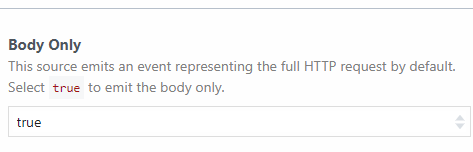
Pay attention to set the _Body Only_ option to true when creating the source, if you haven't and you have already created the Pipedream-Source enables it here: https://pipedream.com/sources/{your-source}/configuration
Added commands
| Commands | Notes |
| ----------------------------------- | -------------------------------------------------------------------------------------------------------------------------------------------------------- |
| cy.getNewestMessage(deleteAfter) | Retrieves the last (NEWEST) SMS for a specific Pipedream Source History within a specified time limit. Optional: set deleteAfter=true to auto-delete. |
| cy.getOldestMessage(deleteAfter) | Retrieves the first (OLDEST) SMS for a specific Pipedream Source History within a specified time limit. Optional: set deleteAfter=true to auto-delete. |
| cy.getArrayMessage() | Retrieves all SMS messages as an array of objects with {id, message} structure. Returns full message list with IDs for selective deletion. |
| cy.deleteSpecificMessage(messageId) | Deletes a specific message by its ID. Use after getArrayMessage() to selectively remove individual messages. |
| cy.clearMessagesHistory() | Clears the entire SMS history for a specific Pipedream Source. |
| cy.clearHistorySendSmsAndGetSMS() | This command simplifies the usage by executing the following commands in sequence: |
`javascript
cy.clearMessagesHistory() //
cy.get('[data-cy="send-sms"]', { timeout: 120000 }).click() // Command to send the SMS from the frontend
cy.getNewestMessage()
`
According to cypress documentation adding the data-cy tag to your frontend, is the best way to keep your test updated and maintainable.


Configuration


$3


At the top of your support file (usually cypress/support/e2e.js for e2e testing type):
`javascript
import "cypress-pipedream-plugin"
`
$3


You MUST set these environment variables to make this plugin working


| Parameter           | Mandatory | Notes                                                                                  | Default                         |

| ------------------- | --------- | -------------------------------------------------------------------------------------- | ------------------------------- |

| pipedreamBearer     | TRUE      | Bearer used for Pipedream Auth                                                         | \                               |

| pipedreamSourceID   | TRUE      | Your Pipedream Source ID                                                               | \                               |

| pipedreamMaxRetries | Optional  | Maximum wait time (in minutes) for
cy.getOldestMessage() and cy.getNewestMessage() | 1 |
| pipedreamFolderPath | FALSE | Folder where the SMS body will be saved | 'cypress/fixtures/sms-response' |
| pipedreamFileName | FALSE | File name in which the message will be written | 'message.json' |
To set these variables dynamically in a multi environment cypress-test, you can use the following plugin:
cypress-env
$3
#### Auto-delete messages after retrieval
You can automatically delete a message after reading it by passing true to the deleteAfter parameter:
`javascript
// Get newest message and delete it automatically
cy.getNewestMessage(true)
// Get oldest message and delete it automatically
cy.getOldestMessage(true)
`
#### Working with message arrays and selective deletion


Use
getArrayMessage() to retrieve all messages with their IDs, then selectively delete specific ones:
`javascript
// Get all messages with IDs
cy.getArrayMessage()
// Read the saved array and delete a specific message
cy.readFile("cypress/fixtures/sms_response/message.json").then((messages) => {
// messages = [{ id: "1762787731250-0", message: "Your SMS text here" }, ...]
// Delete the first message
cy.deleteSpecificMessage(messages[0].id)
// Or delete a message based on content
const messageToDelete = messages.find((msg) => msg.message.includes("verification code"))
if (messageToDelete) {
cy.deleteSpecificMessage(messageToDelete.id)
}
})
`
#### Reading message contents


To check the file contents, you can use the following command:
`javascript
cy.readFile('cypress/fixtures/sms_response/message.json', {
timeout: 60000,
retries: 3,
}).then((message) {
... // do something with the saved message
})
`
$3
`
────────────────────────────────────────────────────────────────────────────────────────────────────


  Running:  myFirstTest.cy.js                                                               (1 of 1)


    An uncaught error was detected outside of a test (Attempt 1 of 2)

    Error: The following error originated from your test code, not from Cypress.

  1) An uncaught error was detected outside of a test


  0 passing (1s)

  1 failing


  1) An uncaught error was detected outside of a test:

     Error: The following error originated from your test code, not from Cypress.


  > CYPRESS-PIPEDREAM-PLUGIN | Missing environment variables: env('pipedreamBearer') & env('pipedreamSourceID') needed


────────────────────────────────────────────────────────────────────────────────────────────────────
``
THE JOB IS DONE!
Happy testing to everyone!
ALEC-JS