distributions-triangular-pdf
v0.0.1
Triangular distribution probability density function (PDF)
0/weekUpdated 3 years agoMIT
Published by Philipp Burckhardt
npm install distributions-triangular-pdfProbability Density Function
===
[![NPM version][npm-image]][npm-url] [![Build Status][travis-image]][travis-url] [![Coverage Status][codecov-image]][codecov-url] [![Dependencies][dependencies-image]][dependencies-url]
> Triangular distribution probability density function (PDF).
The probability density function (PDF) for a Triangular random variable is
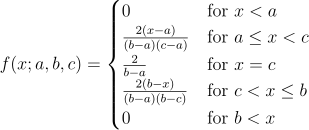
where a is the lower limit and b is the upper limit and c is the mode.
Installation
`` bash`
$ npm install distributions-triangular-pdf
For use in the browser, use browserify.
Usage
` javascript`
var pdf = require( 'distributions-triangular-pdf' );
#### pdf( x[, options] )
Evaluates the probability density function (PDF) for the Triangular distribution. x may be either a number, an array, a typed array, or a matrix.
` javascript
var matrix = require( 'dstructs-matrix' ),
mat,
out,
x,
i;
out = pdf( 0.5 );
// returns 2
out = pdf( -1 );
// returns 0
out = pdf( -1 );
// returns 0
x = [ 0, 0.2, 0.4, 0.6, 0.8, 1 ];
out = pdf( x );
// returns [ 0, 0.8, 1.6, 1.6, 0.8, 0 ]
x = new Float64Array( x );
out = pdf( x );
// returns Float64Array( [0,0.8,1.6,1.6,0.8,0] )
x = new Float32Array( 6 );
for ( i = 0; i < 6; i++ ) {
x[ i ] = i / 6;
}
mat = matrix( x, [3,2], 'float32' );
/*
[ 0 1/6
2/6 3/6
4/6 5/6 ]
*/
out = pdf( mat );
/*
[ 0 ~0.667
~1.33 2
~1.33 ~0.667 ]
*/
`
The function accepts the following options:
* __a__: lower limit. Default: 0.1
* __b__: upper limit. Default: .( a + b ) / 2
* __c__: mode. Default: .function
* __accessor__: accessor for accessing array values.typed array
* __dtype__: output or matrix data type. Default: float64.boolean
* __copy__: indicating if the function should return a new data structure. Default: true.'.'
* __path__: deepget/deepset key path.
* __sep__: deepget/deepset key path separator. Default: .
A Triangular distribution is a function of three parameters: a(lower limit), b(upper limit) and c(mode). By default, a is equal to 0, b is equal to 1 and c is equal to (a + b) / 2 = 0.5. To adjust either parameter, set the corresponding option.
` javascript
var x = [ 0, 0.5, 1, 1.5, 2, 2.5 ];
var out = pdf( x, {
'a': 1,
'b': 3,
'c': 2
});
// returns [ 0, 0, 0, 0.5, 1, 0.5 ]
`
For non-numeric arrays, provide an accessor function for accessing array values.
` javascript
var data = [
[0,0],
[1,0.2],
[2,0.4],
[3,0.6],
[4,0.8],
[5,1]
];
function getValue( d, i ) {
return d[ 1 ];
}
var out = pdf( data, {
'accessor': getValue
});
// returns [ 0, 0.8, 1.6, 1.6, 0.8, 0 ]
`
To deepset an object array, provide a key path and, optionally, a key path separator.
` javascript
var data = [
{'x':[0,0]},
{'x':[1,0.2]},
{'x':[2,0.4]},
{'x':[3,0.6]},
{'x':[4,0.8]},
{'x':[5,1]}
];
var out = pdf( data, {
'path': 'x/1',
'sep': '/'
});
/*
[
{'x':[0,0]},
{'x':[1,0.8]},
{'x':[2,1.6]},
{'x':[3,1.6]},
{'x':[4,0.8]},
{'x':[5,0]}
]
*/
var bool = ( data === out );
// returns true
`
By default, when provided a typed array or matrix, the output data structure is float64 in order to preserve precision. To specify a different data type, set the dtype option (see matrix for a list of acceptable data types).
` javascript
var x, out;
x = new Float64Array( [0,0.2,0.4,0.6,0.8,1 ] );
out = pdf( x, {
'dtype': 'int32'
});
// returns Int32Array( [0,0,1,1,0,0] )
// Works for plain arrays, as well...
out = pdf( [ 0, 0.2, 0.4, 0.6, 0.8, 1 ], {
'dtype': 'uint8'
});
// returns Uint8Array( [0,0,1,1,0,0] )
`
By default, the function returns a new data structure. To mutate the input data structure (e.g., when input values can be discarded or when optimizing memory usage), set the copy option to false.
` javascript
var bool,
mat,
out,
x,
i;
x = [ 0, 0.2, 0.4, 0.6, 0.8, 1 ];
out = pdf( x, {
'copy': false
});
// returns [ 0, 0.8, 1.6, 1.6, 0.8, 0 ]
bool = ( x === out );
// returns true
x = new Float32Array( 6 );
for ( i = 0; i < 6; i++ ) {
x[ i ] = i / 6;
}
mat = matrix( x, [3,2], 'float32' );
/*
[ 0 1/6
2/6 3/6
4/6 5/6 ]
*/
out = pdf( mat, {
'copy': false
});
/*
[ 0 ~0.667
~1.33 2
~1.33 ~0.667 ]
*/
bool = ( mat === out );
// returns true
`
Notes
* If an element is __not__ a numeric value, the evaluated PDF is NaN.
` javascript
var data, out;
out = pdf( null );
// returns NaN
out = pdf( true );
// returns NaN
out = pdf( {'a':'b'} );
// returns NaN
out = pdf( [ true, null, [] ] );
// returns [ NaN, NaN, NaN ]
function getValue( d, i ) {
return d.x;
}
data = [
{'x':true},
{'x':[]},
{'x':{}},
{'x':null}
];
out = pdf( data, {
'accessor': getValue
});
// returns [ NaN, NaN, NaN, NaN ]
out = pdf( data, {
'path': 'x'
});
/*
[
{'x':NaN},
{'x':NaN},
{'x':NaN,
{'x':NaN}
]
*/
`
* Be careful when providing a data structure which contains non-numeric elements and specifying an integer output data type, as NaN values are cast to 0.
` javascript`
var out = pdf( [ true, null, [] ], {
'dtype': 'int8'
});
// returns Int8Array( [0,0,0] );
Examples
` javascript
var pdf = require( 'distributions-triangular-pdf' ),
matrix = require( 'dstructs-matrix' );
var data,
mat,
out,
tmp,
i;
// Plain arrays...
data = new Array( 10 );
for ( i = 0; i < data.length; i++ ) {
data[ i ] = Math.random();
}
out = pdf( data );
// Object arrays (accessors)...
function getValue( d ) {
return d.x;
}
for ( i = 0; i < data.length; i++ ) {
data[ i ] = {
'x': data[ i ]
};
}
out = pdf( data, {
'accessor': getValue
});
// Deep set arrays...
for ( i = 0; i < data.length; i++ ) {
data[ i ] = {
'x': [ i, data[ i ].x ]
};
}
out = pdf( data, {
'path': 'x/1',
'sep': '/'
});
// Typed arrays...
data = new Float32Array( 10 );
for ( i = 0; i < data.length; i++ ) {
data[ i ] = Math.random();
}
out = pdf( data );
// Matrices...
mat = matrix( data, [5,2], 'float32' );
out = pdf( mat );
// Matrices (custom output data type)...
out = pdf( mat, {
'dtype': 'uint8'
});
`
To run the example code from the top-level application directory,
` bash`
$ node ./examples/index.js
Tests
$3
Unit tests use the Mocha test framework with Chai assertions. To run the tests, execute the following command in the top-level application directory:
` bash`
$ make test
All new feature development should have corresponding unit tests to validate correct functionality.
$3
This repository uses Istanbul as its code coverage tool. To generate a test coverage report, execute the following command in the top-level application directory:
` bash`
$ make test-cov
Istanbul creates a ./reports/coverage directory. To access an HTML version of the report,
` bash``
$ make view-cov
---
License
Copyright
Copyright © 2015. The Compute.io Authors.
[npm-image]: http://img.shields.io/npm/v/distributions-triangular-pdf.svg
[npm-url]: https://npmjs.org/package/distributions-triangular-pdf
[travis-image]: http://img.shields.io/travis/distributions-io/triangular-pdf/master.svg
[travis-url]: https://travis-ci.org/distributions-io/triangular-pdf
[codecov-image]: https://img.shields.io/codecov/c/github/distributions-io/triangular-pdf/master.svg
[codecov-url]: https://codecov.io/github/distributions-io/triangular-pdf?branch=master
[dependencies-image]: http://img.shields.io/david/distributions-io/triangular-pdf.svg
[dependencies-url]: https://david-dm.org/distributions-io/triangular-pdf
[dev-dependencies-image]: http://img.shields.io/david/dev/distributions-io/triangular-pdf.svg
[dev-dependencies-url]: https://david-dm.org/dev/distributions-io/triangular-pdf
[github-issues-image]: http://img.shields.io/github/issues/distributions-io/triangular-pdf.svg
[github-issues-url]: https://github.com/distributions-io/triangular-pdf/issues