electron-chrome-extensions
v4.9.0TypeScript
Chrome extension support for Electron
0/weekUpdated 7 months agoSEE LICENSE IN LICENSE.mdUnpacked: 343.7 KB
Published by Samuel Maddock
npm install electron-chrome-extensionselectron-chrome-extensions
> Chrome extension API support for Electron.
Electron provides basic support for Chrome extensions out of the box. However, it only supports a subset of APIs with a focus on DevTools. Concepts like tabs, popups, and extension actions aren't known to Electron.
This library aims to bring extension support in Electron up to the level you'd come to expect from a browser like Google Chrome. API behavior is customizable so you can define how to handle things like tab or window creation specific to your application's needs.
Install
``
npm install electron-chrome-extensions
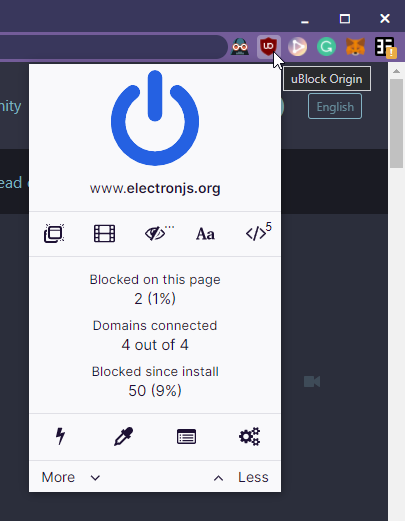
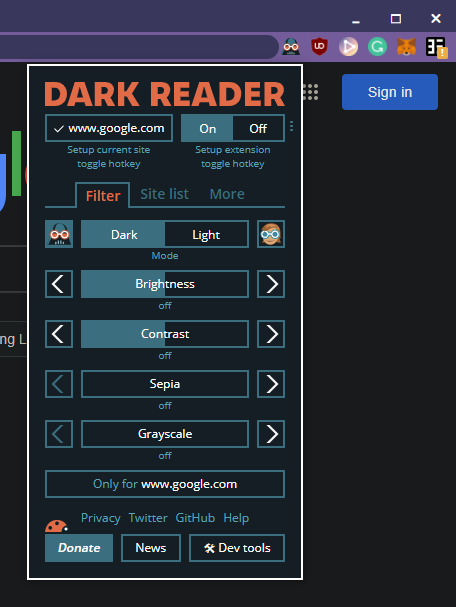
Screenshots
| uBlock Origin | Dark Reader |
| ---------------------------------------------------------------------------------------------------------------------------------------------------------------------- | -------------------------------------------------------------------------------------------------------------------------------------------------------------------- |
|  |
|  |
|
Usage
$3
Simple browser using Electron's default session and one tab.
`js
const { app, BrowserWindow } = require('electron')
const { ElectronChromeExtensions } = require('electron-chrome-extensions')
app.whenReady().then(() => {
const extensions = new ElectronChromeExtensions()
const browserWindow = new BrowserWindow()
// Adds the active tab of the browser
extensions.addTab(browserWindow.webContents, browserWindow)
browserWindow.loadURL('https://samuelmaddock.com')
browserWindow.show()
})
`
$3
Multi-tab browser with full support for Chrome extension APIs.
> For a complete example, see the electron-browser-shell project.
`js
const { app, session, BrowserWindow } = require('electron')
const { ElectronChromeExtensions } = require('electron-chrome-extensions')
app.whenReady().then(() => {
const browserSession = session.fromPartition('persist:custom')
const extensions = new ElectronChromeExtensions({
session: browserSession,
createTab(details) {
// Optionally implemented for chrome.tabs.create support
},
selectTab(tab, browserWindow) {
// Optionally implemented for chrome.tabs.update support
},
removeTab(tab, browserWindow) {
// Optionally implemented for chrome.tabs.remove support
},
createWindow(details) {
// Optionally implemented for chrome.windows.create support
},
removeWindow(browserWindow) {
// Optionally implemented for chrome.windows.remove support
},
requestPermissions(extension, permissions) {
// Optionally implemented for chrome.permissions.request support
},
})
const browserWindow = new BrowserWindow({
webPreferences: {
// Use same session given to Extensions class
session: browserSession,
// Required for extension preload scripts
sandbox: true,
// Recommended for loading remote content
contextIsolation: true,
},
})
// Adds the active tab of the browser
extensions.addTab(browserWindow.webContents, browserWindow)
browserWindow.loadURL('https://samuelmaddock.com')
browserWindow.show()
})
`
$3
This module uses a preload script.
When packaging your application, it's required that the preload script is included. This can be
handled in two ways:
1. Include node_modules in your packaged app. This allows electron-chrome-extensions/preload to
be resolved.
2. In the case of using JavaScript bundlers, you may need to copy the preload script next to your
app's entry point script. You can try using
copy-webpack-plugin,
vite-plugin-static-copy,
or rollup-plugin-copy depending on your app's
configuration.
Here's an example for webpack configurations:
`js`
module.exports = {
entry: './index.js',
plugins: [
new CopyWebpackPlugin({
patterns: [require.resolve('electron-chrome-extensions/preload')],
}),
],
}
API
$3
> Create main process handler for Chrome extension APIs.
#### new ElectronChromeExtensions([options])
- options Objectlicense
- String - Distribution license compatible with your application. See LICENSE.md for more details. \GPL-3.0
Valid options include , Patron-License-2020-11-19
- Electron.Session (optional) - Session which should supportsession.defaultSession
Chrome extension APIs. is used by default.createTab(details) => Promise<[Electron.WebContents, Electron.BrowserWindow]>
- (optional) -chrome.tabs.create
Called when is invoked by an extension. Allows thedetails
application to handle how tabs are created.
- chrome.tabs.CreatePropertiesselectTab(webContents, browserWindow)
- (optional) - Called whenchrome.tabs.update
is invoked by an extension with the option to set thewebContents
active tab.
- Electron.WebContents - The tab to be activated.browserWindow
- Electron.BrowserWindow - The window which owns the tab.removeTab(webContents, browserWindow)
- (optional) - Called whenchrome.tabs.remove
is invoked by an extension.webContents
- Electron.WebContents - The tab to be removed.browserWindow
- Electron.BrowserWindow - The window which owns the tab.createWindow(details) => Promise
-
(optional) - Called when is invoked by an extension.details
- chrome.windows.CreateDataremoveWindow(browserWindow) => Promise
-
(optional) - Called when is invoked by an extension.browserWindow
- Electron.BrowserWindowassignTabDetails(details, webContents) => void
- (optional) - Called when chrome.tabs createsdiscarded
an object for tab details to be sent to an extension background script. Provide this function to
assign custom details such as , frozen, or groupId.details
- chrome.tabs.TabwebContents
- Electron.WebContents - The tab for which details are being created.
`ts`
new ElectronChromeExtensions({
createTab(details) {
const tab = myTabApi.createTab()
if (details.url) {
tab.webContents.loadURL(details.url)
}
return [tab.webContents, tab.browserWindow]
},
createWindow(details) {
const window = new BrowserWindow()
return window
},
})
For a complete usage example, see the browser implementation in the
electron-browser-shell
project.
#### Instance Methods
##### extensions.addTab(tab, window)
- tab Electron.WebContents - A tab that the extension system should keepwindow
track of.
- Electron.BrowserWindow - The window which owns the tab.
Makes the tab accessible from the chrome.tabs API.
##### extensions.selectTab(tab)
- tab Electron.WebContents
Notify the extension system that a tab has been selected as the active tab.
##### extensions.getContextMenuItems(tab, params)
- tab Electron.WebContents - The tab from which the context-menu event originated.params
- Electron.ContextMenuParams - Parameters from the context-menu event.
Returns [Electron.MenuItem[]](https://www.electronjs.org/docs/api/menu-item#class-menuitem) -
An array of all extension context menu items given the context.
##### extensions.getURLOverrides()
Returns Object which maps special URL types to an extension URL. See chrome_urls_overrides for a list of
supported URL types.
Example:
`js`
{
newtab: 'chrome-extension://
}
#### Instance Events
##### Event: 'browser-action-popup-created'
Returns:
- popup PopupView - An instance of the popup.
Emitted when a popup is created by the chrome.browserAction API.
##### Event: 'url-overrides-updated'
Returns:
- urlOverrides Object - A map of url types to extension URLs.
Emitted after an extension is loaded with chrome_urls_overrides set.
$3
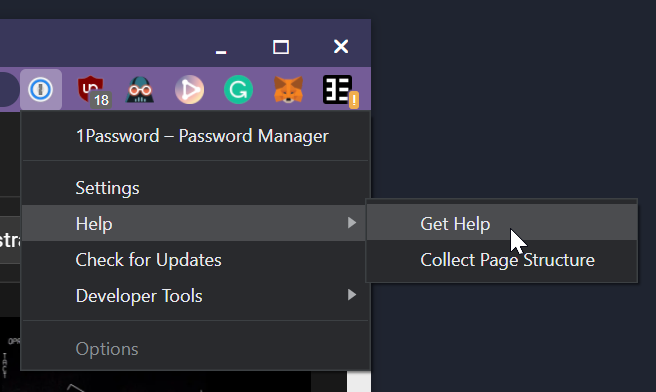
The element provides a row of browser actions which may be pressed to activate the chrome.browserAction.onClicked event or display the extension popup.
To enable the element on a webpage, you must define a preload script which injects the API on specific pages.
#### Attributes
- partition string (optional) - The Electron.Session partition which extensions are loaded in. Defaults to the session in which lives.tab
- string (optional) - The tab's Electron.WebContents ID to use for displayingalignment
the relevant browser action state. Defaults to the active tab of the current browser window.
- string (optional) - How the popup window should be aligned relative to the extension action. Defaults to bottom left. Use any assortment of top, bottom, left, and right.
#### Browser action example
##### Preload
Inject the browserAction API to make the element accessible in your application.
`js
import { injectBrowserAction } from 'electron-chrome-extensions/browser-action'
// Inject
if (location.href === 'webui://browser-chrome.html') {
injectBrowserAction()
}
`
> The use of import implies that your preload script must be compiled using a JavaScript bundler like Webpack.
##### Webpage
Add the element with attributes appropriate for your application.
`html
`
##### Main process
For extension icons to appear in the list, the crx:// protocol needs to be handled in the Session
where it's intended to be displayed.
`js
import { app, session } from 'electron'
import { ElectronChromeExtensions } from 'electron-chrome-extensions'
app.whenReady().then(() => {
// Provide the session where your app will display
const appSession = session.defaultSession
ElectronChromeExtensions.handleCRXProtocol(appSession)
})
`
##### Custom CSS
The element is a Web Component. Its styles are encapsulated within a Shadow DOM. However, it's still possible to customize its appearance using the CSS shadow parts selector ::part(name).
Accessible parts include action and badge.
`css
/ Layout action buttons vertically. /
browser-action-list {
flex-direction: column;
}
/ Modify size of action buttons. /
browser-action-list::part(action) {
width: 16px;
height: 16px;
}
/ Modify hover styles of action buttons. /
browser-action-list::part(action):hover {
background-color: red;
border-radius: 0;
}
`
Supported chrome.* APIs
The following APIs are supported, in addition to those already built-in to Electron.
Click to reveal supported APIs
$3
- [x] chrome.action.setTitle
- [x] chrome.action.getTitle
- [x] chrome.action.setIcon
- [x] chrome.action.setPopup
- [x] chrome.action.getPopup
- [x] chrome.action.setBadgeText
- [x] chrome.action.getBadgeText
- [x] chrome.action.setBadgeBackgroundColor
- [x] chrome.action.getBadgeBackgroundColor
- [ ] chrome.action.enable
- [ ] chrome.action.disable
- [x] chrome.action.openPopup
- [x] chrome.action.onClicked
$3
- [ ] chrome.commands.getAll
- [ ] chrome.commands.onCommand
$3
- [x] chrome.cookies.get
- [x] chrome.cookies.getAll
- [x] chrome.cookies.set
- [x] chrome.cookies.remove
- [x] chrome.cookies.getAllCookieStores
- [x] chrome.cookies.onChanged
$3
- [x] chrome.contextMenus.create
- [ ] chrome.contextMenus.update
- [x] chrome.contextMenus.remove
- [x] chrome.contextMenus.removeAll
- [x] chrome.contextMenus.onClicked
$3
- [x] chrome.notifications.clear
- [x] chrome.notifications.create
- [x] chrome.notifications.getAll
- [x] chrome.notifications.getPermissionLevel
- [x] chrome.notifications.update
- [ ] chrome.notifications.onButtonClicked
- [x] chrome.notifications.onClicked
- [x] chrome.notifications.onClosed
See Electron's Notification tutorial for how to support them in your app.
$3
- [x] chrome.runtime.connect
- [x] chrome.runtime.getBackgroundPage
- [x] chrome.runtime.getManifest
- [x] chrome.runtime.getURL
- [x] chrome.runtime.id
- [x] chrome.runtime.lastError
- [x] chrome.runtime.onConnect
- [x] chrome.runtime.onInstalled
- [x] chrome.runtime.onMessage
- [x] chrome.runtime.onStartup
- [x] chrome.runtime.onSuspend
- [x] chrome.runtime.onSuspendCanceled
- [x] chrome.runtime.openOptionsPage
- [x] chrome.runtime.sendMessage
$3
- [x] chrome.storage.local
- [x] chrome.storage.managed - fallback to local
- [x] chrome.storage.sync - fallback to
$3
- [x] chrome.tabs.get
- [x] chrome.tabs.getCurrent
- [x] chrome.tabs.connect
- [x] chrome.tabs.sendMessage
- [x] chrome.tabs.create
- [ ] chrome.tabs.duplicate
- [x] chrome.tabs.query
- [ ] chrome.tabs.highlight
- [x] chrome.tabs.update
- [ ] chrome.tabs.move
- [x] chrome.tabs.reload
- [x] chrome.tabs.remove
- [ ] chrome.tabs.detectLanguage
- [ ] chrome.tabs.captureVisibleTab
- [x] chrome.tabs.executeScript
- [x] chrome.tabs.insertCSS
- [x] chrome.tabs.setZoom
- [x] chrome.tabs.getZoom
- [x] chrome.tabs.setZoomSettings
- [x] chrome.tabs.getZoomSettings
- [ ] chrome.tabs.discard
- [x] chrome.tabs.goForward
- [x] chrome.tabs.goBack
- [x] chrome.tabs.onCreated
- [x] chrome.tabs.onUpdated
- [ ] chrome.tabs.onMoved
- [x] chrome.tabs.onActivated
- [ ] chrome.tabs.onHighlighted
- [ ] chrome.tabs.onDetached
- [ ] chrome.tabs.onAttached
- [x] chrome.tabs.onRemoved
- [ ] chrome.tabs.onReplaced
- [x] chrome.tabs.onZoomChange
> [!NOTE]
> Electron does not provide tab functionality such as discarded, frozen, or group IDs. If an
> application developer wishes to implement this functionality, emit a "tab-updated" event on thechrome.tabs.onUpdated
> tab's WebContents for to be made aware of changes. Tab properties can beassignTabDetails
> assigned using the option provided to the ElectronChromeExtensions
> constructor.
$3
- [x] chrome.webNavigation.getFrame (Electron 12+)
- [x] chrome.webNavigation.getAllFrames (Electron 12+)
- [x] chrome.webNavigation.onBeforeNavigate
- [x] chrome.webNavigation.onCommitted
- [x] chrome.webNavigation.onDOMContentLoaded
- [x] chrome.webNavigation.onCompleted
- [ ] chrome.webNavigation.onErrorOccurred
- [x] chrome.webNavigation.onCreateNavigationTarget
- [ ] chrome.webNavigation.onReferenceFragmentUpdated
- [ ] chrome.webNavigation.onTabReplaced
- [x] chrome.webNavigation.onHistoryStateUpdated
$3
- [x] chrome.windows.get
- [x] chrome.windows.getCurrent
- [x] chrome.windows.getLastFocused
- [x] chrome.windows.getAll
- [x] chrome.windows.create
- [x] chrome.windows.update
- [x] chrome.windows.remove
- [x] chrome.windows.onCreated
- [x] chrome.windows.onRemoved
- [x] chrome.windows.onFocusChanged
- [x] chrome.windows.onBoundsChanged
Limitations
$3
- The latest version of Electron is recommended. Minimum support requires Electron v35.0.0-beta.8.
- All background scripts are persistent.
$3
- Usage of Electron's webRequest API will prevent chrome.webRequest listeners from being called.chrome.webNavigation.onDOMContentLoaded
- Chrome extensions are not supported in non-persistent/incognito sessions.
- is only emitted for the top frame until support for iframes is added.--no-sandbox
- Service worker preload scripts require Electron's sandbox to be enabled. This is the default behavior, but might be overridden by the flag or sandbox: false in the webPreferences of a BrowserWindow. Check for the --no-sandbox flag using ps -eaf | grep
License
GPL-3
For proprietary use, please contact me or sponsor me on GitHub under the appropriate tier to acquire a proprietary-use license. These contributions help make development and maintenance of this project more sustainable and show appreciation for the work thus far.