ember-container-query
v6.1.7
Make container queries that harness the power of Ember
container-queriescontainer-queryelement-querieselement-queryember-addonemberjsembroiderglintresponsive-designtypescript
0/weekUpdated 4 days agoMITUnpacked: 42.0 KB
Published by Isaac J. Lee
npm install ember-container-query

ember-container-query
_Make container queries that harness the power of Ember_
Installation
``sh`
pnpm add -D ember-container-query
*.hbs files?
Extend this addon's template registry to get native types.
`ts
/ types/index.d.ts /
import '@glint/environment-ember-loose';
import '@glint/environment-ember-template-imports';
import type EmberContainerQueryRegistry from 'ember-container-query/template-registry';
declare module '@glint/environment-ember-loose/registry' {
export default interface Registry extends EmberContainerQueryRegistry, / other addon registries / {
// local entries
}
}
`
Applications
Where can you use container queries? Here are real-life (and some theoretical) applications!
1. Components form a core of an Ember app. We love components!
1. With media queries,
- A design that looked amazing on 2 or 3 fixed screen sizes can end up looking terrible at a size in-between.
- Designing the template for specific screen sizes isn't a future-proof solution. You may need to reuse the component under different local width and height constraints.
- In ember-qunit tests, the window is scaled by default. You may end up stubbing a service (fake the window size) to get certain DOM elements to (dis)appear.
1. With container queries,
- A component only needs to know how much space it has to figure out how to best present data.
- Since each component can be free to decide how it looks, a webpage may end up with an unexpected combined look. This may be good, may be bad.
- In tests, you will be driven to have a correct window size. If the window size is correct, then all elements should (dis)appear just like they would on your browser.
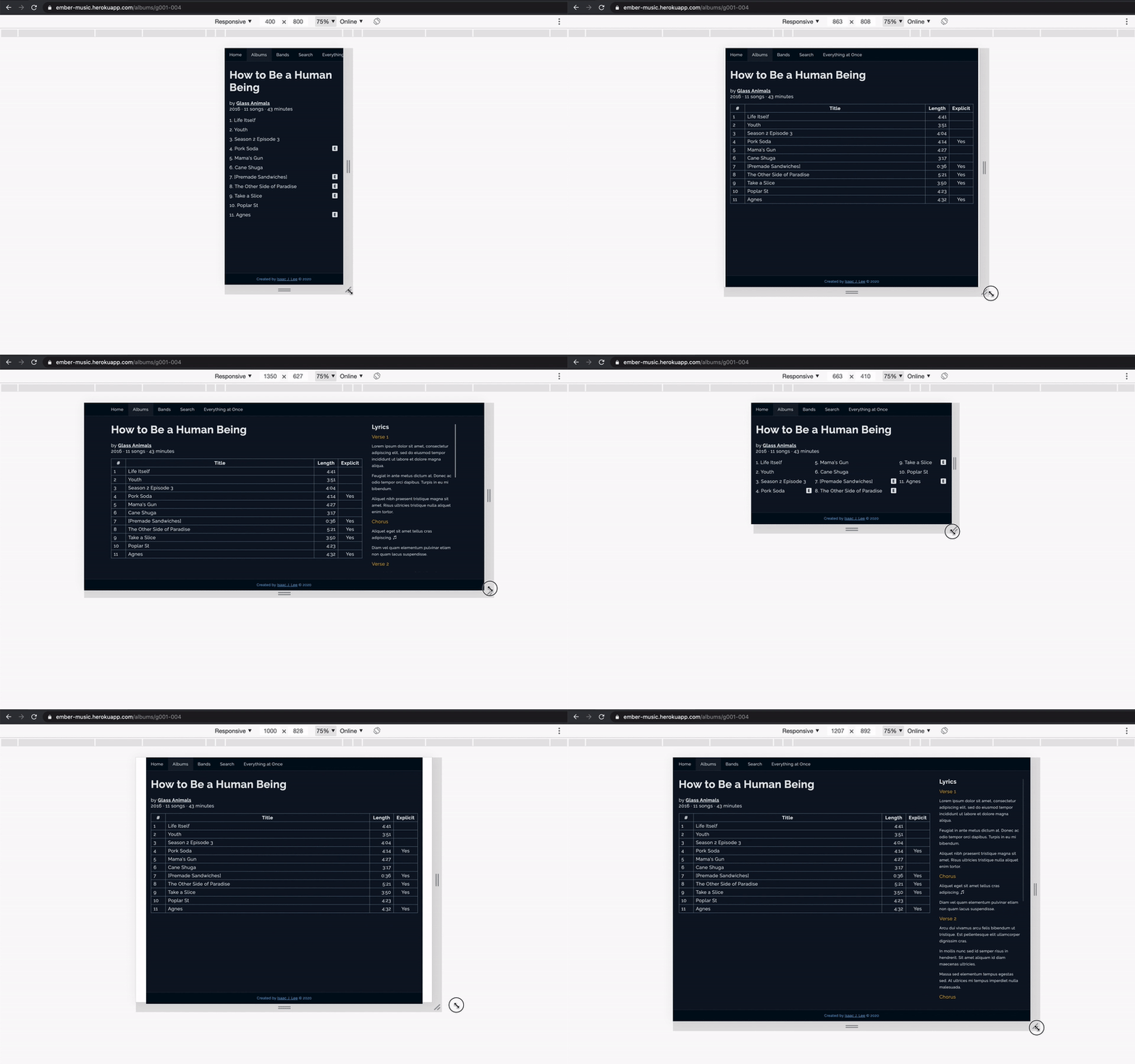
1. A table is great for showing structured data. On mobile, with a limited width, not so much.
1. You can use a list to show data vertically. This works until the user rotates the screen and sees only so much at a time.
1. You can use container queries to decide which table columns to show and how many columns to spread the list across.
1. It's difficult to create dashboard widgets that can be placed anywhere and look good.
1. As a result, you may artificially constrain your users from customizing their dashboard.
1. If you _combine_ media and container queries, you can better meet the wants of designers, developers, and users.
1. Currently, you have to use srcset to load images with the optimal file size. Alternatively, you can use container queries to decide which images to load.
2. Similarly, for videos, you could use container queries to decide format and display resolution.
3. D3 components can use container queries to decide what's the best way to show data. Do you show larger chart elements, show legends, allow scrolling, show text summary? etc.
1. You may be able to compose this addon with others to arrive at something ambitious and unique.
1. For example, ember-printable-pages lets us reuse components to make a printable document. The components could focus on presenting data with container queries, while ember-printable-pages could focus on deciding page layouts and lazily rendering components.
1. You're designing a game in Ember.
1. Maybe a secret, most powerful item appears when the game world is at a certain size? :)
You will find plenty of examples in docs-app. Visit https://ember-container-query.netlify.app/ to see the app in action!

API
ember-container-query provides 1 Glimmer component and 3 helpers:
-
-
-
-
The addon also provides a modifier so that you can opt out of using the provided component. You may also use the modifier to get the container dimensions when the window is resized.
- {{container-query}}
Expand the items below to learn more about the API.
<ContainerQuery>
$3
You can pass these arguments to the component.
| Name | Required | Description | Type |
|--|:--:|--|--|
| @features | Yes1 | Container query definitions | POJO |
| @dataAttributePrefix | No | Prefix for data attributes | string |
| @debounce | No | Debounce time for resize (ms) | number ≥ 0 |
| @tagName | No | Container tag name2 | HTML tag name |
1. The component renders without error when @features isn't provided. In practice, you will always want to set @features.
2. By default, the component is a You _may_1 pass attributes to the component for these reasons: - Style (e.g. 1. Do refrain from overusing splattributes (e.g. pass a 2. When an ARIA attribute has multiple values, the order of values can matter. At the moment, splattributes doesn't guarantee the order. You can consume these values in your app or addon. | Name | Yielded | Description | Type | All helpers accept these arguments: | Name | Required | Description | Type | 1. The helpers use default values of 2. Aspect ratio is unitless. Height and width have the unit of pixel. You can pass these arguments to the modifier. - For more information, refer to the arguments of The output is similar to those of Data attributes are automatically applied to the HTML element. To get export default class Chart extends Component { @action updateDimensions({ dimensions }: { dimensions: Dimensions }) { this.height = height; // ... - Ember.js v4.12 or above See the Contributing guide for details. Much thanks goes to Chad Carbert (@chadian), who introduced me to container queries at EmberFest 2019 and created This project is licensed under the MIT License. element. You can pass a valid HTML tag name to facilitate accessibility and semantic HTML.class$3
, local-class){{did-insert}}
- Accessibility (e.g. ARIA attributes2, roles) modifier to fetch data), since the component's API may change and cause unexpected results. Practice separation of concerns when possible. For example, data fetching can be handled by another element or @use decorator.min = 0$3
|--|:--:|--|--|
| features | Yes | Container query results | POJO |
| dimensions | Yes | Container dimensions | POJO |
| data-container-query-_{featureName}_ | No | Data attributes for CSS selector | HTML data attribute |{{aspect-ratio}}, {{height}}, {{width}}$3
|--|:--:|--|--|
| min | Yes1 | Lower bound for feature2 | number ≥ 0 |
| max | Yes1 | Upper bound for feature2 | number ≥ 0 | and max = Infinity, and assume the inequalities min ≤ x < max. In practice, you will always want to set min or max (or both).@dataAttributePrefix{{container-query}}$3
-
-
- component.$3
component.dimensions and features, you will need to pass the argument @onQuery (a function) to the modifier.`ts`
/ app/components/chart.gts /
import { action } from '@ember/object';
import Component from '@glimmer/component';
import { tracked } from '@glimmer/tracking';
import { containerQuery, type Dimensions } from 'ember-container-query';
@tracked height: number;
@tracked width: number;
const { height, width } = dimensions;
this.width = width;
}
}Compatibility
- Node.js v20 or aboveContributing
Credits
🌟. I modeled the API for ember-container-query` based on Chad's addon.License