eslint-formatter-json-summary
v1.0.0
ESLint summary formatter aggregating results by rule and return the output as json
0/weekUpdated 2 years agoMITUnpacked: 19.1 KB
Published by Eli Sklar
npm install eslint-formatter-json-summary     
eslint-formatter-json-summary
> ESLint formatter aggregating results by rule
Based on the original eslint-formatter-summary package by https://github.com/mhipszki
Features
- aggregated errors / warnings per rule
- sort by rule name, number of errors or warnings
TL;DR
This formatter simply aggregates the ESLint results _by rule_ and shows the following output:
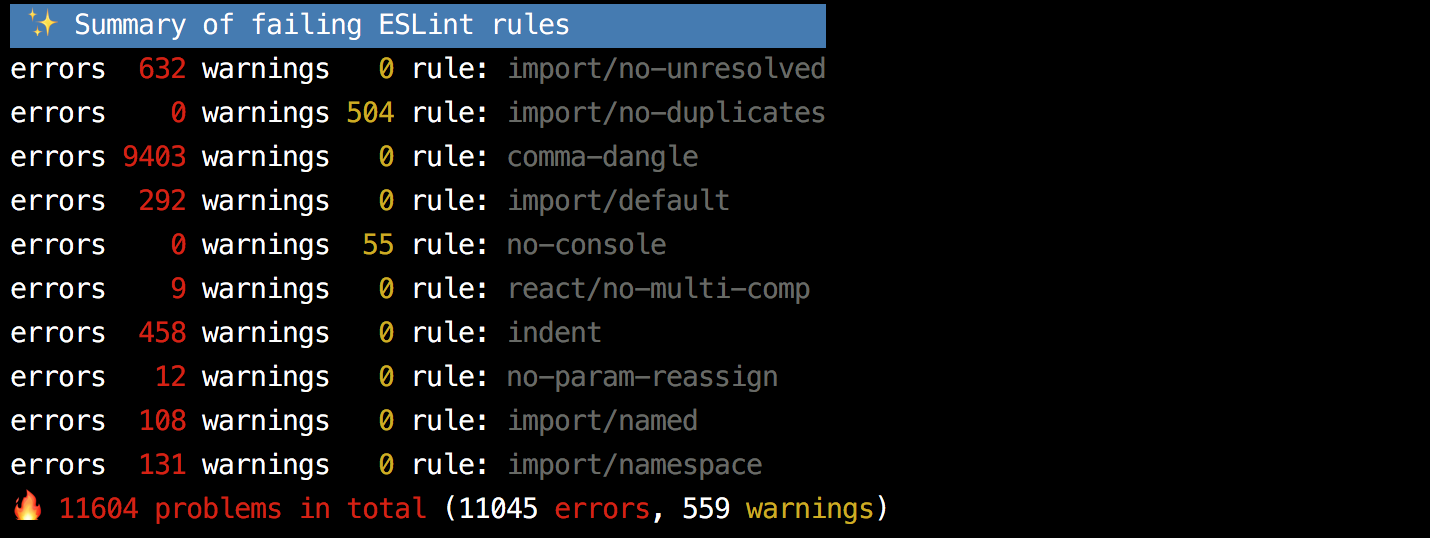
It can also be configured to sort results by rule, errors or warnings using env vars e.g.
``shell`
SORT_BY=rule DESC=true eslint -f json-summary ./src
(see details below).
How to install
If you're using yarn just run
`shell`
yarn add -D eslint-formatter-json-summary
otherwise with npm run
`shell`
npm i --save-dev eslint-formatter-json-summary
How to use
When you run ESLint just specify eslint-formatter-json-summary as the formatter:
`shell`
eslint -f json-summary [file|dir|glob]*
or if you use an older version of ESLint:
`shell`
eslint -f node_modules/eslint-formatter-json-summary [file|dir|glob]*
See http://eslint.org/docs/user-guide/command-line-interface#-f---format
Intention
It is a matter of minutes to add ESLint to a new project, however it can be quite challenging to introduce it (or just add a stricter rule set) to _existing projects_, already large codebases.
Possibly hundreds if not thousands of errors will pop up which can seem overwhelming to be fixed when we see the default formatted output, forcing us to back up from making our code base better / more consistent.
This package provides a custom ESLint formatter to help in these situations to make the right decisions by showing the linting results aggregated by rule. It gives an overview of all rules failing showing the total number of errors and warnings summed up by rule.
Having this _summary_ overview can give us the opportunity e.g. to consider suppressing certain rules for now and bringing them back in later when we are ready to fix them.
Output format
With the default ESLint formatter you might get several thousands of lines of failing rules in various files in the output e.g.:
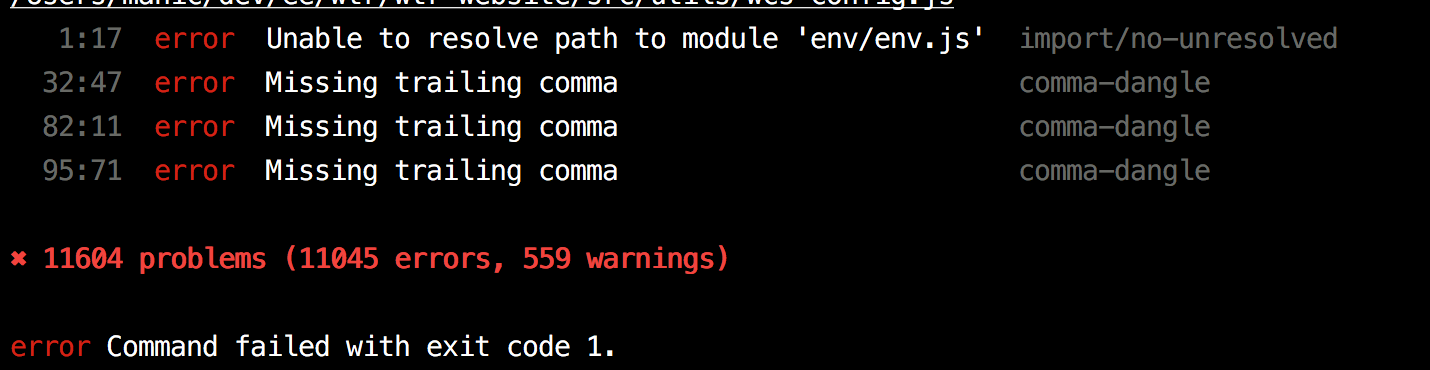
The Summary Formatter simply aggregates the ESLint results _by rule_ and shows the following output instead:
In the above example we can notice that the comma-dangle rule is responsible for about 2/3 of the failures, so we can consider turning it off or just suppressing it to a warning for now as we can do so with the other failing rules.
Sorting output
> Default sorting is by rule in an ascending order
Configuration options can be passed to the formatter to alter the output.
Using theSORT_BY env var the aggregated results can be sorted by either rule, errors or warnings e.g.
`shell`
SORT_BY=rule eslint -f json-summary ./src
the sorted results are shown in ASCENDING order by default but the order can also be reversed using DESC=true:
`shell`
SORT_BY=rule DESC=true eslint -f json-summary ./src
YAML Output
You can output in YAML format by using OUTPUT_FORMAT=yaml e.g.
`shell`
OUTPUT_FORMAT=yaml eslint -f json-summary ./src
Supported Node versions
The project came alive with the specific intention to support all Node.js version from v4.x as this formatter is supposed to be an _enabler for most projects_ and does not want to stand in the way by supporting only the latest Node.js versions.
Supported Node.js versions are the _latest_:
- latest stable
- v4 to LTS
The distribution version targets Node.js v4 and should work on this version and above.
Supported ESLint versions
ESLint versions are supported from v4 onwards, although eslint-formatter-json-summary may also work with lower versions of ESLint. Please open an issue if you need support for other versions of ESLint.
Contribute
Please feel free to submit an issue describing your proposal you would like to discuss. PRs are also welcome!
$3
`
yarn
$3
`
yarn test
$3
The project's code is written using the latest EcmaScript standard's features, some of which needs to be polyfilled in older Node.js versions e.g. Array.prototype.includes and String.prototype.padLeft etc., for that core-js is being used.
When changing code, you might want to run unit tests and re-build the project on file changes:
`
yarn test --watch
and
`
yarn dev
$3
`
yarn build
This will use babel-cli to transpile the source code targeting node v4 (the lowest supported Node.js version) to dist folder.
The transpiled code is generated under the dist/ folder and it is the one used to generate the summary output of ESLint rather than the original ES7+ source code under lib/.
$3
Once the project is built the distribution version can be tested via passing a .js file to yarn try.
For example:
`
yarn try test.js
$3
The project is built on Travis-ci.org targeting each supported Node.js versions (see the list above).
During the CI build all source files are linted and all unit tests need to pass resulting in a coverage report.
$3
The project uses semantic versioning.
patch versions are used to fix bugs and upgrade dependencies. minor versions are used to add new _non-breaking_ features. major version is bumped when there are significant changes which could break projects already using eslint-formatter-json-summary.
To publish a new version we use np
`
yarn release 1.2.3
See https://github.com/sindresorhus/np for more options.
Possible improvements / planned features
- test formatter with different Node.js and ESLint versions on CI
- allow different output showing files with aggregated number of errors / warnings
- export results as JSON
- export each rule turned off and ready to be added to .eslintrc`
License
MIT