fun-7-segment
v1.1.0TypeScript
A modern 7-segment display library with multi-color segments and full character mapping
7-segmentsegment-displayled-displaydigital-displaycharacter-displayscrolling-textretro-displayseven-segmentdisplayled
2/weekUpdated 3 months agoMITUnpacked: 43.2 KB
Published by Drestanto Muhammad Dyasputro
npm install fun-7-segmentfun-7-segment ✨
> A modern 7-segment display library with Fun Coloring (multi-color segments) and Char to 7-Segment (full character mapping)


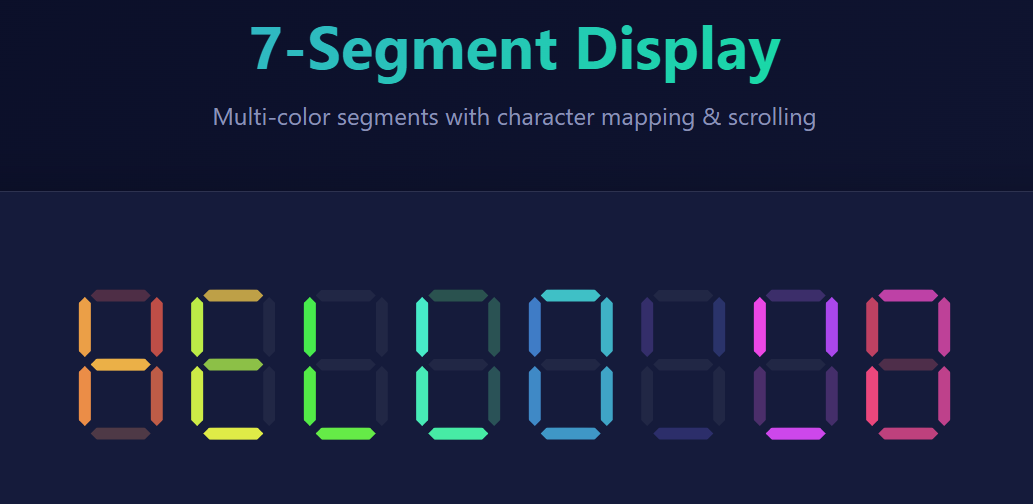
🚀 Quick Start
$3
Via NPM:
``bash`
npm install fun-7-segment
Via CDN:
`html`
$3
`html
`
$3
`javascript
import SegmentDisplay from 'fun-7-segment';
import 'fun-7-segment/dist/fun-7-segment.min.css';
const display = new SegmentDisplay('#display', {
text: 'HELLO',
digitCount: 5,
rainbowMode: true
});
`
---
📚 API Reference
$3
`javascript`
new SegmentDisplay(container, options)
Parameters:
- container (string|HTMLElement) - CSS selector or DOM elementoptions
- (Object) - Configuration options
Options:
`javascript`
{
text: 'HELLO', // Initial text to display
digitCount: 8, // Number of digits (4-16)
scrollSpeed: 200, // Scroll speed in milliseconds
scrolling: true, // Enable scrolling animation
rainbowMode: false, // Enable rainbow colors
color: '#00ff88' // Default segment color (CSS color)
}
$3
#### Text Control
`javascript`
display.setText('NEW TEXT'); // Update display text
#### Display Configuration
`javascript`
display.setDigitCount(10); // Change number of digits
#### Scrolling Control
`javascript`
display.startScrolling(); // Start scrolling animation
display.stopScrolling(); // Stop scrolling
display.setScrollSpeed(150); // Set speed in milliseconds
#### Color Control
`javascript
display.setRainbowMode(true); // Enable rainbow mode
display.setColor('#ff0000'); // Set default segment color
display.randomizeColors(); // Randomize all segment colors
// Set colors for specific digit (Fun Coloring!)
display.setDigitColors(0, {
a: '#ff0000', // top segment
b: '#00ff00', // top-right segment
c: '#0000ff', // bottom-right segment
d: '#ffff00', // bottom segment
e: '#ff00ff', // bottom-left segment
f: '#00ffff', // top-left segment
g: '#ffffff' // middle segment
});
display.clearColors(); // Clear all custom colors
`
#### Cleanup
`javascript`
display.destroy(); // Remove display and cleanup
---
🎯 Examples
$3
`javascript
const clock = new SegmentDisplay('#clock', {
text: '00:00:00',
digitCount: 8,
scrolling: false
});
setInterval(() => {
const now = new Date();
const time = now.toTimeString().slice(0, 8);
clock.setText(time);
}, 1000);
`
$3
`javascript`
const marquee = new SegmentDisplay('#marquee', {
text: 'WELCOME TO OUR STORE! SPECIAL OFFERS TODAY!',
digitCount: 16,
scrollSpeed: 150,
scrolling: true,
rainbowMode: true
});
$3
`javascript
let count = 0;
const counter = new SegmentDisplay('#counter', {
text: '0000',
digitCount: 4,
scrolling: false,
color: '#00ff00'
});
setInterval(() => {
count++;
counter.setText(count.toString().padStart(4, '0'));
}, 1000);
`
$3
`javascript
const temp = new SegmentDisplay('#temperature', {
text: '72°F',
digitCount: 4,
scrolling: false
});
// Change color based on temperature
function updateTemp(temperature) {
const color = temperature > 80 ? '#ff0000' :
temperature < 60 ? '#0000ff' : '#00ff00';
temp.setColor(color);
temp.setText(${temperature}°F);`
}
$3
`javascript
const funDisplay = new SegmentDisplay('#fun', {
text: '888',
digitCount: 3,
scrolling: false
});
// Create a rainbow effect on first digit
funDisplay.setDigitColors(0, {
a: '#ff0000',
b: '#ff7f00',
c: '#ffff00',
d: '#00ff00',
e: '#0000ff',
f: '#4b0082',
g: '#9400d3'
});
`
---
✨ Features
$3
Independent color control for each of the 7 segments - impossible in real hardware!
Real 7-segment displays share a common anode/cathode, making per-segment coloring impossible. This library gives you full creative control:
- Rainbow gradients across displays
- Color-coded data visualization
- Temperature indicators (blue→cold, red→hot)
- Brand-specific color schemes
$3
Display any alphanumeric text, not just numbers!
Supports 100+ characters including:
- Numbers: 0-9
- Uppercase Letters: A-Z
- Lowercase Letters: a-z ✨ (fun approximations!)
- Math Symbols: + - / \ < > ^ | ~ @ # $ % &
- Punctuation: . , : ; ! ? " ' ( ) [ ] { } = _ - *
- Fun Extras: ♥ ☺ → ← ↑ ↓ (hearts, arrows, emojis!)
Characters are intelligently mapped to 7-segment patterns:
`
'A' → segments a,b,c,e,f,g
'b' → segments c,d,e,f,g (lowercase)
'+' → segments b,f,g (plus sign)
'♥' → segments b,c,d,f,g (heart!)
'8' → all segments (fallback for unknown)
Try it:
`javascript`
display.setText('Hello World!');
display.setText('1+1=2');
display.setText('test@example.com');
display.setText('I ♥ Code!');
display.setText('←↑→↓');
$3
Marquee-style animation with adjustable speed:
- Right-to-left scrolling
- Configurable speed (50-500ms)
- Circular buffer for seamless looping
- Start/stop control
$3
Perfect display on all devices:
- Desktop: 60×100px digits
- Tablet: 45×75px digits
- Mobile: 35×60px digits
---
🎨 Theming
Customize colors using CSS variables:
`css`
:root {
--segment-on: #00ff88; / Active segment color /
--segment-off: rgba(255,255,255,0.05); / Inactive segment /
--glow: rgba(0,255,136,0.6); / Glow effect /
}
Or use the API:
`javascript`
display.setColor('#ff00ff'); // All segments
display.setRainbowMode(true); // Rainbow gradient
display.randomizeColors(); // Random per segment
---
🔧 TypeScript Support
Full TypeScript definitions included:
`typescript
import SegmentDisplay, { SegmentDisplayOptions } from 'fun-7-segment';
const options: SegmentDisplayOptions = {
text: 'TYPESCRIPT',
digitCount: 10,
scrolling: true,
rainbowMode: false,
color: '#00ff88'
};
const display = new SegmentDisplay('#display', options);
// Type-safe method calls
display.setText('HELLO');
display.setDigitCount(8);
display.setRainbowMode(true);
`
---
📊 Bundle Size
Lightweight with zero dependencies:
- JavaScript: ~8KB minified
- CSS: ~2KB minified
- Total: ~10KB
---
🌐 Browser Support
Works on all modern browsers:
- Chrome/Edge 90+
- Firefox 88+
- Safari 14+
- Opera 76+
---
🎯 Use Cases
- Digital clocks and timers
- Score displays for games
- Temperature/weather displays
- Stock tickers and counters
- LED sign simulators
- Retro-style interfaces
- Data visualization with color coding
- Marketing displays with scrolling text
---
🚀 Live Demo
- GitHub Pages: https://drestanto.github.io/seven-segment/
- CodePen: [Coming soon]
---
🛠️ Development
$3
`bash`
git clone https://github.com/drestanto/seven-segment.git
cd seven-segment
npm install
$3
`bash`
npm run build
Creates minified files:
- dist/fun-7-segment.min.js
-
$3
`bashOpen demo page
start index.html
Or use example
start examples/simple.html
`
---
🐛 Troubleshooting
$3
Make sure to import the CSS:
javascript
import 'fun-7-segment/dist/fun-7-segment.min.css';
`$3
Ensure DOM is ready:
javascript
document.addEventListener('DOMContentLoaded', () => {
    const display = new SegmentDisplay('#display', {...});
});
`$3
Force re-render:
javascript
display.setText('TEST');
display.render();
`---
🤝 Contributing
Contributions welcome! Please:
1. Fork the repository
2. Create feature branch:
3. Commit changes:
4. Push to branch: 5. Open Pull Request
---
📄 License
MIT License - see LICENSE file for details.
Free for personal and commercial use!
---
🙏 Credits
- Author: Drestanto Muhammad Dyasputro
- Inspired by: Classic 7-segment LED displays
- Character mapping inspired by: CodePen: 0x04/AEjQwB
---
📞 Support
- GitHub Issues: Report bugs
- GitHub Discussions: Ask questions
- Email: dyas@live.com
---
⭐ Show Your Support
If you like this project, please give it a star on GitHub!
---
Built with ❤️ using vanilla JavaScript