getmediaelement
v1.0.2
This library generates HTML Audio/Video element with rich user-interface and advance media controls. It gives you full control over each control button; and its functionality!
webrtcgetMediaElementwebrtc-librarylibraryjavascriptrtcwebwebrtc-experimentjavascript-librarymuazmuaz-khan
0/weekUpdated 3 years agoMITUnpacked: 65.9 KB
Published by Muaz Khan
npm install getmediaelementgetMediaElement.js: A reusable library for all WebRTC applications! / Demo
 
This library generates HTML Audio/Video element with rich user-interface and advance media controls. It gives you full control over each control button; and its functionality!
``
html
`
`sh
npm install getMediaElement
`
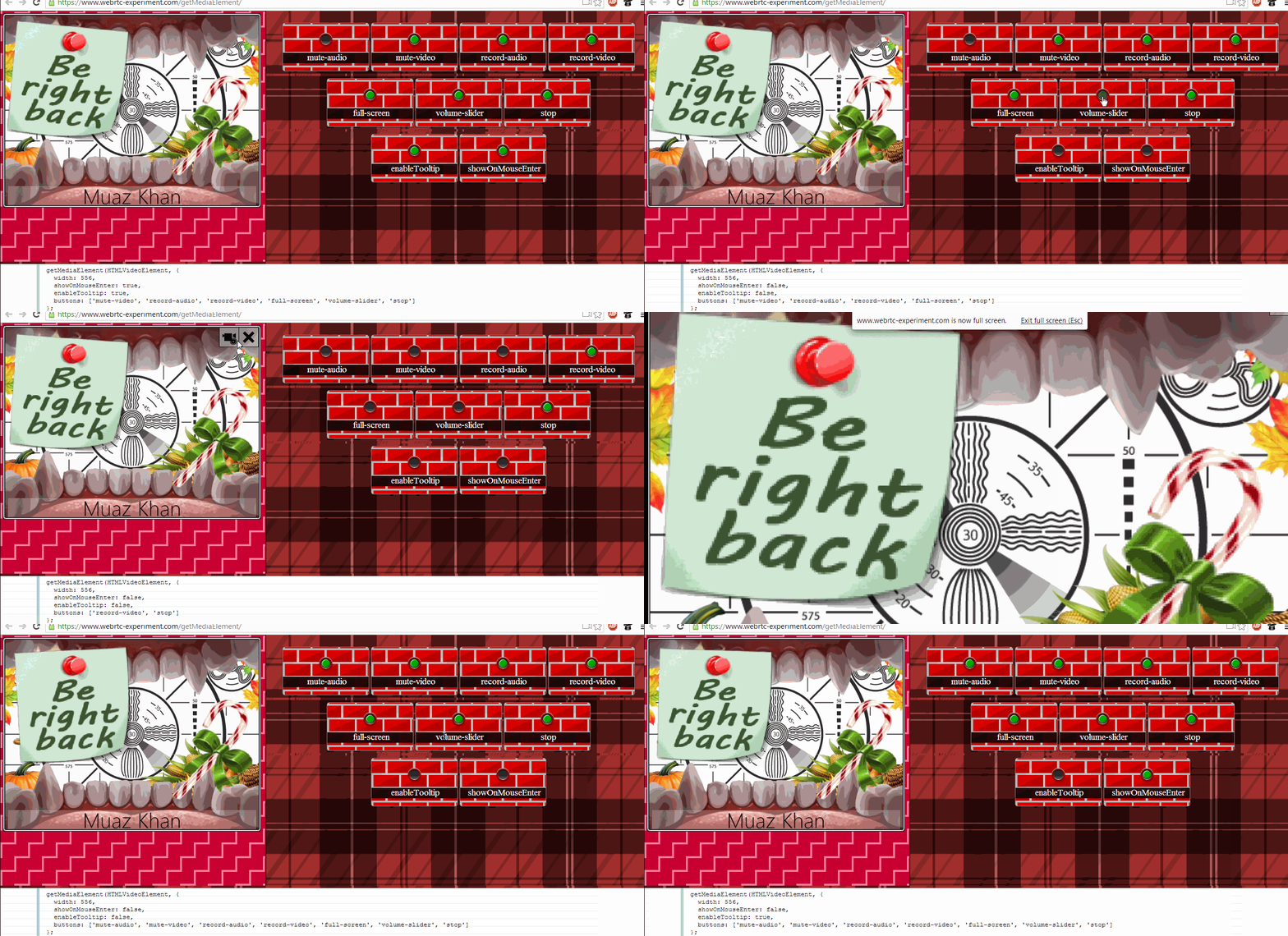
A working example:


Audio+Video Stream:
`javascript
navigator.mediaDevices.getUserMedia({ audio: true, video: true }).then(function (audioVideoStream) {
var mediaElement = getMediaElement(audioVideoStream);
// append to HTML-BODY element
document.body.appendChild(mediaElement);
// you can acccess audio/video elements using "media" property
mediaElement.media.play();
});
`
If your media stream contains video tracks; then it will create HTMLVideoElement; otherwise; it will create HTMLAudioElement.
`javascript
// you can pass HTML Video Element
document.body.appendChild( getMediaElement(HTMLVideoElement) );
// you can pass HTML Audio Element
document.body.appendChild( getMediaElement(HTMLAudioElement) );
`
For audio-only element; you can pass "title":
`javascript
document.body.appendChild( getMediaElement(HTMLAudioElement) );
document.body.appendChild( getMediaElement(HTMLAudioElement, {
title: 'User Name',
buttons: [] // use this line only if you want to hide audio-recorder button
}) );
`
Features


1. You can capture
onMuted event; and disable audio/video tracks accordingly; or hold streams using "inactive" attribute in the SDP!
2. You can capture onUnMuted event; and enable audio/video tracks accordingly; or unhold streams using "sendrecv" attribute in the SDP!
3. You can capture onRecordingStarted and use RecordRTC to record audio/video streams.
4. You can capture onRecordingStopped and invoke stopRecording method of RecordRTC to stop audio/video recording. You can write recorded audio/video blobs to indexed-db using RecordRTC's newly introduced writeToDisk and getFromDisk methods.
5. You can capture onZoomin to understand that video is NOW in full-screen mode.
6. You can capture onZoomout to understand that video is NOW in normal mode.
7. You can capture onTakeSnapshot which will be fired if someone tries to take snapshot.
8. You can control buttons array to control which button should be displayed on media element.
9. You can use toggle method to change buttons' state at runtime!
10. You can manually pass "toggle" object to force default behaviour.
11. You can use showOnMouseEnter to control whether buttons should be displayed on mouse enter.
Structure of getMediaElement.js
`javascript
var mediaElement = getMediaElement(HTMLVideoElement || HTMLVideoElement || MediaStream, {
// buttons you want to display
buttons: ['mute-audio', 'mute-video', 'record-audio', 'record-video', 'full-screen', 'volume-slider', 'stop'],
// to override default behaviour
toggle: ['mute-audio', 'mute-video', 'record-audio', 'record-video'],
// fired whe audio or video is muted
onMuted: function (type) { },
// fired whe audio or video is unmuted
onUnMuted: function (type) { },
// fired whe audio or video started recording
onRecordingStarted: function (type) { },
// fired whe audio or video stopped recording
onRecordingStopped: function (type) { },
// fired for full-screen mode
onZoomin: function () { },
// fired for leaving full-screen mode
onZoomout: function () { },
// fired when call is dropped; or user is ejected
onStopped: function () { },
// fired when take-snapshot button is clicked
onTakeSnapshot: function (snapshot) { },
width: 'media-element-width',
height: 'media-element-height',
showOnMouseEnter: true,
volume: 100
});
`
getMediaElement objects takes two arguments:


1. HTMLVideoElement or HTMLAudioElement or MediaStream

2. Options


Second argument accepts following objects and events:


1. buttons; which is an array, allows you control media buttons to be displayed.
2. width; you can customize width of the media-container element by passing this object. Its default value is about "36%-of-screen".
3. height; you can customize height of the media-container element by passing this object. Its default value is "auto".
4. onMuted; which is fired if audio or video stream is muted. Remember, getMediaElement.js just mutes audio/video locally; you need to send websocket messages in onMuted event to remote party.
5. onUnMuted; which is reverse of onMuted.
6. onRecordingStarted; you can implement audio-recording options using RecordRTC!
7. onRecordingStopped; RecordRTC supports stopRecording method as well!
8. onZoomin; it is fired when media element is in full-screen mode.
9. onZoomout; it is fired when user leaves full-screen mode either by presssing ESC key; or by clicking a button.
10. onTakeSnapshot; it is fired when user clicks to take snapshot. Snapshot is passed over callback in PNG format.
Possible options for
buttons array
1. mute-audio
2. mute-video
3. record-audio
4. record-video
5. full-screen
6. volume-slider
7. stop
Possible options for
toggle array
1. mute-audio
2. mute-video
3. record-audio
4. record-video
Difference between
toggle array and toggle method
toggle method allows you toggle buttons at runtime:
`javascript
mediaElement.toggle('mute-audio');
`
However, toggle array is only be passed once as second argument:
`javascript
var mediaElement = getMediaElement(MediaStream, {
toggle: ['mute-audio', 'mute-video', 'record-audio', 'record-video']
});
`
toggle method
`javascript
getMediaElement(firstArgument, secondArgument).toggle(options)
`
Using "toggle" method; you can customize media control buttons' state at runtime; e.g. Mute/UnMute or Zoom-in/Zoom-out etc.
`javascript
var mediaElement = getMediaElement(HTMLVideoElement);
// anytime, later
mediaElement.toggle(['mute-audio']);
mediaElement.toggle(['mute-audio', 'mute-video']);
`
"toggle" method accepts following values:


1.
mute-audio
2. mute-video
3. record-audio
4. record-video
5. stop
"stop" be used to auto-remove media element:
`javascript
mediaElement.toggle(['stop']);
// or simply; as a string argument, instead of an array
mediaElement.toggle('stop');
`
How to acccess HTMLAudioElement or HTMLVideoElement?


There is a
media property that returns HTMLAudioElement or HTMLVideoElement:
`javascript
var mediaElement = getMediaElement(MediaStream, {
toggle: ['mute-audio', 'mute-video', 'record-audio', 'record-video']
});
// Lets play the Video
mediaElement.media.play();
// Lets pause the Audio
mediaElement.media.pause();
// Lets change width/height at runtime
mediaElement.style.width = mediaElement.media.videoWidth + 'px';
mediaElement.style.height = mediaElement.media.videoHeight + 'px';
`
getMediaElement and RTCMultiConnection.js
`javascript
var videosContainer = document.body;
// www.RTCMultiConnection.org/docs/onstream/
rtcMultiConnection.onstream = function(e) {
var mediaElement = getMediaElement(e.mediaElement, {
width: (videosContainer.clientWidth / 2) - 50,
buttons: ['mute-audio', 'mute-video', 'record-audio', 'record-video', 'full-screen', 'volume-slider', 'stop', 'take-snapshot'],
toggle: e.type == 'local' ? ['mute-audio'] : [],
onMuted: function(type) {
// www.RTCMultiConnection.org/docs/mute/
rtcMultiConnection.streams[e.streamid].mute({
audio: type == 'audio',
video: type == 'video'
});
},
onUnMuted: function(type) {
// www.RTCMultiConnection.org/docs/unmute/
rtcMultiConnection.streams[e.streamid].unmute({
audio: type == 'audio',
video: type == 'video'
});
},
onRecordingStarted: function(type) {
// www.RTCMultiConnection.org/docs/startRecording/
rtcMultiConnection.streams[e.streamid].startRecording({
audio: type == 'audio',
video: type == 'video'
});
},
onRecordingStopped: function(type) {
// www.RTCMultiConnection.org/docs/stopRecording/
rtcMultiConnection.streams[e.streamid].stopRecording(function(blob) {
if (blob.audio) rtcMultiConnection.saveToDisk(blob.audio);
else if (blob.video) rtcMultiConnection.saveToDisk(blob.audio);
else rtcMultiConnection.saveToDisk(blob);
}, type);
},
onStopped: function() {
rtcMultiConnection.peers[e.userid].drop();
},
onTakeSnapshot: function() {
if (!e.stream.getVideoTracks().length) return;
// www.RTCMultiConnection.org/docs/takeSnapshot/
rtcMultiConnection.takeSnapshot(e.userid, function(snapshot) {
// on taking snapshot!
});
}
});
videosContainer.insertBefore(mediaElement, videosContainer.firstChild);
};
// www.RTCMultiConnection.org/docs/onstreamended/
rtcMultiConnection.onstreamended = function(e) {
if (e.mediaElement.parentNode && e.mediaElement.parentNode.parentNode && e.mediaElement.parentNode.parentNode.parentNode) {
e.mediaElement.parentNode.parentNode.parentNode.removeChild(e.mediaElement.parentNode.parentNode);
}
};
``
License
getMediaElement is released under MIT licence . Copyright (c) 2013 Muaz Khan.