git-notify
v0.2.3TypeScript
Communicate important updates to your team via git commit messages
0/weekUpdated 3 years agoMITUnpacked: 34.4 KB
Published by Jani Eväkallio
npm install git-notifygit-notify
_Communicate important updates to your team via git commit messages_.
What is git-notify?
Sometimes you need to communicate changes to other developers on your project. In a small team, a Slack message works okay, but in larger teams and distributed organizations (such as open source projects), reaching everyone can be a pain.
git-notify allows you to embed announcements into your git commit messages:
``sh`
git commit -m 'git-notify: NEW DEVELOPMENT ENVIRONMENT ...'
And display them to another developer on a machine, far far away:
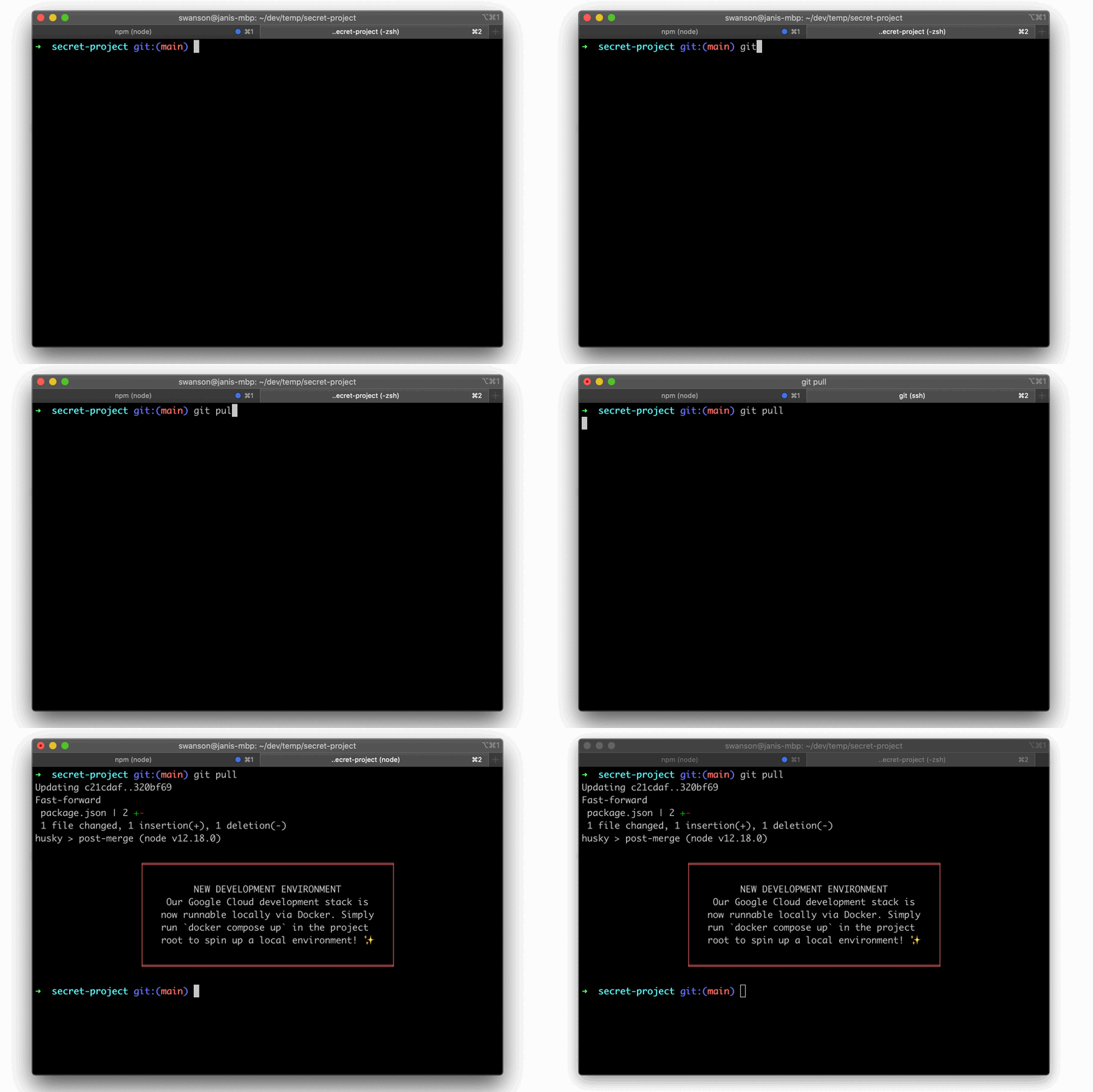
Simple as that.
How to use git-notify?
Just add "git-notify:" to your git commit message, and anything that follows will be displayed when another developer pulls that commit, or switches from a branch that does not contain that commit to one that does.
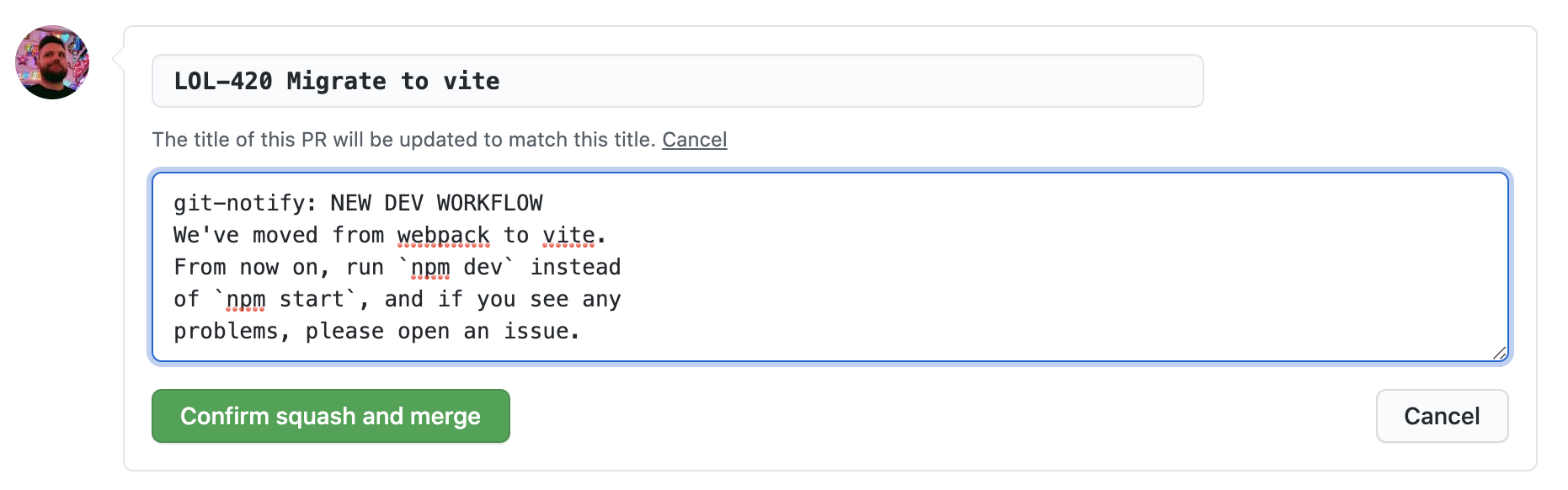
If you're using a merge or squash commit strategy on GitHub, you can also add them to the extended commit message when landing a PR:
Getting Started
Install git-notify to your npm (or yarn) based project as a devDependency:
`bashusing npm
npm install --save-dev git-notify
using yarn
yarn add -D git-notify
`
Next, we'll configure
to run automatically when other developers pull commits that contain git messages. Below we show how to achieve this with the excellent husky library. For other approaches, see the Git Hooks section later in this document.$3
`
using npm
npm install --save-dev husky@4using yarn
yarn add -D husky@4
Configure
hooks by adding the following husky entries to your package.json:`json
{
//...snip
"husky": {
"hooks": {
"post-merge": "git-notify merge $HUSKY_GIT_PARAMS",
"post-rewrite": "git-notify rewrite $HUSKY_GIT_PARAMS",
"post-checkout": "git-notify checkout $HUSKY_GIT_PARAMS"
}
}
}
`_Note: The above instructions below are for husky v4.x. Husky v5 has changed how hooks are configured, as well updated its licensing terms to be free only to other open source projects.See husky's own documentation for how to configure hooks in their latest version._
Configuration
-
- Change the prefix looks for in git commit messages
- Default: git-notify:
-
  - Change the color of the banner or message
- This can be one of the preset colors or a hex value. Note that not all terminals support full hex color scales.
- git-notify --simple
- Instead of a fancy banner, displays a simple text message$3
Run
for an up to date list of parameters:`sh
npx git-notify --help Usage
$ git-notify [options] $GIT_PARAMS
Methods
since show all notifications since commit
merge run on git pull/merge
rewrite run on git rebase
checkout run on git checkout/switch
Options
--prefix, -p prefix to look for in commit messages (default: "git-notify:")
--simple, -s show a plain, unboxed notification
--color, -c color of displayed notification
Examples
$ git-notify since HEAD~5
$ git-notify checkout $GIT_PARAMS
`About formatting
will display a message for every "git-notify:" prefix it finds in the commit log that was just pulled/merged/rebased/checked out. The notification message will be the rest of the paragraph following the prefix.For example, this commit message:
`
This change upgrades some of our dependencies. git-notify: Please run npm install
Will print:
            ╒════════════════════════════╕
            │                            │
            │  Please run npm install    │
            │                            │
            ╘════════════════════════════╛
The message will run until the end of the paragraph, delimited by a double line break. Single line breaks and other whitespace will be preserved. So that:
Rewrite everything.git-notify:EVERYTHING HAS CHANGED
This project has been rewritten
from scratch. If something broke,
please contact Jeff at dev@null.com.
May god please forgive me.
Will display:
         ╒══════════════════════════════════════════╕
         │                                          │
         │          EVERYTHING HAS CHANGED          │
         │     This project has been rewritten      │
         │    from scratch. If something broke,     │
         │   please contact Jeff at dev@null.com.   │
         │                                          │
         ╘══════════════════════════════════════════╛
You can run
to test configuration and dry-run the message you've just created locally. For example:`
git commit -m '@team what's up??'
npx git-notify since HEAD~1 --prefix "@team"
$3
Not at the moment, but this should not be difficult to add. See Contributing
Git Hooks
$3
See Installing hooks with husky in the Getting Started section.
$3
is agnostic to however you want to install your git hooks.The hooks you need to configure are:
- post-merge (runs on
git pull and git merge)
- npx git-notify merge $GIT_PARAMS
- post-rewrite (runs on )
- npx git-notify rewrite $GIT_PARAMS
- post-checkout (runs on -- optional, but useful)
- npx git-notify checkout $GIT_PARAMSAt the time of writing,
is the only hook that uses the arguments ($GIT_PARAMS) passed to the git hook, but ideally you should always pass the arguments to git-notify, in case we'll need to use them in a later version.See githooks.com for more resources on the topic. Documentation for different approaches are welcome!
$3
At this time,
git-notify is a node-based project. While I recognize it could be useful in other types of projects (ruby, python, rust, etc...), cross-platform scripting sucks, and this project is not interested in solving those problems at this time.If you like this idea, feel free to steal it and implement your own version for other toolsets!
Contributing
This project is open to contributions. For anything that would radically change the nature of the project or increase its maintenance burden, please open an issue first to discuss.
$3
This project is written in TypeScript and scaffolded using tsdx.
To run TSDX, use:
`bash
yarn start
`This builds to
and runs the project in watch mode so any edits you save inside src causes a rebuild to /dist.To do a one-off build, use
npm run build or yarn build.To run tests, use
npm test or yarn test`.Thanks
Special thanks to Sindre Sorhus, whose excellent meow, boxen and chalk libraries make developing Node CLIs a breeze.