gl-shader
v4.3.1
WebGL shader wrapper
0/weekUpdated 1 years agoMITUnpacked: 37.0 KB
Published by Mikola Lysenko
npm install gl-shadergl-shader
=========
A wrapper for WebGL shaders. Part of stack.gl
Example
Try it out now in your browser: http://stackgl.github.io/gl-shader/
``javascript
var shell = require('gl-now')()
var createShader = require('gl-shader')
var shader, buffer
shell.on('gl-init', function() {
var gl = shell.gl
//Create shader
shader = createShader(gl,
'attribute vec3 position;\
varying vec2 uv;\
void main() {\
gl_Position = vec4(position, 1.0);\
uv = position.xy;\
}',
'precision highp float;\
uniform float t;\
varying vec2 uv;\
void main() {\
gl_FragColor = vec4(0.5(uv+1.0), 0.5(cos(t)+1.0), 1.0);\
}')
//Create vertex buffer
buffer = gl.createBuffer()
gl.bindBuffer(gl.ARRAY_BUFFER, buffer)
gl.bufferData(gl.ARRAY_BUFFER, new Float32Array([
-1, 0, 0,
0, -1, 0,
1, 1, 0
]), gl.STATIC_DRAW)
})
shell.on('gl-render', function(t) {
var gl = shell.gl
//Bind shader
shader.bind()
//Set attributes
gl.bindBuffer(gl.ARRAY_BUFFER, buffer)
shader.attributes.position.pointer()
//Set uniforms
shader.uniforms.t += 0.01
//Draw
gl.drawArrays(gl.TRIANGLES, 0, 3)
})
`
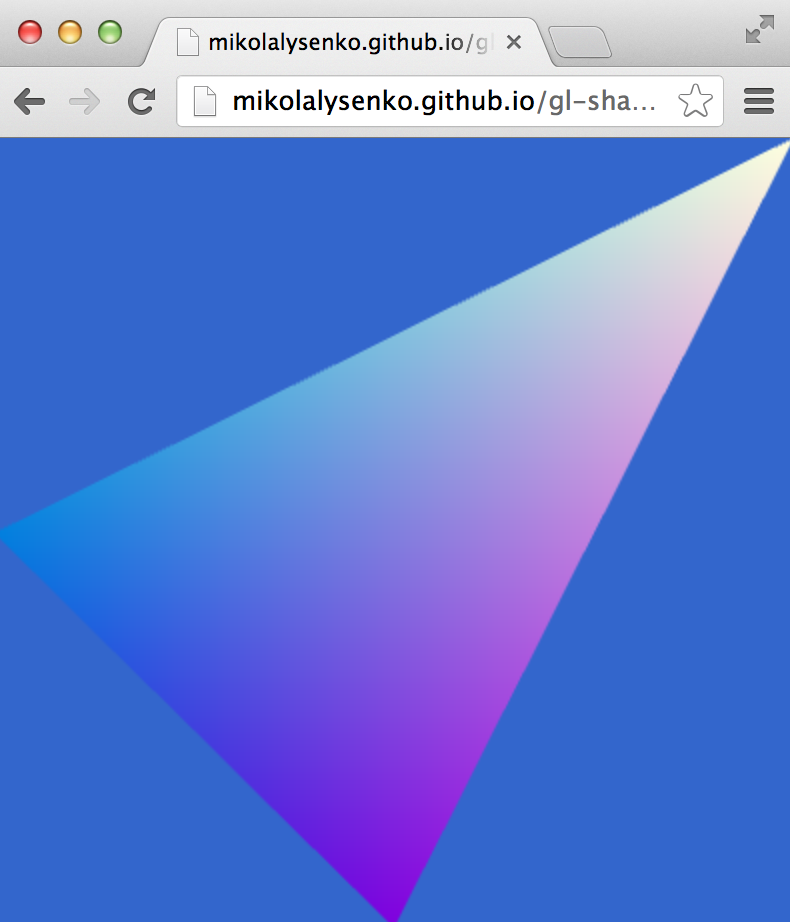
Here is the result:
Install
npm install gl-shader
API
`javascript`
var createShader = require('gl-shader')
$3
There are two main usages for the constructor. First,
#### var shader = createShader(gl, vertexSource, fragmentSource[, uniforms, attributes])
Constructs a wrapped shader object with shims for all of the uniforms and attributes in the program.
* gl is the webgl context in which the program will be createdvertexSource
* is the source code for the vertex shaderfragmentSource
* is the source code for the fragment shaderuniforms
* is an (optional) list of all uniforms exported by the shader programattributes
* is an (optional) list of all attributes exported by the shader program
The optional uniforms and attributes arrays have the following format. This will be extracted at run-time from the shader, so you can typically omit the uniforms and attributes arguments.
`js`
{
uniforms: [
{ type: 'mat4', name: 'projection' },
{ type: 'sampler2D', name: 'texture0' }
],
attributes: [
{ type: 'vec3', name: 'position' }
]
}
You can specify a default location number for each attribute, otherwise WebGL will bind it automatically.
Returns A compiled shader object.
#### var shader = createShader(gl, opt)
The same as above, but takes an object instead of a parameter list.
* gl is a WebGL contextopt.vertex
* a vertex shader sourceopt.fragment
* a fragment shader sourceopt.uniforms
* (optional) a list of uniformsopt.attributes
* (optional) a list of attributes
Returns A wrapped shader object
$3
#### shader.bind()
Binds the shader for rendering
#### shader.update(vertSource,fragSource[,uniforms,attributes])
Rebuilds the shader object with new vertex and fragment shaders (same behavior as constructor)
#### shader.update(opt)
Rebuilds the shader object with new vertex and fragment shaders (same behavior as constructor)
#### shader.dispose()
Deletes the shader program and associated resources.
$3
#### gl
The WebGL context associated to the shader
#### program
A reference to the underlying program object in the WebGL context
#### vertShader
A reference to the underlying vertex shader object
#### fragShader
A reference to the underlying fragment shader object
$3
The uniforms for the shader program are packaged up as properties in the shader.uniforms
object. The shader must be bound before the uniforms are assigned. For example, to update a scalar uniform you can just assign to it:`javascript
shader.bind()
shader.uniforms.scalar = 1.0
`While you can update vector uniforms by writing an array to them:
javascript
shader.uniforms.vector = [1,0,1,0]
`Matrix uniforms must have their arrays flattened first:
javascript
shader.uniforms.matrix = [ 1, 0, 1, 0,
                           0, 1, 0, 0,
                           0, 0, 1, 1,
                           0, 0, 0, 1 ]
`You can read the value of uniform too if the underlying shader is currently bound. For example,
javascript
shader.bind()
console.log(shader.uniforms.scalar)
console.log(shader.uniforms.vector)
console.log(shader.uniforms.matrix)
`Struct uniforms can also be accessed using the normal dot property syntax:
javascript
shader.uniforms.light[0].color = [1, 0, 0, 1]
`It is also possible to initialize uniforms in bulk by assigning an object:
javascript
shader.uniforms = {
  model:  [1, 0, 0, 0,
           0, 1, 0, 0,
           0, 0, 1, 0,
           0, 0, 0, 1],
  color:  [1, 0, 1, 1]
}
`The contents of uniform values are lost when a shader is unbound.
$3
The basic idea behind the attribute interface is similar to that for uniforms, however because attributes can be either a constant value or get values from a vertex array they have a slightly more complicated interface. All of the attributes are stored in the
property.####
attrib = constant
For non-array attributes you can set the constant value to be broadcast across all vertices. For example, to set the vertex color of a shader to a constant you could do:javascript
shader.attributes.color = [1, 0, 0, 1]
`. Setting the attribute will also call gl.disableVertexAttribArray on the attribute's location.####
attrib.location
This property accesses the location of the attribute. You can assign/read from it to modify the location of the attribute. For example, you can update the location by doing:javascript
attrib.location = 0
`Or you can read the currently bound location back by just accessing it:
javascript
console.log(attrib.location)
`WARNING Changing the attribute location requires recompiling the program. This recompilation is deferred until the next call to
####
A shortcut for /gl.enableVertexAttribArray. See the OpenGL man page for details on how this works. The main difference here is that the WebGL context, size and index are known and so these parameters are bound.*
type is the type of the pointer (default gl.FLOAT)
* normalized specifies whether fixed-point data values should be normalized (true) or converted directly as fixed-point values (false) when they are accessed. (Default false)
* stride the byte offset between consecutive generic vertex attributes. (Default: 0)
* offset offset of the first element of the array in bytes. (Default 0)#### Matrix attributes
Matrix attributes are also supported, however there are a few subtle difference. Due to WebGL limitations, d-dimensional matrix attributes require d separate attribute locations. If
matrix is a matrix attribute, then the rows of the matrix can be accessed independently using:`javascript
//First row of matrix
shader.attributes.matrix[0]//Second row
shader.attributes.matrix[1]
// ... etc.
`The interface for these attributes is identical to the above interfaces for vector attributes (support constant setters,
, and .location).There is also a bulk interface which simplifies working with the matrix as a whole unit. For example, it is possible to update the location of each row of the matrix simultaneously by assigning it a vector value:
`javascript
shader.attributes.matrix.location = [1, 2, 3, 4]
`Similarly, if the matrix attribute is stored as a contiguous range in memory, the pointer for each row can be set using
. For example, if matrix is a 4x4 matrix attribute then,`javascript
shader.attributes.matrix.pointer(gl.FLOAT, false, 16, 0)
`is equivalent to,
javascript
shader.attributes.matrix[0].pointer(gl.FLOAT, false, 16, 0)
shader.attributes.matrix[0].pointer(gl.FLOAT, false, 16, 4)
shader.attributes.matrix[0].pointer(gl.FLOAT, false, 16, 8)
shader.attributes.matrix[0].pointer(gl.FLOAT, false, 16, 12)
`$3
Finally, the library supports some reflection capabilities. The set of all uniforms and data types are stored in the "type" property of the shader object,
javascript
console.log(shader.types)
``This reflects the uniform and attribute parameters that were passed to the shader constructor.
Acknowledgements
(c) 2013-2015 Mikola Lysenko. MIT License