grapesjs-preset-newsletter
v1.0.2
GrapesJS preset configuration for the newsletter editor
30.7K/weekUpdated 2 years agoBSD-3-ClauseUnpacked: 1.7 MB
Published by Artur Arseniev
npm install grapesjs-preset-newsletterGrapesJS Preset Newsletter
This preset configures GrapesJS to be used as a Newsletter Builder with some unique features and blocks composed specifically for being rendered correctly inside all major email clients.
> The demo might include external plugins, you can check the full demo code here.
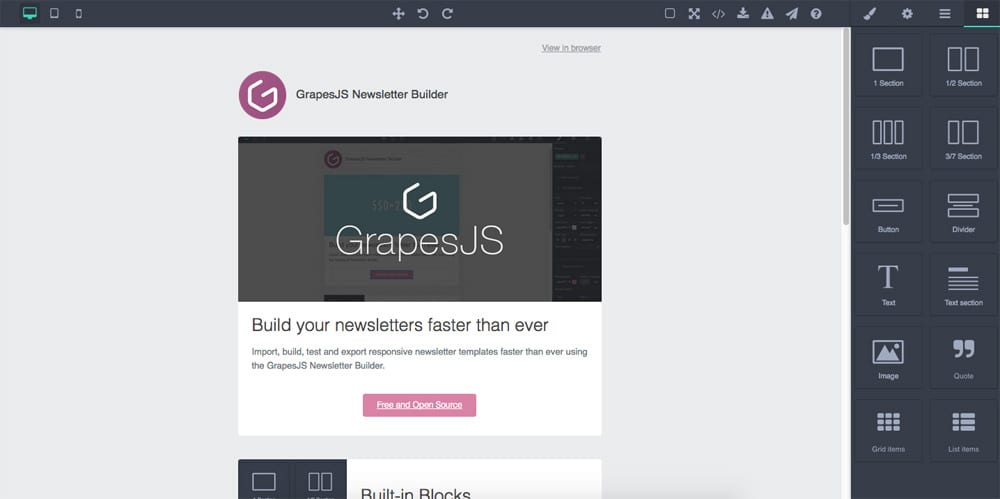
Summary
* Plugin name: grapesjs-preset-newsletter
* Commands
* gjs-get-inlined-html Get html with inlined CSS
* gjs-open-import-template Opens a modal for the import
* gjs-toggle-images Enable/Disable images
* Blocks
* sect100 A section with 1 100% cell inside
* sect50 A section with 2 50% cells inside
* sect30 A section with 3 33.3333% cells inside
* sect37 A section with 2 cells inside: 30% and 70%
* button Simple button
* divider Divider block
* text Simple text component
* text-sect A block with 2 text components, respectively for the heading and paragraph
* image Simple image component
* quote Text component for quotes
* grid-items Block of 2 components in row
* list-items List of 2 components
Options
| Option | Description | Default |
| - | - | - |
| blocks | Which blocks to add | All available blocks |
|block| Add custom block options, based on block id|(blockId) => ({})|
|cmdOpenImport| Import command id |gjs-open-import-template|
|cmdTglImages| Toggle images command id |gjs-toggle-images|
|cmdInlineHtml| Get inlined HTML command id |gjs-get-inlined-html|
|modalTitleImport| Title for the import modal |Import template|
|modalTitleExport| Title for the export modal |Export template|
|modalLabelExport| Label for the export modal |''|
|modalLabelImport| Label for the import modal |''|
|modalBtnImport| Label for the import button |Import|
|importPlaceholder| Template as a placeholder inside import modal |''|
|inlineCss| If true, inlines CSS on export |true|
|updateStyleManager| Update Style Manager with more reliable style properties to use for newsletters |true|
|showStylesOnChange| Show the Style Manager on component change |true|
|showBlocksOnLoad| Show the Block Manager on load |true|
|codeViewerTheme| Code viewer theme |hopscotch|
|juiceOpts| Custom options for the juice HTML inliner |{}|
|textCleanCanvas| Confirm text before clearing the canvas |Are you sure you want to clear the canvas?|
|useCustomTheme| Load custom preset theme |true|
|cellStyle| Default style used inside blocks tds |{ padding: 0, margin: 0, 'vertical-align': 'top' }|
|tableStyle| Default style used for blocks tables |{ height: '150px', margin: '0 auto 10px auto', padding: '5px 5px 5px 5px', width: '100%' }|
Download
* CDN
* https://unpkg.com/grapesjs-preset-newsletter
* NPM
* npm i grapesjs-preset-newsletter
* GIT
* git clone https://github.com/grapesjs/preset-newsletter.git
Usage
Directly in the browser
``html
`
Modern javascript
`js
import grapesjs from 'grapesjs';
import plugin from 'grapesjs-preset-newsletter';
const editor = grapesjs.init({
container : '#gjs',
// ...
plugins: [plugin],
pluginsOpts: {
[plugin]: { / options / }
}
// or
plugins: [
editor => plugin(editor, { / options / }),
],
});
`
Development
Clone the repository
`sh`
$ git clone https://github.com/grapesjs/preset-newsletter.git
$ cd preset-newsletter
Install it
`sh`
$ npm i
Start the dev server
`sh`
$ npm start
Build before the commit. This will also increase the patch level version of the package
`sh``
$ npm run build
License
BSD 3-Clause