horiz-gauge
v0.10.3
Draw a horizontal svg progress gauge
0/weekUpdated 3 years agoMITUnpacked: 1.3 MB
Published by Ulf Schneider
npm install horiz-gauge$3
- [HorizGauge][1]
- [Parameters][2]
- [draw][3]
- [Parameters][4]
- [remove][5]
- [imageSource][6]
- [svgSource][7]
HorizGauge



Draw a horizontal svg gauge.
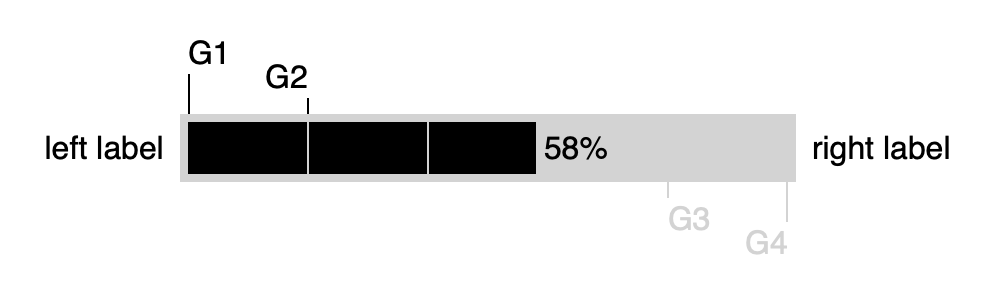
Play with the settings of the horiz-gauge by visiting the [horiz-gauge playground][8].
Install in your Node project with
npm i horiz-gauge
and use it inside your code via
const gauge = require('horiz-gauge');
or, alternatively
import gauge from 'horize-gauge';
Create the new gauge objects via
let diagram = gauge(settings);
$3
- settings [Object][9] The configuration object for the gauge.
All data for the gauge is provided with this object.
- settings.svg [Object][9] The DOM tree element, wich must be an svg tag.
The gauge will be attached to this DOM tree element. Example:
settings.svg = document.getElementById('gauge');'gauge' is the id of a svg tag.-
settings.id [String][10]? The id of a domtree svg element, to which the gauge will be bound to. The id will only be used in case settings.svg is not provided.
-
settings.fraction [Number][11]? Progress indication for the gauge. A value of 0 is indicating no progress, 1.0 is indicating completion. Default is 0.0-
settings.fractionLabel [String][10]? A label to show for the progress fraction. Default is ''.-
settings.fractionColor [String][10]? The color for the fraction indication. Default is '#222'-
settings.fractionExceedColor [String][10]? The color to use in case fraction > 1.0.-
settings.emptyColor [String][10]? Color for the non-progress area of the gauge. Default is borderColor-
settings.emptyPattern [Boolean][12]? When true, the empty area will be a pattern made of fractionColor and emptyColor-
settings.progressWidth [Number][11]? Width in pixels for the progress gauge without borders and margins. Default is 200.-
settings.progressHeight [Number][11]? Height in pixels for the progress gauge without borders and margins. Default is fontSize + 2.-
settings.borderColor [String][10]? Color of the border of the progress gauge. Default is '#ccc'-
settings.borderWidth [Number][11]? Width in pixels for the border of the progress gauge. Default is 0-
settings.fontSize [Number][11]? Size in pixels for all labels. Default is 16-
settings.fontFamily [String][10]? The font to use for all labels. Default is sans-serif.-
settings.margin {top: [Number][11], right: [Number][11], bottom: [Number][11], left: [Number][11]}? The margin for the gauge. Markers and labels are drawn inside of the margin.Default values are:
settings.margin = {
        top: 0,
        right: 0,
        bottom: 0,
        left: 0 }
-
settings.leftLabel {label: [String][10], color: [String][10], textAnchor: [String][10]}? A label to put to the left of the progress gauge. Must fit into the left margin. Allowed values for
textAnchor are 'start', 'middle', 'end'. Default values are:
settings.leftLabel = {
         label: '',
         color: '#222',
         textAnchor: 'start'
        }
-
settings.rightLabel {label: [String][10], color: [String][10], textAnchor: [String][10]}? A label to put to the right of the progress gauge. Must fit into the right margin. Allowed values for
textAnchor are 'start', 'middle', 'end'. Default values are:
settings.rightLabel = {
         label: '',
         color: '#222',
         textAnchor: 'start'
        }
-
settings.markers [Array][13]<{fraction: [Number][11], label: [String][10], color: [String][10], position: [String][10], distance: [Number][11], textAnchor: [String][10]}>? Highlight fractions outside of the gauge.Each marker is an object with a fraction for the marker and some optional settings. A marker must fit into the margins of the gauge.
Allowed values for
position are 'top', 'bottom'Allowed values for
textAnchor are 'start', 'middle', 'end'Example:
settings.markers = [
        { fraction: 0.0, label: 'G1', distance: 20 },
        { fraction: 0.2, label: 'G2' },
        { fraction: 0.8, label: 'G3', color: 'lightgray', position: 'bottom', textAnchor: 'start'}];
-
settings.dividers [Array][13]<{fraction: [Number][11], color: [String][10]}>? Highlight fractions inside of the gauge.Each divider is an object with a fraction and an optional color.
The default for
color is emptyColor.Example:
settings.markers = [
        { fraction: 0.1 },
        { fraction: 0.2, color: 'green' },
        { fraction: 0.8, color: 'red'}];
$3
Draw the gauge.
#### Parameters
- settings [Object][9]? The configuration object for the gauge. Optional.
If provided, will overwrite the settings object already given to the constructor.
$3
Clear the gauge.
$3
Draw the gauge and return the result as a string which can be assigned to the SRC attribute of an HTML IMG tag.
Returns [string][10]
$3
Draw the gauge and return the result as a SVG tag string.
Returns [string][10]
[1]: #horizgauge
[2]: #parameters
[3]: #draw
[4]: #parameters-1
[5]: #remove
[6]: #imagesource
[7]: #svgsource
[8]: https://htmlpreview.github.io/?https://github.com/ulfschneider/horiz-gauge/blob/master/horiz-gauge-playground.html
[9]: https://developer.mozilla.org/docs/Web/JavaScript/Reference/Global_Objects/Object
[10]: https://developer.mozilla.org/docs/Web/JavaScript/Reference/Global_Objects/String
[11]: https://developer.mozilla.org/docs/Web/JavaScript/Reference/Global_Objects/Number
[12]: https://developer.mozilla.org/docs/Web/JavaScript/Reference/Global_Objects/Boolean
[13]: https://developer.mozilla.org/docs/Web/JavaScript/Reference/Global_Objects/Array