i18n-autohotkey
v1.0.0
Internationalization library for AutoHotKey programs.
0/weekUpdated 3 years agoMITUnpacked: 128.3 KB
Published by IAmMael
npm install i18n-autohotkeyi18n-autohotkey
An internationalization and localization library for AutoHotKey programs.
There is also a program with a GUI to help you translate your projects.
Table of contents
* Getting started
+ Instructions
* Sample project
* Advanced sample project
* Translation Helper
Getting started
Download the latest release and import the content to your program directory.
Read the instructions or check the sample project below.
$3
- Go in the folder i18n and create your first INI language file (example: en-US.ini).
- All keys must be declared in the [Strings] section.
- You can add dynamic arguments in the key value with {1}, {2}, etc...
- Declare a new global object named i18nService.
-
Global i18nService := New i18n(LanguageFolder, LanguageFile, [DevMode])
- If DevMode is set to True, it will trigger some alerts for missing strings when you execute your program.
- Whenever you want to internationalize a string, make a call to function Translate.
str := Translate("KeyName", [arg1, arg2, ...])
$3
Here's an example of an en-US.ini file:
``
ini

[Strings]

HelloWorld=Hello world!

Greetings=Welcome in {1}.
`
Here's an example of a working script featuring i18n (it will work given you have the associated fr-FR.ini file in your language folder):
`AutoHotKey
#Include lib\i18n.ahk
MyAppName := "Sample Project"
Global i18nService := New i18n("i18n", "en-US")
MsgBox % Translate("HelloWorld")
MsgBox % Translate("Greetings", [MyAppName])
; You can dynamically change the language without reloading the program
i18nService := New i18n("i18n", "fr-FR")
MsgBox % Translate("HelloWorld")
MsgBox % Translate("Greetings", [MyAppName])
`
You can download this sample project on the releases page.


$3


Here is an example of a project using a GUI, multiline and imbricated translation (you download this sample project on the releases page).
`AutoHotKey
#Include lib\i18n.ahk
Global i18nService := New i18n("i18n", "en-US", True)
Gui, Add, Button, ,Switch Language
Gui, Add, Text, vTextGui w150,% Translate("TextGui")
Gui, Add, Button, ,Demo
Gui, Show, w300 h200
toggled := False
return
GetVar(var){
global
return %var%
}
ButtonSwitchLanguage:
If !toggled
lang := "fr-FR"
Else
lang := "en-US"
i18nService := New i18n("i18n", lang, True)
GuiControl, Text, TextGui, % Translate("TextGui")
toggled := !toggled
return
ButtonDemo:
; #1 - Basic translation
MsgBox,, % "#1", % Translate("Basic")
; #2a - Argument
TitleApp := "Translation Helper"
MsgBox,, % "#2a", % Translate("Greetings", [TitleApp])
; #2b - Example multiple arguments
colors := [Translate("Blue"), Translate("White"), Translate("Red")]
MsgBox,, % "#2b", % Translate("Flag", [colors[1], colors[2], colors[3]])
; #3 - Multiline
; To Do
; #4 - Example complex MsgBox
MsgBox, 48, % "#4 " Translate("ComplexTitle", [GetVar("TitleApp")]), % Translate("Complex", [colors[3], colors[1]])
return
F12::
ExitApp
return
``
Translation Helper
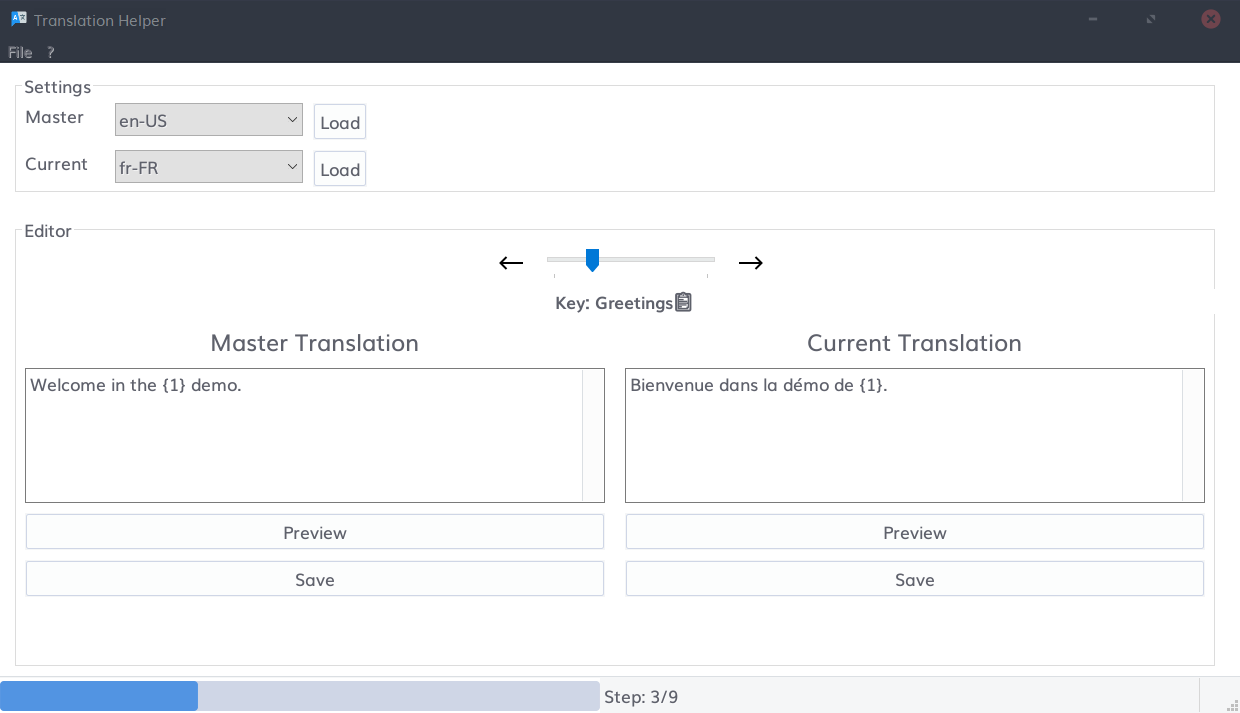
To be written.