iframe-video-overlay
v1.0.5
Simple embed responsive video(YouTube, Vimeo, Daily Motion, Coub) overlay module.
0/weekUpdated 3 years agoISCUnpacked: 13.7 KB
Published by Dmitriy Akkerman
npm install iframe-video-overlaySimple embed responsive video(YouTube, Vimeo, Daily Motion, Coub) overlay module.

Example
https://codepen.io/mickyholbrook/pen/yLYvNEr
------
Installation
npm
npm i iframe-video-overlay
Load the required JS to your entry JS file:
let IFrameVideoOverlay = require('iframe-video-overlay');
or
import IFrameVideoOverlay from 'iframe-video-overlay';
Load the required stylesheet to your entry CSS file:
@import "node_modules/iframe-video-overlay/index";
Cloning git repository
1. Go to your project directory
2. git clone https://github.com/dmitriyakkerman/iframe-video-overlay.git .
Put the required stylesheet link in HEAD tag:
Put the script at the bottom of your markup:
------
Usage
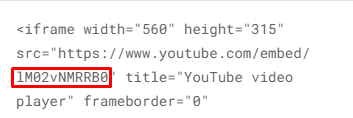
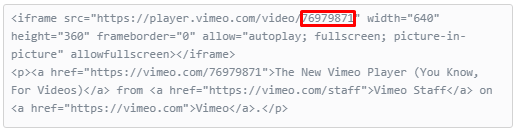
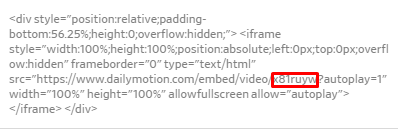
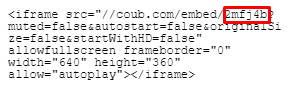
Create root element, specify video ID inside "data-id" attribute.
_Youtube video ID_
_Vimeo video ID_
_Daily Motion video ID_
_Coub video ID_
------
Initialization
1.Specify root element (string or DOM node) in "el" option.
2.Specify video hosting name("youtube" or "vimeo" or "dailymotion" or "coub") in "type" option.
*_You can pass this option in case using youtube video(option "type" has "youtube" value by default)._
3.Specify "imageSrc" if you want to overlay iframe with image.
4.Specify "iconSrc", "width", "height" and "percentage" options inside "playButton" option for play button customization.
*_You can pass "width" and "height" options in case using "percentage" option(or even pass "percentage" option, by default "width" and "height" equal "10%" of root element)_
document.addEventListener('DOMContentLoaded', function() {
new IFrameVideoOverlay({
el: '.video',
type: 'youtube', //or 'vimeo' or 'dailymotion' or 'coub'
imageSrc: 'video-image.jpg',
playButton: {
iconSrc: 'play-button.png',
width: '15%',
height: '15%',
//or
percentage: 20
}
})
});
------
Options
#####
el
Root element for module initialization.
Type: String, Element
Required: true
#####
type
Points of what type of the video hosting you are going to use.
Type: String
Default:
youtube
Required: false
#####
imageSrc
Background image, which covers your iframe video.
Type: String
Required:
false
#####
playButton
Play button customization property, which includes
playButton.iconSrc, playButton.width, playButton.height and playButton.percentage options.
Type: Object
Required: true
######
playButton.iconSrc
Play button icon.
Type: String
Required: true
######
playButton.width
Width of play button.
Type: String(px, %, etc...)
Default:
playButton.percentage or 10% of root element
Required: false
######
playButton.height
Height of play button.
Type: String(px, %, etc...)
Default:
playButton.percentage or 10% of root element
Required: false
######
playButton.percentage
Width and height of play button in percentage.
Type: Number
Default: 10% of root element
Required: false