lenka
v1.0.4TypeScript
Typescript and javascript utilities. clone: deep copy the almost all js structures (plain objects, sets, maps, buffers, class instances etc.) with support circular/duplicate references and customizing; whatIsIt: typeof+instanceOf on steroids with support
deepcopydeep copycustom copydeep clonecircular dependenciescircular depscircular referencescirculartypescriptes6
0/weekUpdated 2 years agoApache-2.0Unpacked: 82.9 KB
Published by Alexander Paschenko
npm install lenkalenka 1.0.4




A set of useful utilities:
- clone(): customizable cloning of any js objects (plain object, array, buffer etc.) with circular references
- whatIsIt(): intuitively obvious js typeof+instanceOf with support of user-defined and platform-specific classes
- isItTheSameAs(): customizable recursively comparision
Prerequisites:
javascript: version >= es2015 (es6+) or typescript: version >= 3.4For the using as node.js package: node.js version >= 6.4.0
Installation
npm install lenka*
Migration from 0.2.x, 0.3.x versions
This version is incompatible with 0.2 and 0.3. It has a lot of changes changes compared to earlier versions. Please follow this documentation.
clone
$3
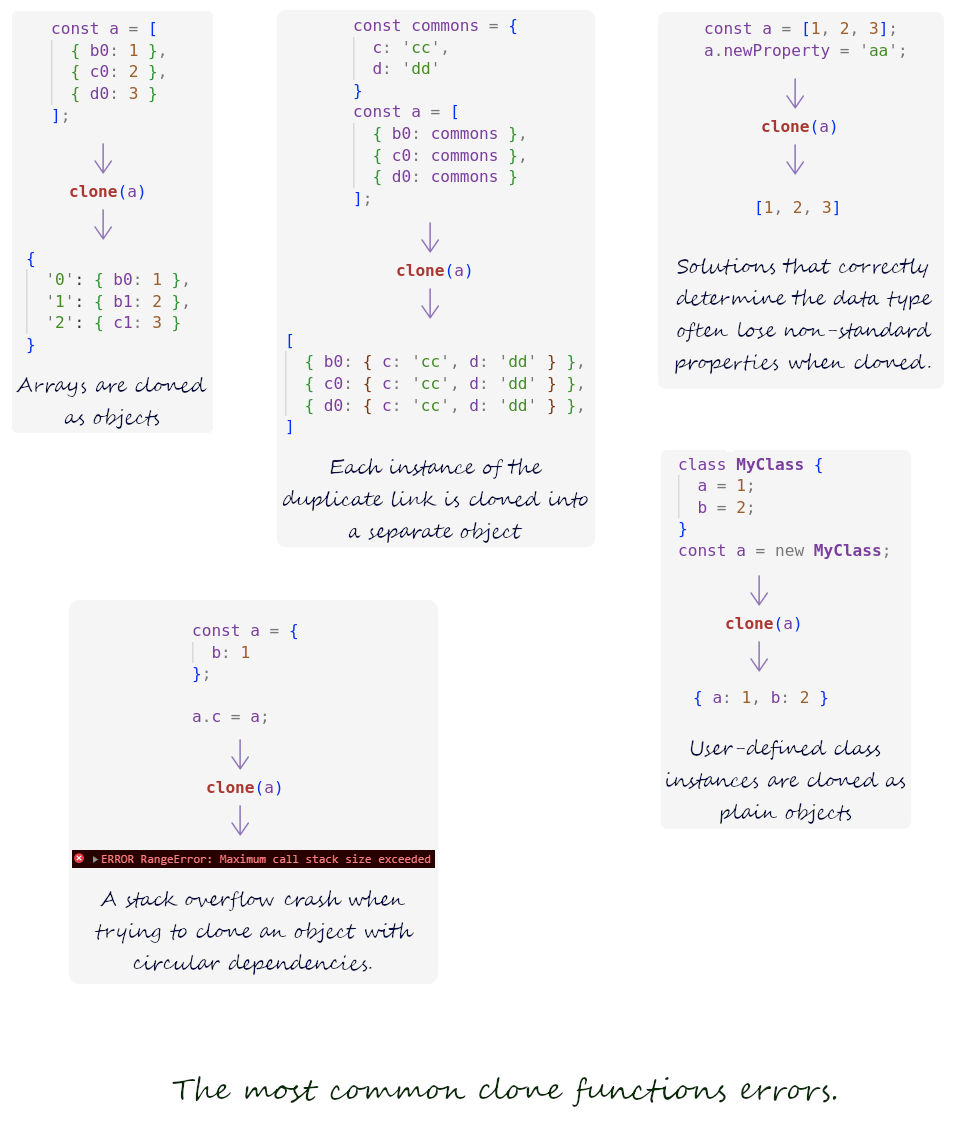 There are many out-of-the-box deep copy solutions (for example,
 _.deepClone/deepCloneWith from Lodash package). But when trying to copy objects with circular references, they crashes with stack overflow, and their customization options are extremely limited. If the object contains duplicate references, a copy of each of these references is created instead of correctly reproducing the structure of the original object.These shortcomings I tried to correct in
clone.$3
- !done Correct copying of js structures (objects, maps, arraybuffers etc.) Including those that contain circular and duplicate references (by default, all circular/duplicate references of the original will be reproduced in the copy).
- !done Advanced customization ability.
$3
typescript:import { clone } from lenka
javascript:const { clone } = require('lenka')
$3
``
typescript
const copy = clone(original [, options])
`When
 invoked without options, it works just like regular deep copy utilities, with one exception:
if the original object contains circular and/or duplicate referenceses, then all these references will be correctly reproduced in the copy (of course, they will point to members of the copy, not the original).To control the behavior of
clone, you can pass an options object (for typescript, the Lenka package exports CloneOptions interface that describes the fields of this object). All fields of this object are optional.
`typescript
{
accumulator?: Record // default is {} (empty object)
output?: 'simple' | 'verbose' // default is 'simple'
descriptors?: boolean // default is false
customizer?: (params: CustomizerParams) => unknown
}
`
this is where your customizer function will store data between calls. If you don't set a value for this field, it will sets by default to an empty object.output can have one of two values: 'simple' or 'verbose'.
In a simple mode, clone returns a copy of the original object.
In verbose mode, the function returns an instance of Results class.
Verbose mode allows you to perform the necessary post-processing of a copy or original after copying is completed.descriptors: By default, Lenka copies objects without regard to properties descriptors to speed up work. This almost always gives the expected result. But if you want the descriptors of all properties of the copy to exactly match the original (for example, if you are copying an object that has some fields that have getters and/or setters), set this flag to true.customizer is a reference to your customizer function:
$3
`typescript
function customizer(params: CustomizerParams) {
// ...
}const copy = clone(original, { customizer })
`
This customizer will be called for the each node of an original object (for each key of object, each array's and set's item, etc.).The customizer takes one parameter: this is an object (for typescript, the Lenka package exports a service type CustomizerParams that describes the fields of this object):
$3
typescript
interface CustomizerParams {
  accumulator: Record // Place where you can save some
                          // data between customizer calls, if necessary
                          // (see options.accumulator above).
  value: any              // Value of the current node in the original.
  parent: CustomizerParams   // Reference to the CustomizerParams
                             // of parent node of the original.
                          // For the root node this is null.
  root: CustomizerParams  // Link to the CustomizerParams object of the
                          // root node
  index: number           // for clone() function - always 0. Ignore it.
  level: number           // It's a level of current node: 0 for the
                          // root node, 1 for its children, etc.
  label: number           // Internal label of the current node. You
                          // can save it in accumulator and use later
                          // for the postrocessing in the 'verbose' mode
                          // (please see "Using setByLabel method for
                          // post-processing" example below).
  key: any                // Key or property name in parent node for
                          // current node (for example, index of array
                          // item, key of object or value of Set's item)
  isItADouble: boolean    // Whether the current node is a duplicate of
                          // a link already present in the original.
  isItAPrimitive: boolean // Whether the value of the current node is
                          // of a primitive type (number, string etc.)
  options: CloneOptions   // Options you passed to the clone() function.
}
`Note A: All fields of the object have read-only access. You cannot change values of these fields: 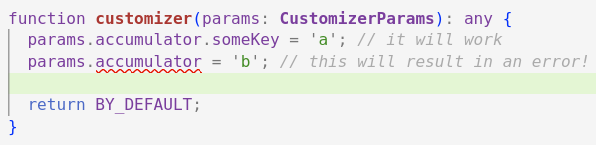
Note B:
field of CustomizerParams has Record type (general plain object). But the structure of the accumulator is usually known in advance. Therefore, for your convenience, the package provides two useful CustomizerParams type extensions: CustParamsAccSoft and CustParamsAccStrict.
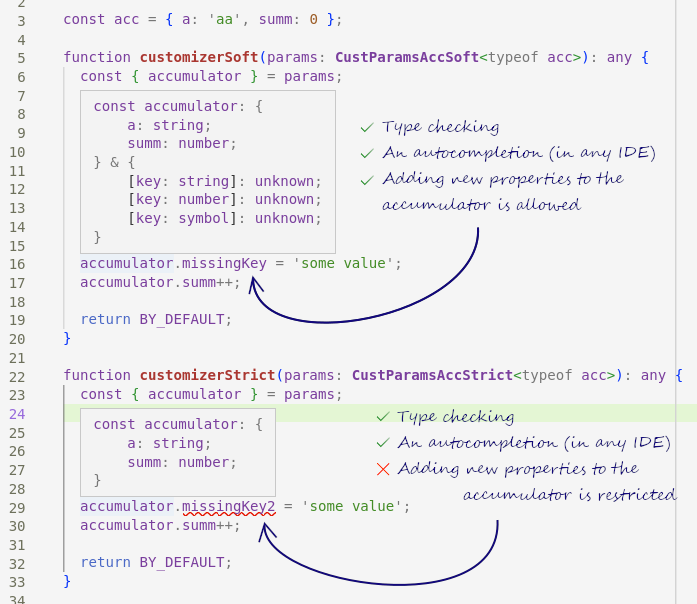
Note C: Please note: the
root and parent fields do not point to the original nodes,
but to the CustomizerParams objects of the corresponding original nodes.
So for example, if you need to get a link to the root node of the original,
you should use root.value.
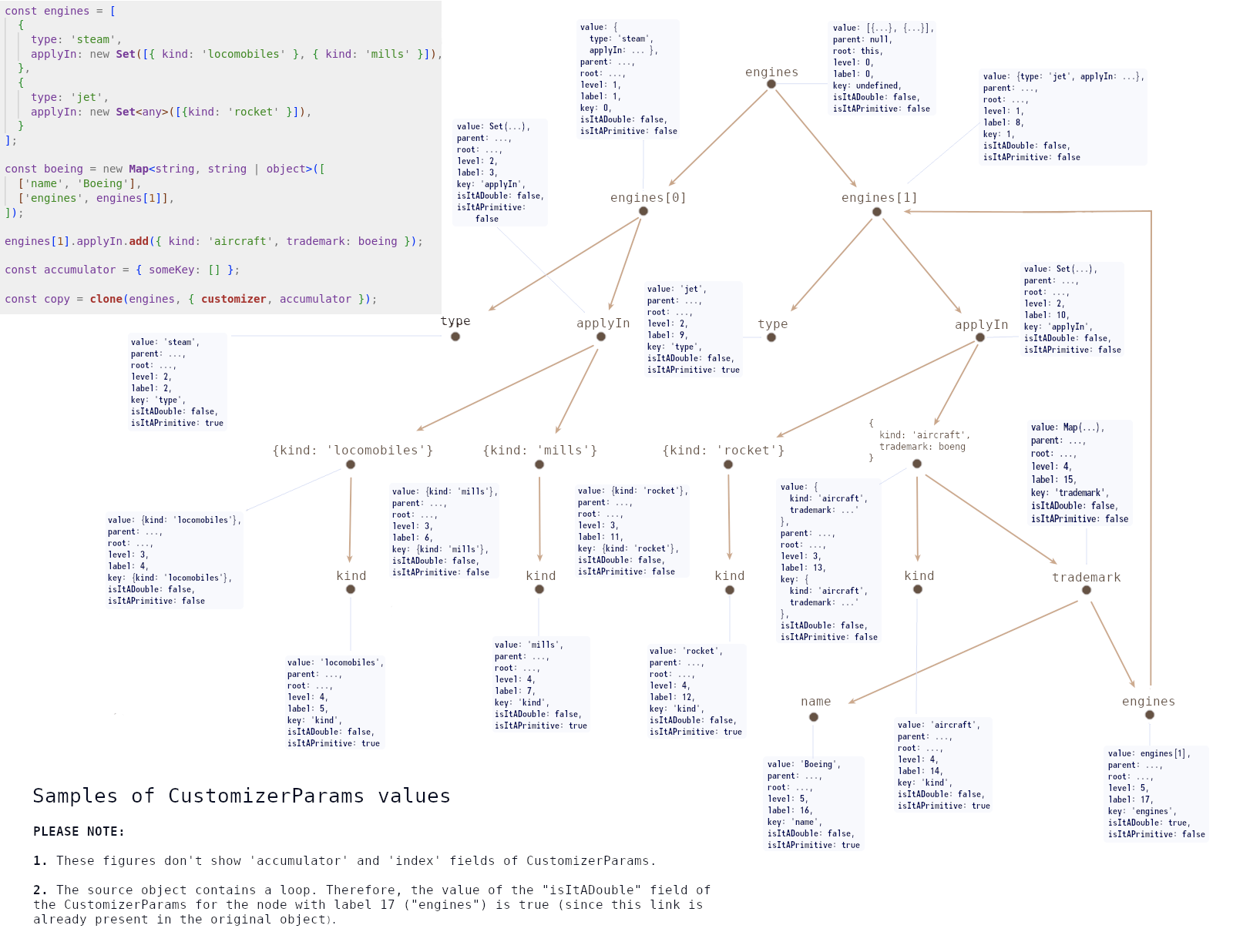
The customizer must return one of three things:
- If the customizer returns a special
BY_DEFAULT symbol (you should import it from the lenka package: import {BY_DEFAULT} from 'lenka'), it means that the customizer delegates the processing of this node to clone (see use cases below).
- If the customizer returns a special MISSING symbol (you should import it from the lenka package: import {MISSING} from 'lenka'), this node will be excluded from the copy.
- If the customizer returns any other value, processing of the current node is considered complete and the returned result is used as the value of that node in the copy.$3
This class has 3 properties and 2 methods:
`typescript
interface Results {
result: any
accumulator: Record
options: CloneOptions // Options you passed to the clone() function.
setByLabel: (label: number, value: any) => void
deleteByLabel: (label: number) => void
}
`
- - a copy (the same as clone function returns in simple mode)
- accumulator - in which the сustomizer() can store some data
- options - options you passed to the clone() function.
- setByLabel - this function takes two arguments:
- label - the label of node
- value - new value of node
and changes value of corresponding node in result (copy).
- deleteByLabel - this function takes a label of node and removes the corresponding node from result (copy).-----
Postprocessing
Sometimes we need to not only get an exact copy of the original object, but also modify it in some way.
If the changes depend on the value of the current node, we can change this node directly during cloning by returning the modified value of the node from the
customizer function or MISSING symbol to exclude it from the copy.But it happens that we can make a decision about modification only on the basis of some general properties of the copied object.
For such cases,
lenka provides a convenient post-processing mechanism.
This mechanic uses a customizer function, accumulator, node labels (accumulator and label fields of CustomizerParams object), as well as setByLabel and deleteByLabel methods of Results.Let's illustrate how post-processing works with a simple example.
Consider the hypothetical "noseball" game in which the players kick the ball with their noses.
According to the rules of this game, after each round, one team with the fewest points is eliminated.
We have a set of noseball player cards:
`typescript
const playes = new Set([
{ name: 'John', age: 21, team: 'blue', points: 14 },
{ name: 'Emma', age: 4, team: 'green', points: 5 },
// and also 1000 cards...
{ name: 'Bob', age: 85, team: 'red', points: 0 };
]);
`And we want to not just clone this set, but also throw out the cards of all the players of the eliminated team from it.
A team's points are the sum of the points of its players. Of course, we don't have this information until the cloning of the set is complete. Therefore, we will go the other way: during cloning, we will save the information we need in the accumulator, and after cloning, we will apply post-processing of the copy.
For each team, we will count the points and collect the labels of the cards of its players in the array:
typescript
type TeamInfo = { points: number, players: number[] };const acc: Record = {};
const customizer = (params: CustParamsAccSoft) => {
const {
accumulator,
label,
value: { team, points }
} = params;
if (team in accumulator) {
accumulator[team].points += points;
accumulator[team].players.push(label);
} else {
accumulator[team] = {
points,
players: [label];
}
}
return BY_DEFAULT;
}
`Let's call
in verbose mode:
`typescript
const { result, accumulator, deleteByLabel } = clone(players, {
customizer,
accumulator: acc,
output: 'verbose'
});
`Then find the team with the minimum number of points...
typescript
const eliminatedTeam = Object.values(accumulator).sort((a, b) => {
  return a.points - b.points;
})[0];
`
...and remove the cards of its players from the result:
typescript
for (const label of eliminatedTeam.players) {
  deleteByLabel(label);
}
`
That's all!Of course, you can combine post-processing with changing/removing nodes "on the fly" by returning not BY_DEFAULT value from the
.You can see another example of post-processing here.
-----
A few use cases
(You can find all these examples here)- Typescript examples
- "simple" (default) output mode
- Simple usage
- Customization to prevent redundant cloning
- Customization to limit copy levels
- Customization to remove circular dependencies
- Customization to change value of some field
- "verbose" output mode
- Using the accumulator to calculate the sum of numeric nodes
- Using setByLabel and deleteByLabel methods for post-processing
$3
#### T.1. Simple usage
`typescript
import { clone } from 'lenka';// Let's define a some complex object.
const original: any = {
a: {
aa: 1,
ab: [
{
aba: '1',
abb: '2',
},
{
abc: 3,
abd: { abda: 18 },
},
],
},
b: 33,
};
// Let's mess it up by adding two cyclic dependencies...
original.c = original;
original.a.ab[1].abd.abdb = original.a;
// ...and copy it.
const copy = clone(original);
// Let's make sure the result still contains the circular dependencies
// (we can't use JSON.stringify here because it's not supports objects
// with loops!)
console.log(copy);
// Cyclic dependencies in the copy are reproduced correctly, they do
// not point to the original.
console.log('copy.c === original.c: ', copy.c === original.c); // false
console.log(
'copy.a.ab[1].abd.abdb === original.a.ab[1].abd.abdb: ',
copy.a.ab[1].abd.abdb === original.a.ab[1].abd.abdb
); // false
`#### T.2. Customization to prevent redundant cloning
typescript
import { clone, CustomizerParams, BY_DEFAULT } from 'lenka';// Let's define a some object...
const original: any = {
a: {
aa: 1,
ab: [
{ aba: '1', abb: '2' },
{ abc: 3, abd: { abda: 18 } },
],
},
b: 33,
};
function customizer(params: CustomizerParams): any {
// eslint-disable-next-line prettier/prettier
console.log(
node ${params.label}: ${JSON.stringify(params.value, null, 4)
}
); return BY_DEFAULT;
}
// ...and copy it.
const copy = clone(original, { customizer });
// Let's make sure the result looks the same as the original,..
console.log('copy: ', JSON.stringify(copy, null, 4), '\n');
// ...that the utility actually made a copy,..
console.log('copy === original: ', copy === original); // false
// ...and that it's not a shallow copy.
console.log(
'original.a.ab[1] === copy.a.ab[1]: ',
original.a.ab[1] === copy.a.ab[1]
); // false
`#### T.3. Customization to limit copy levels
typescript
import { clone, CustomizerParams, BY_DEFAULT } from 'lenka';// Let's take the some object:
const original: any = {
a: {
aa: {
aaa: 1,
aab: {
aaba: 72,
},
},
ab: [
{
aba: '1',
abb: '2',
},
{
abc: 3,
abd: { abda: 18 },
},
],
ac: {
aca: 1,
acb: { acba: 'leaf' },
},
},
b: 33,
};
// Let's say we want to get something between a deep and a shallow copy:
// let the top N levels of the original be copied, while the deeper
// levels of nesting remain references to the nodes of the original
// object.
const MAX_LEVEL = 3;
// To do this, we need to define a customizer function (note that the
// package provides service
// types to describe the parameters and return the customizer).
// This function will be called for each node of the original object.
function customizer(params: CustomizerParams): any {
// It takes one parameter: object. A full description of all fields
// of this object is provided in the README.
// To solve the task, we need only two fields: the current nesting
// level and value of the current original node.
const { value, level } = params;
// For nesting levels less than the threshold, let the deepCopy
// process the data (for this we will return
BY_DEFAULT),
// and when the specified depth is reached, we will
// interrupt processing and return a reference to the
// original.
return level < MAX_LEVEL ? BY_DEFAULT : value;
}// Get copy.
const copy = clone(original, { customizer });
console.log('copy === original: ', copy === original); // false
// Top level items (level=0) copied
console.log('copy.a === original.a: ', copy.a === original.a); // false
// Second level (level=1) copied too.
console.log('copy.a.ab === original.a.ab: ', copy.a.ab === original.a.ab); // false
console.log('copy.a.ac === original.a.ac: ', copy.a.ac === original.a.ac); // false
// Third level didn't copied.
console.log(
'copy.a.ac.acb === original.a.ac.acb: ',
copy.a.ac.acb === original.a.ac.acb
); // true
`#### T.4. Customization to remove circular and duplicate dependencies
typescript
import { clone, CustomizerParams, BY_DEFAULT } from 'lenka';// Let's define a some complex object.
const original: any = {
a: {
aa: 1,
ab: [
{ aba: '1', abb: '2' },
{ abc: 3, abd: { abda: 18 } },
],
},
b: 33,
};
// Let's mess it up by adding two cyclic dependencies.
original.c = original;
original.a.ab[1].abd.abdb = original.a;
// We want to replace all cyclic dependencies in the copy
// with the string "Death to cycles!"
// To do this, we need to define a customizer function (note that the
// package provides service types to describe the parameters and return
// the customizer).
// This function will be called for each node of the original object.
function customizer(params: CustomizerParams): any {
// It takes one parameter: object. A full description of all fields
// of this object is provided in the README.
// To solve the task, we need only one field: boolean flag
// "isItADouble".
const { isItAdouble } = params;
// If the node on which the customizer is called is not a cyclic
// or duplicated dependency,let the deepCopy process the data (for
// this we will return
BY_DEFAULT), and for circular or duplicate
// deps. we will interrupt processing and return the result.
return isItAdouble ? 'Death to cycles!' : BY_DEFAULT;
}// Get copy.
const copy = clone(original, { customizer });
// Wow! The copy does not contain cycles!
console.log(JSON.stringify(copy, null, 4));
`#### T.5. Customization to change value of some field
typescript
import { clone, CustomizerParams, BY_DEFAULT } from 'lenka';// Let's define a some object.
const original: any = {
name: 'John',
surname: 'Doe',
age: 35,
address: '-',
timestamps: {
createdAt: '1995-12-17T03:24:00.285Z',
updatedAt: '2003-09-01T16:52:30.011Z',
},
};
// Suppose that when copying an object, we want to update the
// "updatedAt" field with current data.
// To do this, we need to define a customizer function (note that the
// package provides service types to describe the parameters and return
// the customizer).
// This function will be called for each node of the original object.
function customizer(params: CustomizerParams): any {
// It takes one parameter: object. A full description of all fields
// of this object is provided in the README.
// To solve the task, we need only one field: "producedBy" that
// contains a name of the field.
const { key } = params;
// If the node on which the customizer is not "updatedAt",
// let the deepCopy process the data (for this we
// will return
BY_DEFAULT), and for "updatedAt" we will
// interrupt processing, returning the result. // eslint-disable-next-line prettier/prettier
return key === 'updatedAt'
? new Date().toISOString()
: BY_DEFAULT;
}
// Get copy.
const copy = clone(original, { customizer });
// The value of "updatedAt" has been changed.
console.log(JSON.stringify(copy, null, 4));
`$3
#### T.6. Using the
to calculate the sum of the numeric nodes of the original object.
`typescript
import { clone, CustomizerParams, BY_DEFAULT } from 'lenka';// Let's say a sports coach gave us his gym inventory results as
// a Javascript object.
// We should copy this object (the coach won't let us keep the original)
// Let's count at the same time how many items are in the gym.
const original: any = {
balls: 3,
hulaHoops: 7,
skateboards: {
red: 2,
yellow: 5,
green: 3,
},
kettlebells: {
'8kg': 6,
'16kg': 4,
},
barbells: {
forChildren: 2,
forAdults: {
new: 1,
other: {
rusty: 6,
broken: 1,
},
},
},
};
// To do this, we use three features of deep copying: the customizer
// function, the accumulator and the verbose mode (so that after copying
// we get access to the accumulator in which we will accumulate the
// total number of items.
function customizer(params: CustomizerParams): any {
// It takes one parameter: object. A full description of all fields
// of this object is provided in the README.
// To solve the task, we need two field: "accumulator" and "value".
const { value, accumulator } = params;
// We will calculate the sum of the values of all numerical nodes
if ('number' === typeof value) {
accumulator.count = accumulator.count + value;
}
return BY_DEFAULT;
// eslint-disable-next-line prettier/prettier
}
// Get copy.
const { result, accumulator } = clone(original, {
customizer,
accumulator: { count: 0 },
output: 'verbose',
});
console.log('copy: ', JSON.stringify(result, null, 4));
console.log(
Total number of item: ${accumulator.count}); // 40`#### T.7 Using
and deleteByLabel methods for post-processing.
`typescript
/ eslint-disable eslint-comments/disable-enable-pair /
/ eslint-disable prettier/prettier /
import { clone, CustParamsAccStrict, BY_DEFAULT } from 'lenka';// Imagine that you are the director of a zoo.
// Wolves, hares and foxes live and breed in your zoo. Each animal is
// settled in a separate single aviary or cage.
// You asked your assistant to count the number of animals of each
// species.
// He conscientiously walked around the zoo, but arithmetic is too
// difficult for him, so he brought you this report:
const original = {
aviaries: {
northern: {
'the one where the boy fell last year': 'wolf',
'where the crocodile lived': 'fox',
},
western: {
'where I would like to live': 'hare',
'named after Monty Python': 'fox',
'the aviaries we built on credit': {
first: 'hare',
second:
I don't know who it is but it's creepy!,
'I always forget about this aviary': 'hare',
'damn, there are too many!': 'wolf',
},
},
},
cages: {
warm: 'hare',
skewed: '?',
new: 'this cage is empty',
'cages that Alice gave us': {
blue: it's definitely not an elephant,
'who has a holey ': it hid and I couldn't see who it was,
woodens: {
old: 'hare',
older: 'sorry, I forgot to check it',
oldest: 'hare',
},
'first time I see this cage!': 'fox',
"I'm too lazy to write separately for each cage": [
'hare',
I don't know who it is but it bites,
'fox',
],
},
},
};// Let's make sure that we have successfully replaced the hares with
// beavers both in the properties of objects and in the members of
// arrays.
console.log('original: ', JSON.stringify(original, null, 4));
// Let's copy this report, and at the same time still count the animals.
// And if we have more hares than wolves, then we will exchange all our
// hares for beavers and remove all foxes in the neighboring zoo.
// In order not to do the job twice, we will remember the places where
// each of the biological species is located during copying.
// We can easily do this because the customizer receives a label
// of the current node.
const acc = { wolf: [], hare: [], fox: [] };
function customizer(params: CustParamsAccStrict): any {
// It takes one parameter: object. A full description of all fields
// of this object is provided in the README.
const {
value, // Value of the current node.
accumulator, // The value of this object is preserved between calls,
// so we will remember the places of occupation here.
label, // unique label of the current node.
} = params;
// we will remember places only for the predefined accumulator's keys
// ('hares', 'foxes' and 'wolves'
if (value in accumulator) {
accumulator[value as keyof typeof accumulator].push(label);
}
return BY_DEFAULT;
}
// Get copy.
const { result, accumulator, setByLabel, deleteByLabel } =
clone(original, {
customizer,
accumulator: { wolf: [], hare: [], fox: [] },
output: 'verbose',
});
for (const [name, places] of Object.entries(accumulator)) {
console.log(
${name}: ${(places as number[]).length});
}// if there were more hares than wolves, then we'll change all
// hares for beavers.
const { hare, wolf, fox } = accumulator;
if (hare.length > wolf.length) {
// So, let's do it!
for (const label of hare) {
setByLabel(label as number, 'beaver');
}
for (const label of fox) {
deleteByLabel(label as number);
}
}
// Let's make sure that we have successfully replaced the hares with
// beavers both in the properties of objects and in the members of
// arrays.
console.log('Result: ', JSON.stringify(result, null, 4));
`whatIsIt()
$3
The built-in javascript operator does not work satisfactorily because it still unchanged from the earliest versions of the JS language.
There are many alternative solutions, but they all have serious drawbacks: Almost all of them do not work well with user-defined classes, as well as platform-specific classes (for example, Node.js classes).
Let's take for example one of the most popular solutions - kind-of:
`typescript
import kindOf from 'kind-of'
import EventEmitter from 'events' // NodeJS-specific class// The instance of build-in class:
const myWeakMap = new WeakMap
// User-defined class...
class ExtNumber extends Number {
say1(): { return 1 }
}
// ... and instance of this class:
const myNumber = new ExtNumber()
const myEmitter = new EventEmitter()
// Yes, it's a right result.
kindOf(myWeakMap) // "weakmap"
// And first failure: kind-of doesn't show the classes itself:
// even for standard javascript classes.
// It goes without saying that when we pass a class, we expect to see
// its name. That its constructor is a function is obvious without
// kind-of calling
kindOf(WeakMap) // "function" (instead "WeakMap")
// Well, since it does not know how to work with classes, then perhaps
// it will at least show the type of the instance correctly?
// Oops, no again.
kindOf(myNumber) // "number" (instead "extNumber")
// Failed again: an async function and a (synchronous) function are two
// different things.
kindOf(async function myAsyncFunction() {}) // "function"
// And things are really bad for platform-specific classes and their
// instances:
kindOf(myEmitter) // "object"
`So, my expectations from a correct utility of this type:
- when we pass a class constructor function to it, it should return not "function", but the name of the class with a capital letter.
- When we pass an instance of ANY class (standard or platform-specific) to it, it should return the name of the class starting with a small letter.
- It goes without saying that primitive types should also be supported.
$3
typescript:
javascript:
$3
typescript
const type = whatIsIt(anyData)
// or
const copy = whatIsIt(anyData, options)
`
The second parameter can be passed to the function is an options.
At the moment there are only two of them and they indicate how they
should be processed NaN and Infinities (see below).$3
typescript
import { whatIsIt } from lenka
import EventEmitter from 'events'class MyClass {
a() { return 1 }
}
class MyClassExt extends Number {
toMyNumber() { return 7 }
}
const constMyClass = MyClass
whatIsIt(WeakMap) // "WeakMap"
whatIsIt(new WeakMap()) // "weakMap"
whatIsIt(new Set()) // "set"
whatIsIt({ a: 1, b: 2}) // "object"
whatIsIt(new Object(null)) // "object"
whatIsIt(function myFunction(a) { return a }) // "function"
whatIsIt(MyClass) // "MyClass"
whatIsIt(new MyClass()) // "myClass"
whatIsIt(MyClassExt) // "MyClassExt"
whatIsIt(new MyClassExt()) // "myClassExt"
whatIsIt(constMyClass) // "MyClass"
whatIsIt(EventEmitter) // "EventEmitter"
whatIsIt(new EventEmitter()) // "eventEmitter"
whatIsIt(async function myAsyncFunction() {}) // "asyncFunction"
whatIsIt(function* myGenerator() { yield 1 }) // "generatorFunction"
whatIsIt([1, 2, 3]) // "array"
whatIsIt(/.*.a/g) // "regExp"
whatIsIt(Number) // "Number"
whatIsIt(Number(1)) // "number"
whatIsIt(7) // "number"
whatIsIt('www') // "string"
whatIsIt(null) // "null"
whatIsIt(undefined) // "undefined"
whatIsIt(void 0) // "undefined"
whatIsIt(true) // "boolean"
whatIsIt(Symbol('unic')) // "symbol"
whatIsIt(Promise) // "Promise"
whatIsIt(new Promise((resolve) => { resolve(1)})) // "promise"
// etc.
`$3
typescript
{
  nan?: boolean      // default is false
  infinity?: boolean // default is false
}
`Although
, Infinity, Number.POSITIVE_INFINITY and Number.NEGATIVE_INFINITY in Javascript refer to numbers, using them in calculations rarely gives the expected result.
For your convenience, if you specify the "nan: true" option, whatIsIt will return result for NaN as a separate type "nan", not a "number".
Similarly for infinities:
`typescript
whatIsIt(NaN) // "number"
whatIsIt(nan, { nan: true }) // "nan"
whatIsIt(Infinity) // "number"
whatIsIt (Infinity, { nan: true }) // "infinity"
whatIsIt(Number.POSITIVE_INFINITY) // "number"
whatIsIt(Number.POSITIVE_INFINITY, { infinity: true }) // "infinity"
whatIsIt(Number.NEGATIVE_INFINITY) // "number"
whatIsIt(Number.NEGATIVE_INFINITY, { infinity: true }) // "infinity"
`isItTheSameAs
$3
How to compare different objects (or instances of classes, buffers, etc.) with each other?
In different situations, we are interested in different comparisons.
Sometimes we just need to compare values. That is, if we have a base class instance and a derived class instance that have the same values, we consider them the same.
Sometimes we want to compare classes as well: that is, instances of the base and derived class are considered different, even if they are filled with the same values.
Sometimes we also want to compare property descriptors.
The function has been designed for all these situations. It has four modes of operation that determine the "strictness" of the comparison.
$3
typescript:
javascript:
$3
typescript
const type = isItTheSameAs(anyData)
// or
const copy = isItTheSameAs(anyData, options)
`
The second parameter can be passed to the function is an options:
typescript
interface IsSameOptions {
  mode: 'soft' | 'moderate' | 'strict' | 'draconian' // default is 'moderate'
}
`
At the moment there are includes mode only.$3
- soft - Compare only values using js equality operator (==). In all other modes, the strict equality (===) operator is used.
`typescript
isItTheSameAs({a: {b: 1, c: 2}}, {a: {b: 1, c: 2}}, {mode: 'soft'}); // true
isItTheSameAs({a: {b: 1, c: 2}}, {a: {b: '1', c: '2'}}, {mode: 'soft'}); // true
isItTheSameAs({a: {b: 1, c: 2}}, {a: {b: 1, c: 3}}, {mode: 'soft'}); // false
`-
- Compare only values.
`typescript
isItTheSameAs({a: {b: 1, c: 2}}, {a: {b: 1, c: 2}}, {mode: 'moderate'}); // true
isItTheSameAs({a: {b: 1, c: 2}}, {a: {b: '1', c: '2'}}, {mode: 'moderate'}); // false
isItTheSameAs({a: {b: 1, c: 2}}, {a: {b: 1, c: 3}}, {mode: 'moderate'}); // false
`-
- Compare values as well as classes.
`typescript
class MyArray extends Array {};
isItTheSameAs(new Array(1, 2), new Array(1, 2), {mode: 'strict'}); // true
isItTheSameAs(new Array(1, 2), new Array('1', '2'), {mode: 'strict'}); // false
isItTheSameAs(new Array(1, 2), new MyArray(1, 2), {mode: 'strict'}); // false
`-
(c) 2022-2023