lets-validate-a11y
v1.0.7TypeScript
The Lets Validate A11y tool simplifies the process of assessing accessibility issues by generating user-friendly reports, enabling users to efficiently address identified problems across multiple URLs or files.
0/weekUpdated 1 years agoISCUnpacked: 15.6 KB
Published by Rohit Shrivastava
npm install lets-validate-a11yLet's Validate A11Y 
User-friendly and straightforward, enhanced by the "Let's Validate A11y" tool and supported by the AXE-Core CLI.
This tool enables you to assess accessibility issues across multiple URLs or files and produces a report in a user-friendly HTML format, allowing you to concentrate on resolving the identified problems.
Installation
Use the package manager npm to install Lets Lighthouse.
``bash`
npm i lets-validate-a11y
Simple setup
$3
`bash`
npm run init
Heart of the project
To use this tool, you'll need to modify the configuration structure outlined in the config.yaml file.
Create a config.yaml file (if it does not already exist) alongside your project's package.json file.
Note: _In the YAML file, Whitespace indentation is used to indicate nesting and overall structure._
Here is the read about YAML
`
config:
  #use when you want the script to find HTML by itself using the given path, default to false.
  #Example Value: /Users/rohit.shrivastava/Desktop/
  findHtmlFromHere: false
  ignoreFileAndFolders:
    - node_modules
    - example.html
    - test.com
#skipped if the above path is set. This parameter will help the script to run only on given path/URLs.
filesToValidateA11y:
- https://www.google.com
- /Users/rohit.shrivastava/Desktop/test-file.html
- /Users/rohit.shrivastava/Desktop/content/quizcontentfragment/element.html
disableRules:
- document-title
- html-has-lang
- landmark-one-main
- page-has-heading-one
- duplicate-id
headless: true
`
Usage
$3
`bashExecute the below command to start accessibility analysis on
multiple URLs/files(uses config.yaml)
npm run analysis
``
The command provided will generate the artifacts directory within the root of your project.
All analyses are documented in HTML format, as illustrated in the attached screenshot.
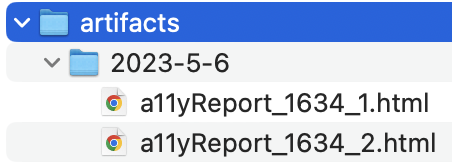
Access the HTML Report to review the accessibility issues associated with specific URLs or files directly in your browser as outlined below.
Contributing
Contributions in the form of pull requests are encouraged. For significant modifications, please initiate a discussion by opening an issue to outline your proposed changes.
Kindly ensure that tests are updated as necessary.