lightning-flow-scanner
v6.19.1
A Salesforce CLI plugin for analysis and optimization of Salesforce Flow. Scans metadata for 20+ issues such as hardcoded IDs, unsafe contexts, inefficient SOQL/DML operations, recursion risks, and missing fault handling. Supports auto-fixes, rule configu
salesforceflowlintercode-qualitystatic-analysisstatic-code-analysissalesforce-cli-pluginsfdx-plugindevopsci-cd
0/weekUpdated 6 days agoMITUnpacked: 110.1 KB
Published by Ruben Halman
npm install lightning-flow-scanner







Detect unsafe contexts, queries in loops, hardcoded IDs, and more to optimize Salesforce Flows
---
Table of contents
- Usage
- Default Rules
- Problems
- Suggestions
- Layout
- Configuration
- Installation
- Development
---
Usage
Privacy: Zero user data collected. All processing is client-side. → See our Security Policy.
$3
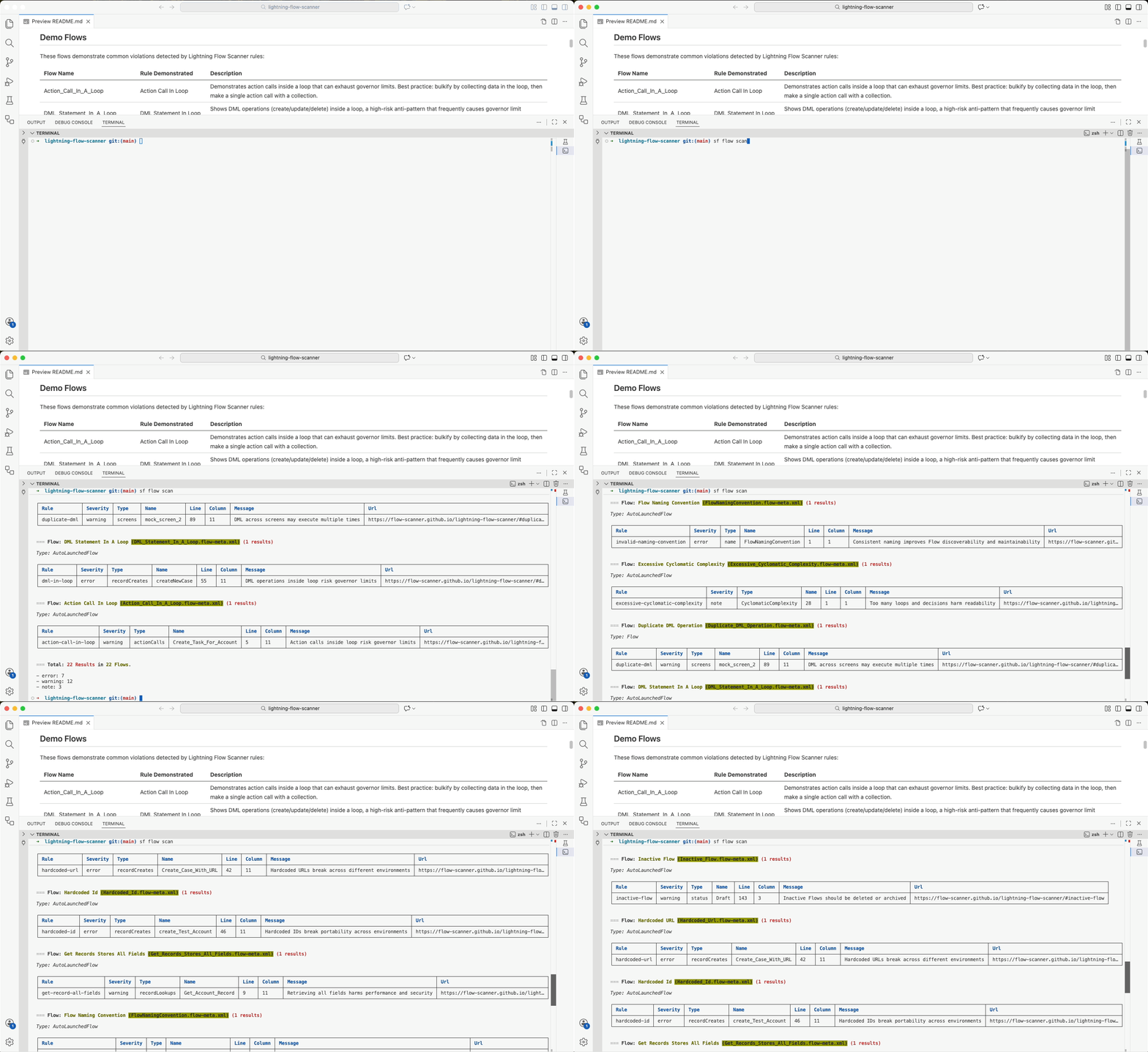
Lightning Flow Scanner CLI is plug-and-play. Just open any Salesforce project and run:
``
bash

sf flow:scan
`
All default rules are applied automatically.
`bash
sf flow:scan # Scan flows in the current directory
sf flow:scan --sarif > report.sarif # Export scan results as SARIF
sf flow scan --csv > results.csv # Export scan results as CSV
`
| Flag            | Alias | Description                                   | Example                             |

|-----------------|-------|-----------------------------------------------|-------------------------------------|

|
--config | -c | Path to config file | -c .flow-scanner.yml |
| --directory | -d | Directory to scan | -d force-app |
| --files | -p | Specific flow files | -p "flows/MyFlow.flow-meta.xml" |
| --csv | -v | CSV output | --csv > violations.csv |
| --sarif | -s | SARIF output (GitHub, etc.) | --sarif > report.sarif |
| --json | | Pretty JSON output | --json |
| --threshold | -t | Fail on error/warn | --threshold error |
| --betaMode | -z | Enable beta rules | --betaMode |
| --loglevel | | Logging level | --loglevel debug |
$3
The flow:fix command automatically fixes certain issues in your flows. It uses the same .flow-scanner.yml configuration as the scan command.
`bash
sf flow:fix -d src/flows # Apply fixes using config rules
sf flow:fix -d src/flows --dry-run # Preview changes without applying
sf flow:fix -d src/flows -i # Interactive mode with confirmation
sf flow:fix -d src/flows -r unused-variable # Filter to specific rule
`
| Flag            | Alias | Description                                   | Example                             |

|-----------------|-------|-----------------------------------------------|-------------------------------------|

|
--config | -c | Path to configuration file | -c .flow-scanner.yml |
| --directory | -d | Directory containing flows | -d force-app |
| --files | -f | Specific flow files | -f "flows/MyFlow.flow-meta.xml" |
| --rules | -r | Filter to specific rules (optional) | -r unused-variable |
| --dry-run | | Preview changes without applying | --dry-run |
| --interactive| -i | Show diff and prompt for confirmation | -i |Default Rules
📌Tip: To link directly to a specific rule, use the full GitHub anchor link format. Example:
https://flow-scanner.github.io/lightning-flow-scanner/#unsafe-running-context
> Want to help improve this project? See our Contributing Guidelines
---
$3
These rules detect anti-patterns and unsafe practices in your Flows that could break functionality, compromise security, or cause deployment failures.
#### DML Statement In A Loop
Executing DML operations (insert, update, delete) inside a loop is a high-risk anti-pattern that frequently causes governor limit exceptions. All database operations should be collected and executed once, outside the loop.
Rule ID:
dml-in-loop
Class Name: _DMLStatementInLoop_
Severity: 🔴 Error#### Hardcoded Id
Avoid hard-coding record IDs, as they are unique to a specific org and will not work in other environments. Instead, store IDs in variables—such as merge-field URL parameters or a Get Records element—to make the Flow portable, maintainable, and flexible.
Rule ID:
Class Name: _HardcodedId_
Severity: 🔴 Error#### Hardcoded Secret !Beta
Avoid hardcoding secrets, API keys, tokens, or credentials in Flows. These should be stored securely in Named Credentials, Custom Settings, Custom Metadata, or external secret management systems.
Rule ID:
Class Name: _HardcodedSecret_
Severity: 🔴 Error#### Hardcoded Url
Avoid hard-coding URLs, as they may change between environments or over time. Instead, store URLs in variables or custom settings to make the Flow adaptable, maintainable, and environment-independent.
Rule ID:
Class Name: _HardcodedUrl_
Severity: 🔴 Error#### Process Builder
Process Builder is retired. Continuing to use it increases maintenance overhead and risks future compatibility issues. Migrating automation to Flow reduces risk and improves maintainability.
Rule ID:
Class Name: _ProcessBuilder_
Severity: 🔴 Error#### SOQL Query In A Loop
Running SOQL queries inside a loop can rapidly exceed query limits and severely degrade performance. Queries should be executed once, with results reused throughout the loop.
Rule ID:
Class Name: _SOQLQueryInLoop_
Severity: 🔴 Error#### Unsafe Running Context
Flows configured to run in System Mode without Sharing grant access to all data, bypassing user permissions. Avoid this setting to prevent security risks and protect sensitive data.
Rule ID:
Class Name: _UnsafeRunningContext_
Severity: 🔴 Error#### Duplicate DML Operation
When a Flow performs database operations across multiple screens, users navigating backward can cause the same actions to run multiple times. To prevent unintended changes, either restrict backward navigation or redesign the Flow so database operations execute in a single, forward-moving step.
Rule ID:
Class Name: _DuplicateDMLOperation_
Severity: 🟡 Warning#### Missing Fault Path
Elements that can fail should include a Fault Path to handle errors gracefully. Without it, failures show generic errors to users. Fault Paths improve reliability and user experience.
Rule ID:
Class Name: _MissingFaultPath_
Severity: 🟡 Warning#### Missing Null Handler
Get Records operations return null when no data is found. Without handling these null values, Flows can fail or produce unintended results. Adding a null check improves reliability and ensures the Flow behaves as expected.
Rule ID:
Class Name: _MissingNullHandler_
Severity: 🟡 Warning#### Recursive After Update
After-save Flows that update the same record can trigger recursion, causing unintended behavior or performance issues. Avoid updating the triggering record in after-save Flows; use before-save Flows instead to prevent recursion.
Rule ID:
Class Name: _RecursiveAfterUpdate_
Severity: 🟡 Warning---
$3
These rules highlight areas where Flows can be improved. Following them increases reliability and long-term maintainability.
#### Action Call In A Loop
Repeatedly invoking Apex actions inside a loop can exhaust governor limits and lead to performance issues. Where possible, bulkify your logic by moving the action call outside the loop and passing a collection variable instead.
Rule ID:
Class Name: _ActionCallsInLoop_
Severity: 🟡 Warning#### Get Record All Fields
Avoid using Get Records to retrieve all fields unless necessary. This improves performance, reduces processing time, and limits exposure of unnecessary data.
Rule ID:
Class Name: _GetRecordAllFields_
Severity: 🟡 Warning#### Inactive Flow
Inactive Flows should be deleted or archived to reduce risk. Even when inactive, they can cause unintended record changes during testing or be activated as subflows. Keeping only active, relevant Flows improves safety and maintainability.
Rule ID:
Class Name: _InactiveFlow_
Severity: 🟡 Warning#### Invalid API Version !Auto-Fix
Flows running on outdated API versions may behave inconsistently when newer platform features or components are used. From API version 50.0 onward, the API Version attribute explicitly controls Flow runtime behavior. Keeping Flows aligned with a supported API version helps prevent compatibility issues and ensures predictable execution.
Rule ID:
Class Name: _APIVersion_
Severity: 🟡 Warning| Option | Type | Default | Description |
|--------|------|---------|-------------|
| expression | expression |
| Comparison expression for API version (e.g., >= 58, < 50, === 60) |
#### Missing Filter Record Trigger !Beta
Record-triggered Flows without filters on changed fields or entry conditions execute on every record change. Adding filters ensures the Flow runs only when needed, improving performance.
Rule ID:
missing-record-trigger-filter
Class Name: _MissingFilterRecordTrigger_
Severity: 🟡 Warning#### Same Record Field Updates
Before-save Flows can safely update the triggering record directly via $Record, applying changes efficiently without extra DML operations. Using before-save updates improves performance
Rule ID:
Class Name: _SameRecordFieldUpdates_
Severity: 🟡 Warning#### Cognitive Complexity !Beta
Flows with deeply nested loops and decisions are hard to understand. Unlike cyclomatic complexity which counts paths, cognitive complexity penalizes nesting depth. Consider extracting nested logic into subflows.
Rule ID:
Class Name: _CognitiveComplexity_
Severity: 🔵 Note| Option | Type | Default | Description |
|--------|------|---------|-------------|
| threshold | number |
| Maximum cognitive complexity score before triggering a violation |
#### Excessive Cyclomatic Complexity
High numbers of loops and decision elements increase a Flow's cyclomatic complexity. To maintain simplicity and readability, consider using subflows or splitting a Flow into smaller, ordered Flows.
Rule ID:
excessive-cyclomatic-complexity
Class Name: _CyclomaticComplexity_
Severity: 🔵 Note| Option | Type | Default | Description |
|--------|------|---------|-------------|
| threshold | number |
| Maximum cyclomatic complexity score before triggering a violation |
#### Missing Trigger Order
Record-triggered Flows without a specified Trigger Order may execute in an unpredictable sequence. Setting a Trigger Order ensures your Flows run in the intended order.
Rule ID:
unspecified-trigger-order
Class Name: _TriggerOrder_
Severity: 🔵 Note#### Record ID as String !Beta
Flows that use a String variable for a record ID instead of receiving the full record introduce unnecessary complexity and additional Get Records queries. Using the complete record simplifies the Flow and improves performance.
Rule ID:
Class Name: _RecordIdAsString_
Severity: 🔵 Note#### Transform Instead of Loop !Beta
Loop elements that perform direct Assignments on each item can slow down Flows. Using Transform elements allows bulk operations on collections, improving performance and reducing complexity.
Rule ID:
Class Name: _TransformInsteadOfLoop_
Severity: 🔵 Note---
$3
Focused on naming, documentation, and organization, these rules ensure Flows remain clear, easy to understand, and maintainable as automations grow.
#### Flow Naming Convention
Using clear and consistent Flow names improves readability, discoverability, and maintainability. A good naming convention helps team members quickly understand a Flow's purpose—for example, including a domain and brief description like Service_OrderFulfillment. Adopt a naming pattern that aligns with your organization's standards.
Rule ID:
Class Name: _FlowName_
Severity: 🔴 Error| Option | Type | Default | Description |
|--------|------|---------|-------------|
| expression | expression |
| Regex pattern for valid Flow names |
#### Missing Flow Description
Flow descriptions are essential for documentation and maintainability. Include a description for each Flow, explaining its purpose and where it's used.
Rule ID:
missing-flow-description
Class Name: _FlowDescription_
Severity: 🔴 Error#### Missing Metadata Description !Beta
Elements and metadata without a description reduce clarity and maintainability. Adding descriptions improves readability and makes your automation easier to understand.
Rule ID:
Class Name: _MissingMetadataDescription_
Severity: 🟡 Warning#### Unclear API Name
Elements with unclear or duplicated API names, like Copy_X_Of_Element, reduce Flow readability. Make sure to update the API name when copying elements to keep your Flow organized.
Rule ID:
Class Name: _CopyAPIName_
Severity: 🟡 Warning#### Unreachable Element !Auto-Fix
Unconnected elements never execute and add unnecessary clutter. Remove or connect unused Flow elements to keep Flows clean and efficient.
Rule ID:
Class Name: _UnconnectedElement_
Severity: 🟡 Warning#### Unused Variable !Auto-Fix
Unused variables are never referenced and add unnecessary clutter. Remove them to keep Flows efficient and easy to maintain.
Rule ID:
Class Name: _UnusedVariable_
Severity: 🟡 Warning#### Missing Auto Layout !Auto-Fix
Auto-Layout automatically arranges and aligns Flow elements, keeping the canvas organized and easier to maintain. Enabling it saves time and improves readability.
Rule ID:
Class Name: _AutoLayout_
Severity: 🔵 Note#### System (subcategory)
System rules are a subset of Layout rules that detect structural issues normally prevented by the Flow Builder UI. See System Rules Documentation for the full list.
Configuration
It is recommend to configure and define:
- The severity of violating any specific rule.
- Expressions used for rules, such as REGEX patterns and comparison operators.
- Any known exceptions that should be ignored during scanning.
- (Optional) Implement filters based on a severity threshold or rule categories.
Most distributions automatically load configuration from:
-
- .flow-scanner.json
- package.json → "flowScanner" key
`json
{
"rules": {
// rule customizations (severity, expression, enabled, ...)
},
"exceptions": {
// flow → rule → result suppressions
},
"threshold": "error", // only consider errors
"categories": ["problem", "layout"] // only run rules from these categories
}
`
$3


By default, all default rules are executed. You can customize individual rules and override the rules to be executed without having to specify every rule. Below is a breakdown of the available attributes of rule configuration:
`json
{
"rules": {
"": {
"severity": "", // Override severity level
"expression": "", // Override rule expression
"message": "", // Set custom message
"messageUrl": "", // Set custom documentation URL
"enabled": false, // Disable this rule
}
}
}
`
#### Configure Severity


Available values for severity are error, warning and note. If no severity is provided, a default value is applied. Configure the severity per rule as demonstrated below:
`json
{
"rules": {
"record-id-as-string": {
"severity": "warning",
},
"unclear-api-naming": {
"severity": "error",
}
}
}
`
#### Customize Rules


Some rules are configurable and allow overriding their default expressions, or setting a threshold as shown in the examples below.
`json
{
"rules": {
"invalid-api-version": {
"expression": "===58" // comparison expression
},
"invalid-naming-convention": {
"expression": "[A-Za-z0-9]" // regular expression
},
"excessive-cyclomatic-complexity": {
"threshold": 10 // threshold
}
}
}
`
#### Customize Rule Messages


If not provided,
message shows the standard rule summary and messageUrl links to the README; providing either overrides the default behavior.
`json
{
"rules": {
"dml-in-loop": {
"message": "Avoid DML inside loops. Bulkify operations instead.",
"messageUrl": "https://internal.docs.company.com/salesforce/flow-dml-best-practices"
}
}
}
`
#### Disable Rules


To disable a rule, set
"enabled": false as shown below:
`json
{
"rules": {
"dml-in-loop": {
"enabled": false
}
}
}
`
$3


Defining exceptions allows you to exclude specific scenarios from rule enforcement. Exceptions can be specified at the flow, rule, or result level to provide fine-grained control. Below is a breakdown of the available attributes of exception configuration:
`json
{
"exceptions": {
"": {
"": [
"", // Suppress a result
"*", // Wildcard to suppress all results
...
]
},
...
}
}
`
_Example_
`json
{
"exceptions": {
"MyFlow": {
"hardcoded-id": ["Old_Lookup_1"],
"missing-null-handler": ["*"]
}
}
}
`
$3


#### Exclude by File Path (Node.js only)


Use glob patterns to exclude flows based on their file system location. This is useful for excluding entire directories or specific name patterns:
`json
{
"ignore": [
"/testing/",
"*/_Deprecated.flow-meta.xml"
]
}
`
Environment compatibility: requires Node.js(file system access) and is not available when using the Core Library in browser/web environments.


#### Exclude by Flow API Name (Browser-compatible)


Exclude specific flows by their unique API names, regardless of their location. This is particularly useful for:

- Excluding specific flows without knowing their exact file path

- Working with metadata API deployments where directory structures may vary

- More precise control than path-based patterns
`json
{
"ignoreFlows": [
"My_Legacy_Flow",
"Temporary_Test_Flow",
"Deprecated_Process_Builder"
]
}
`
Environment compatibility: works in all environments including Node.js and browser/web distributions, as it operates on parsed flow data rather than file system paths.


$3


#### Severity Threshold

Only report on violations at or above a chosen severity level:
`json
{ "threshold": "error" }
`
#### Filter by category

Restrict the scan to specific categories of rules:
`json
{ "categories": ["problem", "layout"] }
`
#### Beta Mode


New rules are introduced in Beta mode before being added to the default ruleset. To include current Beta rules, enable the optional betamode parameter in your configuration:
`json
{ "betaMode": true }
`
#### Rule Mode


By default, Lightning Flow Scanner runs all default rules and merges any custom configurations you provide.  If instead, you want to run only the rules you explicitly specify, use:
`json
{ "ruleMode": "isolated" }
`
Installation


bash

sf plugins install lightning-flow-scanner
`
OR
`bash
npm install -g lightning-flow-scanner
`
---


Development


> This project optionally uses Volta to guarantee the exact same Node.js and tool versions for every contributor. Install Volta with:

>

> MacOs/Linux:

> `sh
> curl https://get.volta.sh | bash
> `
> Windows:

> `sh
> winget install Volta.Volta
> `
> Volta will automatically install and lock the tool versions defined in package.json.
1. Clone the repository
`bash
git clone https://github.com/Flow-Scanner/lightning-flow-scanner.git
`
2. Install dependencies:
`bash
pnpm install
`
3. Compile:
`bash
pnpm run build:cli
`
4. Run tests:
`bash
pnpm test:cli
`
5. Linking the Salesforce CLI module locally(Optional):


   To link the module, run:
`bash
sf plugins link packages/cli
``