maplibre-theme
v1.0.0
CSS Themes for your Maplibre GL Js Web app
953/weekUpdated 8 months agoMITUnpacked: 535.6 KB
Published by Hugues Tavernier
npm install maplibre-themeMaplibre GL CSS Themes
Themes classic / modern
this themes are designed to mimic the actual theme with some improvements.
- light : actually 20ko-30ko minified (the current theme from maplibre-gl/maplibre-gl.css is 65ko minified).
- support dark mode
- support CSS variables for easy optimisation.
- possibility to use another icon set for your buttons
- compat mode to support .mapboxgl-ctrl and .mapboxgl-ctrl-group classes.
See a demo with MapLibre theme customizer.
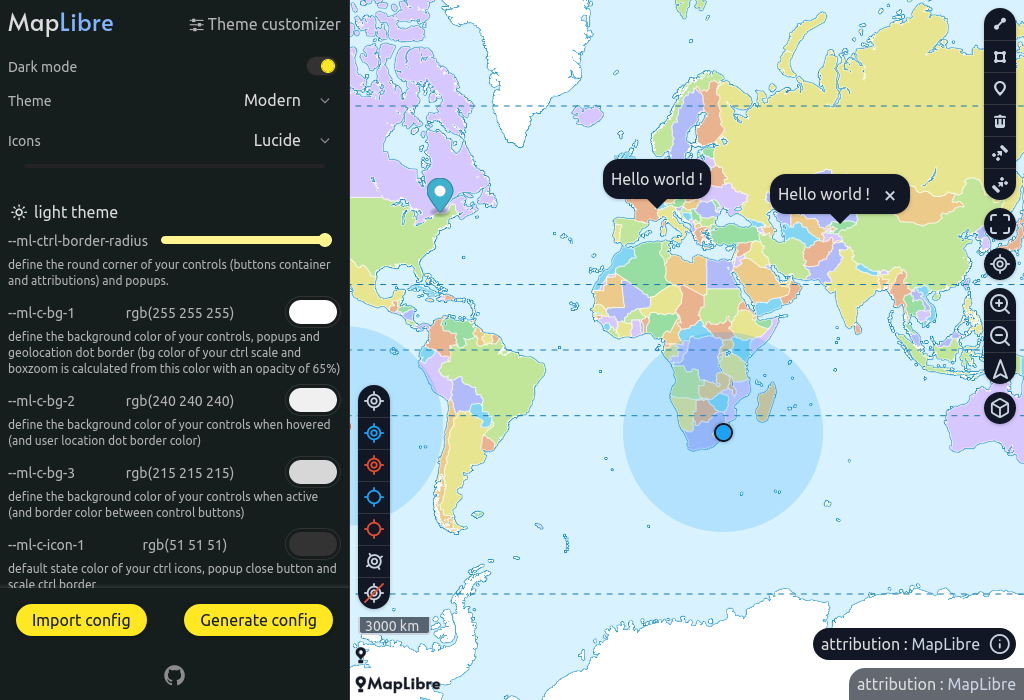
This custimizer can be used in different ways. test how this package works, create your own theme and see the associated configuration.
> [!IMPORTANT]
> if you have created a nice theme from the customizer and you want to share it, export it in JSON format, open a github issue with the content of the JSON, it will be added as a preset.
Compatibility : maplibre-gl >= 1.15
Installation
``bash`
npm i maplibre-theme
TL;DR;
`diff`
- import "maplibre-gl/dist/maplibre-gl.css";
+ import "maplibre-theme/icons.default.css";
+ import "maplibre-theme/modern.css";
Extra config
`css
.maplibregl-map {
/ your CSS vars /
--ml-ctrl-border-radius: 4px;
/*
* bg-1 default state
* bg-2 usually hover effect
* bg-3 active effect
*/
--ml-c-bg-1: #ffffff;
--ml-c-bg-2: #f0f0f0;
--ml-c-bg-3: #d7d7d7;
}
`
check modern vars.css for all available css vars.
Migration from v0.2.x to v1.x
If you were using custom colors in your CSS vars. You need to convert color channel to real colors
`diff
.maplibregl-map {
- --ml-c-bg-1: 255 255 255;
+ --ml-c-bg-1: #ffffff;
}
`
Details
MapLibre theme separate your CSS into 2 files. one for inline icons and another for the rest.
`ts`
import "maplibre-theme/icons.
import "maplibre-theme/
For theme choose between:
- modern
- (looks like the current MapLibre theme as a starting point, but now you have dark mode built in and can play with css variables)legacy
-
For icon set choose between:
- default
-
note: if you don't use default icon set, add this extra config in your css.
`css`
.maplibregl-map {
--ml-font-icons: maplibregl-icons-
}
Example: Modern theme with lucide icon set
`js`
import "maplibre-theme/icons.lucide.css";
import "maplibre-theme/modern.css";css`
.maplibregl-map {
--ml-font-icons: maplibregl-icons-lucide;
}
Package files
List of available CSS files to import. (see Scoped themes section for .scoped.css files)
`
.
└── maplibre-theme
|
| // choose one of them.
├── modern.css (18 ko)
├── classic.css (17 ko)
|
| // icon sets, need to be added with your theme above
├── icons.default.css (6 ko)
├── icons.lucide.css (6 ko)
|
| // scoped themes only if you need to use multiple theme in your app
├── classic.scoped.css (21 ko)
├── modern.scoped.css (22 ko)
|
| // maplibre-theme compatible plugin stylesheets
├── plugins
| └── mapbox-gl-draw.css
|
| // for special use cases
└── extra
├── classic.compat.css
├── classic.scoped.css
├── classic.scoped.compat.css
├── modern.compat.css
├── modern.scoped.css
├── modern.scoped.compat.css
├── legacy.compat.css
├── legacy.scoped.css
└── legacy.scoped.compat.css
Theme modern
`ts
import { Map } from "maplibre-gl";
import "maplibre-theme/icons.default.css";
import "maplibre-theme/modern.css";
new Map({
container: "map-1"
})
new Map({
container: "map-2"
})
`
`html
`
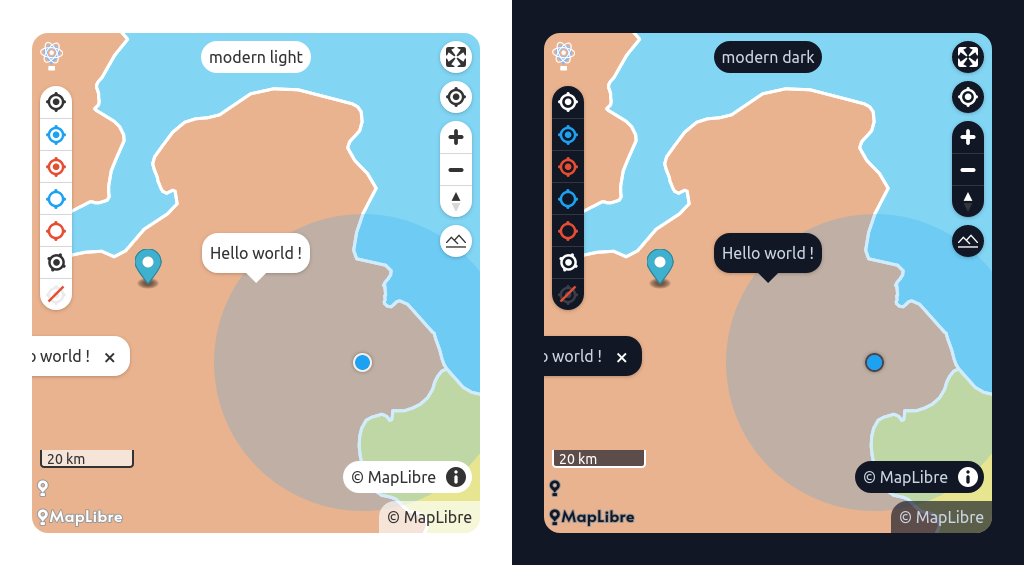
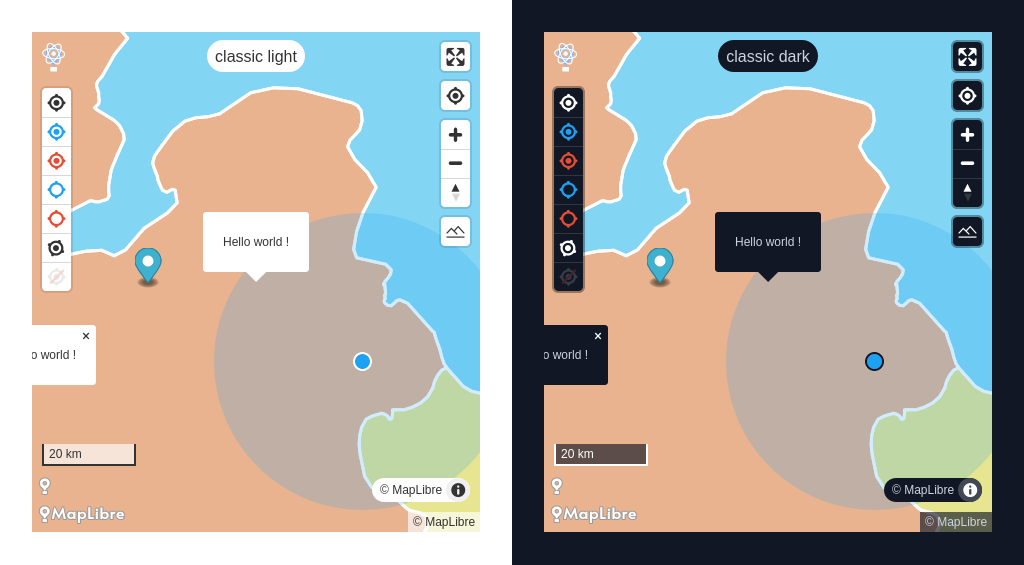
Theme classic
ts
import { Map } from "maplibre-gl";
import "maplibre-theme/icons.default.css";
import "maplibre-theme/classic.css";new Map({
container: "map-1"
})
new Map({
container: "map-2"
})
`html
`
Advanced configuration with CSS vars.
css
/**
* default values are defined in :root selector
* with .maplibregl-map you overwrite CSS vars you want
*/
.maplibregl-map {
/ your CSS vars /
--ml-ctrl-border-radius: 4px; /*
* bg-1 default state
* bg-2 usually hover effect
* bg-3 active effect
*/
--ml-c-bg-1: #ffffff;
--ml-c-bg-2: #f0f0f0;
--ml-c-bg-3: #d7d7d7;
/ etc... /
}
`Some variables differs between
and modern. check the source code for the exact implementation.- modern vars.css
- classic vars.css
It is not recommended to modify css variables for media queries
@media (forced-colors: active) and (prefers-color-scheme: light) and @media (forced-colors: active).
If you find inconsistencies, open an issue or submit a PR instead.Custom icon set
If you want to use another set of icons
`js
import "maplibre-theme/icons..css";
import "maplibre-theme/classic.css";
`css
.maplibregl-map {
--ml-font-icons: maplibregl-icons-;
}
`example with lucide
js
import "maplibre-theme/icons.lucide.css";
import "maplibre-theme/classic.css";`
css
.maplibregl-map {
  --ml-font-icons: maplibregl-icons-lucide;
}
`Create your own icon set
If you want to replace the default icons with your own set of icons.
Simply remove this import
diff
- import "maplibre-theme/icons.default.css"
`Instead add this code.
css
@font-face {
  font-family: "maplibregl-icons-custom";
  src: url("./path/to/your/icon-font.woff2");
  font-weight: normal;
  font-style: normal;
}
`
css
.maplibregl-map {
  --ml-font-icons: maplibregl-icons-custom;
}
`And create with a tool like Fontello your icons using this codes.
| Icon | Unicode |
|------|---------|
| | U+E808 |
| | U+E809 |
| | U+E80A |
| | U+E80B |
| | U+E80C |
| | U+E80D |
| | U+E80E |
| | U+E80F |
| | U+E810 |
| | U+002B |
| | U+002D |
| | U+E800 |
note: if you don't want to specify a bicolor compass icon. add your compass for the code
and a blank icon like space.svg for the U+E80A char code.
Scoped themes
If you want to show multiple themes inside the same page you probably need to scope your CSS theme.
You can use the
*.scoped.css version of the theme for this to work. In addition you will have to add the maplibregl-theme- class name to your map container.`ts
import "maplibre-theme/classic.scoped.css";
import "maplibre-theme/modern.scoped.css";
import { Map } from "maplibre-gl";new Map({
container: "map-1"
})
new Map({
container: "map-2"
})
`
html
`
css
.maplibregl-map.maplibregl-theme-classic {
  --ml-ctrl-border-radius: 4px;
}
`MapBox compatible mode
since MapLibre has removed
classes (#1575) some MapBox plugins may display poorly on your map and therefore with your theme. (note we will talk about css incompatibilities here, there may also be some related to js features and they will not be covered here)It is especially when the
.maplibregl-ctrl and .maplibregl-ctrl-group classes are hardcoded in the js.You can try this special
themes which will replace your usual import.Note: These special stylesheets don't do magic, they help with compatibility with your theme when the plugin has hard coded in the JavaScript classnames associated with MapBox (
.mapboxgl-ctrl, .mapboxgl-ctrl-group).
It will then be necessary to make the stylesheet produced by the plugin compatible but this step is easy to carry out.$3
`diff
- import "maplibre-theme/modern.css"
+ import "maplibre-theme/extra/modern.compat.css"
`here is what this style sheet is responsible for doing
diff
- .maplibregl-ctrl {
+ :is(.maplibregl-ctrl, .mapboxgl-ctrl) {
clear: both;
pointer-events: auto; / workaround for a Safari bug https://github.com/mapbox/mapbox-gl-js/issues/8185 /
transform: translate(0, 0);
}
- .maplibregl-map .maplibregl-ctrl-group button + button {
+ .maplibregl-map :is(.maplibregl-ctrl, .mapboxgl-ctrl) button + button {
border-top: 1px solid rgb(var(--ml-c-bg-3));
}
`$3
this special files create stylesheets with scoped themes and MapBox compatible. These special themes which will replace your usual import.
diff
- import "maplibre-theme/modern.css"
+ import "maplibre-theme/extra/modern.scoped.compat.css"
`
MapLibre Plugins
This section gives you some tips for integrating MapLibre plugins with your theme.
note: if the plugin was originally designed for MapBox you may encounter problems with the hard-coded classes
and mapboxgl-ctrl-group see section above.you will also find in the
maplibre-theme/plugins directory style sheets in the name of your plugin which will replace the plugin style sheet.Be lenient MapLibre theme is not intended to provide the perfect style sheet for your use case. you will definitely need to refactor the css depending on the version of the plugin you are using. I can advise you to copy and paste this style sheet into your project and use it as a basis for work. This is why plugin stylesheets are not minified.
$3
as this plugin comes from MapBox you will need to use the associated
compat theme`js
import "maplibre-theme/icons.default.css";// don't use
// import "maplibre-theme/modern.css";
// use this instead
import "maplibre-theme/extra/modern.compat.css";
// because you probably need to copy-paste this stylesheet to adapt to your use case
// (difference between version you use, etc...)
// this stylesheet is not minified.
import "maplibre-theme/plugins/mapbox-gl-draw.css";
`
Create your own Theme
To facilitate the creation of themes for MapLibre, the main style sheet has been split into several files. vital css rules vs default style related rules.
css
@import "maplibre-theme/core.css";
`Notes
for users who are interested to create their own icon theme.
Icons are placed in a font generated by fontello.
To update your font file, a nodejs script makes it easier for you.
inside
directory`bash
pnpm run fontello:choose -> Open Fontello in your Browser.
select your font to add/update
clic save
rerun
pnpm run fontello:
choose -> Save your font in your local system
`your
is updated...the file
src/icons/ is used as a helper to know the correspondance between the icon and the character code.original svg files are saved inside
src/icons/ directory.There is some restriction with your SVG file, check the Fontello Wiki page.
If you want to optimize your svg icon files you can use SVGOMG.
Forced-colors
Default generated colors with Forced-colors active.
| Theme | Light | Dark |
|----------------|----------|---------|
| CanvasText | #000000 | #fff |
| Canvas | #ffffff | #000 |
| LinkText | #0000ee | #ff0 |
| ButtonText | #000000 | #fff |
| ButtonFace | #f5f5f5 | #000 |
| HighlightText | #ffffff | #000 |
| Highlight | #1f9ede | #1aebff |
For Developpers
in sync with MapLibre GL : v4.6.0
to check diff : https://github.com/maplibre/maplibre-gl-js/compare/v4.6.0...main
filename in maplibre-gl repository :
src/css/maplibre-gl.css$3
in the root directory
run concurrently the 2 playgrounds sandbox and wizard and start postcss in watch mode.go to http://localhost:5173 or http://localhost:5174 to see the 2 apps.
$3
when your working directory is clean and when you have updated the changelog.
run the all-in-one script
./bin/change-version-and-publish.sh x.y.z. The script:- change the version number of all the packages
- create a tag
- push your work (this rebuild the wizard website)
- publish the
maplibre-theme` package.