mdne
v0.3.0
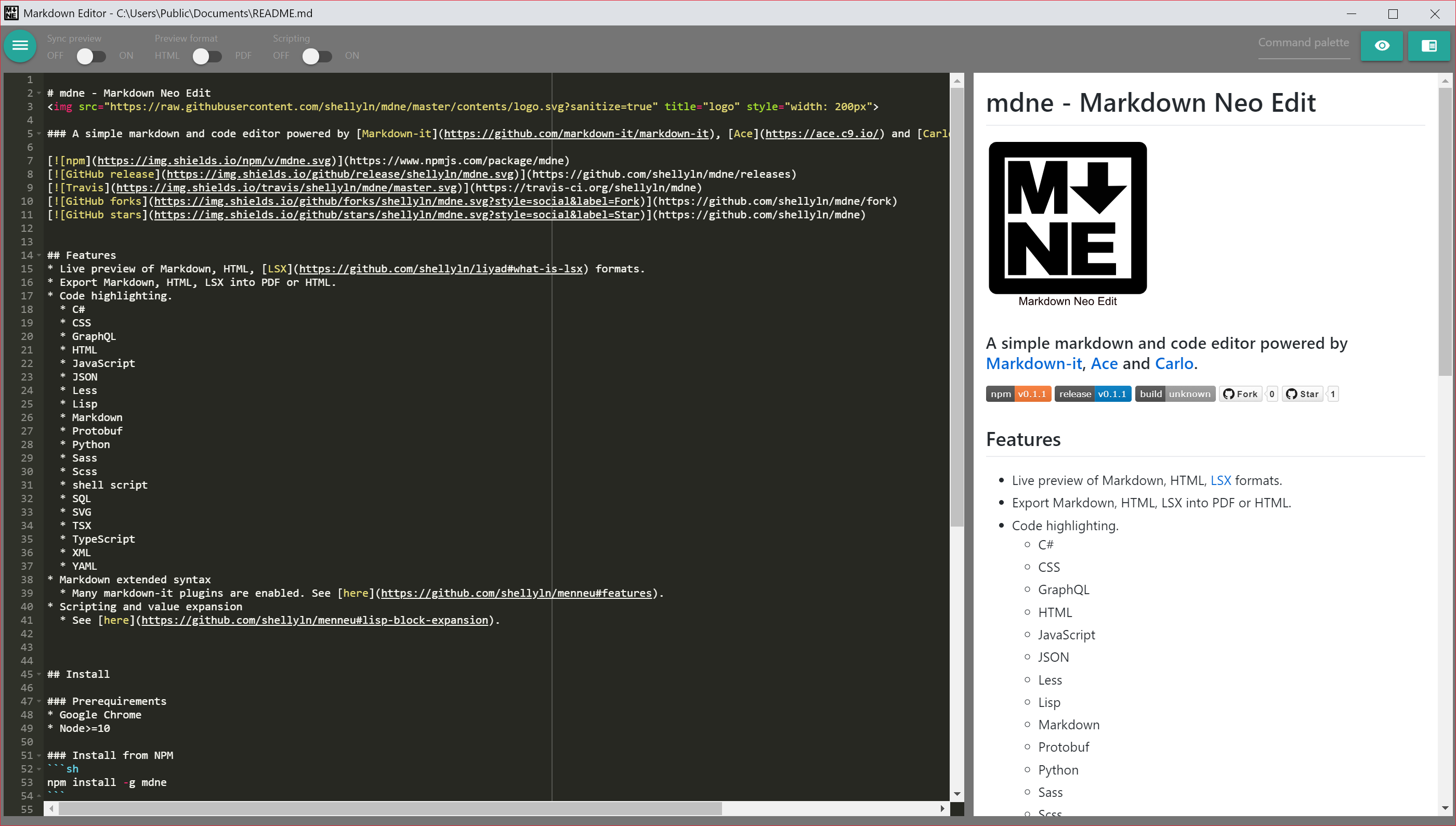
MDNE - Markdown Neo Edit. A simple markdown and code editor powered by Markdown-it, Ace and Carlo.
0/weekUpdated 3 years agoISCUnpacked: 13.7 MB
Published by shellyln
npm install mdne
mdne - Markdown Neo Edit

$3


> Migrate from
v0.1.x (for Windows)
> Please re-run
./make-shortcut.cmd.
Features
* Live preview of Markdown, HTML, LSX formats.
* Export Markdown, HTML, LSX into PDF or HTML.
* Code highlighting.
* C#
* CSS
* Dockerfile
* Go
* GraphQL
* HTML
* JavaScript
* JSON
* JSON5
* JSX
* Latex
* Less
* Lisp
* Makefile
* Markdown
* Protobuf
* Python
* R
* Ruby
* Rust
* Sass
* Scss
* Shell script
* SQL
* SVG
* Tex
* TSX
* TypeScript
* XML
* YAML
* Markdown extended syntax
* Many markdown-it plugins are enabled. See here.
* Scripting and value expansion
* See here.
* Full screen mode (F11)
Distributions and Integrations
* mdne
* Offline desktop app for Google Chrome browser + Node.js.
This repository*
* Carlo app
* mdne-electron
* Standalone offline desktop app for Windows/Mac/Linux.
* Electron app
* mdne-for-kintone
* Edit kintone record's field. (browser app)
* mdne online
* Live demo (PWA)
Install
$3
* Google Chrome (latest)
* Node>=10
$3
* Linux
``
sh

    env PUPPETEER_SKIP_CHROMIUM_DOWNLOAD=TRUE npm install -g mdne
`
* Windows
`cmd
set PUPPETEER_SKIP_CHROMIUM_DOWNLOAD=TRUE
npm install -g mdne
`
* Chrome OS (Chromebook / Chromebox) Crostini
`sh
env PUPPETEER_SKIP_CHROMIUM_DOWNLOAD=TRUE npm install -g mdne
cd
mkdir Desktop
`
$3

* Download source zip archive from here.

* Extract zip archive and run make-shortcut.cmd.
$3
* mdne.desktop
`ini
[Desktop Entry]
Version=1.0
Type=Application
Name=mdne
Comment=mdne
Exec=/home/(user name)/.nvm/versions/node/v??.??.??/bin/node /home/(user name)/.nvm/versions/node/v??.??.??/lib/node_modules/mdne/index.js %F
Icon=/home/(user name)/.nvm/versions/node/v??.??.??/lib/node_modules/mdne/contents/favicon.svg
Path=/home/(user name)/Desktop
Terminal=false
StartupNotify=false
Name[en_US]=mdne
`
> Replace (user name) and ??.??.?? .
Run
$3
* Linux, Windows
`sh
mdne
`
* Chrome OS (Chromebook / Chromebox) Crostini
`sh
env MDNE_CHROME_CHANNEL_CHROMIUM=true mdne
`
* MDNE_CHROME_CHANNEL_CHROMIUM=TRUE can alternatively be written to .bashrc.
* Chromium is downloaded locally the first time it run.
$3
* Linux, Windows
`sh
mdne README.md
`
* Chrome OS (Chromebook / Chromebox) Crostini
`sh
env MDNE_CHROME_CHANNEL_CHROMIUM=true mdne README.md
`
* MDNE_CHROME_CHANNEL_CHROMIUM=TRUE can alternatively be written to .bashrc.
* Chromium is downloaded locally the first time it run.
CLI
Please use Ménneu CLI.
Live demo
https://shellyln.github.io/mdne/
#### Open external files from live demo
* Drop a local file into FileDropOpenDialog.
* Set the target URL to a location hash.
* example: react-dom.development.js
* Fetching files is restricted by the Same-Origin Policy.
* Set zipped data to a location hash.
* example: hello.md
* location hash is generated when Save or SaveAs commands are done.
#### Live demo browser requirements
* Google Chrome: latest
* Firefox: latest
#### Live demo restrictions
* Rendering / exporting to PDF is not available.
* Save and SaveAs commands download the file being edited.
Deploying Live demo
1. Run npm run manifest after edit the contents/*.
* New contents/precache-manifest.yyyyy.js will generate.
1. Remove the old contents/precache-manifest.xxxxx.js.
1. Edit contents/service-worker.js to change the reference of contents/precache-manifest.yyyyy.js file name.
1. Deploy the contents/*`.
Security warning
Exposing of Node side functions by RPC is enabled in preview iframe.
DON'T OPEN links to untrusted sites from the preview.
Exposed functions have the ability to list / read / write local files.
License
ISC
Copyright (c) 2019 Shellyl_N and Authors.
----
Bundled softwares' license
* Ace: license (BSD-3-Clause)
* Materialize: license (MIT)
* Normalize.css: license (MIT)
* React: license (MIT)
* pako: license (MIT + ZLIB)
* dialog-polyfill: license (BSD-3-Clause)