messaging-api-messenger
v1.1.0TypeScript
Messaging API client for Messenger
0/weekUpdated 3 years agoMITUnpacked: 725.8 KB
Published by chentsulin
npm install messaging-api-messengermessaging-api-messenger
> Messaging API client for Messenger

Table of Contents
- Installation
- Usage
- API Reference
- Send API
- Content Types
- Templates
- Quick Replies
- Sender Actions
- Attachment Upload API
- Message Batching
- Custom Labels
- User Profile API
- Messenger Profile API
- Persistent Menu
- Get Started Button
- Greeting Text
- Whitelisted Domains
- Account Linking URL
- Handover Protocol API
- Page Messaging Insights API
- Built-in NLP API
- Event Logging API
- ID Matching API
- Persona API
- Others
- Debug Tips
- Testing
Installation
``sh`
npm i --save messaging-api-messenger
or
`sh`
yarn add messaging-api-messenger
Usage
$3
`js
const { MessengerClient } = require('messaging-api-messenger');
const client = new MessengerClient({
accessToken: ACCESS_TOKEN,
appId: APP_ID,
appSecret: APP_SECRET,
version: '6.0',
});
`
If the version option is not specified, 6.0 will be used by default.
$3
If appSecret is provided, MessengerClient will enable this feature automatically and include appsecret_proof in every Graph API requests. To skip it, set the skipAppSecretProof option to true:
`js`
const client = new MessengerClient({
accessToken: ACCESS_TOKEN,
appId: APP_ID,
appSecret: APP_SECRET,
skipAppSecretProof: true,
});
$3
messaging-api-messenger uses axios as HTTP client. We use axios-error package to wrap API error instances for better formatting error messages. Directly calling console.log with the error instance will return formatted message. If you'd like to get the axios request, response, or config, you can still get them via those keys on the error instance.
`js`
client.sendRawBody(body).catch((error) => {
console.log(error); // formatted error message
console.log(error.stack); // error stack trace
console.log(error.config); // axios request config
console.log(error.request); // HTTP request
console.log(error.response); // HTTP response
});
API Reference
All methods return a Promise.
$3
$3
- sendText
- sendAttachment
- sendAudio
- sendImage
- sendVideo
- sendFile
$3
- sendTemplate
- sendButtonTemplate
- sendGenericTemplate
- sendMediaTemplate
- sendReceiptTemplate
- sendAirlineBoardingPassTemplate
- sendAirlineCheckinTemplate
- sendAirlineItineraryTemplate
- sendAirlineUpdateTemplate
- sendOneTimeNotifReqTemplate
$3
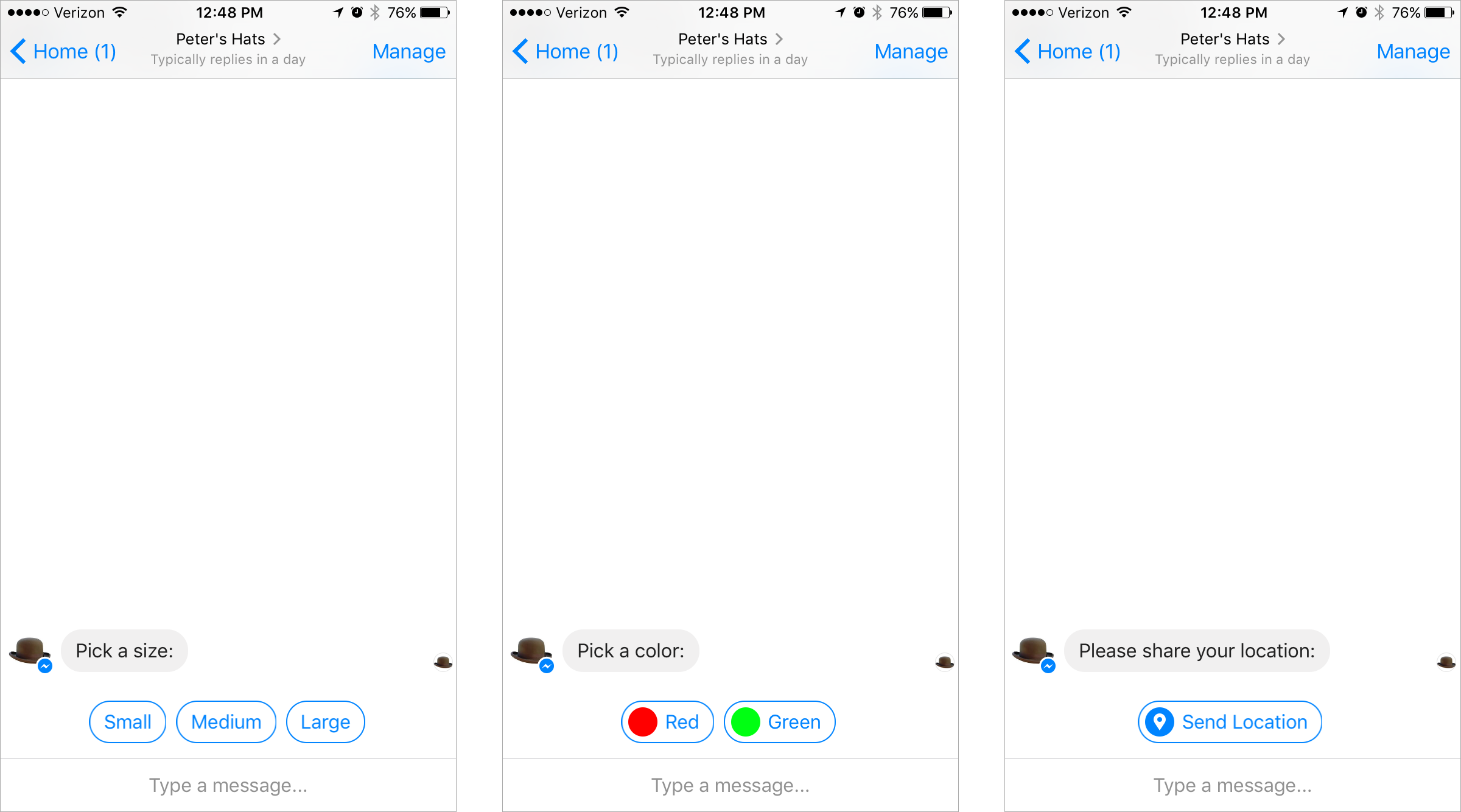
To send messages with quick replies to the specified user using the Send API, pass quickReplies option to send message methods, for example, with sendText:
`js`
await client.sendText(USER_ID, 'Pick a color:', {
quickReplies: [
{
contentType: 'text',
title: 'Red',
payload: 'DEVELOPER_DEFINED_PAYLOAD_FOR_PICKING_RED',
},
],
});
with the sendImage option:
`js`
await client.sendImage(USER_ID, 'https://example.com/vr.jpg', {
quickReplies: [
{
contentType: 'text',
title: 'Red',
payload: 'DEVELOPER_DEFINED_PAYLOAD_FOR_PICKING_RED',
},
],
});
It works with all of message sending methods.
$3
- sendSenderAction
- markSeen
- typingOn
- typingOff
$3
> Note: Only attachments that were uploaded with the isReusable property set to true can be sent to other message recipients.
- uploadAttachment
- uploadAudio
- uploadImage
- uploadVideo
- uploadFile
$3
There are a bunch of factory methods can be used to create batch requests:
- MessengerBatch.sendRequest
-
-
-
-
-
-
-
-
-
-
-
-
-
-
-
-
-
-
-
-
-
-
-
-
-
-
-
-
Those methods have exactly same argument signature with the methods on client.
$3
- createLabel
- associateLabel
- dissociateLabel
- getAssociatedLabels
- getLabelDetails
- getLabelList
- deleteLabel
$3
$3
- getMessengerProfile
- setMessengerProfile
- deleteMessengerProfile
$3

- getPersistentMenu
- setPersistentMenu
- deletePersistentMenu
$3

- getGetStarted
- setGetStarted
- deleteGetStarted
$3

- getGreeting
- setGreeting
- deleteGreeting
$3
- getWhitelistedDomains
- setWhitelistedDomains
- deleteWhitelistedDomains
$3
- getAccountLinkingURL
- setAccountLinkingURL
- deleteAccountLinkingURL
$3
- passThreadControl
- passThreadControlToPageInbox
- takeThreadControl
- requestThreadControl
- getThreadOwner
- getSecondaryReceivers
$3
Requirements for insights API:
- The page token must have read_insights permission.30
- Insights are only generated for a Facebook Page that has more than people that like it.
- getInsights
- getBlockedConversations
- getReportedConversations
- getTotalMessagingConnections
- getNewConversations
$3
- setNLPConfigs
- enableNLP
- disableNLP
$3
$3
- getIdsForApps
- getIdsForPages
$3
- createPersona
- getPersona
- getPersonas
- getAllPersonas
- deletePersona
$3
- debugToken
- createSubscription
- getSubscriptions
- getPageSubscription
- getPageInfo
- getMessagingFeatureReview
Debug Tips
$3
To enable default request debugger, use following DEBUG env variable:
`sh`
DEBUG=messaging-api:request
If you want to use a custom request logging function, just provide your own onRequest:
`js`
const client = new MessengerClient({
accessToken: ACCESS_TOKEN,
onRequest: ({ method, url, headers, body }) => {
/ /
},
});
Testing
$3
To avoid sending requests to real Messenger server, specify the origin option when constructing your client:
`js
const { MessengerClient } = require('messaging-api-messenger');
const client = new MessengerClient({
accessToken: ACCESS_TOKEN,
origin: 'https://mydummytestserver.com',
});
``
> Warning: Don't do this on your production server.
[send-api-reference#recipient]: https://developers.facebook.com/docs/messenger-platform/send-api-reference#recipient