modeldoc
v0.1.14
Auto generates mkdocs from python model files.
0/weekUpdated 3 years agoISCUnpacked: 58.8 KB
Published by Joe Ennis
npm install modeldocModeldoc
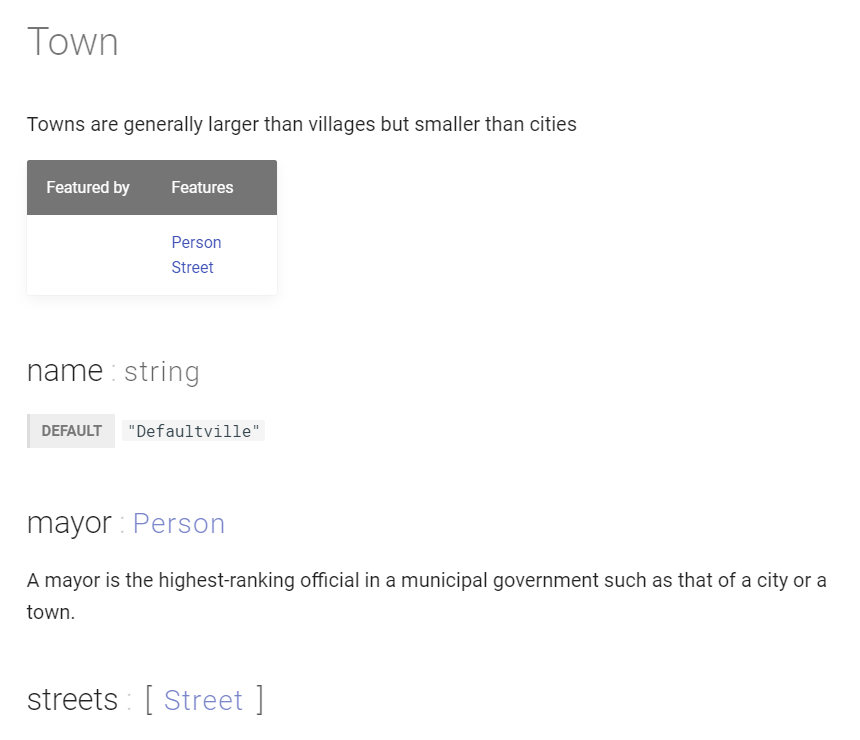
Modeldoc is a tool for creating mkdoc files from Python models. Specifically, it parses classes (generally dataclass or Pydantic) from Python files, outputting .md files designed for Material for MkDocs.
``
python

from typing import List


class Town():

    name: str = "Defaultville"

    mayor: Person

    streets: List[Street]


'''

Town

Towns are generally larger than villages but smaller than cities

'''


'''

mayor

A mayor is the highest-ranking official in a municipal

government such as that of a city or a town.

'''
`
becomes
Usage
From within the project folder:
`
npx modeldoc
`
This expects models to be in /models and outputs .md files to /docs or can be configured
Features
- Links between models
- Enables model and field meta-data:
- key-value pairs
- tags
- Accepts markdown descriptions in comments
- Constructs dependency tree page
Limitations
Modeldoc is not that smart. It does not actually interpret the python, so:
- it won't understand type/model aliases
- inheritance will be ignored
Also, it only has a JSON-like support of primitive types:
- string
- boolean
- integer
- float
- null (None)
- array (List)
- object (Dict)
Comment format
Comments are used to provide additional information about a field or model:
`
'''


[, ]

 ->

 ->


'''
`
E.g.
`
'''

user_id

[primary key, immutable]

database table -> User

max length -> 12

Generated during
create_user()
'''
`
The tag or key-value lines are optional but need to come before the description body. Everything after the "header" (name, tags, key-values) will be considered the description. Each field or value needs to be placed in it's own separate comment.


Configuration

Modeldoc can be configured by creating a
modeldoc.yml file in the project directory. The default values are:
`
inputDirectory: models/

docDirectory: docs/

docModelDirectory: models/

navFolder: Models

mkdocsFile: mkdocs

includeDependencies: true

dependenciesTitle: Model dependencies

outputFile: null
``
- inputDirectory: where modeldoc expects to find the .py model files, relative to project
- docDirectory: mkdocs source directory relative to project
- docModelDirectory: output model directory relative to doc directory
- navFolder: directory within mkdocs navigation for models
- mkdocsFile: filename of mkdocs yaml file
- includeDependencies: whether or not to create a dependency graph page
- dependenciesTitle: title of dependencies graph page
- outputFile: generate a JSON file with data extracted from the .py model files