nativescript-pedometer
v2.1.0TypeScript
NativeScript pedometer plugin. Step counting FTW!
0/weekUpdated 3 years agoMITUnpacked: 22.2 KB
Published by Your Name
npm install nativescript-pedometerNativeScript Pedometer plugin

Supported platforms
* iOS 8 (the newer the OS the more features are available)
* Android, any device with a step counter sensor
Installation
From the command prompt go to your app's root folder and execute:
``
tns plugin add nativescript-pedometer
Demo app
Want to dive in quickly? Check out the demo app! Otherwise, continue reading.
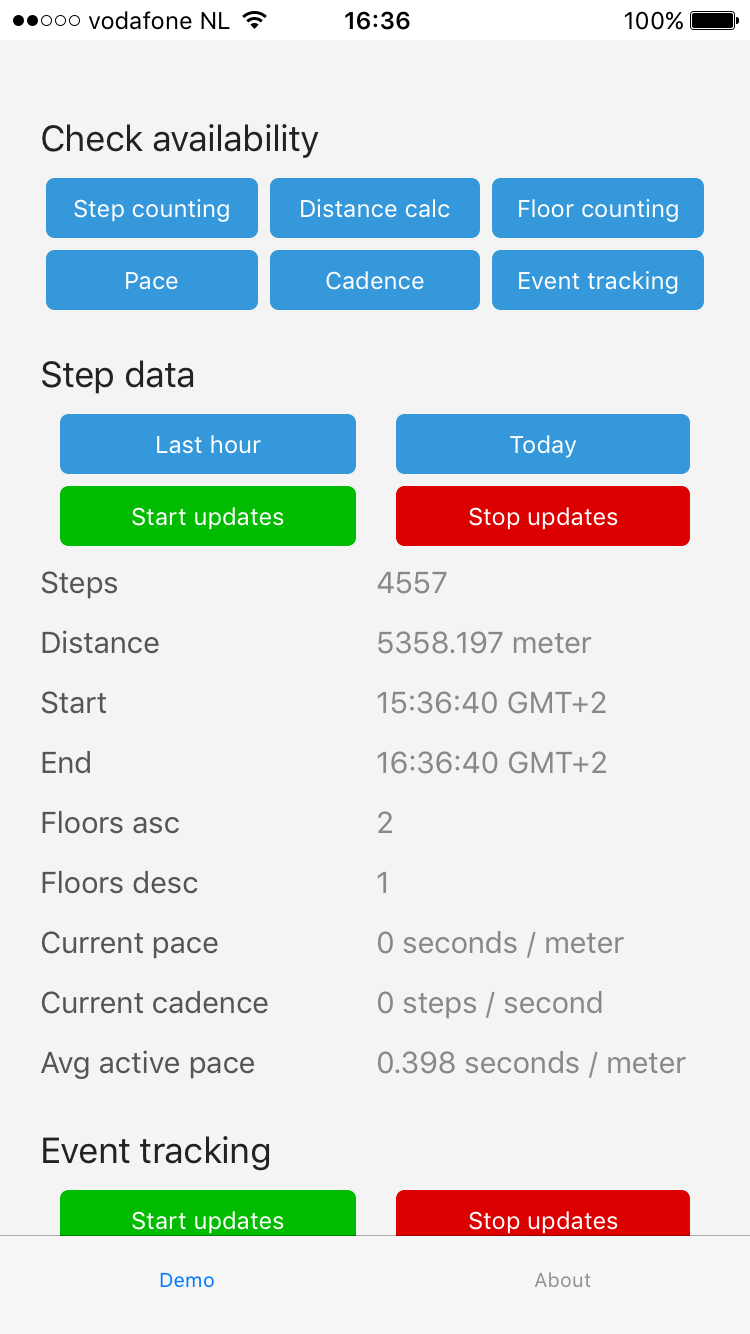
You can run the demo app from the root of the project by typing npm run demo.ios.device and you'll see this:
API
$3
The key feature of this plugin is counting steps. And it's also the only feature that Android supports.
##### TypeScript
`js
// require the plugin
import { Pedometer } from "nativescript-pedometer";
// instantiate the plugin
let pedometer = new Pedometer();
pedometer.isStepCountingAvailable().then(avail => {
alert(avail ? "Yes" : "No");
});
`
##### JavaScript
`js
// require the plugin
var Pedometer = require("nativescript-pedometer").Pedometer;
// instantiate the plugin
var pedometer = new Pedometer();
pedometer.isStepCountingAvailable(function(avail) {
alert(avail ? "Yes" : "No");
});
`
> Providing only TypeScript examples from here on out, but usage it largely similar. Also, I'm leaving out the Promises where they don't add clarity to the code sample.
$3
To start receiving step count updates from this moment forward you can invoke startUpdates
.
If you want historic data on iOS, pass in a custom fromDate.`js
pedometer.startUpdates({
fromDate: new Date(), // iOS only. Optional, default: now
onUpdate: result => {
// see the table below
console.log(Pedometer update: ${JSON.stringify(result)});
}
}).then(() => {
console.log("Pedometer updates started.");
}, err => {
console.log("Error: " + err);
});
`The
callback receives an object containing these properties:| Property | iOS? | Android? | Description |
--- | --- | --- | ---
| startDate | :white_check_mark: | :white_check_mark: | This is when recording of the currently returned data was started. |
| endDate | :white_check_mark: | :white_check_mark: | This is when recording of the currently returned data was ended (usually: now). |
| steps | :white_check_mark: | :white_check_mark: | Step count between startDate and endDate |
| distance | :white_check_mark: | :white_medium_square: | The distance covered in meters between startDate and endDate. |
| floorsAscended | :white_check_mark: | :white_medium_square: | The number of floors ascended between startDate and endDate. |
| floorsDescended | :white_check_mark: | :white_medium_square: | The number of floors descended between startDate and endDate. |
| currentPace | :white_check_mark: iOS9+ | :white_medium_square: | The current pace in seconds per meter. |
| currentCadence | :white_check_mark: iOS9+ | :white_medium_square: | The current cadence in steps per second. |
| averageActivePace | :white_check_mark: iOS10+ | :white_medium_square: | The average pace while active in seconds per meter between startDate and endDate. |
If you want to check beforehand if things like
currentPace are available,
there's a few functions similar to isStepCountingAvailable that you can invoke:*
isDistanceAvailable
*
*
* $3
You can wire up a Promise but there's no real need.js
pedometer.stopUpdates();
`$3
Instead of listening to "live" updates you can query historic data:js
pedometer.query({
fromDate: new Date(new Date().getTime() - (1000 60 60)),
toDate: new Date() // default
}).then(result => {
// see the table at 'startUpdates' above
console.log(Pedometer update: ${JSON.stringify(result)});
});
`$3
From iOS 10 onwards it's possible to get notified whenever the device detects a switch
between a 'paused' and 'resumed' state (so starting/stopping walking).To check beforehand whether or not this feature is availbe,
call
(which has a similar API to isStepCountingAvailable).`js
pedometer.startEventUpdates({
onUpdate: result => {
// see the table below
console.log("Pedometer event update: " + JSON.stringify(result));
}
}).then(() => {
console.log("Pedometer event updates started.");
);
`The
| Property | Description |
--- | ---
| date | The moment the event occured. |
| type | Either "pause" or "resume". |
Changelog
* 2.0.0 Android support added.
* 1.0.0 Initial release, iOS only, but full featured.