nestjs-telegram-helpdesk
v1.4.12TypeScript
Telegram Helpdesk Bot
15/weekUpdated 2 years agoMITUnpacked: 388.1 KB
Published by kovalenko
npm install nestjs-telegram-helpdeskDescription
It is an application designed to make a helpdesk via telegram.
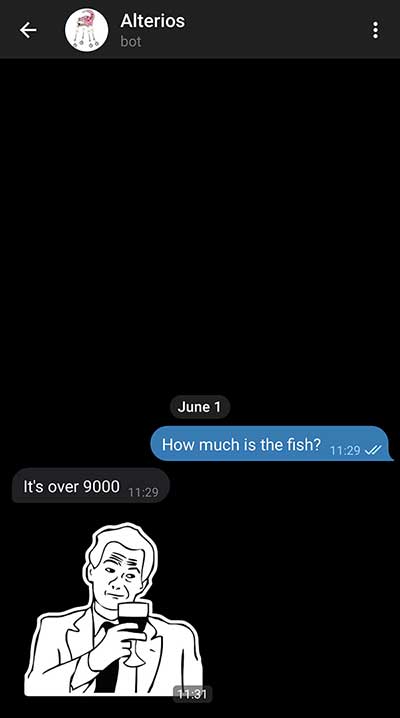
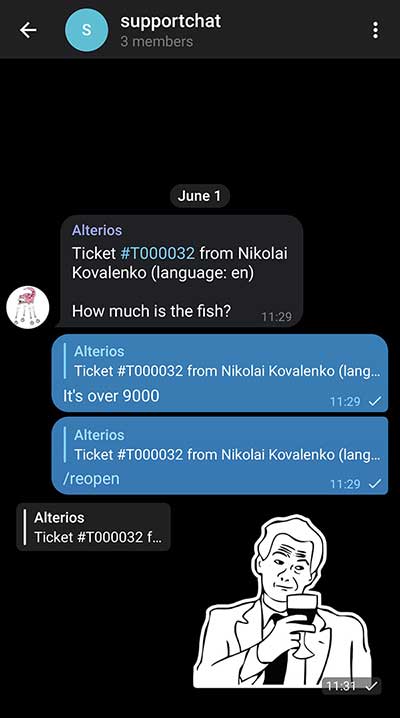
When a user writes to the support bot, it forwards the message to the support group, then one member of the support team replies the message, and it is being forwarded to the user.
 |  |
|---|
Features
When a user sends a message to the support chat it will create a ticket which will be forwarded to the staff group. Any admin in the staff group may answer that ticket by just replying to it. Salutation is added automatically. Photos or stickers will be forwarded too.
Currently, the support chat offers these commands (staff commands):
* /id - returns your telegram id and the group chat id (1234567 -1234567890)
* /close - close a ticket manually (in case someone writes 'thank you')
* /reopen - reopen a ticket manually
* /clear - close all tickets in category or close all tickets in all categories when typed in staff chat
User commands:
* /start - prints all public support categories
* /cat - print current support categories
Features:
* File forwarding from and to user
* Database for handling open and closed tickets
* Simple anti spam system
* Send tickets to different staff groups
* Anonymize users
Installation
Create a folder for the application, cd into it. Then download and unpack the package here:
``bash`
$ npm v nestjs-telegram-helpdesk dist.tarball | xargs curl | tar -xz --strip-components=1
Telegram token
To use the Telegram Bot API,
you first have to get a bot account
by chatting with BotFather.
BotFather will give you a token, something like 123456789:AbCdfGhIJKlmNoQQRsTUVwxyZ.
Configuration
Rename example settings file:
`bash`
$ mv settings.example.yml settings.yml
$3
#### db
Database settings
- host
-
-
-
#### redis
Redis for exchange with external process via Bull
_optional. Used for support categories update in runtime_
_required if tickets is defined_
- host
-
#### tickets
_optional. Used for deletion of closed tickets_
- # How many days to keep closed tickets. 0 for infiniteremoveTicketsCron
- # When to launch clean up
#### bull
Bull queues for external process exchange;
_optional, required if "redis" is defined_
- appQueue: "app-queue-name" # sends a message when application startscategoriesQueue: "cat-queue-name"
- # listens to messages with support categories from external process
#### botToken
Support bot token
#### staffChatId
Admin's group. Accumulate messages from all categories
#### ownerId
Admin's telegram id
#### spamTime
time (in MS) in which user may send {spamCantMsg} messages
#### spamCantMsg
Maximum messages in {spamTime} MS
#### autoCloseTickets
Close tickets after answering
#### anonymousTickets
Include userid in tickets or not
#### categories
_optional_
Array of built-in support categories
- id: '100500' # category id
- name: 'Superchat' # category name
- groupId: '-100500' # telegram group id
- isPublic: true # public flag
Support categories
Adding support categories allows you to have invitation links:
https://t.me/{helpdesk_bot_name}?start={id}
- helpdesk_bot_name is your bot's usernameid
- is category id from config. Unique string, e.g. UUID
Running the app
$3
`
bash
$ docker-compose up -d
`$3
#### Once
bash
$ npm i -g pm2
$ mv ecosystem.config.example.js ecosystem.config.js
`#### Every time you update the app
bash
$ npm i --only=prod
$ npm run migration:prod
$ pm2 start ecosystem.config.js
``