next-route-visualizer
v1.1.3TypeScript
Visualize your Next.js app directory routes
0/weekUpdated 2 years agoISCUnpacked: 143.0 KB
Published by Alex Vencel
npm install next-route-visualizer---
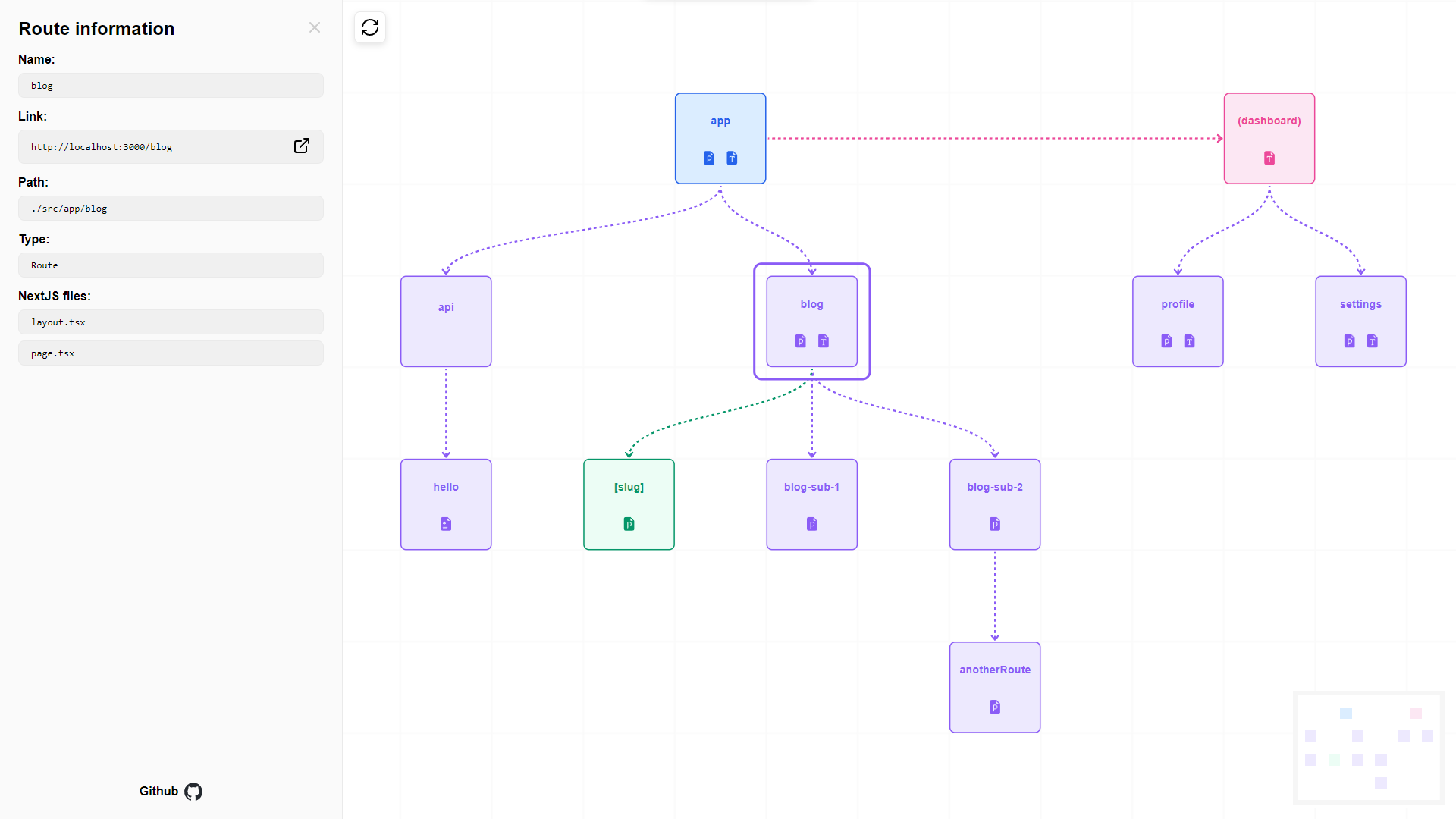
Next Route Visualizer is designed to display the routes for the app directory of Next.js (starting at version 13) in a visual tree-like fashion.
This package aims to help developers better understand the routes in their Next.js app directory by providing a clear visual representation of the routes and their relationships.
This package can be useful if you are new to the app directory and need to visualize it.
---
Usage
$3
You can install
next-route-visualizer using npm:
``
npm install next-route-visualizer
`
$3


Once you've installed the package, you can import the
Visualizer component into any page of your Next.js version 13 app directory.
For ease of use just import it in the root page for instance:
`jsx
import Visualizer from 'next-route-visualizer';
export default function Home() {
return (
)
}
`
That's it! The Visualizer component will render a tree chart that displays the routes of your Next.js app directory.
$3
| Prop name | Type | Description
| ----------------- | -------------------- | ------------
| path | String or undefined | Path to the starting route (relative to the app directory).
If not provided, the component will search for the app directory within the root folder or .src/ folder.
| baseURL | String or undefined | Base URL of your project.
Default: http://localhost:3000
| displayColocating | Boolean or undefined | Display colocating folders
Default: false
---
Example
The below example shows how to use the path, baseURL and displayColocating parameters.
`jsx
import Visualizer from 'next-route-visualizer';
export default function Home() {
return (
)
}
`
Only the sub-routes of blog (blog included) will be displayed on the chart. This assumes that blog is a direct sub-route of the app root (i.e ./app/blog in your file system).
Since displayColocating was also provided, all the colocating folders will also be included on the chart.
---
Features
Under the hood, next-route-visualizer utilizes ReactFlow to build the chart.
- Starting route: You can start displaying at any route of your project.
- Side dashboard: Display information about a route
- Name
- Link
- Path
- Type
- Next.js files
- Other files (non Next files)
- Display if RSC or Client according to the file having the 'use client'` statement.
This may not be 100% exact...
- Route selection: Select a Route from the chart to see its information
- Node type colors: The nodes in the chart have different colors based on the type of route:
- Root: Entry point
- Route: A normal route
- Route group: folder that are marked in parenthesis e.g. (routeGroup)
- Route segment: all the various slug options e.g
- [slug]
- [...slug]
- [[...slug]]
- Preview the Next.js files included in the route with the following icons (files extensions: [.js, .jsx, .ts, .tsx])
- for page
- for error or not-found
- for layout or template
- for route
- for loading
- Display the colocating files and folders
- Display if the page is SERVER or CLIENT on the chart node
Colors of the nodes are as followed:
| Type | Color |
| ------------- | --------- |
| Root | Blue |
| Route | Purple |
| Group | Red |
| Segment | Green |
| Colocating | Orange |
---
Limitations
In order for the component to work properly, the routes need to be retrievef server side, and rendered on the client using ReactFlow.
For that reason, you must refresh the page to see any changes that you applied to your routes, for them to take effect on the chart.
---
Future work
This is only a side project. The code is definitely a mess and I was too lazy to provide testing for it. I may be open to make a few changes on my free time if I feel like it.
On that note, please feel free to use and make any changes that you wish to include.
---
Dependencies
- Next >= 13.2.3
- ReactFlow >= 11.5.6
Note: I didn't use tailwind or any other packages for the styles.
License
Next Router Visualizer is ISC licensed.
