ngx-audio-control
v2.0.0TypeScript
Audio Player control for angular projects with speed control by native player in browser (HTML5)
0/weekUpdated 4 months agoMITUnpacked: 84.0 KB
Published by Mohammadreza Samani
A library for loading and playing audio using HTML 5 for Angular
###### Demo
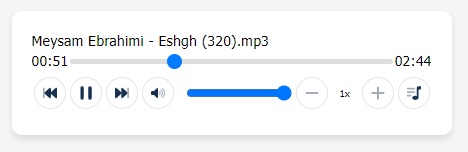
Live Demo
📥 Installation
ngx-audio-control is available via npm and yarn
$3
$ npm install ngx-audio-control --save
$3
$ yarn add ngx-audio-control
🌟 Getting Started
Import NgxAudioPlayerModule in in the root module(AppModule):
``
// Import library module

import { NgxAudioPlayerModule } from 'ngx-audio-player';


@NgModule({

  imports: [

    // ...

    NgxAudioPlayerModule

  ]

})

export class AppModule { }
`
#### Usage

HTML
`
[download]="true"
>
`
Ts
`
@Component({

  selector: 'app-player',

  templateUrl: './player.component.html',

  styleUrls: ['./player.component.scss']

})

export class PlayerComponent {

  files = [

    'assets/files/a.mp3',

    'assets/files/b.mp3',

    'assets/files/c.mp3',

  ];

}
`
Properties

#### @Input

|      Name      |                                                                Description                                                                |             Type             | Default Value |

| -------------- | ----------------------------------------------------------------------------------------------------------------------------------------- | ---------------------------- | ------------- |

| [showList]     | Show play list button                                                                                                                     | boolean                      | true          |

| [download]     | Show download button                                                                                                                      | boolean                      | false         |

| [showFileName] | Display filename in header                                                                                                                | boolean                      | true          |

| [showSpeed]    | Show speed control                                                                                                                        | boolean                      | true          |

| [showVolume]   | Show volume control                                                                                                                       | boolean                      | true          |

| [linear]       | Display vertically or horizontally between control buttons and range seeker                                                               | boolean                      | false         |

| [preload]      | This enumerated attribute is intended to provide a hint to the browser about what the author thinks will lead to the best user experience | 'none',  'metadata' , 'auto' | 'metadata'    |


____


> ## 🔰 for seek audio file in chrome:


IIS web.config
`
`
Appache .htaccess
`
Header set Accept-Ranges bytes
`
NginX nginx.conf
`
http {

    server {

        location / {

            add_header Accept-Ranges bytes;

        }

    }

}
``
Author
💻Mohammadreza samani | FrontEnd Developer
Donate
If you like my work you can buy me a 🍺 or 🍕
❤️Donate😉
