node-red-contrib-consecutive-queue-gate
v1.1.1
A gate node (with queueing) for node-RED
0/weekUpdated 1 years agoApache-2.0Unpacked: 6.5 MB
Published by Michael.I. Bell
npm install node-red-contrib-consecutive-queue-gatenode-red-contrib-queue-gate
A Node-RED node for controlling message flow, with queueing capability
Install
Use the Node-RED
Manage Palette command or run the following in your Node-RED user directory (typically ~/.node-red):
npm install node-red-contrib-queue-gate
Usage
The
q-gate node is similar to the gate node published as node-red-contrib-simple-gate but with the added capability of queueing messages and releasing them on demand.
The node will transmit the input message to its output when in the
open state and block it when closed. In the queueing state, the input message is added to the end of the message queue, provided space is available. Messages in the queue can be released in the order received, either singly or the entire queue at once. Alternatively, the oldest message in the queue can be sent without releasing it, or the oldest message can be removed from the queue without sending it on.
The user can limit the size of the queue to prevent memory problems. Messages arriving when the queue is full are discarded by default, so that the queue contains the oldest messages. Since version 1.1.0, however, the user can select the
Keep newest messages checkbox to have new messages added to the queue (at the tail), while discarding the oldest message (from the head), so that the queue contains the most recent messages. This feature makes it possible to retain only the latest message and deliver it on request, as shown in the _Save Most Recent_ example below.
Messages with the user-defined topic
Control Topic (set when the node is deployed) are not passed through but are used to control the state of the gate or the queue.
Control messages can have values representing commands that change the state of the gate:
open, close, toggle, queue, or default. Messages that control or monitor the queue are trigger, flush, peek, drop, and reset. The status command forces the node status to be refreshed. The (case-insensitive) strings representing these commands are set by the user when the node is deployed. Since version 1.4.0, if a control message is received with a payload that is a number or boolean, the payload is converted to a string and then tested against the command definitions. If a control message is received but not recognized, there is no output or change of state, and the node issues a warning.
The
peek command sends the oldest message but does not remove it from the queue; the drop command removes the oldest message from the queue without sending it. The two may be used together to get the oldest message, perform some action, and then remove it from the queue only when it has been successfully serviced. This is illustrated in the _Retain Until Processed_ example below. The status command can be used in conjunction with a Status node to obtain the current state of the gate or the number of messages in the queue. This is shown in the _Basic Operation_ flow. (Thanks to Colin Law for suggesting and implementing these commands.)
When first deployed or after a
default command, the gate is in the user-selected state defined by Default State. (See below regarding persistence.) When a valid control message is received, the gate performs one of the following actions, depending on its state:
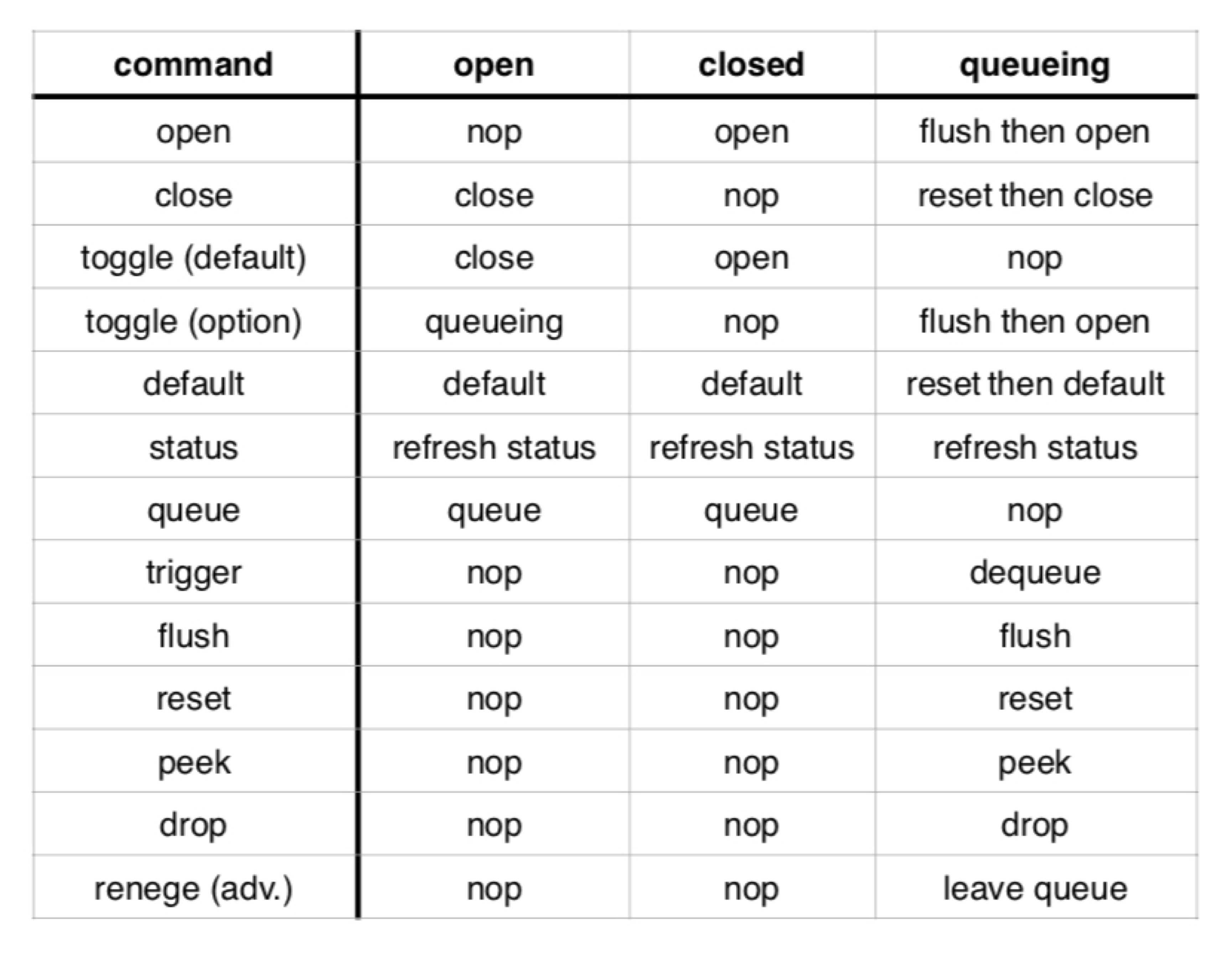
The actions available in the
queueing state are defined by:

The specified behaviors of the
queueing state (flush before opening, reset before closing, and reset before default) can be reversed by sending a sequence of commands, i.e., [reset, open], [flush, close] or [flush, default].
The effect of the
toggle command depends on the option selected using the Toggle between open and queueing checkbox. In the default (unchecked) case, the node toggles between the open and closed states. When the option is selected, the node toggles between the open and queueing states, with the queue being flushed each time the open state is entered. (Thanks to Simon Walters for suggesting and helping to implement this feature.)
Users should be aware that in each of the three states the node will not respond to one or more types of control message (indicated by
nop in table). This should be taken into account when selecting the Default State and designing flows.
Node status
The state of the gate is indicated by a status object:
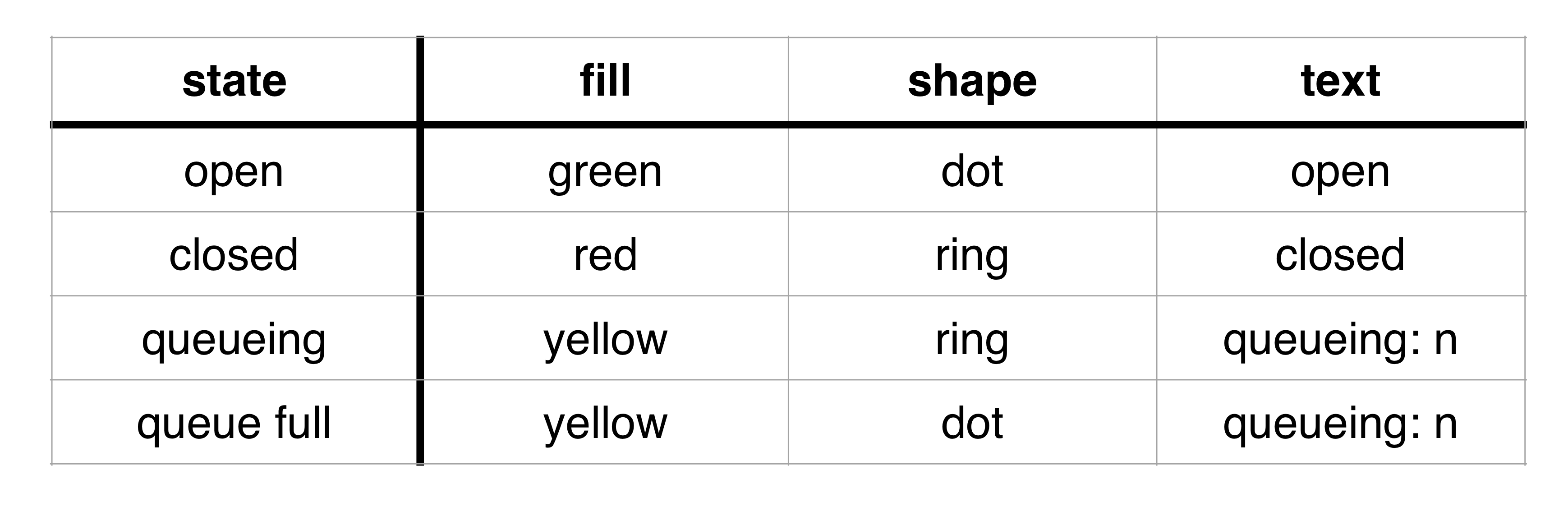
where n = the number of messages in the queue.
State persistence
By default, the node enters the
Default State on startup, either when first deployed in the editor, re-deployed as part of a modified flow or entire workspace, or when Node-RED is restarted by the user or by a system service. If the Default State is queueing, the message queue will be empty. The state of the node is maintained in the node context, and if a persistent (non-volatile) form of context storage is available, the user has the option of restoring the state from that storage. This is done by activating the
Restore from state saved in option (checkbox) in the edit dialog and choosing a non-volatile storage module from the adjacent dropdown list. (The list shows all the storage modules enabled in the Node-RED settings.js file.) If the saved state is queueing, the message queue will be also be restored. If for any reason the node is unable to retrieve valid state information, it will enter the Default State. (Note: versions prior to 1.5.0 were able to use only the default context store, so that state persistence was possible only when that store was non-volatile.)
Version History
Over time, various features have been added to this node. Early on, the documentation identified which version introduced a given capability. Eventually, the changes became so numerous that such information is of little value. In general, users are urged to use the most recent available version of the node and to report any issues encountered in upgrading. If needed, the revision history can be found in the CHANGELOG document.
Examples
These flows can be loaded into the editor from the Examples section of the Import sub-menu or downloaded from GitHub.
$3
This flow demonstrates the basic operation of the
q-gate node and the commands that can be used to change or display its state or manage the queue.

$3
This flow, as noted above, saves the most recent message in the queue and releases it when a
trigger, flush, or open command is received. (Note that if the open command is used, the gate will remain open until a queue or default command is received to restore the original mode of operation.) If the node receives a trigger command but has no messages queued, it will output a trigger command. This allows you to have two seperate queues work together. The q-gate is configured with Default State = queueing, Maximum Queue Length = 1, and Keep Newest Messages = true.

$3
This flow uses the
peek and drop commands in order to (1) release the oldest message without deleting it from the queue, (2) process the message (here simply waiting 5 seconds for demonstration purposes), and then (3) remove it from the head of the queue and release the next message. Processing stops once the queue is empty.

Author
Mike Bell (drmike)
Contributors
Simon Walters (cymplecy)
Colin Law (colinl)