alt="nb"
width="200">
nb is a command line and local web
- plain text data storage,encryption ,filtering , pinning , #tagging , and search ,Git -backed versioning and syncing ,Pandoc -backed conversion ,[[wiki-style linking]] ,browsing ,images ,todos with tasks ,notebooks ,folders ,color themes ,plugins ,
and more, in a single portable script.
nb creates notes in text-based formats likeMarkdown ,Org ,LaTeX ,AsciiDoc ,nb, you can write notes usingnb works in any standard Linux / Unix environment,Optional dependencies can be installed to enhance functionality,nb works great without them.
alt="home"
width="450">
nb is also a powerful bookmarking system featuring:
- locally-served, text-centric, distraction-free bookmark browsing Internet Archive Wayback Machine snapshot lookupnb features.
Page information is
alt="nb browse"
width="500">
nb uses Git in the background tonb can also be configured to
alt="nb list empty"
width="450">
nb is designed to be portable, future-focused, and vendor independent,well-tested shell scriptcurled almost anywhere and just work,progressive enhancement nb works great whether you have one notebook with just a few notesnb makes it easy to incorporate other tools, writing apps, and workflows.nb can be used a little, a lot, once in a while, or for just a subset of features.nb is flexible.
nb
$3 #### Dependencies
##### Required
- Bash )nb works perfectly with Zsh, fish, and any other shellGit Vim ),Emacs ,Visual Studio Code ,Sublime Text ,Helix ,micro ,nano ,Atom ,TextMate ,MacDown ,some of these ,and many of these.
##### Optional
nb leverages standard command line toolsnb also checks the environment for some additional optional tools and
Recommended:
- batncatsocatpandocrgtigw3m
Also supported for various enhancements:
Ack ,afplayasciidoctorThe Silver Searcher (ag) ,catimgChafa ,Chromium / Chrome ,ezaffplayImageMagick ,glowGnuPG ,highlightimgcatjoshutokitty's icat kitten ,lowdownlsdLinks ),Lynx ),mdcatmdlessmdvMidnight Commander (mc) ,mpg123MPlayer ,ncatnetcatnote-link-janitor plugin ),pdftotextPygments ,Ranger ,readability-cli ,rga / ripgrep-allsc-imsocattermvisagetermpdf.pyTidy-Viewer (tv) ,timgvifm ,viuVisiData
#### macOS / Homebrew
``bash`
Installing nb with Homebrew also installs
Install the latest development version from the repository with:
`bash`
nb is also available inhomebrew-core .bash formula is recommended:
`bash`
#### Ubuntu, Windows, and others
##### npm
`bash`
After npm installation completes, runsudo "$(which nb)" completions install
On Ubuntu and WSL, you cansudo "$(which nb)" env install
When nb is installed on Windows,socat (MSYS ,Cygwin ) is recommended.
*nb is also available under its original package name,notes.sh ,notes executable wrapping nb.*
##### Download and Install
To install as an administrator,
`bashinstall using wget
install using curl sudo curl -L https://raw.github.com/xwmx/nb/master/nb -o /usr/local/bin/nb &&
sudo chmod +x /usr/local/bin/nb &&
sudo nb completions install --download
`
On Ubuntu and WSL, you can
sudo nb env install
to install the optional dependencies.###### User-only Installation
To install with just user permissions, simply
nb
script to your $PATH
.~/bin
directory, for example, you can
`
bashdownload with wget
download with curl `
Installing with just user permissions doesn't include
nb
core functionality works without them.sudo
access and want
`
bash`
##### Make
To install with Make ),
`
bash`
This will also install the completion scripts on all systems and
##### bpkg
To install with bpkg :
`
bash`
##### basher
To install with basher :
`
bash`
#### Tab Completion
Bash, Fish, and Zsh tab completion should be enabled
nb
is installed using the methods above,sudo
.nb
, see thecompletion installation instructions .#### Updating
When
nb
is installed using a package manager like npm or Homebrew,nb
tonb
can be updated to the latest version usingnb update
subcommand.
Overview
To get started, simply run:
`
bash`
nb
sets up your initial home
notebook the first time it runs.By default, notebooks and notes are global (at
~/.nb
),nb
nb
also supports local notebooks .
$3 #### Adding
↑ ·nb addnb browse add
Use
nb add
(shortcuts: nb a
, nb +
)
`
bashcreate a new note in your text editor
create a new note with the filename "example.md"
create a new note containing "This is a note."
create a new note with piped content
create a new password-protected, encrypted note titled "Secret Document"
create a new note in the notebook named "example"
create a new note in the folder named "sample" `
nb add
with no arguments or input will open the new, blank note$EDITOR
environment variablenb set editor
.
nb
files are Markdown nb set default_extension
.
nb add
has intelligent argument parsing
`
bash`
When a string is specified, a new note is immediately created
`
bash`
nb add
is useful for quickly jotting down notes directlyWhen no filename is specified,
nb add uses the current datetime as
nb add can also receive piped content, which behaves the same asnb add :
`bashcreate a new note containing "Note content."
create a new note containing the clipboard contents on macOS
create a new note containing the clipboard contents using xclip `Content can be passed with the
option,
`bash`When content is piped,
,--edit flag to open the file in the editorThe title, filename, and content can also be specified with long and
`bash`The
<code class="bg-muted px-1 py-0.5 rounded text-sm font-mono"></a> / <a href="#add" class="text-primary hover:underline" target="_blank" rel="noopener noreferrer"></code>--title <title><code class="bg-muted px-1 py-0.5 rounded text-sm font-mono"></a> option also<br />sets the filename to the title,<br />lowercased with spaces and non-filename characters replaced with underscores:</p><p class="my-3"></code>`<code class="bg-muted px-1 py-0.5 rounded text-sm font-mono">bash<br />❯ nb add --title "Example Title" "Example content."<br />Added: [10] example_title.md "Example Title"<br /></code>`<code class="bg-muted px-1 py-0.5 rounded text-sm font-mono"></p><p class="my-3">Tags can be added with the <a href="#add" class="text-primary hover:underline" target="_blank" rel="noopener noreferrer"></code>--tags <tag1>,<tag2>...<code class="bg-muted px-1 py-0.5 rounded text-sm font-mono"></a> option, which<br />takes a comma separated list of tags,<br />converts them to <a href="#-tagging" class="text-primary hover:underline" target="_blank" rel="noopener noreferrer">#hashtags</a>,<br />and inserts them between the title and content:</p><p class="my-3"></code>`<code class="bg-muted px-1 py-0.5 rounded text-sm font-mono">bash<br />❯ nb add "Example content." --title "Tagged Example" --tags tag1,tag2<br />Added: [11] tagged_example.md "Tagged Example"</p><p class="my-3">❯ nb show 11 --print<br /><h1 class="text-2xl font-bold mt-6 mb-4">Tagged Example</h1></p><p class="my-3">#tag1 #tag2</p><p class="my-3">Example content.<br /></code>`<code class="bg-muted px-1 py-0.5 rounded text-sm font-mono"></p><p class="my-3"><a href="#-search" class="text-primary hover:underline" target="_blank" rel="noopener noreferrer">Search</a> for tagged items with<br /><a href="#search" class="text-primary hover:underline" target="_blank" rel="noopener noreferrer"></code>nb search<code class="bg-muted px-1 py-0.5 rounded text-sm font-mono"></a> / <a href="#search" class="text-primary hover:underline" target="_blank" rel="noopener noreferrer"></code>nb q<code class="bg-muted px-1 py-0.5 rounded text-sm font-mono"></a>:</p><p class="my-3"></code>`<code class="bg-muted px-1 py-0.5 rounded text-sm font-mono">bash<br /><h1 class="text-2xl font-bold mt-6 mb-4">search for items tagged with "#tag1"</h1><br />nb search --tag tag1</p><p class="my-3"><h1 class="text-2xl font-bold mt-6 mb-4">search for items tagged with "#tag1" AND "#tag2", short options</h1><br />nb q -t tag1 -t tag2</p><p class="my-3"><h1 class="text-2xl font-bold mt-6 mb-4">search for items tagged with "#tag1" OR "#tag2", arguments</h1><br />nb q \#tag1 --or \#tag2<br /></code>`<code class="bg-muted px-1 py-0.5 rounded text-sm font-mono"></p><p class="my-3">Files can be created with any file type by specifying the extension either<br />in the filename (</code>example.md<code class="bg-muted px-1 py-0.5 rounded text-sm font-mono">),<br />the extension by itself (</code>.md<code class="bg-muted px-1 py-0.5 rounded text-sm font-mono">),<br />or via the <a href="#add" class="text-primary hover:underline" target="_blank" rel="noopener noreferrer"></code>--type <type><code class="bg-muted px-1 py-0.5 rounded text-sm font-mono"></a> option (</code>--type md<code class="bg-muted px-1 py-0.5 rounded text-sm font-mono">):</p><p class="my-3"></code>`<code class="bg-muted px-1 py-0.5 rounded text-sm font-mono">bash<br /><h1 class="text-2xl font-bold mt-6 mb-4">open a new Org file in the editor</h1><br />nb add example.org</p><p class="my-3"><h1 class="text-2xl font-bold mt-6 mb-4">open a new reStructuredText file in the editor</h1><br />nb add --type rst</p><p class="my-3"><h1 class="text-2xl font-bold mt-6 mb-4">open a new JavaScript file in the editor</h1><br />nb add .js<br /></code>`<code class="bg-muted px-1 py-0.5 rounded text-sm font-mono"></p><p class="my-3">Combining a type argument with piped clipboard content provides<br />a very convenient way to save code snippets using a clipboard utility such as<br /></code>pbpaste<code class="bg-muted px-1 py-0.5 rounded text-sm font-mono">,<br /></code>xclip<code class="bg-muted px-1 py-0.5 rounded text-sm font-mono">,<br />or <a href="https://github.com/xwmx/pb" class="text-primary hover:underline" target="_blank" rel="noopener noreferrer"></code>pb<code class="bg-muted px-1 py-0.5 rounded text-sm font-mono"></a>:</p><p class="my-3"></code>`<code class="bg-muted px-1 py-0.5 rounded text-sm font-mono">bash<br /><h1 class="text-2xl font-bold mt-6 mb-4">save the clipboard contents as a JavaScript file in the current notebook</h1><br />pb | nb add .js</p><p class="my-3"><h1 class="text-2xl font-bold mt-6 mb-4">save the clipboard contents as a Rust file in the "rust" notebook</h1><br /><h1 class="text-2xl font-bold mt-6 mb-4">using the shortcut alias </code>nb a<code class="bg-muted px-1 py-0.5 rounded text-sm font-mono"></h1><br />pb | nb a rust: .rs</p><p class="my-3"><h1 class="text-2xl font-bold mt-6 mb-4">save the clipboard contents as a Haskell file named "example.hs" in the</h1><br /><h1 class="text-2xl font-bold mt-6 mb-4">"snippets" notebook using the shortcut alias </code>nb +<code class="bg-muted px-1 py-0.5 rounded text-sm font-mono"></h1><br />pb | nb + snippets: example.hs<br /></code>`<code class="bg-muted px-1 py-0.5 rounded text-sm font-mono"></p><p class="my-3">Use <a href="#show" class="text-primary hover:underline" target="_blank" rel="noopener noreferrer"></code>nb show<code class="bg-muted px-1 py-0.5 rounded text-sm font-mono"></a> and <a href="#browse" class="text-primary hover:underline" target="_blank" rel="noopener noreferrer"></code>nb browse<code class="bg-muted px-1 py-0.5 rounded text-sm font-mono"></a> to view code snippets<br />with automatic syntax highlighting and<br />use <a href="#edit" class="text-primary hover:underline" target="_blank" rel="noopener noreferrer"></code>nb edit<code class="bg-muted px-1 py-0.5 rounded text-sm font-mono"></a> to open in your editor.</p><p class="my-3">The <a href="#clip" class="text-primary hover:underline" target="_blank" rel="noopener noreferrer"></code>clip<code class="bg-muted px-1 py-0.5 rounded text-sm font-mono"> plugin</a> can also be used to<br />create notes from clipboard content.</p><p class="my-3">Piping,<br /><a href="#add" class="text-primary hover:underline" target="_blank" rel="noopener noreferrer"></code>--title <title><code class="bg-muted px-1 py-0.5 rounded text-sm font-mono"></a>,<br /><a href="#add" class="text-primary hover:underline" target="_blank" rel="noopener noreferrer"></code>--tags <tag-list><code class="bg-muted px-1 py-0.5 rounded text-sm font-mono"></a>,<br /><a href="#add" class="text-primary hover:underline" target="_blank" rel="noopener noreferrer"></code>--content <content><code class="bg-muted px-1 py-0.5 rounded text-sm font-mono"></a>,<br />and content passed in an argument<br />can be combined as needed<br />to create notes with content from multiple input methods and sources<br />using a single command:</p><p class="my-3"></code>`<code class="bg-muted px-1 py-0.5 rounded text-sm font-mono">bash<br />❯ pb | nb add "Argument content." \<br /> --title "Sample Title" \<br /> --tags tag1,tag2 \<br /> --content "Option content."<br />Added: [12] sample_title.md "Sample Title"</p><p class="my-3">❯ nb show 12 --print<br /><h1 class="text-2xl font-bold mt-6 mb-4">Sample Title</h1></p><p class="my-3">#tag1 #tag2</p><p class="my-3">Argument content.</p><p class="my-3">Option content.</p><p class="my-3">Clipboard content.<br /></code>`<code class="bg-muted px-1 py-0.5 rounded text-sm font-mono"></p><p class="my-3">For a full list of options available for <a href="#add" class="text-primary hover:underline" target="_blank" rel="noopener noreferrer"></code>nb add<code class="bg-muted px-1 py-0.5 rounded text-sm font-mono"></a>, run<br /><a href="#add" class="text-primary hover:underline" target="_blank" rel="noopener noreferrer"></code>nb help add<code class="bg-muted px-1 py-0.5 rounded text-sm font-mono"></a>.</p><p class="my-3">##### Password-Protected Encrypted Notes and Bookmarks</p><p class="my-3">Password-protected notes and <a href="#-bookmarks" class="text-primary hover:underline" target="_blank" rel="noopener noreferrer">bookmarks</a> are<br />created with the <a href="#add" class="text-primary hover:underline" target="_blank" rel="noopener noreferrer"></code>-e<code class="bg-muted px-1 py-0.5 rounded text-sm font-mono"></a> / <a href="#add" class="text-primary hover:underline" target="_blank" rel="noopener noreferrer"></code>--encrypt<code class="bg-muted px-1 py-0.5 rounded text-sm font-mono"></a> flag and<br />encrypted with AES-256 using OpenSSL by default.<br />GPG is also supported and can be configured with<br /><a href="#encryption_tool" class="text-primary hover:underline" target="_blank" rel="noopener noreferrer"></code>nb set encryption_tool<code class="bg-muted px-1 py-0.5 rounded text-sm font-mono"></a>.</p><p class="my-3">Each protected note and bookmark is<br />encrypted individually with its own password.<br />When an encrypted item is viewed, edited, or opened,<br /></code>nb<code class="bg-muted px-1 py-0.5 rounded text-sm font-mono"> will simply prompt for the item's password before proceeding.<br />After an item is edited,<br /></code>nb<code class="bg-muted px-1 py-0.5 rounded text-sm font-mono"> automatically re-encrypts it and saves the new version.</p><p class="my-3">Encrypted notes can be decrypted<br />using the OpenSSL and GPG command line tools directly, so<br />you aren't dependent on </code>nb<code class="bg-muted px-1 py-0.5 rounded text-sm font-mono"> to decrypt your files.</p><p class="my-3">##### Templates</p><p class="my-3">Create a note based on a template by assigning a template string<br />or path to a template file with <a href="#add" class="text-primary hover:underline" target="_blank" rel="noopener noreferrer"></code>add --template <template><code class="bg-muted px-1 py-0.5 rounded text-sm font-mono"></a>:</p><p class="my-3"><!-- {% raw %} --><br /></code>`<code class="bg-muted px-1 py-0.5 rounded text-sm font-mono">bash<br /><h1 class="text-2xl font-bold mt-6 mb-4">create a new note based on a template specified by path</h1><br />nb add --template /path/to/example/template</p><p class="my-3"><h1 class="text-2xl font-bold mt-6 mb-4">create a new note based on a template defined as a string</h1><br />nb add --template "{{title}} • {{content}}"<br /></code>`<code class="bg-muted px-1 py-0.5 rounded text-sm font-mono"><br /><!-- {% endraw %} --></p><p class="my-3"></code>nb<code class="bg-muted px-1 py-0.5 rounded text-sm font-mono"> template tags are enclosed in double curly brackets.<br />Supported tags include:</p><p class="my-3"><dl><br /> <dt><code>{{title}}</code></dt><br /> <dd>The note title, as specified with<br /> <a href="#add"><code>add --title <title></code></a></dd><br /> <dt><code>{{tags}}</code></dt><br /> <dd>A list of hashtags, as specified with<br /> <a href="#add"><code>add --tags <tag1>,<tag2></code></a></dd><br /> <dt><code>{{content}}</code></dt><br /> <dd>The note content, as specified with<br /> <a href="#add"><code>add <content></code></a>,<br /> <a href="#add"><code>add --content <content></code></a>,<br /> and piped content.</dd><br /> <dt><code>{{date}}</code></dt><br /> <dd>The ouput of the system's <code>date</code> command. Use the<br /> <a href="https://man7.org/linux/man-pages/man1/date.1.html"><code>date</code><br /> command options</a> to control formatting, e.g.,<br /> <code>{{date +"%Y-%m-%d"}}</code>.<br /> </dd><br /></dl></p><p class="my-3">An example complete markdown template could look like the following:</p><p class="my-3"><!-- {% raw %} --><br /></code>`<code class="bg-muted px-1 py-0.5 rounded text-sm font-mono"><br /><h1 class="text-2xl font-bold mt-6 mb-4">{{title}}</h1></p><p class="my-3">{{date +"%Y-%m-%d"}}</p><p class="my-3">{{tags}}</p><p class="my-3">{{content}}<br /></code>`<code class="bg-muted px-1 py-0.5 rounded text-sm font-mono"><br /><!-- {% endraw %} --></p><p class="my-3">Templates are Bash strings processed with </code>eval<code class="bg-muted px-1 py-0.5 rounded text-sm font-mono">, so you can use<br />command substitution (</code>$(echo "Example command")<code class="bg-muted px-1 py-0.5 rounded text-sm font-mono">) to include<br />the output from command line tools and shell code.</p><p class="my-3">A default template can be configured by assigning a string or path<br />to the <a href="#nb_default_template" class="text-primary hover:underline" target="_blank" rel="noopener noreferrer"></code>$NB_DEFAULT_TEMPLATE<code class="bg-muted px-1 py-0.5 rounded text-sm font-mono"></a> variable<br />in your </code>~/.nbrc<code class="bg-muted px-1 py-0.5 rounded text-sm font-mono"> file:</p><p class="my-3"><!-- {% raw %} --><br /></code>`<code class="bg-muted px-1 py-0.5 rounded text-sm font-mono">bash<br /><h1 class="text-2xl font-bold mt-6 mb-4">set the default template to a path</h1><br />export NB_DEFAULT_TEMPLATE="/path/to/example/template"</p><p class="my-3"><h1 class="text-2xl font-bold mt-6 mb-4">set the default template with a string</h1><br />export NB_DEFAULT_TEMPLATE="{{title}} • {{content}}"<br /></code>`<code class="bg-muted px-1 py-0.5 rounded text-sm font-mono"><br /><!-- {% endraw %} --></p><p class="my-3">Use <a href="#add" class="text-primary hover:underline" target="_blank" rel="noopener noreferrer"></code>nb add --no-template<code class="bg-muted px-1 py-0.5 rounded text-sm font-mono"></a> to skip using a template when<br />one is assigned.</p><p class="my-3">##### Shortcut Aliases: </code>nb a<code class="bg-muted px-1 py-0.5 rounded text-sm font-mono">, </code>nb +<code class="bg-muted px-1 py-0.5 rounded text-sm font-mono"></p><p class="my-3"></code>nb<code class="bg-muted px-1 py-0.5 rounded text-sm font-mono"> includes shortcuts for many commands, including<br /><a href="#add" class="text-primary hover:underline" target="_blank" rel="noopener noreferrer"></code>nb a<code class="bg-muted px-1 py-0.5 rounded text-sm font-mono"></a> and <a href="#add" class="text-primary hover:underline" target="_blank" rel="noopener noreferrer"></code>nb +<code class="bg-muted px-1 py-0.5 rounded text-sm font-mono"></a> for <a href="#add" class="text-primary hover:underline" target="_blank" rel="noopener noreferrer"></code>nb add<code class="bg-muted px-1 py-0.5 rounded text-sm font-mono"></a>:</p><p class="my-3"></code>`<code class="bg-muted px-1 py-0.5 rounded text-sm font-mono">bash<br /><h1 class="text-2xl font-bold mt-6 mb-4">create a new note in your text editor</h1><br />nb a</p><p class="my-3"><h1 class="text-2xl font-bold mt-6 mb-4">create a new note with the filename "example.md"</h1><br />nb a example.md</p><p class="my-3"><h1 class="text-2xl font-bold mt-6 mb-4">create a new note containing "This is a note."</h1><br />nb + "This is a note."</p><p class="my-3"><h1 class="text-2xl font-bold mt-6 mb-4">create a new note containing the clipboard contents with xclip</h1><br />xclip -o | nb +</p><p class="my-3"><h1 class="text-2xl font-bold mt-6 mb-4">create a new note in the notebook named "example"</h1><br />nb example:a<br /></code>`<code class="bg-muted px-1 py-0.5 rounded text-sm font-mono"></p><p class="my-3">##### Other Aliases: </code>nb create<code class="bg-muted px-1 py-0.5 rounded text-sm font-mono">, </code>nb new<code class="bg-muted px-1 py-0.5 rounded text-sm font-mono"></p><p class="my-3"><a href="#add" class="text-primary hover:underline" target="_blank" rel="noopener noreferrer"></code>nb add<code class="bg-muted px-1 py-0.5 rounded text-sm font-mono"></a> can also be invoked with<br /><a href="#add" class="text-primary hover:underline" target="_blank" rel="noopener noreferrer"></code>nb create<code class="bg-muted px-1 py-0.5 rounded text-sm font-mono"></a> and <a href="#add" class="text-primary hover:underline" target="_blank" rel="noopener noreferrer"></code>nb new<code class="bg-muted px-1 py-0.5 rounded text-sm font-mono"></a> for convenience:</p><p class="my-3"></code>`<code class="bg-muted px-1 py-0.5 rounded text-sm font-mono">bash<br /><h1 class="text-2xl font-bold mt-6 mb-4">create a new note containing "Example note content."</h1><br />nb new "Example note content."</p><p class="my-3"><h1 class="text-2xl font-bold mt-6 mb-4">create a new note with the title "Example Note Title"</h1><br />nb create --title "Example Note Title"<br /></code>`<code class="bg-muted px-1 py-0.5 rounded text-sm font-mono"></p><p class="my-3">##### Adding with </code>nb browse<code class="bg-muted px-1 py-0.5 rounded text-sm font-mono"></p><p class="my-3">Items can also be added within terminal and GUI web browsers using<br /><a href="#browse" class="text-primary hover:underline" target="_blank" rel="noopener noreferrer"></code>nb browse add<code class="bg-muted px-1 py-0.5 rounded text-sm font-mono"></a> / <a href="#browse" class="text-primary hover:underline" target="_blank" rel="noopener noreferrer"></code>nb b a<code class="bg-muted px-1 py-0.5 rounded text-sm font-mono"></a>:</p><p class="my-3"></code>`<code class="bg-muted px-1 py-0.5 rounded text-sm font-mono">bash<br />❯ nb browse add<br />❯nb · home : +</p><p class="my-3">[ ]<br />[ ]<br />[ ]<br />[ ]<br />[ ]<br />[ ]<br />[ ]<br />[ ]<br />[ ]<br />[ ]</p><p class="my-3">[add]<br /></code>`<code class="bg-muted px-1 py-0.5 rounded text-sm font-mono"></p><p class="my-3">Pass a filename, relative path, and / or notebook name to<br />create a new note at that location:</p><p class="my-3"></code>`<code class="bg-muted px-1 py-0.5 rounded text-sm font-mono">bash<br /><h1 class="text-2xl font-bold mt-6 mb-4">open the add form in the browser to create the file "file.md" in the folder "example"</h1><br />nb browse add "example/file.md"<br /></code>`<code class="bg-muted px-1 py-0.5 rounded text-sm font-mono"></p><p class="my-3"><a href="#browse" class="text-primary hover:underline" target="_blank" rel="noopener noreferrer"></code>nb browse add<code class="bg-muted px-1 py-0.5 rounded text-sm font-mono"></a> includes options for quickly<br />pre-populating new notes with content:</p><p class="my-3"></code>`<code class="bg-muted px-1 py-0.5 rounded text-sm font-mono">bash<br />❯ nb browse add --title "Example Title" --content "Example content." --tags tag1,tag2<br />❯nb · home : +</p><p class="my-3">[# Example Title ]<br />[ ]<br />[#tag1 #tag2 ]<br />[ ]<br />[Example content. ]<br />[ ]<br />[ ]<br />[ ]<br />[ ]<br />[ ]</p><p class="my-3">[add]<br /></code>`<code class="bg-muted px-1 py-0.5 rounded text-sm font-mono"></p><p class="my-3"><a href="#browse" class="text-primary hover:underline" target="_blank" rel="noopener noreferrer"></code>nb browse add<code class="bg-muted px-1 py-0.5 rounded text-sm font-mono"></a> can also be opened with<br /><a href="#add" class="text-primary hover:underline" target="_blank" rel="noopener noreferrer"></code>nb add --browse<code class="bg-muted px-1 py-0.5 rounded text-sm font-mono"></a> / <a href="#add" class="text-primary hover:underline" target="_blank" rel="noopener noreferrer"></code>nb a -b<code class="bg-muted px-1 py-0.5 rounded text-sm font-mono"></a>.</p><p class="my-3">For more information, see <a href="#-browsing" class="text-primary hover:underline" target="_blank" rel="noopener noreferrer">Browsing</a>.</p><p class="my-3">#### Listing & Filtering</p><p class="my-3"><p><br /> <sup><br /> <a href="#overview">↑</a> ·<br /> <a href="#ls"><code>nb ls</code></a>,<br /> <a href="#list"><code>nb list</code></a>,<br /> <a href="#browse"><code>nb browse</code></a><br /> </sup><br /></p></p><p class="my-3">To list notes and notebooks, run <a href="#ls" class="text-primary hover:underline" target="_blank" rel="noopener noreferrer"></code>nb ls<code class="bg-muted px-1 py-0.5 rounded text-sm font-mono"></a> (shortcut alias: </code>nb<code class="bg-muted px-1 py-0.5 rounded text-sm font-mono">):</p><p class="my-3"><div align="center"><br /> <img src="https://xwmx.github.io/misc/nb/images/nb-theme-utility-home.png"<br /> alt="nb ls"<br /> width="450"><br /></div></p><p class="my-3">Notebooks are listed above the line,<br />with the current notebook highlighted and/or underlined,<br />depending on terminal capabilities.<br /><a href="#ls" class="text-primary hover:underline" target="_blank" rel="noopener noreferrer"></code>nb ls<code class="bg-muted px-1 py-0.5 rounded text-sm font-mono"></a> also includes a footer with example commands for easy reference.<br />The notebook header and command footer can be configured or hidden with<br /><a href="#header" class="text-primary hover:underline" target="_blank" rel="noopener noreferrer"></code>nb set header<code class="bg-muted px-1 py-0.5 rounded text-sm font-mono"></a> and<br /><a href="#footer" class="text-primary hover:underline" target="_blank" rel="noopener noreferrer"></code>nb set footer<code class="bg-muted px-1 py-0.5 rounded text-sm font-mono"></a>.</p><p class="my-3"></code>`<code class="bg-muted px-1 py-0.5 rounded text-sm font-mono">bash<br />❯ nb ls<br />home<br />----<br />[3] example.md · "Example content."<br />[2] sample.md · "Sample content."<br />[1] demo.md · "- Demo list item one."<br /></code>`<code class="bg-muted px-1 py-0.5 rounded text-sm font-mono"></p><p class="my-3">Notes from the current notebook are listed in the order they were last modified.<br />By default, each note is listed with its<br />id, filename, and an excerpt from the first line of the note.<br />When a note has a title, the title is displayed<br />instead of the filename and first line.</p><p class="my-3">Markdown titles can be defined within a note using<br /><a href="https://daringfireball.net/projects/markdown/syntax#header" class="text-primary hover:underline" target="_blank" rel="noopener noreferrer">either Markdown </code>h1<code class="bg-muted px-1 py-0.5 rounded text-sm font-mono"> style</a><br />or <a href="#front-matter" class="text-primary hover:underline" target="_blank" rel="noopener noreferrer">YAML front matter</a>:</p><p class="my-3"></code>`<code class="bg-muted px-1 py-0.5 rounded text-sm font-mono">markdown<br /><h1 class="text-2xl font-bold mt-6 mb-4">Example Title</h1><br /></code>`<code class="bg-muted px-1 py-0.5 rounded text-sm font-mono"></p><p class="my-3"></code>`<code class="bg-muted px-1 py-0.5 rounded text-sm font-mono">markdown<br />Sample Title<br />============<br /></code>`<code class="bg-muted px-1 py-0.5 rounded text-sm font-mono"></p><p class="my-3"></code>`<code class="bg-muted px-1 py-0.5 rounded text-sm font-mono">markdown<br />---<br />title: Demo Title<br />---<br /></code>`<code class="bg-muted px-1 py-0.5 rounded text-sm font-mono"></p><p class="my-3"><a href="https://orgmode.org/" class="text-primary hover:underline" target="_blank" rel="noopener noreferrer">Org</a>,<br /><a href="https://www.latex-project.org/" class="text-primary hover:underline" target="_blank" rel="noopener noreferrer">LaTeX</a>,<br />and <a href="https://asciidoc.org/" class="text-primary hover:underline" target="_blank" rel="noopener noreferrer">AsciiDoc</a><br />titles are recognized in </code>.org<code class="bg-muted px-1 py-0.5 rounded text-sm font-mono">,</code>.latex<code class="bg-muted px-1 py-0.5 rounded text-sm font-mono">, and </code>.asciidoc<code class="bg-muted px-1 py-0.5 rounded text-sm font-mono"> / </code>.adoc<code class="bg-muted px-1 py-0.5 rounded text-sm font-mono"> files:</p><p class="my-3"></code>`<code class="bg-muted px-1 py-0.5 rounded text-sm font-mono">text<br />#+title: Example Org Title<br /></code>`<code class="bg-muted px-1 py-0.5 rounded text-sm font-mono"></p><p class="my-3"></code>`<code class="bg-muted px-1 py-0.5 rounded text-sm font-mono">latex<br />\title{Example LaTeX Title}<br /></code>`<code class="bg-muted px-1 py-0.5 rounded text-sm font-mono"></p><p class="my-3"></code>`<code class="bg-muted px-1 py-0.5 rounded text-sm font-mono">asciidoc<br />= Example AsciiDoc Title<br /></code>`<code class="bg-muted px-1 py-0.5 rounded text-sm font-mono"></p><p class="my-3">Once defined, titles are displayed in place of the filename and first line<br />in the output of <a href="#ls" class="text-primary hover:underline" target="_blank" rel="noopener noreferrer"></code>nb ls<code class="bg-muted px-1 py-0.5 rounded text-sm font-mono"></a>:</p><p class="my-3"></code>`<code class="bg-muted px-1 py-0.5 rounded text-sm font-mono">bash<br />❯ nb ls<br />home<br />----<br />[3] Example Title<br />[2] Sample Title<br />[1] Demo Title<br /></code>`<code class="bg-muted px-1 py-0.5 rounded text-sm font-mono"></p><p class="my-3">Pass an id, filename, or title to view the listing for that note:</p><p class="my-3"></code>`<code class="bg-muted px-1 py-0.5 rounded text-sm font-mono">bash<br />❯ nb ls Sample\ Title<br />[2] Sample Title</p><p class="my-3">❯ nb ls 3<br />[3] Example Title<br /></code>`<code class="bg-muted px-1 py-0.5 rounded text-sm font-mono"></p><p class="my-3">If there is no exact match, </code>nb<code class="bg-muted px-1 py-0.5 rounded text-sm font-mono"> will list items with<br />titles and filenames that fuzzy match the query:</p><p class="my-3"></code>`<code class="bg-muted px-1 py-0.5 rounded text-sm font-mono">bash<br />❯ nb ls exa<br />[3] Example Title</p><p class="my-3">❯ nb ls ample<br />[3] Example Title<br />[2] Sample Title<br /></code>`<code class="bg-muted px-1 py-0.5 rounded text-sm font-mono"></p><p class="my-3">Multiple words act like an </code>OR<code class="bg-muted px-1 py-0.5 rounded text-sm font-mono"> filter, listing any<br />titles or filenames that match any of the words:</p><p class="my-3"></code>`<code class="bg-muted px-1 py-0.5 rounded text-sm font-mono">bash<br />❯ nb ls example demo<br />[3] Example Title<br />[1] Demo Title<br /></code>`<code class="bg-muted px-1 py-0.5 rounded text-sm font-mono"></p><p class="my-3">When multiple words are quoted, filter titles and filenames for that phrase:</p><p class="my-3"></code>`<code class="bg-muted px-1 py-0.5 rounded text-sm font-mono">bash<br />❯ nb ls "example title"<br />[3] Example Title<br /></code>`<code class="bg-muted px-1 py-0.5 rounded text-sm font-mono"></p><p class="my-3">For full text search, see <a href="#-search" class="text-primary hover:underline" target="_blank" rel="noopener noreferrer">Search</a>.</p><p class="my-3">To view excerpts of notes, use the <a href="#ls" class="text-primary hover:underline" target="_blank" rel="noopener noreferrer"></code>--excerpt<code class="bg-muted px-1 py-0.5 rounded text-sm font-mono"></a> or <a href="#ls" class="text-primary hover:underline" target="_blank" rel="noopener noreferrer"></code>-e<code class="bg-muted px-1 py-0.5 rounded text-sm font-mono"></a> option,<br />which optionally accepts a length:</p><p class="my-3"></code>`<code class="bg-muted px-1 py-0.5 rounded text-sm font-mono">bash<br />❯ nb ls 3 --excerpt<br />[3] Example Title<br />-----------------<br /><h1 class="text-2xl font-bold mt-6 mb-4">Example Title</h1></p><p class="my-3">This is an example excerpt.</p><p class="my-3">❯ nb ls 3 -e 8<br />[3] Example Title<br />-----------------<br /><h1 class="text-2xl font-bold mt-6 mb-4">Example Title</h1></p><p class="my-3">This is an example excerpt.</p><p class="my-3">More example content:</p><p class="my-3">- one<br />- two<br /></code>`<code class="bg-muted px-1 py-0.5 rounded text-sm font-mono"></p><p class="my-3">Several classes of file types are represented with emoji<br /><a href="#indicators" class="text-primary hover:underline" target="_blank" rel="noopener noreferrer">indicators</a> to make them easily identifiable in lists.<br />For example, bookmarks and encrypted notes are listed with </code>🔖<code class="bg-muted px-1 py-0.5 rounded text-sm font-mono"> and </code>🔒<code class="bg-muted px-1 py-0.5 rounded text-sm font-mono">:</p><p class="my-3"></code>`<code class="bg-muted px-1 py-0.5 rounded text-sm font-mono">bash<br />❯ nb ls<br />home<br />----<br />[4] Example Note<br />[3] 🔒 encrypted-note.md.enc<br />[2] 🔖 Example Bookmark (example.com)<br />[1] 🔖 🔒 encrypted.bookmark.md.enc<br /></code>`<code class="bg-muted px-1 py-0.5 rounded text-sm font-mono"></p><p class="my-3">File types include:</p><p class="my-3"></code>`<code class="bg-muted px-1 py-0.5 rounded text-sm font-mono">text<br /> 🔉 Audio<br /> 📖 Book<br /> 🔖 Bookmark<br /> 🔒 Encrypted<br /> 📂 Folder<br /> 🌄 Image<br /> 📄 PDF, Word, or Open Office document<br /> 📹 Video<br /></code>`<code class="bg-muted px-1 py-0.5 rounded text-sm font-mono"></p><p class="my-3">By default, items are listed starting with the most recently modified.<br />To reverse the order, use the <a href="#ls" class="text-primary hover:underline" target="_blank" rel="noopener noreferrer"></code>-r<code class="bg-muted px-1 py-0.5 rounded text-sm font-mono"></a> or <a href="#ls" class="text-primary hover:underline" target="_blank" rel="noopener noreferrer"></code>--reverse<code class="bg-muted px-1 py-0.5 rounded text-sm font-mono"></a> flag:</p><p class="my-3"></code>`<code class="bg-muted px-1 py-0.5 rounded text-sm font-mono">bash<br />❯ nb ls<br />home<br />----<br />[2] Todos<br />[3] Example Title<br />[1] Ideas</p><p class="my-3">❯ nb ls --reverse<br />[1] Ideas<br />[3] Example Title<br />[2] Todos<br /></code>`<code class="bg-muted px-1 py-0.5 rounded text-sm font-mono"></p><p class="my-3">Notes can be sorted with the <a href="#ls" class="text-primary hover:underline" target="_blank" rel="noopener noreferrer"></code>-s<code class="bg-muted px-1 py-0.5 rounded text-sm font-mono"></a> / <a href="#ls" class="text-primary hover:underline" target="_blank" rel="noopener noreferrer"></code>--sort<code class="bg-muted px-1 py-0.5 rounded text-sm font-mono"></a> flag,<br />which can be combined with <a href="#ls" class="text-primary hover:underline" target="_blank" rel="noopener noreferrer"></code>-r<code class="bg-muted px-1 py-0.5 rounded text-sm font-mono"></a> / <a href="#ls" class="text-primary hover:underline" target="_blank" rel="noopener noreferrer"></code>--reverse<code class="bg-muted px-1 py-0.5 rounded text-sm font-mono"></a>:</p><p class="my-3"></code>`<code class="bg-muted px-1 py-0.5 rounded text-sm font-mono">bash<br />❯ nb ls<br />home<br />----<br />[2] Sample Title<br />[3] Example Title<br />[1] Demo Title</p><p class="my-3">❯ nb ls --sort<br />[1] Demo Title<br />[2] Sample Title<br />[3] Example Title</p><p class="my-3">❯ nb ls --sort --reverse<br />[3] Example Title<br />[2] Sample Title<br />[1] Demo Title<br /></code>`<code class="bg-muted px-1 py-0.5 rounded text-sm font-mono"></p><p class="my-3"></code>nb<code class="bg-muted px-1 py-0.5 rounded text-sm font-mono"> with no subcommand behaves like an alias for <a href="#ls" class="text-primary hover:underline" target="_blank" rel="noopener noreferrer"></code>nb ls<code class="bg-muted px-1 py-0.5 rounded text-sm font-mono"></a>,<br />so the examples above can be run without the </code>ls<code class="bg-muted px-1 py-0.5 rounded text-sm font-mono">:</p><p class="my-3"></code>`<code class="bg-muted px-1 py-0.5 rounded text-sm font-mono">bash<br />❯ nb<br />home<br />----<br />[2] Sample Title<br />[3] Example Title<br />[1] Demo Title</p><p class="my-3">❯ nb example<br />[3] Example Title</p><p class="my-3">❯ nb 3 --excerpt<br />[3] Example Title<br />-----------------<br /><h1 class="text-2xl font-bold mt-6 mb-4">Example Title</h1></p><p class="my-3">This is an example excerpt.</p><p class="my-3">❯ nb 3 -e 8<br />[3] Example Title<br />-----------------<br /><h1 class="text-2xl font-bold mt-6 mb-4">Example Title</h1></p><p class="my-3">This is an example excerpt.</p><p class="my-3">More example content:</p><p class="my-3">- one<br />- two</p><p class="my-3">❯ nb --sort<br />[1] Demo Title<br />[2] Sample Title<br />[3] Example Title</p><p class="my-3">❯ nb --sort --reverse<br />[3] Example Title<br />[2] Sample Title<br />[1] Demo Title<br /></code>`<code class="bg-muted px-1 py-0.5 rounded text-sm font-mono"></p><p class="my-3">Short options can be combined for brevity:</p><p class="my-3"></code>`<code class="bg-muted px-1 py-0.5 rounded text-sm font-mono">bash<br /><h1 class="text-2xl font-bold mt-6 mb-4">equivalent to </code>nb --sort --reverse --excerpt 2<code class="bg-muted px-1 py-0.5 rounded text-sm font-mono"> and </code>nb -s -r -e 2<code class="bg-muted px-1 py-0.5 rounded text-sm font-mono">:</h1><br />❯ nb -sre 2<br />[3] Example Title<br />-----------------<br /><h1 class="text-2xl font-bold mt-6 mb-4">Example Title</h1></p><p class="my-3">[2] Sample Title<br />----------------<br />Sample Title<br />============<br />[1] Demo Title<br />--------------<br />---<br />title: Demo Title<br /></code>`<code class="bg-muted px-1 py-0.5 rounded text-sm font-mono"></p><p class="my-3"></code>nb<code class="bg-muted px-1 py-0.5 rounded text-sm font-mono"> and <a href="#ls" class="text-primary hover:underline" target="_blank" rel="noopener noreferrer"></code>nb ls<code class="bg-muted px-1 py-0.5 rounded text-sm font-mono"></a> display the 15 most recently modified items.<br />The default limit can be changed with <a href="#limit" class="text-primary hover:underline" target="_blank" rel="noopener noreferrer"></code>nb set limit <number><code class="bg-muted px-1 py-0.5 rounded text-sm font-mono"></a>.<br />To list a different number of items on a per-command basis, use the<br /><a href="#ls" class="text-primary hover:underline" target="_blank" rel="noopener noreferrer"></code>-n <limit><code class="bg-muted px-1 py-0.5 rounded text-sm font-mono"></a>,<br /><a href="#ls" class="text-primary hover:underline" target="_blank" rel="noopener noreferrer"></code>--limit <limit><code class="bg-muted px-1 py-0.5 rounded text-sm font-mono"></a>,<br /><a href="#ls" class="text-primary hover:underline" target="_blank" rel="noopener noreferrer"></code>--<limit><code class="bg-muted px-1 py-0.5 rounded text-sm font-mono"></a>,<br /><a href="#ls" class="text-primary hover:underline" target="_blank" rel="noopener noreferrer"></code>-a<code class="bg-muted px-1 py-0.5 rounded text-sm font-mono"></a>,<br />and <a href="#ls" class="text-primary hover:underline" target="_blank" rel="noopener noreferrer"></code>--all<code class="bg-muted px-1 py-0.5 rounded text-sm font-mono"></a><br />flags:</p><p class="my-3"></code>`<code class="bg-muted px-1 py-0.5 rounded text-sm font-mono">bash<br />❯ nb -n 1<br />home<br />----<br />[5] Example Five<br />4 omitted. 5 total.</p><p class="my-3">❯ nb --limit 2<br />home<br />----<br />[5] Example Five<br />[4] Example Four<br />3 omitted. 5 total.</p><p class="my-3">❯ nb --3<br />home<br />----<br />[5] Example Five<br />[4] Example Four<br />[3] Example Three<br />2 omitted. 5 total.</p><p class="my-3">❯ nb --all<br />home<br />----<br />[5] Example Five<br />[4] Example Four<br />[3] Example Three<br />[2] Example Two<br />[1] Example One<br /></code>`<code class="bg-muted px-1 py-0.5 rounded text-sm font-mono"></p><p class="my-3">Lists can be paginated with<br /><a href="#ls" class="text-primary hover:underline" target="_blank" rel="noopener noreferrer"></code>-p <number><code class="bg-muted px-1 py-0.5 rounded text-sm font-mono"></a> / <a href="#ls" class="text-primary hover:underline" target="_blank" rel="noopener noreferrer"></code>--page <number><code class="bg-muted px-1 py-0.5 rounded text-sm font-mono"></a>,<br />which paginates by the value of <a href="#limit" class="text-primary hover:underline" target="_blank" rel="noopener noreferrer"></code>nb set limit<code class="bg-muted px-1 py-0.5 rounded text-sm font-mono"></a> by<br />default, or the value of<br /><a href="#ls" class="text-primary hover:underline" target="_blank" rel="noopener noreferrer"></code>-n <limit><code class="bg-muted px-1 py-0.5 rounded text-sm font-mono"></a>,<br /><a href="#ls" class="text-primary hover:underline" target="_blank" rel="noopener noreferrer"></code>--limit <limit><code class="bg-muted px-1 py-0.5 rounded text-sm font-mono"></a>,<br />or <a href="#ls" class="text-primary hover:underline" target="_blank" rel="noopener noreferrer"></code>--<limit><code class="bg-muted px-1 py-0.5 rounded text-sm font-mono"></a><br />when present:</p><p class="my-3"></code>`<code class="bg-muted px-1 py-0.5 rounded text-sm font-mono">bash<br />❯ nb<br />home<br />----<br />[6] Example Six<br />[5] Example Five<br />[4] Example Four<br />[3] Example Three<br />[2] Example Two<br />[1] Example One</p><p class="my-3">❯ nb set limit 3<br />NB_LIMIT set to 3</p><p class="my-3">❯ nb --page 1<br />[6] Example Six<br />[5] Example Five<br />[4] Example Four</p><p class="my-3">❯ nb -p 2<br />[3] Example Three<br />[2] Example Two<br />[1] Example One</p><p class="my-3">❯ nb -p 2 --limit 2<br />[4] Example Four<br />[3] Example Three</p><p class="my-3">❯ nb -p 3 --2<br />[2] Example Two<br />[1] Example One<br /></code>`<code class="bg-muted px-1 py-0.5 rounded text-sm font-mono"></p><p class="my-3">List <a href="#tagging" class="text-primary hover:underline" target="_blank" rel="noopener noreferrer">#tagged</a> items by passing </code>\#escaped<code class="bg-muted px-1 py-0.5 rounded text-sm font-mono"> or </code>"#quoted"<code class="bg-muted px-1 py-0.5 rounded text-sm font-mono"> hashtags<br />or tags specified with the <a href="#ls" class="text-primary hover:underline" target="_blank" rel="noopener noreferrer"></code>--tags<code class="bg-muted px-1 py-0.5 rounded text-sm font-mono"></a> option. Multiple tags perform an<br /></code>AND<code class="bg-muted px-1 py-0.5 rounded text-sm font-mono"> query:</p><p class="my-3"></code>`<code class="bg-muted px-1 py-0.5 rounded text-sm font-mono">bash<br /><h1 class="text-2xl font-bold mt-6 mb-4">list items in the current notebook tagged with "#tag1", escaped</h1><br />nb \#tag1</p><p class="my-3"><h1 class="text-2xl font-bold mt-6 mb-4">list items in the "example" notebook tagged with "#tag2", quoted</h1><br />nb example: "#tag2"</p><p class="my-3"><h1 class="text-2xl font-bold mt-6 mb-4">list items in all notebooks tagged with "#tag1", long option</h1><br />nb \#tag1 --all</p><p class="my-3"><h1 class="text-2xl font-bold mt-6 mb-4">list items in the current notebook tagged with "#tag1" AND "#tag2"</h1><br />nb \#tag1 "#tag2"</p><p class="my-3"><h1 class="text-2xl font-bold mt-6 mb-4">list items in all notebooks tagged with "#tag2" AND "#tag3", short option</h1><br />nb --tags tag2,tag3 -a<br /></code>`<code class="bg-muted px-1 py-0.5 rounded text-sm font-mono"></p><p class="my-3"><a href="#ls" class="text-primary hover:underline" target="_blank" rel="noopener noreferrer"></code>nb ls<code class="bg-muted px-1 py-0.5 rounded text-sm font-mono"></a> is a combination of<br /><a href="#notebooks" class="text-primary hover:underline" target="_blank" rel="noopener noreferrer"></code>nb notebooks<code class="bg-muted px-1 py-0.5 rounded text-sm font-mono"></a> and <a href="#list" class="text-primary hover:underline" target="_blank" rel="noopener noreferrer"></code>nb list<code class="bg-muted px-1 py-0.5 rounded text-sm font-mono"></a><br />in one view and accepts the same arguments as <a href="#list" class="text-primary hover:underline" target="_blank" rel="noopener noreferrer"></code>nb list<code class="bg-muted px-1 py-0.5 rounded text-sm font-mono"></a>,<br />which lists only notes without the notebook list and with no limit by default:</p><p class="my-3"></code>`<code class="bg-muted px-1 py-0.5 rounded text-sm font-mono">bash<br />❯ nb list<br />[100] Example One Hundred<br />[99] Example Ninety-Nine<br />[98] Example Ninety-Eight<br />... lists all notes ...<br />[2] Example Two<br />[1] Example One<br /></code>`<code class="bg-muted px-1 py-0.5 rounded text-sm font-mono"></p><p class="my-3">For more information about options for listing notes, run<br /><a href="#ls" class="text-primary hover:underline" target="_blank" rel="noopener noreferrer"></code>nb help ls<code class="bg-muted px-1 py-0.5 rounded text-sm font-mono"></a><br />and<br /><a href="#list" class="text-primary hover:underline" target="_blank" rel="noopener noreferrer"></code>nb help list<code class="bg-muted px-1 py-0.5 rounded text-sm font-mono"></a>.</p><p class="my-3">##### Listing with </code>browse<code class="bg-muted px-1 py-0.5 rounded text-sm font-mono"></p><p class="my-3">Items can be listed within terminal and GUI web browsers using<br /><a href="#browse" class="text-primary hover:underline" target="_blank" rel="noopener noreferrer"></code>nb browse<code class="bg-muted px-1 py-0.5 rounded text-sm font-mono"></a> / <a href="#browse" class="text-primary hover:underline" target="_blank" rel="noopener noreferrer"></code>nb b<code class="bg-muted px-1 py-0.5 rounded text-sm font-mono"></a>:</p><p class="my-3"></code>`<code class="bg-muted px-1 py-0.5 rounded text-sm font-mono">bash<br />❯ nb browse example:sample/demo/<br />❯nb · example : sample / demo / +</p><p class="my-3">search: [ ]</p><p class="my-3">[example:sample/demo/7] Title Seven<br />[example:sample/demo/6] Title Six<br />[example:sample/demo/5] Title Five<br />[example:sample/demo/4] Title Four<br />[example:sample/demo/3] Title Three</p><p class="my-3">next ❯<br /></code>`<code class="bg-muted px-1 py-0.5 rounded text-sm font-mono"></p><p class="my-3">For more information, see <a href="#-browsing" class="text-primary hover:underline" target="_blank" rel="noopener noreferrer">Browsing</a>.</p><p class="my-3">#### Editing</p><p class="my-3"><p><br /> <sup><br /> <a href="#overview">↑</a> ·<br /> <a href="#edit"><code>nb edit</code></a>,<br /> <a href="#browse"><code>nb browse edit</code></a><br /> </sup><br /></p></p><p class="my-3">You can edit an item in your editor with<br /><a href="#edit" class="text-primary hover:underline" target="_blank" rel="noopener noreferrer"></code>nb edit<code class="bg-muted px-1 py-0.5 rounded text-sm font-mono"></a> (shortcut: <a href="#edit" class="text-primary hover:underline" target="_blank" rel="noopener noreferrer"></code>nb e<code class="bg-muted px-1 py-0.5 rounded text-sm font-mono"></a>):</p><p class="my-3"></code>`<code class="bg-muted px-1 py-0.5 rounded text-sm font-mono">bash<br /><h1 class="text-2xl font-bold mt-6 mb-4">edit note by id</h1><br />nb edit 3</p><p class="my-3"><h1 class="text-2xl font-bold mt-6 mb-4">edit note by filename</h1><br />nb edit example.md</p><p class="my-3"><h1 class="text-2xl font-bold mt-6 mb-4">edit note by title</h1><br />nb edit "A Document Title"</p><p class="my-3"><h1 class="text-2xl font-bold mt-6 mb-4">edit note 12 in the notebook named "example"</h1><br />nb edit example:12</p><p class="my-3"><h1 class="text-2xl font-bold mt-6 mb-4">edit note 12 in the notebook named "example", alternative</h1><br />nb example:12 edit</p><p class="my-3"><h1 class="text-2xl font-bold mt-6 mb-4">edit note 12 in the notebook named "example", alternative</h1><br />nb example:edit 12</p><p class="my-3"><h1 class="text-2xl font-bold mt-6 mb-4">edit the last modified item</h1><br />nb edit --last<br /></code>`<code class="bg-muted px-1 py-0.5 rounded text-sm font-mono"></p><p class="my-3"><a href="#edit" class="text-primary hover:underline" target="_blank" rel="noopener noreferrer"></code>edit<code class="bg-muted px-1 py-0.5 rounded text-sm font-mono"></a> and other subcommands that take an identifier<br />can be called with the identifier and subcommand name reversed:</p><p class="my-3"></code>`<code class="bg-muted px-1 py-0.5 rounded text-sm font-mono">bash<br /><h1 class="text-2xl font-bold mt-6 mb-4">edit note by id</h1><br />nb 3 edit<br /></code>`<code class="bg-muted px-1 py-0.5 rounded text-sm font-mono"></p><p class="my-3"><a href="#edit" class="text-primary hover:underline" target="_blank" rel="noopener noreferrer"></code>nb edit<code class="bg-muted px-1 py-0.5 rounded text-sm font-mono"></a> can also receive piped content, which it<br />appends to the specified note without opening the editor:</p><p class="my-3"></code>`<code class="bg-muted px-1 py-0.5 rounded text-sm font-mono">bash<br />echo "Content to append." | nb edit 1<br /></code>`<code class="bg-muted px-1 py-0.5 rounded text-sm font-mono"></p><p class="my-3">Content can be passed with the <a href="#edit" class="text-primary hover:underline" target="_blank" rel="noopener noreferrer"></code>--content <content><code class="bg-muted px-1 py-0.5 rounded text-sm font-mono"></a> option,<br />which also appends the content without opening the editor:</p><p class="my-3"></code>`<code class="bg-muted px-1 py-0.5 rounded text-sm font-mono">bash<br />nb edit 1 --content "Content to append."<br /></code>`<code class="bg-muted px-1 py-0.5 rounded text-sm font-mono"></p><p class="my-3">Use the <a href="#edit" class="text-primary hover:underline" target="_blank" rel="noopener noreferrer"></code>--overwrite<code class="bg-muted px-1 py-0.5 rounded text-sm font-mono"></a> option to overwrite existing file content<br />and the <a href="#edit" class="text-primary hover:underline" target="_blank" rel="noopener noreferrer"></code>--prepend<code class="bg-muted px-1 py-0.5 rounded text-sm font-mono"></a> option to prepend the new content before existing content.</p><p class="my-3">When content is piped or specified with <a href="#edit" class="text-primary hover:underline" target="_blank" rel="noopener noreferrer"></code>--content <content><code class="bg-muted px-1 py-0.5 rounded text-sm font-mono"></a>,<br />use the <a href="#edit" class="text-primary hover:underline" target="_blank" rel="noopener noreferrer"></code>--edit<code class="bg-muted px-1 py-0.5 rounded text-sm font-mono"></a> flag to open the file in the editor<br />before the change is committed.</p><p class="my-3">Edit the last modified item with <a href="#edit" class="text-primary hover:underline" target="_blank" rel="noopener noreferrer"></code>--last<code class="bg-muted px-1 py-0.5 rounded text-sm font-mono"></a> / <a href="#edit" class="text-primary hover:underline" target="_blank" rel="noopener noreferrer"></code>-l<code class="bg-muted px-1 py-0.5 rounded text-sm font-mono"></a>:</p><p class="my-3"></code>`<code class="bg-muted px-1 py-0.5 rounded text-sm font-mono">bash<br /><h1 class="text-2xl font-bold mt-6 mb-4">edit the last modified item</h1><br />nb edit --last</p><p class="my-3"><h1 class="text-2xl font-bold mt-6 mb-4">edit the last modified item, short option</h1><br />nb edit -l<br /></code>`<code class="bg-muted px-1 py-0.5 rounded text-sm font-mono"></p><p class="my-3">##### Editing Encrypted Notes</p><p class="my-3">When a note is encrypted,<br /><a href="#edit" class="text-primary hover:underline" target="_blank" rel="noopener noreferrer"></code>nb edit<code class="bg-muted px-1 py-0.5 rounded text-sm font-mono"></a> prompts you for the note password,<br />opens the unencrypted content in your editor,<br />and then automatically reencrypts the note when you are done editing.</p><p class="my-3">##### Shortcut Alias: </code>nb e<code class="bg-muted px-1 py-0.5 rounded text-sm font-mono"></p><p class="my-3"><a href="#edit" class="text-primary hover:underline" target="_blank" rel="noopener noreferrer"></code>nb edit<code class="bg-muted px-1 py-0.5 rounded text-sm font-mono"></a> can be called by the shortcut alias, <a href="#edit" class="text-primary hover:underline" target="_blank" rel="noopener noreferrer"></code>nb e<code class="bg-muted px-1 py-0.5 rounded text-sm font-mono"></a>:</p><p class="my-3"></code>`<code class="bg-muted px-1 py-0.5 rounded text-sm font-mono">bash<br /><h1 class="text-2xl font-bold mt-6 mb-4">edit note by id</h1><br />nb e 3</p><p class="my-3"><h1 class="text-2xl font-bold mt-6 mb-4">edit note by filename</h1><br />nb e example.md</p><p class="my-3"><h1 class="text-2xl font-bold mt-6 mb-4">edit note by title</h1><br />nb e "A Document Title"</p><p class="my-3"><h1 class="text-2xl font-bold mt-6 mb-4">edit note by id, alternative</h1><br />nb 3 e</p><p class="my-3"><h1 class="text-2xl font-bold mt-6 mb-4">edit note 12 in the notebook named "example"</h1><br />nb e example:12</p><p class="my-3"><h1 class="text-2xl font-bold mt-6 mb-4">edit note 12 in the notebook named "example", alternative</h1><br />nb example:12 e</p><p class="my-3"><h1 class="text-2xl font-bold mt-6 mb-4">edit note 12 in the notebook named "example", alternative</h1><br />nb example:e 12</p><p class="my-3"><h1 class="text-2xl font-bold mt-6 mb-4">edit the last modified item, short option</h1><br />nb e -l<br /></code>`<code class="bg-muted px-1 py-0.5 rounded text-sm font-mono"></p><p class="my-3">For <a href="#edit" class="text-primary hover:underline" target="_blank" rel="noopener noreferrer"></code>nb edit<code class="bg-muted px-1 py-0.5 rounded text-sm font-mono"></a> help information, run <a href="#edit" class="text-primary hover:underline" target="_blank" rel="noopener noreferrer"></code>nb help edit<code class="bg-muted px-1 py-0.5 rounded text-sm font-mono"></a>.</p><p class="my-3">##### Editing with </code>browse<code class="bg-muted px-1 py-0.5 rounded text-sm font-mono"></p><p class="my-3">Items can be edited within terminal and GUI web browsers using<br /><a href="#browse" class="text-primary hover:underline" target="_blank" rel="noopener noreferrer"></code>nb browse edit<code class="bg-muted px-1 py-0.5 rounded text-sm font-mono"></a> / <a href="#browse" class="text-primary hover:underline" target="_blank" rel="noopener noreferrer"></code>nb b e<code class="bg-muted px-1 py-0.5 rounded text-sm font-mono"></a>:</p><p class="my-3"></code>`<code class="bg-muted px-1 py-0.5 rounded text-sm font-mono">bash<br />❯ nb browse edit text:formats/markdown/123<br />❯nb · text : formats / markdown / 123 · ↓ · editing · - | +</p><p class="my-3">[# Daring Fireball: Markdown (daringfireball.net) ]<br />[ ]<br />[<https://daringfireball.net/projects/markdown/> ]<br />[ ]<br />[## Related ]<br />[ ]<br />[- <https://en.wikipedia.org/wiki/Markdown> ]<br />[ ]<br />[## Comments ]<br />[ ]<br />[See also: ]<br />[ ]<br />[- [[text:formats/org]] ]<br />[- [[cli:apps/nb]] ]<br />[ ]<br />[## Tags ]<br />[ ]</p><p class="my-3">[save] · last: 2021-01-01 01:00:00<br /></code>`<code class="bg-muted px-1 py-0.5 rounded text-sm font-mono"></p><p class="my-3">For more information, see<br /><a href="#browse-edit" class="text-primary hover:underline" target="_blank" rel="noopener noreferrer"></code>browse edit<code class="bg-muted px-1 py-0.5 rounded text-sm font-mono"></a> and <a href="#-browsing" class="text-primary hover:underline" target="_blank" rel="noopener noreferrer">Browsing</a>.</p><p class="my-3">#### Viewing</p><p class="my-3"><p><br /> <sup><br /> <a href="#overview">↑</a> ·<br /> <a href="#show"><code>nb show</code></a>,<br /> <a href="#browse"><code>nb browse</code></a>,<br /> <a href="#open"><code>nb open</code></a>,<br /> <a href="#peek"><code>nb peek</code></a><br /> </sup><br /></p></p><p class="my-3">Notes and other items can be viewed using<br /><a href="#show" class="text-primary hover:underline" target="_blank" rel="noopener noreferrer"></code>nb show<code class="bg-muted px-1 py-0.5 rounded text-sm font-mono"></a> (shortcut: <a href="#show" class="text-primary hover:underline" target="_blank" rel="noopener noreferrer"></code>nb s<code class="bg-muted px-1 py-0.5 rounded text-sm font-mono"></a>):</p><p class="my-3"></code>`<code class="bg-muted px-1 py-0.5 rounded text-sm font-mono">bash<br /><h1 class="text-2xl font-bold mt-6 mb-4">show note by id</h1><br />nb show 3</p><p class="my-3"><h1 class="text-2xl font-bold mt-6 mb-4">show note by filename</h1><br />nb show example.md</p><p class="my-3"><h1 class="text-2xl font-bold mt-6 mb-4">show note by title</h1><br />nb show "A Document Title"</p><p class="my-3"><h1 class="text-2xl font-bold mt-6 mb-4">show note by id, alternative</h1><br />nb 3 show</p><p class="my-3"><h1 class="text-2xl font-bold mt-6 mb-4">show note 12 in the notebook named "example"</h1><br />nb show example:12</p><p class="my-3"><h1 class="text-2xl font-bold mt-6 mb-4">show note 12 in the notebook named "example", alternative</h1><br />nb example:12 show</p><p class="my-3"><h1 class="text-2xl font-bold mt-6 mb-4">show note 12 in the notebook named "example", alternative</h1><br />nb example:show 12<br /></code>`<code class="bg-muted px-1 py-0.5 rounded text-sm font-mono"></p><p class="my-3">By default, <a href="#show" class="text-primary hover:underline" target="_blank" rel="noopener noreferrer"></code>nb show<code class="bg-muted px-1 py-0.5 rounded text-sm font-mono"></a> opens notes in<br /><a href="https://linux.die.net/man/1/less" class="text-primary hover:underline" target="_blank" rel="noopener noreferrer"></code>less<code class="bg-muted px-1 py-0.5 rounded text-sm font-mono"></a>,<br />with syntax highlighting if<br /><a href="https://github.com/sharkdp/bat" class="text-primary hover:underline" target="_blank" rel="noopener noreferrer"></code>bat<code class="bg-muted px-1 py-0.5 rounded text-sm font-mono"></a>,<br /><a href="http://www.andre-simon.de/doku/highlight/en/highlight.php" class="text-primary hover:underline" target="_blank" rel="noopener noreferrer"></code>highlight<code class="bg-muted px-1 py-0.5 rounded text-sm font-mono"></a>,<br />or<br /><a href="https://pygments.org/" class="text-primary hover:underline" target="_blank" rel="noopener noreferrer">Pygments</a><br />is installed.<br />You can navigate in </code>less<code class="bg-muted px-1 py-0.5 rounded text-sm font-mono"> using the following keys:</p><p class="my-3"></code>`<code class="bg-muted px-1 py-0.5 rounded text-sm font-mono">text<br />Key Function<br />--- --------<br />mouse scroll Scroll up or down<br />arrow up or down Scroll one line up or down<br />f Jump forward one window<br />b Jump back one window<br />d Jump down one half window<br />u Jump up one half window<br />/<query> Search for <query><br />n Jump to next <query> match<br />q Quit<br /></code>`<code class="bg-muted px-1 py-0.5 rounded text-sm font-mono"></p><p class="my-3">*If </code>less<code class="bg-muted px-1 py-0.5 rounded text-sm font-mono"> scrolling isn't working in <a href="https://www.iterm2.com/" class="text-primary hover:underline" target="_blank" rel="noopener noreferrer">iTerm2</a>,<br />go to*<br />"Settings"<br />-> "Advanced"<br />-> "Scroll wheel sends arrow keys when in alternate screen mode"<br /><em>and change it to</em> "Yes".<br /><em><a href="https://stackoverflow.com/a/37610820" class="text-primary hover:underline" target="_blank" rel="noopener noreferrer">More Info</a></em></p><p class="my-3">Use the <a href="#show" class="text-primary hover:underline" target="_blank" rel="noopener noreferrer"></code>-p<code class="bg-muted px-1 py-0.5 rounded text-sm font-mono"></a> / <a href="#show" class="text-primary hover:underline" target="_blank" rel="noopener noreferrer"></code>--print<code class="bg-muted px-1 py-0.5 rounded text-sm font-mono"></a> option<br />to print to standard output with syntax highlighting:</p><p class="my-3"></code>`<code class="bg-muted px-1 py-0.5 rounded text-sm font-mono">bash<br />❯ nb show 123 --print<br /><h1 class="text-2xl font-bold mt-6 mb-4">Example Title</h1></p><p class="my-3">Example content:</p><p class="my-3">- one<br />- two<br />- three<br /></code>`<code class="bg-muted px-1 py-0.5 rounded text-sm font-mono"></p><p class="my-3">Use <a href="#show" class="text-primary hover:underline" target="_blank" rel="noopener noreferrer"></code>nb show --print --no-color<code class="bg-muted px-1 py-0.5 rounded text-sm font-mono"></a> to print without syntax highlighting.</p><p class="my-3">When <a href="https://pandoc.org/" class="text-primary hover:underline" target="_blank" rel="noopener noreferrer">Pandoc</a> is available,<br />use the <a href="#show" class="text-primary hover:underline" target="_blank" rel="noopener noreferrer"></code>-r<code class="bg-muted px-1 py-0.5 rounded text-sm font-mono"></a> / <a href="#show" class="text-primary hover:underline" target="_blank" rel="noopener noreferrer"></code>--render<code class="bg-muted px-1 py-0.5 rounded text-sm font-mono"></a> option to<br />render the note to HTML and open it in your terminal browser:</p><p class="my-3"></code>`<code class="bg-muted px-1 py-0.5 rounded text-sm font-mono">bash<br />nb show example.md --render<br /><h1 class="text-2xl font-bold mt-6 mb-4">opens example.md as an HTML page in w3m, links, or lynx</h1><br /></code>`<code class="bg-muted px-1 py-0.5 rounded text-sm font-mono"></p><p class="my-3"><a href="#show" class="text-primary hover:underline" target="_blank" rel="noopener noreferrer"></code>nb show<code class="bg-muted px-1 py-0.5 rounded text-sm font-mono"></a> also supports previewing other file types in the terminal,<br />depending on the tools available in the environment. To prefer specific tools<br />for certain file types, </code>nb<code class="bg-muted px-1 py-0.5 rounded text-sm font-mono"> provides configuration variables that can be<br />set in your </code>~/.nbrc<code class="bg-muted px-1 py-0.5 rounded text-sm font-mono"> file,<br />which can be opened in your editor with <a href="#settings" class="text-primary hover:underline" target="_blank" rel="noopener noreferrer"></code>nb settings edit<code class="bg-muted px-1 py-0.5 rounded text-sm font-mono"></a>.</p><p class="my-3">Supported file types and tools include:</p><p class="my-3">- Markdown files (<a href="#nb_markdown_tool" class="text-primary hover:underline" target="_blank" rel="noopener noreferrer"></code>$NB_MARKDOWN_TOOL<code class="bg-muted px-1 py-0.5 rounded text-sm font-mono"></a>):<br /> - <a href="https://github.com/sharkdp/bat" class="text-primary hover:underline" target="_blank" rel="noopener noreferrer"></code>bat<code class="bg-muted px-1 py-0.5 rounded text-sm font-mono"></a><br /> - <a href="https://github.com/charmbracelet/glow" class="text-primary hover:underline" target="_blank" rel="noopener noreferrer"></code>glow<code class="bg-muted px-1 py-0.5 rounded text-sm font-mono"></a><br /> - <a href="https://kristaps.bsd.lv/lowdown" class="text-primary hover:underline" target="_blank" rel="noopener noreferrer"></code>lowdown<code class="bg-muted px-1 py-0.5 rounded text-sm font-mono"></a><br /> - <a href="https://github.com/swsnr/mdcat" class="text-primary hover:underline" target="_blank" rel="noopener noreferrer"></code>mdcat<code class="bg-muted px-1 py-0.5 rounded text-sm font-mono"></a><br /> - <a href="https://github.com/ttscoff/mdless" class="text-primary hover:underline" target="_blank" rel="noopener noreferrer"></code>mdless<code class="bg-muted px-1 py-0.5 rounded text-sm font-mono"></a><br /> - <a href="https://github.com/axiros/terminal_markdown_viewer" class="text-primary hover:underline" target="_blank" rel="noopener noreferrer"></code>mdv<code class="bg-muted px-1 py-0.5 rounded text-sm font-mono"></a><br />- PDF files:<br /> - <a href="https://github.com/dsanson/termpdf.py" class="text-primary hover:underline" target="_blank" rel="noopener noreferrer"></code>termpdf.py<code class="bg-muted px-1 py-0.5 rounded text-sm font-mono"></a><br /> with <a href="https://sw.kovidgoyal.net/kitty/" class="text-primary hover:underline" target="_blank" rel="noopener noreferrer">kitty</a><br /> - <a href="https://en.wikipedia.org/wiki/Pdftotext" class="text-primary hover:underline" target="_blank" rel="noopener noreferrer"></code>pdftotext<code class="bg-muted px-1 py-0.5 rounded text-sm font-mono"></a><br />- Audio files (<a href="#nb_audio_tool" class="text-primary hover:underline" target="_blank" rel="noopener noreferrer"></code>$NB_AUDIO_TOOL<code class="bg-muted px-1 py-0.5 rounded text-sm font-mono"></a>):<br /> - <a href="https://en.wikipedia.org/wiki/MPlayer" class="text-primary hover:underline" target="_blank" rel="noopener noreferrer"></code>mplayer<code class="bg-muted px-1 py-0.5 rounded text-sm font-mono"></a><br /> - <a href="https://ss64.com/osx/afplay.html" class="text-primary hover:underline" target="_blank" rel="noopener noreferrer"></code>afplay<code class="bg-muted px-1 py-0.5 rounded text-sm font-mono"></a><br /> - <a href="https://en.wikipedia.org/wiki/Mpg123" class="text-primary hover:underline" target="_blank" rel="noopener noreferrer"></code>mpg123<code class="bg-muted px-1 py-0.5 rounded text-sm font-mono"></a><br /> - <a href="https://ffmpeg.org/ffplay.html" class="text-primary hover:underline" target="_blank" rel="noopener noreferrer"></code>ffplay<code class="bg-muted px-1 py-0.5 rounded text-sm font-mono"></a><br />- <a href="#-images" class="text-primary hover:underline" target="_blank" rel="noopener noreferrer">Images</a> (<a href="#nb_image_tool" class="text-primary hover:underline" target="_blank" rel="noopener noreferrer"></code>$NB_IMAGE_TOOL<code class="bg-muted px-1 py-0.5 rounded text-sm font-mono"></a>):<br /> - <a href="https://github.com/posva/catimg" class="text-primary hover:underline" target="_blank" rel="noopener noreferrer"></code>catimg<code class="bg-muted px-1 py-0.5 rounded text-sm font-mono"></a><br /> - <a href="https://github.com/hpjansson/chafa" class="text-primary hover:underline" target="_blank" rel="noopener noreferrer">Chafa</a><br /> - <a href="https://imagemagick.org/" class="text-primary hover:underline" target="_blank" rel="noopener noreferrer">ImageMagick</a> with a terminal that<br /> supports <a href="https://en.wikipedia.org/wiki/Sixel" class="text-primary hover:underline" target="_blank" rel="noopener noreferrer">sixels</a><br /> - <a href="https://www.iterm2.com/documentation-images.html" class="text-primary hover:underline" target="_blank" rel="noopener noreferrer"></code>imgcat<code class="bg-muted px-1 py-0.5 rounded text-sm font-mono"></a> with<br /> <a href="https://www.iterm2.com/" class="text-primary hover:underline" target="_blank" rel="noopener noreferrer">iTerm2</a><br /> - <a href="https://sw.kovidgoyal.net/kitty/kittens/icat.html" class="text-primary hover:underline" target="_blank" rel="noopener noreferrer">kitty's </code>icat<code class="bg-muted px-1 py-0.5 rounded text-sm font-mono"> kitten</a><br /> - <a href="https://github.com/AnonymouX47/termvisage" class="text-primary hover:underline" target="_blank" rel="noopener noreferrer"></code>termvisage<code class="bg-muted px-1 py-0.5 rounded text-sm font-mono"></a><br /> - <a href="https://github.com/hzeller/timg" class="text-primary hover:underline" target="_blank" rel="noopener noreferrer"></code>timg<code class="bg-muted px-1 py-0.5 rounded text-sm font-mono"></a><br /> - <a href="https://github.com/atanunq/viu" class="text-primary hover:underline" target="_blank" rel="noopener noreferrer"></code>viu<code class="bg-muted px-1 py-0.5 rounded text-sm font-mono"></a><br />- Folders, Directories, Notebooks (<a href="#nb_directory_tool" class="text-primary hover:underline" target="_blank" rel="noopener noreferrer"></code>$NB_DIRECTORY_TOOL<code class="bg-muted px-1 py-0.5 rounded text-sm font-mono"></a>):<br /> - <a href="https://github.com/eza-community/eza" class="text-primary hover:underline" target="_blank" rel="noopener noreferrer"></code>eza<code class="bg-muted px-1 py-0.5 rounded text-sm font-mono"></a><br /> - <a href="https://github.com/kamiyaa/joshuto" class="text-primary hover:underline" target="_blank" rel="noopener noreferrer"></code>joshuto<code class="bg-muted px-1 py-0.5 rounded text-sm font-mono"></a><br /> - <a href="https://github.com/lsd-rs/lsd" class="text-primary hover:underline" target="_blank" rel="noopener noreferrer"></code>lsd<code class="bg-muted px-1 py-0.5 rounded text-sm font-mono"></a><br /> - <a href="https://en.wikipedia.org/wiki/Midnight_Commander" class="text-primary hover:underline" target="_blank" rel="noopener noreferrer">Midnight Commander (</code>mc<code class="bg-muted px-1 py-0.5 rounded text-sm font-mono">)</a><br /> - <a href="https://ranger.github.io/" class="text-primary hover:underline" target="_blank" rel="noopener noreferrer"></code>ranger<code class="bg-muted px-1 py-0.5 rounded text-sm font-mono"></a><br /> - <a href="https://vifm.info/" class="text-primary hover:underline" target="_blank" rel="noopener noreferrer"></code>vifm<code class="bg-muted px-1 py-0.5 rounded text-sm font-mono"></a><br />- Word Documents:<br /> - <a href="https://pandoc.org/" class="text-primary hover:underline" target="_blank" rel="noopener noreferrer">Pandoc</a> with<br /> <a href="https://en.wikipedia.org/wiki/W3m" class="text-primary hover:underline" target="_blank" rel="noopener noreferrer"></code>w3m<code class="bg-muted px-1 py-0.5 rounded text-sm font-mono"></a> or<br /> <a href="https://en.wikipedia.org/wiki/Links_(web_browser" class="text-primary hover:underline" target="_blank" rel="noopener noreferrer"></code>links<code class="bg-muted px-1 py-0.5 rounded text-sm font-mono"></a>)<br />- Excel, CSV, TSV, and data files (<a href="#nb_data_tool" class="text-primary hover:underline" target="_blank" rel="noopener noreferrer"></code>$NB_DATA_TOOL<code class="bg-muted px-1 py-0.5 rounded text-sm font-mono"></a>):<br /> - <a href="https://www.visidata.org/" class="text-primary hover:underline" target="_blank" rel="noopener noreferrer">VisiData</a><br /> - <a href="https://github.com/andmarti1424/sc-im" class="text-primary hover:underline" target="_blank" rel="noopener noreferrer"></code>sc-im<code class="bg-muted px-1 py-0.5 rounded text-sm font-mono"></a><br /> - <a href="https://github.com/alexhallam/tv" class="text-primary hover:underline" target="_blank" rel="noopener noreferrer">Tidy-Viewer (</code>tv<code class="bg-muted px-1 py-0.5 rounded text-sm font-mono">)</a><br />- EPUB ebooks:<br /> - <a href="https://pandoc.org/" class="text-primary hover:underline" target="_blank" rel="noopener noreferrer">Pandoc</a> with<br /> <a href="https://en.wikipedia.org/wiki/W3m" class="text-primary hover:underline" target="_blank" rel="noopener noreferrer"></code>w3m<code class="bg-muted px-1 py-0.5 rounded text-sm font-mono"></a> or<br /> <a href="https://en.wikipedia.org/wiki/Links_(web_browser" class="text-primary hover:underline" target="_blank" rel="noopener noreferrer"></code>links<code class="bg-muted px-1 py-0.5 rounded text-sm font-mono"></a>)</p><p class="my-3">When using <a href="#show" class="text-primary hover:underline" target="_blank" rel="noopener noreferrer"></code>nb show<code class="bg-muted px-1 py-0.5 rounded text-sm font-mono"></a> with other file types or<br />if the above tools are not available,<br /><a href="#show" class="text-primary hover:underline" target="_blank" rel="noopener noreferrer"></code>nb show<code class="bg-muted px-1 py-0.5 rounded text-sm font-mono"></a> opens files in<br />your system's preferred application for each type.</p><p class="my-3"><a href="#show" class="text-primary hover:underline" target="_blank" rel="noopener noreferrer"></code>nb show<code class="bg-muted px-1 py-0.5 rounded text-sm font-mono"></a> also provides <a href="#show" class="text-primary hover:underline" target="_blank" rel="noopener noreferrer">options</a> for<br />querying information about an item. For example, use the<br /><a href="#show" class="text-primary hover:underline" target="_blank" rel="noopener noreferrer"></code>--added<code class="bg-muted px-1 py-0.5 rounded text-sm font-mono"></a> / <a href="#show" class="text-primary hover:underline" target="_blank" rel="noopener noreferrer"></code>-a<code class="bg-muted px-1 py-0.5 rounded text-sm font-mono"></a> and <a href="#show" class="text-primary hover:underline" target="_blank" rel="noopener noreferrer"></code>--updated<code class="bg-muted px-1 py-0.5 rounded text-sm font-mono"></a> / <a href="#show" class="text-primary hover:underline" target="_blank" rel="noopener noreferrer"></code>-u<code class="bg-muted px-1 py-0.5 rounded text-sm font-mono"></a><br />flags to print the date and time that an item was added or updated:</p><p class="my-3"></code>`<code class="bg-muted px-1 py-0.5 rounded text-sm font-mono">bash<br />❯ nb show 2 --added<br />2020-01-01 01:01:00 -0700</p><p class="my-3">❯ nb show 2 --updated<br />2020-02-02 02:02:00 -0700<br /></code>`<code class="bg-muted px-1 py-0.5 rounded text-sm font-mono"></p><p class="my-3"><a href="#show" class="text-primary hover:underline" target="_blank" rel="noopener noreferrer"></code>nb show<code class="bg-muted px-1 py-0.5 rounded text-sm font-mono"></a> is primarily intended for viewing items within the terminal.<br />To view a file in the system's preferred GUI application, use<br /><a href="#open" class="text-primary hover:underline" target="_blank" rel="noopener noreferrer"></code>nb open<code class="bg-muted px-1 py-0.5 rounded text-sm font-mono"></a>.<br />To <a href="#-browsing" class="text-primary hover:underline" target="_blank" rel="noopener noreferrer">browse</a> rendered items in terminal and GUI web browsers, use<br /><a href="#browse" class="text-primary hover:underline" target="_blank" rel="noopener noreferrer"></code>nb browse<code class="bg-muted px-1 py-0.5 rounded text-sm font-mono"></a>.</p><p class="my-3">For full <a href="#show" class="text-primary hover:underline" target="_blank" rel="noopener noreferrer"></code>nb show<code class="bg-muted px-1 py-0.5 rounded text-sm font-mono"></a> usage information, run <a href="#show" class="text-primary hover:underline" target="_blank" rel="noopener noreferrer"></code>nb help show<code class="bg-muted px-1 py-0.5 rounded text-sm font-mono"></a>.</p><p class="my-3">##### Shortcut Alias: </code>nb s<code class="bg-muted px-1 py-0.5 rounded text-sm font-mono"></p><p class="my-3"><a href="#show" class="text-primary hover:underline" target="_blank" rel="noopener noreferrer"></code>nb show<code class="bg-muted px-1 py-0.5 rounded text-sm font-mono"></a> can be called using the shortcut alias <a href="#show" class="text-primary hover:underline" target="_blank" rel="noopener noreferrer"></code>nb s<code class="bg-muted px-1 py-0.5 rounded text-sm font-mono"></a>:</p><p class="my-3"></code>`<code class="bg-muted px-1 py-0.5 rounded text-sm font-mono">bash<br /><h1 class="text-2xl font-bold mt-6 mb-4">show note by id</h1><br />nb s 3</p><p class="my-3"><h1 class="text-2xl font-bold mt-6 mb-4">show note by filename</h1><br />nb s example.md</p><p class="my-3"><h1 class="text-2xl font-bold mt-6 mb-4">show note by title</h1><br />nb s "A Document Title"</p><p class="my-3"><h1 class="text-2xl font-bold mt-6 mb-4">show note by id, alternative</h1><br />nb 3 s</p><p class="my-3"><h1 class="text-2xl font-bold mt-6 mb-4">show note 12 in the notebook named "example"</h1><br />nb s example:12</p><p class="my-3"><h1 class="text-2xl font-bold mt-6 mb-4">show note 12 in the notebook named "example", alternative</h1><br />nb example:12 s</p><p class="my-3"><h1 class="text-2xl font-bold mt-6 mb-4">show note 12 in the notebook named "example", alternative</h1><br />nb example:s 12<br /></code>`<code class="bg-muted px-1 py-0.5 rounded text-sm font-mono"></p><p class="my-3">##### Alias: </code>nb view<code class="bg-muted px-1 py-0.5 rounded text-sm font-mono"></p><p class="my-3"><a href="#show" class="text-primary hover:underline" target="_blank" rel="noopener noreferrer"></code>nb show<code class="bg-muted px-1 py-0.5 rounded text-sm font-mono"></a> can also be invoked with <a href="#show" class="text-primary hover:underline" target="_blank" rel="noopener noreferrer"></code>nb view<code class="bg-muted px-1 py-0.5 rounded text-sm font-mono"></a> for convenience:</p><p class="my-3"></code>`<code class="bg-muted px-1 py-0.5 rounded text-sm font-mono">bash<br /><h1 class="text-2xl font-bold mt-6 mb-4">show note by id</h1><br />nb view 3</p><p class="my-3"><h1 class="text-2xl font-bold mt-6 mb-4">show note by filename</h1><br />nb view example.md</p><p class="my-3"><h1 class="text-2xl font-bold mt-6 mb-4">show note by title</h1><br />nb view "A Document Title"</p><p class="my-3"><h1 class="text-2xl font-bold mt-6 mb-4">show note by id, alternative</h1><br />nb 3 view<br /></code>`<code class="bg-muted px-1 py-0.5 rounded text-sm font-mono"></p><p class="my-3">##### Viewing with </code>browse<code class="bg-muted px-1 py-0.5 rounded text-sm font-mono"></p><p class="my-3">Items can be viewed within terminal and GUI web browsers using<br /><a href="#browse" class="text-primary hover:underline" target="_blank" rel="noopener noreferrer"></code>nb browse<code class="bg-muted px-1 py-0.5 rounded text-sm font-mono"></a> / <a href="#browse" class="text-primary hover:underline" target="_blank" rel="noopener noreferrer"></code>nb b<code class="bg-muted px-1 py-0.5 rounded text-sm font-mono"></a>:</p><p class="my-3"></code>`<code class="bg-muted px-1 py-0.5 rounded text-sm font-mono">bash<br />❯ nb browse text:formats/markdown/123<br />❯nb · text : formats / markdown / 123 · ↓ · edit | +<br />Daring Fireball: Markdown (daringfireball.net)</p><p class="my-3">https://daringfireball.net/projects/markdown/</p><p class="my-3">Related</p><p class="my-3"> • https://en.wikipedia.org/wiki/Markdown</p><p class="my-3">Comments</p><p class="my-3">See also:</p><p class="my-3"> • [[text:formats/org]]<br /> • [[cli:apps/nb]]</p><p class="my-3">Tags</p><p class="my-3">#markup #plain-text</p><p class="my-3">Content</p><p class="my-3">Daring Fireball: Markdown</p><p class="my-3">Download</p><p class="my-3">Markdown 1.0.1 (18 KB) — 17 Dec 2004</p><p class="my-3">Introduction</p><p class="my-3">Markdown is a text-to-HTML conversion tool for web writers. Markdown allows<br />you to write using an easy-to-read, easy-to-write plain text format, then<br />convert it to structurally valid XHTML (or HTML).<br /></code>`<code class="bg-muted px-1 py-0.5 rounded text-sm font-mono"></p><p class="my-3">For more information, see <a href="#-browsing" class="text-primary hover:underline" target="_blank" rel="noopener noreferrer">Browsing</a>.</p><p class="my-3">#### Deleting</p><p class="my-3"><p><br /> <sup><br /> <a href="#overview">↑</a> ·<br /> <a href="#delete"><code>nb delete</code></a>,<br /> <a href="#browse"><code>nb browse delete</code></a><br /> </sup><br /></p></p><p class="my-3">To delete one or more notes, pass any number of<br />ids, filenames, titles, and other <a href="#-selectors" class="text-primary hover:underline" target="_blank" rel="noopener noreferrer">selectors</a><br />to <a href="#delete" class="text-primary hover:underline" target="_blank" rel="noopener noreferrer"></code>nb delete<code class="bg-muted px-1 py-0.5 rounded text-sm font-mono"></a> (shortcuts: <a href="#delete" class="text-primary hover:underline" target="_blank" rel="noopener noreferrer"></code>nb d<code class="bg-muted px-1 py-0.5 rounded text-sm font-mono"></a>, <a href="#delete" class="text-primary hover:underline" target="_blank" rel="noopener noreferrer"></code>nb -<code class="bg-muted px-1 py-0.5 rounded text-sm font-mono"></a>):</p><p class="my-3"></code>`<code class="bg-muted px-1 py-0.5 rounded text-sm font-mono">bash<br /><h1 class="text-2xl font-bold mt-6 mb-4">delete item by id</h1><br />nb delete 3</p><p class="my-3"><h1 class="text-2xl font-bold mt-6 mb-4">delete item by filename</h1><br />nb delete example.md</p><p class="my-3"><h1 class="text-2xl font-bold mt-6 mb-4">delete item by title</h1><br />nb delete "A Document Title"</p><p class="my-3"><h1 class="text-2xl font-bold mt-6 mb-4">delete item by id, alternative</h1><br />nb 3 delete</p><p class="my-3"><h1 class="text-2xl font-bold mt-6 mb-4">delete item 12 in the notebook named "example"</h1><br />nb delete example:12</p><p class="my-3"><h1 class="text-2xl font-bold mt-6 mb-4">delete item 12 in the notebook named "example", alternative</h1><br />nb example:12 delete</p><p class="my-3"><h1 class="text-2xl font-bold mt-6 mb-4">delete item 12 in the notebook named "example", alternative</h1><br />nb example:delete 12</p><p class="my-3"><h1 class="text-2xl font-bold mt-6 mb-4">delete item 345 in the folder named "example"</h1><br />nb delete example/345</p><p class="my-3"><h1 class="text-2xl font-bold mt-6 mb-4">delete items with the ids 89, 56, and 21</h1><br />nb delete 89 56 21<br /></code>`<code class="bg-muted px-1 py-0.5 rounded text-sm font-mono"></p><p class="my-3">By default, <a href="#delete" class="text-primary hover:underline" target="_blank" rel="noopener noreferrer"></code>nb delete<code class="bg-muted px-1 py-0.5 rounded text-sm font-mono"></a> will display a confirmation prompt.<br />To skip, use the <a href="#delete" class="text-primary hover:underline" target="_blank" rel="noopener noreferrer"></code>--force<code class="bg-muted px-1 py-0.5 rounded text-sm font-mono"></a> / <a href="#delete" class="text-primary hover:underline" target="_blank" rel="noopener noreferrer"></code>-f<code class="bg-muted px-1 py-0.5 rounded text-sm font-mono"></a> option:</p><p class="my-3"></code>`<code class="bg-muted px-1 py-0.5 rounded text-sm font-mono">bash<br />nb delete 3 --force<br /></code>`<code class="bg-muted px-1 py-0.5 rounded text-sm font-mono"></p><p class="my-3">##### Shortcut Aliases: </code>nb d<code class="bg-muted px-1 py-0.5 rounded text-sm font-mono">, </code>nb -<code class="bg-muted px-1 py-0.5 rounded text-sm font-mono"></p><p class="my-3"><a href="#delete" class="text-primary hover:underline" target="_blank" rel="noopener noreferrer"></code>nb delete<code class="bg-muted px-1 py-0.5 rounded text-sm font-mono"></a> has the aliases <a href="#delete" class="text-primary hover:underline" target="_blank" rel="noopener noreferrer"></code>nb d<code class="bg-muted px-1 py-0.5 rounded text-sm font-mono"></a> and <a href="#delete" class="text-primary hover:underline" target="_blank" rel="noopener noreferrer"></code>nb -<code class="bg-muted px-1 py-0.5 rounded text-sm font-mono"></a>:</p><p class="my-3"></code>`<code class="bg-muted px-1 py-0.5 rounded text-sm font-mono">bash<br /><h1 class="text-2xl font-bold mt-6 mb-4">delete note by id</h1><br />nb d 3</p><p class="my-3"><h1 class="text-2xl font-bold mt-6 mb-4">delete note by filename</h1><br />nb d example.md</p><p class="my-3"><h1 class="text-2xl font-bold mt-6 mb-4">delete note by title</h1><br />nb - "A Document Title"</p><p class="my-3"><h1 class="text-2xl font-bold mt-6 mb-4">delete note by id, alternative</h1><br />nb 3 d</p><p class="my-3"><h1 class="text-2xl font-bold mt-6 mb-4">delete note 12 in the notebook named "example"</h1><br />nb - example:12</p><p class="my-3"><h1 class="text-2xl font-bold mt-6 mb-4">delete note 12 in the notebook named "example", alternative</h1><br />nb example:12 d</p><p class="my-3"><h1 class="text-2xl font-bold mt-6 mb-4">delete note 12 in the notebook named "example", alternative</h1><br />nb example:d 12<br /></code>`<code class="bg-muted px-1 py-0.5 rounded text-sm font-mono"></p><p class="my-3">For <a href="#delete" class="text-primary hover:underline" target="_blank" rel="noopener noreferrer"></code>nb delete<code class="bg-muted px-1 py-0.5 rounded text-sm font-mono"></a> help information, run <a href="#delete" class="text-primary hover:underline" target="_blank" rel="noopener noreferrer"></code>nb help delete<code class="bg-muted px-1 py-0.5 rounded text-sm font-mono"></a>.</p><p class="my-3">##### Deleting with </code>nb browse<code class="bg-muted px-1 py-0.5 rounded text-sm font-mono"></p><p class="my-3">Items can be deleted within terminal and GUI web browsers using<br /><a href="#browse" class="text-primary hover:underline" target="_blank" rel="noopener noreferrer"></code>nb browse delete<code class="bg-muted px-1 py-0.5 rounded text-sm font-mono"></a> / <a href="#browse" class="text-primary hover:underline" target="_blank" rel="noopener noreferrer"></code>nb b d<code class="bg-muted px-1 py-0.5 rounded text-sm font-mono"></a>:</p><p class="my-3"></code>`<code class="bg-muted px-1 py-0.5 rounded text-sm font-mono">bash<br />❯ nb browse delete example:4<br />❯nb · example : 4 · ↓ · edit · - | +</p><p class="my-3"> deleting</p><p class="my-3">[4] example_file.md "Example Title"</p><p class="my-3"> [delete]</p><p class="my-3"></code>`<code class="bg-muted px-1 py-0.5 rounded text-sm font-mono"></p><p class="my-3">For more information, see <a href="#-browsing" class="text-primary hover:underline" target="_blank" rel="noopener noreferrer">Browsing</a>.</p><p class="my-3"><h3 class="text-lg font-medium mt-4 mb-2">$3</h3></p><p class="my-3"><p><br /> <sup><br /> <a href="#overview">↑</a> ·<br /> <a href="#nb-help"><code>nb <url></code></a>,<br /> <a href="#browse"><code>nb browse</code></a>,<br /> <a href="#bookmark"><code>nb bookmark</code></a>,<br /> <a href="#open"><code>nb open</code></a>,<br /> <a href="#peek"><code>nb peek</code></a>,<br /> <a href="#show"><code>nb show</code></a><br /> </sup><br /></p></p><p class="my-3"></code>nb<code class="bg-muted px-1 py-0.5 rounded text-sm font-mono"> includes a bookmarking system to conveniently<br />create, annotate, view, search, <a href="#-browsing" class="text-primary hover:underline" target="_blank" rel="noopener noreferrer">browse</a>, and manage<br />collections of bookmarks.</p><p class="my-3"><div align="center"><br /> <img src="https://xwmx.github.io/misc/nb/images/nb-bookmarks-gui-gui-terminal.png"<br /> alt="nb bookmarks"<br /> width="450"><br /></div></p><p class="my-3">Bookmarks in </code>nb<code class="bg-muted px-1 py-0.5 rounded text-sm font-mono"> are stored as<br /><a href="#nb-markdown-bookmark-file-format" class="text-primary hover:underline" target="_blank" rel="noopener noreferrer">simple structured Markdown files</a><br />containing information extracted from the bookmarked pages.</p><p class="my-3">To create a new bookmark, pass a URL as the first argument to </code>nb<code class="bg-muted px-1 py-0.5 rounded text-sm font-mono">:</p><p class="my-3"></code>`<code class="bg-muted px-1 py-0.5 rounded text-sm font-mono">bash<br />nb https://example.com<br /></code>`<code class="bg-muted px-1 py-0.5 rounded text-sm font-mono"></p><p class="my-3"></code>nb<code class="bg-muted px-1 py-0.5 rounded text-sm font-mono"> automatically generates a bookmark using information from the page:</p><p class="my-3"></code>`<code class="bg-muted px-1 py-0.5 rounded text-sm font-mono">markdown<br /><h1 class="text-2xl font-bold mt-6 mb-4">Example Title (example.com)</h1></p><p class="my-3"><https://example.com></p><p class="my-3"><h2 class="text-xl font-semibold mt-5 mb-3">Description</h2></p><p class="my-3">Example description.</p><p class="my-3"><h2 class="text-xl font-semibold mt-5 mb-3">Content</h2></p><p class="my-3">Example Title<br />=============</p><p class="my-3">This domain is for use in illustrative examples in documents. You may<br />use this domain in literature without prior coordination or asking for<br />permission.</p><p class="my-3"><a href="https://www.iana.org/domains/example" class="text-primary hover:underline" target="_blank" rel="noopener noreferrer">More information\...</a><br /></code>`<code class="bg-muted px-1 py-0.5 rounded text-sm font-mono"></p><p class="my-3"></code>nb<code class="bg-muted px-1 py-0.5 rounded text-sm font-mono"> embeds the page content in the bookmark, making it available for<br /><a href="#-search" class="text-primary hover:underline" target="_blank" rel="noopener noreferrer">full text search</a> with <a href="#search" class="text-primary hover:underline" target="_blank" rel="noopener noreferrer"></code>nb search<code class="bg-muted px-1 py-0.5 rounded text-sm font-mono"></a> and<br />locally-served, distraction-free <a href="#-browsing" class="text-primary hover:underline" target="_blank" rel="noopener noreferrer">reading and browsing</a><br />with <a href="#browse" class="text-primary hover:underline" target="_blank" rel="noopener noreferrer"></code>nb browse<code class="bg-muted px-1 py-0.5 rounded text-sm font-mono"></a>.<br />When <a href="https://pandoc.org/" class="text-primary hover:underline" target="_blank" rel="noopener noreferrer">Pandoc</a> is installed,<br />the HTML page content is converted to Markdown.<br />When <a href="https://gitlab.com/gardenappl/readability-cli" class="text-primary hover:underline" target="_blank" rel="noopener noreferrer">readability-cli</a><br />is installed, markup is cleaned up to focus on content. When<br /><a href="https://www.chromium.org" class="text-primary hover:underline" target="_blank" rel="noopener noreferrer">Chromium</a> or<br /><a href="https://www.google.com/chrome/" class="text-primary hover:underline" target="_blank" rel="noopener noreferrer">Chrome</a> is installed on the system,<br /></code>nb<code class="bg-muted px-1 py-0.5 rounded text-sm font-mono"> automatically renders JavaScript-dependent pages<br />and saves the resulting markup.</p><p class="my-3">Many shells automatically escape special characters in URLs. If a<br />URL contains characters that are preventing it from being saved in full,<br />URLs can also be enclosed in quotes when passed to </code>nb<code class="bg-muted px-1 py-0.5 rounded text-sm font-mono">:</p><p class="my-3"></code>`<code class="bg-muted px-1 py-0.5 rounded text-sm font-mono">bash<br />nb "https://example.com#sample-anchor"<br /></code>`<code class="bg-muted px-1 py-0.5 rounded text-sm font-mono"></p><p class="my-3">In addition to caching the page content,<br />you can also include a quote from the page in a<br /><a href="#-quote" class="text-primary hover:underline" target="_blank" rel="noopener noreferrer"></code>## Quote<code class="bg-muted px-1 py-0.5 rounded text-sm font-mono"></a> section<br />using the<br /><a href="#bookmark" class="text-primary hover:underline" target="_blank" rel="noopener noreferrer"></code>-q <quote><code class="bg-muted px-1 py-0.5 rounded text-sm font-mono"></a> / <a href="#bookmark" class="text-primary hover:underline" target="_blank" rel="noopener noreferrer"></code>--quote <quote><code class="bg-muted px-1 py-0.5 rounded text-sm font-mono"></a> option:</p><p class="my-3"></code>`<code class="bg-muted px-1 py-0.5 rounded text-sm font-mono">bash<br />nb https://example.com --quote "Example quote line one.</p><p class="my-3">Example quote line two."<br /></code>`<code class="bg-muted px-1 py-0.5 rounded text-sm font-mono"><br /></code>`<code class="bg-muted px-1 py-0.5 rounded text-sm font-mono">markdown<br /><h1 class="text-2xl font-bold mt-6 mb-4">Example Title (example.com)</h1></p><p class="my-3"><https://example.com></p><p class="my-3"><h2 class="text-xl font-semibold mt-5 mb-3">Description</h2></p><p class="my-3">Example description.</p><p class="my-3"><h2 class="text-xl font-semibold mt-5 mb-3">Quote</h2></p><p class="my-3">> Example quote line one.<br />><br />> Example quote line two.</p><p class="my-3"><h2 class="text-xl font-semibold mt-5 mb-3">Content</h2></p><p class="my-3">Example Title<br />=============</p><p class="my-3">This domain is for use in illustrative examples in documents. You may<br />use this domain in literature without prior coordination or asking for<br />permission.</p><p class="my-3"><a href="https://www.iana.org/domains/example" class="text-primary hover:underline" target="_blank" rel="noopener noreferrer">More information\...</a><br /></code>`<code class="bg-muted px-1 py-0.5 rounded text-sm font-mono"></p><p class="my-3">Add a comment in a <a href="#-comment" class="text-primary hover:underline" target="_blank" rel="noopener noreferrer"></code>## Comment<code class="bg-muted px-1 py-0.5 rounded text-sm font-mono"></a> section using the<br /><a href="#bookmark" class="text-primary hover:underline" target="_blank" rel="noopener noreferrer"></code>-c <comment><code class="bg-muted px-1 py-0.5 rounded text-sm font-mono"></a> / <a href="#bookmark" class="text-primary hover:underline" target="_blank" rel="noopener noreferrer"></code>--comment <comment><code class="bg-muted px-1 py-0.5 rounded text-sm font-mono"></a> option:</p><p class="my-3"></code>`<code class="bg-muted px-1 py-0.5 rounded text-sm font-mono">bash<br />nb https://example.com --comment "Example comment."<br /></code>`<code class="bg-muted px-1 py-0.5 rounded text-sm font-mono"><br /></code>`<code class="bg-muted px-1 py-0.5 rounded text-sm font-mono">markdown<br /><h1 class="text-2xl font-bold mt-6 mb-4">Example Title (example.com)</h1></p><p class="my-3"><https://example.com></p><p class="my-3"><h2 class="text-xl font-semibold mt-5 mb-3">Description</h2></p><p class="my-3">Example description.</p><p class="my-3"><h2 class="text-xl font-semibold mt-5 mb-3">Comment</h2></p><p class="my-3">Example comment.</p><p class="my-3"><h2 class="text-xl font-semibold mt-5 mb-3">Content</h2></p><p class="my-3">Example Title<br />=============</p><p class="my-3">This domain is for use in illustrative examples in documents. You may<br />use this domain in literature without prior coordination or asking for<br />permission.</p><p class="my-3"><a href="https://www.iana.org/domains/example" class="text-primary hover:underline" target="_blank" rel="noopener noreferrer">More information\...</a><br /></code>`<code class="bg-muted px-1 py-0.5 rounded text-sm font-mono"></p><p class="my-3">Add related URLs and <a href="#-linking" class="text-primary hover:underline" target="_blank" rel="noopener noreferrer">linked</a> <a href="#-selectors" class="text-primary hover:underline" target="_blank" rel="noopener noreferrer">selectors</a><br />to a <a href="#-related" class="text-primary hover:underline" target="_blank" rel="noopener noreferrer"></code>## Related<code class="bg-muted px-1 py-0.5 rounded text-sm font-mono"></a> section using the<br /><a href="#bookmark" class="text-primary hover:underline" target="_blank" rel="noopener noreferrer"></code>-r (<url> | <selector>)<code class="bg-muted px-1 py-0.5 rounded text-sm font-mono"></a> /<br /><a href="#bookmark" class="text-primary hover:underline" target="_blank" rel="noopener noreferrer"></code>--related (<url> | <selector>)<code class="bg-muted px-1 py-0.5 rounded text-sm font-mono"></a><br />option:</p><p class="my-3"></code>`<code class="bg-muted px-1 py-0.5 rounded text-sm font-mono">bash<br />nb https://example.com --related example:123 -r https://example.net<br /></code>`<code class="bg-muted px-1 py-0.5 rounded text-sm font-mono"><br /></code>`<code class="bg-muted px-1 py-0.5 rounded text-sm font-mono">markdown<br /><h1 class="text-2xl font-bold mt-6 mb-4">Example Title (example.com)</h1></p><p class="my-3"><https://example.com></p><p class="my-3"><h2 class="text-xl font-semibold mt-5 mb-3">Description</h2></p><p class="my-3">Example description.</p><p class="my-3"><h2 class="text-xl font-semibold mt-5 mb-3">Related</h2></p><p class="my-3">- [[example:123]]<br />- <https://example.net></p><p class="my-3"><h2 class="text-xl font-semibold mt-5 mb-3">Content</h2></p><p class="my-3">Example Title<br />=============</p><p class="my-3">This domain is for use in illustrative examples in documents. You may<br />use this domain in literature without prior coordination or asking for<br />permission.</p><p class="my-3"><a href="https://www.iana.org/domains/example" class="text-primary hover:underline" target="_blank" rel="noopener noreferrer">More information\...</a><br /></code>`<code class="bg-muted px-1 py-0.5 rounded text-sm font-mono"></p><p class="my-3">Bookmarks can be tagged using the<br /><a href="#bookmark" class="text-primary hover:underline" target="_blank" rel="noopener noreferrer"></code>-t <tag1>,<tag2>...<code class="bg-muted px-1 py-0.5 rounded text-sm font-mono"></a> /<br /><a href="#bookmark" class="text-primary hover:underline" target="_blank" rel="noopener noreferrer"></code>--tags <tag1>,<tag2>...<code class="bg-muted px-1 py-0.5 rounded text-sm font-mono"></a> option.<br />Tags are converted into <a href="#-tagging" class="text-primary hover:underline" target="_blank" rel="noopener noreferrer">#hashtags</a> and<br />added to a <a href="#-tags" class="text-primary hover:underline" target="_blank" rel="noopener noreferrer"></code>## Tags<code class="bg-muted px-1 py-0.5 rounded text-sm font-mono"></a> section:</p><p class="my-3"></code>`<code class="bg-muted px-1 py-0.5 rounded text-sm font-mono">bash<br />nb https://example.com --tags tag1,tag2<br /></code>`<code class="bg-muted px-1 py-0.5 rounded text-sm font-mono"><br /></code>`<code class="bg-muted px-1 py-0.5 rounded text-sm font-mono">markdown<br /><h1 class="text-2xl font-bold mt-6 mb-4">Example Title (example.com)</h1></p><p class="my-3"><https://example.com></p><p class="my-3"><h2 class="text-xl font-semibold mt-5 mb-3">Description</h2></p><p class="my-3">Example description.</p><p class="my-3"><h2 class="text-xl font-semibold mt-5 mb-3">Tags</h2></p><p class="my-3">#tag1 #tag2</p><p class="my-3"><h2 class="text-xl font-semibold mt-5 mb-3">Content</h2></p><p class="my-3">Example Title<br />=============</p><p class="my-3">This domain is for use in illustrative examples in documents. You may<br />use this domain in literature without prior coordination or asking for<br />permission.</p><p class="my-3"><a href="https://www.iana.org/domains/example" class="text-primary hover:underline" target="_blank" rel="noopener noreferrer">More information\...</a><br /></code>`<code class="bg-muted px-1 py-0.5 rounded text-sm font-mono"></p><p class="my-3"><a href="#-search" class="text-primary hover:underline" target="_blank" rel="noopener noreferrer">Search</a> for tagged bookmarks with<br /><a href="#search" class="text-primary hover:underline" target="_blank" rel="noopener noreferrer"></code>nb search<code class="bg-muted px-1 py-0.5 rounded text-sm font-mono"></a> / <a href="#search" class="text-primary hover:underline" target="_blank" rel="noopener noreferrer"></code>nb q<code class="bg-muted px-1 py-0.5 rounded text-sm font-mono"></a>:</p><p class="my-3"></code>`<code class="bg-muted px-1 py-0.5 rounded text-sm font-mono">bash<br />nb search --tag tag1</p><p class="my-3">nb q -t tag1</p><p class="my-3">nb q \#tag1<br /></code>`<code class="bg-muted px-1 py-0.5 rounded text-sm font-mono"></p><p class="my-3"><a href="#search" class="text-primary hover:underline" target="_blank" rel="noopener noreferrer"></code>nb search<code class="bg-muted px-1 py-0.5 rounded text-sm font-mono"></a> / <a href="#search" class="text-primary hover:underline" target="_blank" rel="noopener noreferrer"></code>nb q<code class="bg-muted px-1 py-0.5 rounded text-sm font-mono"></a><br />automatically searches archived page content:</p><p class="my-3"></code>`<code class="bg-muted px-1 py-0.5 rounded text-sm font-mono">bash<br />❯ nb q "example query"<br />[10] 🔖 example.bookmark.md "Example Bookmark (example.com)"<br />------------------------------------------------------------<br />5:Lorem ipsum example query.<br /></code>`<code class="bg-muted px-1 py-0.5 rounded text-sm font-mono"></p><p class="my-3">Bookmarks can also be encrypted:</p><p class="my-3"></code>`<code class="bg-muted px-1 py-0.5 rounded text-sm font-mono">bash<br /><h1 class="text-2xl font-bold mt-6 mb-4">create a new password-protected, encrypted bookmark</h1><br />nb https://example.com --encrypt<br /></code>`<code class="bg-muted px-1 py-0.5 rounded text-sm font-mono"></p><p class="my-3">Encrypted bookmarks require a password before they can be viewed or<br />opened.</p><p class="my-3">Multiple URLs can be bookmarked with a single command by passing<br />multiple <a href="#bookmark" class="text-primary hover:underline" target="_blank" rel="noopener noreferrer"></code><url><code class="bg-muted px-1 py-0.5 rounded text-sm font-mono"></a> arguments. Additional arguments will be reused<br />for each bookmark:</p><p class="my-3"></code>`<code class="bg-muted px-1 py-0.5 rounded text-sm font-mono">bash<br />❯ nb https://example.com https://example.net --tags tag1,tag2 --filename example<br />Added: [1] 🔖 example.bookmark.md "Example Domain (example.com)"<br />Added: [2] 🔖 example-1.bookmark.md "Example Domain (example.net)"<br /></code>`<code class="bg-muted px-1 py-0.5 rounded text-sm font-mono"></p><p class="my-3">#### Listing and Filtering Bookmarks</p><p class="my-3"><div align="center"><br /> <img src="https://xwmx.github.io/misc/nb/images/nb-bookmarks-gui-terminal-terminal.png"<br /> alt="nb bookmark lists"<br /> width="500"><br /></div></p><p class="my-3">Bookmarks are included in<br /></code>nb<code class="bg-muted px-1 py-0.5 rounded text-sm font-mono">,<br /><a href="#ls" class="text-primary hover:underline" target="_blank" rel="noopener noreferrer"></code>nb ls<code class="bg-muted px-1 py-0.5 rounded text-sm font-mono"></a>,<br /><a href="#list" class="text-primary hover:underline" target="_blank" rel="noopener noreferrer"></code>nb list<code class="bg-muted px-1 py-0.5 rounded text-sm font-mono"></a>,<br />and <a href="#browse" class="text-primary hover:underline" target="_blank" rel="noopener noreferrer"></code>nb browse<code class="bg-muted px-1 py-0.5 rounded text-sm font-mono"></a><br />along with items of other types.<br /><a href="#bookmark" class="text-primary hover:underline" target="_blank" rel="noopener noreferrer"></code>nb bookmark<code class="bg-muted px-1 py-0.5 rounded text-sm font-mono"></a> and <a href="#bookmark" class="text-primary hover:underline" target="_blank" rel="noopener noreferrer"></code>nb bookmark list<code class="bg-muted px-1 py-0.5 rounded text-sm font-mono"></a> can be used to<br />list and filter only bookmarks:</p><p class="my-3"></code>`<code class="bg-muted px-1 py-0.5 rounded text-sm font-mono">bash<br />❯ nb bookmark<br />Add: nb <url> Help: nb help bookmark<br />------------------------------------<br />[3] 🔖 🔒 example.bookmark.md.enc<br />[2] 🔖 Bookmark Two (example.com)<br />[1] 🔖 Bookmark One (example.com)</p><p class="my-3">❯ nb bookmark list two<br />[2] 🔖 Bookmark Two (example.com)<br /></code>`<code class="bg-muted px-1 py-0.5 rounded text-sm font-mono"></p><p class="my-3">Bookmarks are also included in </code>nb<code class="bg-muted px-1 py-0.5 rounded text-sm font-mono">, <a href="#ls" class="text-primary hover:underline" target="_blank" rel="noopener noreferrer"></code>nb ls<code class="bg-muted px-1 py-0.5 rounded text-sm font-mono"></a>, and <a href="#list" class="text-primary hover:underline" target="_blank" rel="noopener noreferrer"></code>nb list<code class="bg-muted px-1 py-0.5 rounded text-sm font-mono"></a>:</p><p class="my-3"></code>`<code class="bg-muted px-1 py-0.5 rounded text-sm font-mono">bash<br />❯ nb<br />home<br />----<br />[7] 🔖 Bookmark Three (example.com)<br />[6] Example Note<br />[5] 🔖 Bookmark Two (example.net)<br />[4] Sample Note<br />[3] 🔖 🔒 example-encrypted.bookmark.md.enc<br />[2] Demo Note<br />[1] 🔖 Bookmark One (example.com)<br /></code>`<code class="bg-muted px-1 py-0.5 rounded text-sm font-mono"></p><p class="my-3">Use the <a href="#ls" class="text-primary hover:underline" target="_blank" rel="noopener noreferrer"></code>--type <type><code class="bg-muted px-1 py-0.5 rounded text-sm font-mono"></a> / <a href="#ls" class="text-primary hover:underline" target="_blank" rel="noopener noreferrer"></code>--<type><code class="bg-muted px-1 py-0.5 rounded text-sm font-mono"></a><br />option as a filter to display only bookmarks:</p><p class="my-3"></code>`<code class="bg-muted px-1 py-0.5 rounded text-sm font-mono">bash<br />❯ nb --type bookmark<br />[7] 🔖 Bookmark Three (example.com)<br />[5] 🔖 Bookmark Two (example.net)<br />[3] 🔖 🔒 example-encrypted.bookmark.md.enc<br />[1] 🔖 Bookmark One (example.com)</p><p class="my-3">❯ nb --bookmark<br />[7] 🔖 Bookmark Three (example.com)<br />[5] 🔖 Bookmark Two (example.net)<br />[3] 🔖 🔒 example-encrypted.bookmark.md.enc<br />[1] 🔖 Bookmark One (example.com)<br /></code>`<code class="bg-muted px-1 py-0.5 rounded text-sm font-mono"></p><p class="my-3"></code>nb<code class="bg-muted px-1 py-0.5 rounded text-sm font-mono"> saves the domain in the title, making it easy to filter by domain<br />using any list subcommands:</p><p class="my-3"></code>`<code class="bg-muted px-1 py-0.5 rounded text-sm font-mono">bash<br />❯ nb example.com<br />[7] 🔖 Bookmark Three (example.com)<br />[1] 🔖 Bookmark One (example.com)<br /></code>`<code class="bg-muted px-1 py-0.5 rounded text-sm font-mono"></p><p class="my-3">For more listing options, see<br /><a href="#ls" class="text-primary hover:underline" target="_blank" rel="noopener noreferrer"></code>nb help ls<code class="bg-muted px-1 py-0.5 rounded text-sm font-mono"></a>,<br /><a href="#list" class="text-primary hover:underline" target="_blank" rel="noopener noreferrer"></code>nb help list<code class="bg-muted px-1 py-0.5 rounded text-sm font-mono"></a>,<br />and <a href="#bookmark" class="text-primary hover:underline" target="_blank" rel="noopener noreferrer"></code>nb help bookmark<code class="bg-muted px-1 py-0.5 rounded text-sm font-mono"></a>.</p><p class="my-3">##### Shortcut Aliases: </code>nb bk<code class="bg-muted px-1 py-0.5 rounded text-sm font-mono">, </code>nb bm<code class="bg-muted px-1 py-0.5 rounded text-sm font-mono"></p><p class="my-3"><a href="#bookmark" class="text-primary hover:underline" target="_blank" rel="noopener noreferrer"></code>nb bookmark<code class="bg-muted px-1 py-0.5 rounded text-sm font-mono"></a> can also be used with the aliases<br /><a href="#bookmark" class="text-primary hover:underline" target="_blank" rel="noopener noreferrer"></code>nb bk<code class="bg-muted px-1 py-0.5 rounded text-sm font-mono"></a> and <a href="#bookmark" class="text-primary hover:underline" target="_blank" rel="noopener noreferrer"></code>nb bm<code class="bg-muted px-1 py-0.5 rounded text-sm font-mono"></a>:</p><p class="my-3"></code>`<code class="bg-muted px-1 py-0.5 rounded text-sm font-mono">bash<br />❯ nb bk<br />Add: nb <url> Help: nb help bookmark<br />------------------------------------<br />[7] 🔖 Bookmark Three (example.com)<br />[5] 🔖 Bookmark Two (example.net)<br />[3] 🔖 🔒 example-encrypted.bookmark.md.enc<br />[1] 🔖 Bookmark One (example.com)</p><p class="my-3">❯ nb bm example.net<br />[5] 🔖 Bookmark Two (example.net)<br /></code>`<code class="bg-muted px-1 py-0.5 rounded text-sm font-mono"></p><p class="my-3">#### Viewing Bookmarks</p><p class="my-3"><p><br /> <sup><br /> <a href="#overview">↑</a> ·<br /> <a href="#browse"><code>nb browse</code></a>,<br /> <a href="#open"><code>nb open</code></a>,<br /> <a href="#peek"><code>nb peek</code></a>,<br /> <a href="#show"><code>nb show</code></a><br /> </sup><br /></p></p><p class="my-3"></code>nb<code class="bg-muted px-1 py-0.5 rounded text-sm font-mono"> provides multiple ways to view bookmark files, bookmarked content,<br />and bookmarked URLs.</p><p class="my-3">Use <a href="#browse" class="text-primary hover:underline" target="_blank" rel="noopener noreferrer"></code>nb browse<code class="bg-muted px-1 py-0.5 rounded text-sm font-mono"></a> (shortcut: <a href="#browse" class="text-primary hover:underline" target="_blank" rel="noopener noreferrer"></code>nb b<code class="bg-muted px-1 py-0.5 rounded text-sm font-mono"></a>)<br />to <a href="#-browsing" class="text-primary hover:underline" target="_blank" rel="noopener noreferrer">browse</a> bookmarks with cached content,<br /><a href="#-linking">[[wiki-style links]]</a>,<br />linked <a href="#-tagging" class="text-primary hover:underline" target="_blank" rel="noopener noreferrer">#tags</a>, and external links:</p><p class="my-3"></code>`<code class="bg-muted px-1 py-0.5 rounded text-sm font-mono">bash<br />❯ nb browse text:formats/markdown/123<br />❯nb · text : formats / markdown / 123 · ↓ · edit | +<br />Daring Fireball: Markdown (daringfireball.net)</p><p class="my-3">https://daringfireball.net/projects/markdown/</p><p class="my-3">Related</p><p class="my-3"> • https://en.wikipedia.org/wiki/Markdown</p><p class="my-3">Comments</p><p class="my-3">See also:</p><p class="my-3"> • [[text:formats/org]]<br /> • [[cli:apps/nb]]</p><p class="my-3">Tags</p><p class="my-3">#markup #plain-text</p><p class="my-3">Content</p><p class="my-3">Daring Fireball: Markdown</p><p class="my-3">Download</p><p class="my-3">Markdown 1.0.1 (18 KB) — 17 Dec 2004</p><p class="my-3">Introduction</p><p class="my-3">Markdown is a text-to-HTML conversion tool for web writers. Markdown allows<br />you to write using an easy-to-read, easy-to-write plain text format, then<br />convert it to structurally valid XHTML (or HTML).<br /></code>`<code class="bg-muted px-1 py-0.5 rounded text-sm font-mono"></p><p class="my-3">For more information, see <a href="#-browsing" class="text-primary hover:underline" target="_blank" rel="noopener noreferrer">Browsing</a>.</p><p class="my-3"><a href="#open" class="text-primary hover:underline" target="_blank" rel="noopener noreferrer"></code>nb open<code class="bg-muted px-1 py-0.5 rounded text-sm font-mono"></a> (shortcut: <a href="#open" class="text-primary hover:underline" target="_blank" rel="noopener noreferrer"></code>nb o<code class="bg-muted px-1 py-0.5 rounded text-sm font-mono"></a>) opens the bookmarked URL in<br />your system's primary web browser:</p><p class="my-3"></code>`<code class="bg-muted px-1 py-0.5 rounded text-sm font-mono">bash<br /><h1 class="text-2xl font-bold mt-6 mb-4">open bookmark by id</h1><br />nb open 3</p><p class="my-3"><h1 class="text-2xl font-bold mt-6 mb-4">open bookmark 12 in the notebook named "example"</h1><br />nb open example:12</p><p class="my-3"><h1 class="text-2xl font-bold mt-6 mb-4">open bookmark 12 in the notebook named "example", alternative</h1><br />nb example:12 open</p><p class="my-3"><h1 class="text-2xl font-bold mt-6 mb-4">open bookmark 12 in the notebook named "example", alternative</h1><br />nb example:open 12<br /></code>`<code class="bg-muted px-1 py-0.5 rounded text-sm font-mono"></p><p class="my-3">*N.B. To use <a href="#open" class="text-primary hover:underline" target="_blank" rel="noopener noreferrer"></code>nb open<code class="bg-muted px-1 py-0.5 rounded text-sm font-mono"></a> with<br /><a href="https://docs.microsoft.com/en-us/windows/wsl/install" class="text-primary hover:underline" target="_blank" rel="noopener noreferrer">WSL</a>,<br />install <a href="https://github.com/wslutilities/wslu" class="text-primary hover:underline" target="_blank" rel="noopener noreferrer">wslu</a>.*</p><p class="my-3"><a href="#peek" class="text-primary hover:underline" target="_blank" rel="noopener noreferrer"></code>nb peek<code class="bg-muted px-1 py-0.5 rounded text-sm font-mono"></a> (shortcut: <a href="#peek" class="text-primary hover:underline" target="_blank" rel="noopener noreferrer"></code>nb p<code class="bg-muted px-1 py-0.5 rounded text-sm font-mono"></a>, alias: <a href="#peek" class="text-primary hover:underline" target="_blank" rel="noopener noreferrer"></code>nb preview<code class="bg-muted px-1 py-0.5 rounded text-sm font-mono"></a>)<br />opens the bookmarked URL in your terminal web browser,<br />such as<br /><a href="https://en.wikipedia.org/wiki/W3m" class="text-primary hover:underline" target="_blank" rel="noopener noreferrer">w3m</a>,<br /><a href="https://en.wikipedia.org/wiki/Links_(web_browser" class="text-primary hover:underline" target="_blank" rel="noopener noreferrer">Links</a>), or<br /><a href="https://en.wikipedia.org/wiki/Lynx_(web_browser" class="text-primary hover:underline" target="_blank" rel="noopener noreferrer">Lynx</a>):</p><p class="my-3"></code>`<code class="bg-muted px-1 py-0.5 rounded text-sm font-mono">bash<br /><h1 class="text-2xl font-bold mt-6 mb-4">peek bookmark by id</h1><br />nb peek 3</p><p class="my-3"><h1 class="text-2xl font-bold mt-6 mb-4">peek bookmark 12 in the notebook named "example"</h1><br />nb peek example:12</p><p class="my-3"><h1 class="text-2xl font-bold mt-6 mb-4">peek bookmark 12 in the notebook named "example", alternative</h1><br />nb example:12 peek</p><p class="my-3"><h1 class="text-2xl font-bold mt-6 mb-4">peek bookmark 12 in the notebook named "example", alternative</h1><br />nb example:peek 12<br /></code>`<code class="bg-muted px-1 py-0.5 rounded text-sm font-mono"></p><p class="my-3"><a href="#open" class="text-primary hover:underline" target="_blank" rel="noopener noreferrer"></code>nb open<code class="bg-muted px-1 py-0.5 rounded text-sm font-mono"></a> and <a href="#peek" class="text-primary hover:underline" target="_blank" rel="noopener noreferrer"></code>nb peek<code class="bg-muted px-1 py-0.5 rounded text-sm font-mono"></a><br />work seamlessly with encrypted bookmarks.<br /></code>nb<code class="bg-muted px-1 py-0.5 rounded text-sm font-mono"> simply prompts you for the bookmark's password.</p><p class="my-3"><a href="#open" class="text-primary hover:underline" target="_blank" rel="noopener noreferrer"></code>nb open<code class="bg-muted px-1 py-0.5 rounded text-sm font-mono"></a> and <a href="#peek" class="text-primary hover:underline" target="_blank" rel="noopener noreferrer"></code>nb peek<code class="bg-muted px-1 py-0.5 rounded text-sm font-mono"></a><br />automatically check whether the URL is still valid.<br />If the page has been removed, </code>nb<code class="bg-muted px-1 py-0.5 rounded text-sm font-mono"> can check<br />the <a href="https://archive.org/web/" class="text-primary hover:underline" target="_blank" rel="noopener noreferrer">Internet Archive Wayback Machine</a><br />for an archived copy.</p><p class="my-3">The preferred terminal web browser can be set using<br />the </code>$BROWSER<code class="bg-muted px-1 py-0.5 rounded text-sm font-mono"> environment variable,<br />assigned in </code>~/.bashrc<code class="bg-muted px-1 py-0.5 rounded text-sm font-mono">, </code>~/.zshrc<code class="bg-muted px-1 py-0.5 rounded text-sm font-mono">, or similar:</p><p class="my-3"></code>`<code class="bg-muted px-1 py-0.5 rounded text-sm font-mono">bash<br />export BROWSER=lynx<br /></code>`<code class="bg-muted px-1 py-0.5 rounded text-sm font-mono"></p><p class="my-3">When </code>$BROWSER<code class="bg-muted px-1 py-0.5 rounded text-sm font-mono"> is not set, </code>nb<code class="bg-muted px-1 py-0.5 rounded text-sm font-mono"> looks for<br /><a href="https://en.wikipedia.org/wiki/W3m" class="text-primary hover:underline" target="_blank" rel="noopener noreferrer"></code>w3m<code class="bg-muted px-1 py-0.5 rounded text-sm font-mono"></a>,<br /><a href="https://en.wikipedia.org/wiki/Links_(web_browser" class="text-primary hover:underline" target="_blank" rel="noopener noreferrer"></code>links<code class="bg-muted px-1 py-0.5 rounded text-sm font-mono"></a>), and<br /><a href="https://en.wikipedia.org/wiki/Lynx_(web_browser" class="text-primary hover:underline" target="_blank" rel="noopener noreferrer"></code>lynx<code class="bg-muted px-1 py-0.5 rounded text-sm font-mono"></a>)<br />and uses the first one it finds.</p><p class="my-3"></code>$BROWSER<code class="bg-muted px-1 py-0.5 rounded text-sm font-mono"> can also be used to easy specify the terminal browser for<br />an individual command:</p><p class="my-3"></code>`<code class="bg-muted px-1 py-0.5 rounded text-sm font-mono">bash<br />❯ BROWSER=links nb 12 peek<br /><h1 class="text-2xl font-bold mt-6 mb-4">opens the URL from bookmark 12 in links</h1></p><p class="my-3">❯ BROWSER=w3m nb 12 peek<br /><h1 class="text-2xl font-bold mt-6 mb-4">opens the URL from bookmark 12 in w3m</h1><br /></code>`<code class="bg-muted px-1 py-0.5 rounded text-sm font-mono"></p><p class="my-3"><a href="#show" class="text-primary hover:underline" target="_blank" rel="noopener noreferrer"></code>nb show<code class="bg-muted px-1 py-0.5 rounded text-sm font-mono"></a> and <a href="#edit" class="text-primary hover:underline" target="_blank" rel="noopener noreferrer"></code>nb edit<code class="bg-muted px-1 py-0.5 rounded text-sm font-mono"></a><br />can also be used to view and edit bookmark files,<br />which include the cached page converted to Markdown.</p><p class="my-3"><a href="#show" class="text-primary hover:underline" target="_blank" rel="noopener noreferrer"></code>nb show <id> --render<code class="bg-muted px-1 py-0.5 rounded text-sm font-mono"></a> / <a href="#show" class="text-primary hover:underline" target="_blank" rel="noopener noreferrer"></code>nb show <id> -r<code class="bg-muted px-1 py-0.5 rounded text-sm font-mono"></a><br />displays the bookmark file converted to HTML in the terminal web browser,<br />including all bookmark fields and the cached page content,<br />providing a cleaned-up, distraction-free, locally-served view of<br />the page content along with all of your notes.</p><p class="my-3">##### Shortcut Aliases: </code>nb o<code class="bg-muted px-1 py-0.5 rounded text-sm font-mono"> and </code>nb p<code class="bg-muted px-1 py-0.5 rounded text-sm font-mono"></p><p class="my-3"><a href="#open" class="text-primary hover:underline" target="_blank" rel="noopener noreferrer"></code>nb open<code class="bg-muted px-1 py-0.5 rounded text-sm font-mono"></a> and <a href="#peek" class="text-primary hover:underline" target="_blank" rel="noopener noreferrer"></code>nb peek<code class="bg-muted px-1 py-0.5 rounded text-sm font-mono"></a><br />can also be used with the shortcut aliases<br /><a href="#open" class="text-primary hover:underline" target="_blank" rel="noopener noreferrer"></code>nb o<code class="bg-muted px-1 py-0.5 rounded text-sm font-mono"></a> and <a href="#peek" class="text-primary hover:underline" target="_blank" rel="noopener noreferrer"></code>nb p<code class="bg-muted px-1 py-0.5 rounded text-sm font-mono"></a>:</p><p class="my-3"></code>`<code class="bg-muted px-1 py-0.5 rounded text-sm font-mono">bash<br /><h1 class="text-2xl font-bold mt-6 mb-4">open bookmark by id</h1><br />nb o 3</p><p class="my-3"><h1 class="text-2xl font-bold mt-6 mb-4">open bookmark 12 in the notebook named "example"</h1><br />nb o example:12</p><p class="my-3"><h1 class="text-2xl font-bold mt-6 mb-4">open bookmark 12 in the notebook named "example", alternative</h1><br />nb example:12 o</p><p class="my-3"><h1 class="text-2xl font-bold mt-6 mb-4">peek bookmark by id</h1><br />nb p 3</p><p class="my-3"><h1 class="text-2xl font-bold mt-6 mb-4">peek bookmark 12 in the notebook named "example"</h1><br />nb p example:12</p><p class="my-3"><h1 class="text-2xl font-bold mt-6 mb-4">peek bookmark 12 in the notebook named "example", alternative</h1><br />nb example:12 p<br /></code>`<code class="bg-muted px-1 py-0.5 rounded text-sm font-mono"></p><p class="my-3">#### Bookmark File Format</p><p class="my-3">Bookmarks are identified by a </code>.bookmark.md<code class="bg-muted px-1 py-0.5 rounded text-sm font-mono"> file extension.<br />The bookmark URL is the first URL in the file within </code><<code class="bg-muted px-1 py-0.5 rounded text-sm font-mono"> and </code>><code class="bg-muted px-1 py-0.5 rounded text-sm font-mono"> characters.<br />To create a minimally valid bookmark file with <a href="#add" class="text-primary hover:underline" target="_blank" rel="noopener noreferrer"></code>nb add<code class="bg-muted px-1 py-0.5 rounded text-sm font-mono"></a>:</p><p class="my-3"></code>`<code class="bg-muted px-1 py-0.5 rounded text-sm font-mono">bash<br />nb add example.bookmark.md --content "<https://example.com>"<br /></code>`<code class="bg-muted px-1 py-0.5 rounded text-sm font-mono"></p><p class="my-3">For a full overview, see<br /><a href="#nb-markdown-bookmark-file-format" class="text-primary hover:underline" target="_blank" rel="noopener noreferrer"></code>nb<code class="bg-muted px-1 py-0.5 rounded text-sm font-mono"> Markdown Bookmark File Format</a>.</p><p class="my-3">#### </code>bookmark<code class="bg-muted px-1 py-0.5 rounded text-sm font-mono"> -- A command line tool for managing bookmarks.</p><p class="my-3"></code>nb<code class="bg-muted px-1 py-0.5 rounded text-sm font-mono"> includes <a href="#bookmark-help" class="text-primary hover:underline" target="_blank" rel="noopener noreferrer"></code>bookmark<code class="bg-muted px-1 py-0.5 rounded text-sm font-mono"></a>, a full-featured<br />command line interface for creating, viewing, searching, and editing bookmarks.</p><p class="my-3"><a href="#bookmark-help" class="text-primary hover:underline" target="_blank" rel="noopener noreferrer"></code>bookmark<code class="bg-muted px-1 py-0.5 rounded text-sm font-mono"></a> is a shortcut for the<br /><a href="#bookmark" class="text-primary hover:underline" target="_blank" rel="noopener noreferrer"></code>nb bookmark<code class="bg-muted px-1 py-0.5 rounded text-sm font-mono"></a> subcommand,<br />accepting all of the same subcommands and options with identical behavior.</p><p class="my-3">Bookmark a page:</p><p class="my-3"></code>`<code class="bg-muted px-1 py-0.5 rounded text-sm font-mono">bash<br />❯ bookmark https://example.com --tags tag1,tag2<br />Added: [3] 🔖 20200101000000.bookmark.md "Example Title (example.com)"<br /></code>`<code class="bg-muted px-1 py-0.5 rounded text-sm font-mono"><br />List and filter bookmarks with<br /><a href="#bookmark" class="text-primary hover:underline" target="_blank" rel="noopener noreferrer"></code>bookmark<code class="bg-muted px-1 py-0.5 rounded text-sm font-mono"></a> and <a href="#bookmark" class="text-primary hover:underline" target="_blank" rel="noopener noreferrer"></code>bookmark list<code class="bg-muted px-1 py-0.5 rounded text-sm font-mono"></a>:</p><p class="my-3"></code>`<code class="bg-muted px-1 py-0.5 rounded text-sm font-mono">bash<br />❯ bookmark<br />Add: bookmark <url> Help: bookmark help<br />---------------------------------------<br />[3] 🔖 🔒 example.bookmark.md.enc<br />[2] 🔖 Example Two (example.com)<br />[1] 🔖 Example One (example.com)</p><p class="my-3">❯ bookmark list two<br />[2] 🔖 Example Two (example.com)<br /></code>`<code class="bg-muted px-1 py-0.5 rounded text-sm font-mono"></p><p class="my-3">View a bookmark in your terminal web browser:</p><p class="my-3"></code>`<code class="bg-muted px-1 py-0.5 rounded text-sm font-mono">bash<br />bookmark peek 2<br /></code>`<code class="bg-muted px-1 py-0.5 rounded text-sm font-mono"></p><p class="my-3">Open a bookmark in your system's primary web browser:</p><p class="my-3"></code>`<code class="bg-muted px-1 py-0.5 rounded text-sm font-mono">bash<br />bookmark open 2<br /></code>`<code class="bg-muted px-1 py-0.5 rounded text-sm font-mono"></p><p class="my-3">Perform a full text search of bookmarks and archived page content:</p><p class="my-3"></code>`<code class="bg-muted px-1 py-0.5 rounded text-sm font-mono">bash<br />❯ bookmark search "example query"<br />[10] 🔖 example.bookmark.md "Example Bookmark (example.com)"<br />------------------------------------------------------------<br />5:Lorem ipsum example query.<br /></code>`<code class="bg-muted px-1 py-0.5 rounded text-sm font-mono"></p><p class="my-3">See <a href="#bookmark-help" class="text-primary hover:underline" target="_blank" rel="noopener noreferrer"></code>bookmark help<code class="bg-muted px-1 py-0.5 rounded text-sm font-mono"></a> for more information.</p><p class="my-3"><h3 class="text-lg font-medium mt-4 mb-2">$3</h3></p><p class="my-3"><p><br /> <sup><br /> <a href="#overview">↑</a> ·<br /> <a href="#do"><code>nb do</code></a>,<br /> <a href="#tasks"><code>nb tasks</code></a>,<br /> <a href="#todo"><code>nb todo</code></a>,<br /> <a href="#undo"><code>nb undo</code></a><br /> </sup><br /></p></p><p class="my-3">Use <a href="#todo" class="text-primary hover:underline" target="_blank" rel="noopener noreferrer"></code>nb todo<code class="bg-muted px-1 py-0.5 rounded text-sm font-mono"></a> (shortcut: <a href="#todo" class="text-primary hover:underline" target="_blank" rel="noopener noreferrer"></code>nb to<code class="bg-muted px-1 py-0.5 rounded text-sm font-mono"></a>)<br />to create, list, and update todos.<br /></code>nb<code class="bg-muted px-1 py-0.5 rounded text-sm font-mono"> todos are <a href="#nb-markdown-todo-file-format" class="text-primary hover:underline" target="_blank" rel="noopener noreferrer">structured Markdown documents</a><br />referencing a single primary todo,<br />with optional <a href="#%EF%B8%8F-tasks" class="text-primary hover:underline" target="_blank" rel="noopener noreferrer">tasks</a>.</p><p class="my-3">Use <a href="#todo" class="text-primary hover:underline" target="_blank" rel="noopener noreferrer"></code>nb todo add<code class="bg-muted px-1 py-0.5 rounded text-sm font-mono"></a> to create a new todo:</p><p class="my-3"></code>`<code class="bg-muted px-1 py-0.5 rounded text-sm font-mono">bash<br /><h1 class="text-2xl font-bold mt-6 mb-4">create a new todo titled "Example todo one."</h1><br />❯ nb todo add "Example todo one."<br />Added: [1] ✔️ [ ] Example todo one.</p><p class="my-3">❯ nb show 1 --print<br /><h1 class="text-2xl font-bold mt-6 mb-4">[ ] Example todo one.</h1><br /></code>`<code class="bg-muted px-1 py-0.5 rounded text-sm font-mono"></p><p class="my-3">Use the <a href="#todo" class="text-primary hover:underline" target="_blank" rel="noopener noreferrer"></code>--due <date><code class="bg-muted px-1 py-0.5 rounded text-sm font-mono"></a> option to add an optional due date in a<br /><a href="#-due" class="text-primary hover:underline" target="_blank" rel="noopener noreferrer"></code>## Due<code class="bg-muted px-1 py-0.5 rounded text-sm font-mono"></a> section:</p><p class="my-3"></code>`<code class="bg-muted px-1 py-0.5 rounded text-sm font-mono">bash<br /><h1 class="text-2xl font-bold mt-6 mb-4">create a new todo titled "Example todo two." with a due date of "2100-01-01"</h1><br />❯ nb todo add "Example todo two." --due "2100-01-01"<br />Added: [2] ✔️ [ ] Example todo two.</p><p class="my-3">❯ nb show 2 --print<br /><h1 class="text-2xl font-bold mt-6 mb-4">[ ] Example todo two.</h1></p><p class="my-3"><h2 class="text-xl font-semibold mt-5 mb-3">Due</h2></p><p class="my-3">2100-01-01<br /></code>`<code class="bg-muted px-1 py-0.5 rounded text-sm font-mono"></p><p class="my-3">Add an optional <a href="#-description-1" class="text-primary hover:underline" target="_blank" rel="noopener noreferrer">description</a> with the<br /><a href="#todo" class="text-primary hover:underline" target="_blank" rel="noopener noreferrer"></code>--description <description><code class="bg-muted px-1 py-0.5 rounded text-sm font-mono"></a><br />option:</p><p class="my-3"></code>`<code class="bg-muted px-1 py-0.5 rounded text-sm font-mono">bash<br />❯ nb todo add "Example todo three." --description "Example description."<br />Added: [3] ✔️ [ ] Example todo three.</p><p class="my-3">❯ nb show 3 --print<br /><h1 class="text-2xl font-bold mt-6 mb-4">[ ] Example todo three.</h1></p><p class="my-3"><h2 class="text-xl font-semibold mt-5 mb-3">Description</h2></p><p class="my-3">Example description.<br /></code>`<code class="bg-muted px-1 py-0.5 rounded text-sm font-mono"></p><p class="my-3">Todos can have <a href="#%EF%B8%8F-tasks" class="text-primary hover:underline" target="_blank" rel="noopener noreferrer">tasks</a>.<br />Tasks added with one or more <a href="#todo" class="text-primary hover:underline" target="_blank" rel="noopener noreferrer"></code>--task <task><code class="bg-muted px-1 py-0.5 rounded text-sm font-mono"></a> options<br />are represented as a markdown task list and placed in a<br /><a href="#-tasks" class="text-primary hover:underline" target="_blank" rel="noopener noreferrer"></code>## Tasks<code class="bg-muted px-1 py-0.5 rounded text-sm font-mono"></a> section:</p><p class="my-3"></code>`<code class="bg-muted px-1 py-0.5 rounded text-sm font-mono">bash<br />❯ nb todo add "Example todo seven." --task "Task one." --task "Task two." --task "Task three."<br />Added: [7] ✔️ [ ] Example todo seven.</p><p class="my-3">❯ nb show 7 --print<br /><h1 class="text-2xl font-bold mt-6 mb-4">[ ] Example todo seven.</h1></p><p class="my-3"><h2 class="text-xl font-semibold mt-5 mb-3">Tasks</h2></p><p class="my-3">- [ ] Task one.<br />- [ ] Task two.<br />- [ ] Task three.<br /></code>`<code class="bg-muted px-1 py-0.5 rounded text-sm font-mono"></p><p class="my-3">Related URLs and <a href="#-linking" class="text-primary hover:underline" target="_blank" rel="noopener noreferrer">linked</a> <a href="#-selectors" class="text-primary hover:underline" target="_blank" rel="noopener noreferrer">selectors</a><br />can be added to a <a href="#-related-1" class="text-primary hover:underline" target="_blank" rel="noopener noreferrer"></code>## Related<code class="bg-muted px-1 py-0.5 rounded text-sm font-mono"></a> field using the<br /><a href="#todo" class="text-primary hover:underline" target="_blank" rel="noopener noreferrer"></code>-r (<url> | <selector>)<code class="bg-muted px-1 py-0.5 rounded text-sm font-mono"></a> / <a href="#todo" class="text-primary hover:underline" target="_blank" rel="noopener noreferrer"></code>--related (<url> | <selector>)<code class="bg-muted px-1 py-0.5 rounded text-sm font-mono"></a><br />option:</p><p class="my-3"></code>`<code class="bg-muted px-1 py-0.5 rounded text-sm font-mono">bash<br />❯ nb todo add "Example todo four." --related example:123 -r https://example.com<br />Added: [4] ✔️ [ ] Example todo four.</p><p class="my-3">❯ nb show 4 --print<br /><h1 class="text-2xl font-bold mt-6 mb-4">[ ] Example todo four.</h1></p><p class="my-3"><h2 class="text-xl font-semibold mt-5 mb-3">Related</h2></p><p class="my-3">- [[example:123]]<br />- <https://example.com><br /></code>`<code class="bg-muted px-1 py-0.5 rounded text-sm font-mono"></p><p class="my-3"><a href="#-tagging" class="text-primary hover:underline" target="_blank" rel="noopener noreferrer">Tags</a> can be added to todos with the<br /><a href="#todo" class="text-primary hover:underline" target="_blank" rel="noopener noreferrer"></code>--tags <tag1>,<tag2>...<code class="bg-muted px-1 py-0.5 rounded text-sm font-mono"></a> option:</p><p class="my-3"></code>`<code class="bg-muted px-1 py-0.5 rounded text-sm font-mono">bash<br />❯ nb todo add "Example todo five." --tags tag1,tag2<br />Added: [5] ✔️ [ ] Example todo five.</p><p class="my-3">❯ nb show 5 --print<br /><h1 class="text-2xl font-bold mt-6 mb-4">[ ] Example todo five.</h1></p><p class="my-3"><h2 class="text-xl font-semibold mt-5 mb-3">Tags</h2></p><p class="my-3">#tag1 #tag2<br /></code>`<code class="bg-muted px-1 py-0.5 rounded text-sm font-mono"></p><p class="my-3"><a href="#-tagging" class="text-primary hover:underline" target="_blank" rel="noopener noreferrer">Tags</a>, <a href="#-linking" class="text-primary hover:underline" target="_blank" rel="noopener noreferrer">links</a>, and URLs can be<br /><a href="#-browsing" class="text-primary hover:underline" target="_blank" rel="noopener noreferrer">browsed</a><br />in terminal and GUI web browsers with <a href="#browse" class="text-primary hover:underline" target="_blank" rel="noopener noreferrer"></code>nb browse<code class="bg-muted px-1 py-0.5 rounded text-sm font-mono"></a>.</p><p class="my-3">#### Listing Todos</p><p class="my-3">List todos in with <a href="#todo" class="text-primary hover:underline" target="_blank" rel="noopener noreferrer"></code>nb todos<code class="bg-muted px-1 py-0.5 rounded text-sm font-mono"></a>:</p><p class="my-3"></code>``bash<br /><h1 class="text-2xl font-bold mt-6 mb-4">list todos in the current notebook</h1><br />❯ nb todos<br />[6] ✔️ [ ] Example todo six.<br />[5] ✅ [x] Example todo five.<br />[4] ✔️ [ ] Example todo four.<br />[3] ✅ [x] Example todo three.<br />[2] ✅ [x] Example todo two.<br />[1] ✔️ [ ] Example todo one.</p><p class="my-3"><h1 class="text-2xl font-bold mt-6 mb-4">list todos in the notebook named "sample"</h1><br />❯ nb todos sample:<br />[sample:4] ✅ [x] Sample todo four.<br />[sample:3] ✔️ [ ] Sample todo three.<br />[sam</p></div><div class="flex justify-center absolute inset-x-0 bottom-0 bg-gradient-to-t from-background via-background to-transparent pb-4 pt-16"><button data-slot="button" class="inline-flex items-center justify-center whitespace-nowrap text-sm font-medium transition-all disabled:pointer-events-none disabled:opacity-50 [&_svg]:pointer-events-none [&_svg:not([class*='size-'])]:size-4 shrink-0 [&_svg]:shrink-0 outline-none focus-visible:border-ring focus-visible:ring-ring/50 focus-visible:ring-[3px] aria-invalid:ring-destructive/20 dark:aria-invalid:ring-destructive/40 aria-invalid:border-destructive border bg-background shadow-xs hover:bg-accent hover:text-accent-foreground dark:bg-input/30 dark:border-input dark:hover:bg-input/50 h-8 rounded-md gap-1.5 px-3 has-[>svg]:px-2.5"><svg xmlns="http://www.w3.org/2000/svg" width="24" height="24" viewBox="0 0 24 24" fill="none" stroke="currentColor" stroke-width="2" stroke-linecap="round" stroke-linejoin="round" class="lucide lucide-chevron-down mr-1 h-4 w-4"><path d="m6 9 6 6 6-6"></path></svg>Show more</button></div></div></div><template id="P:3"></template><template id="P:4"></template></div></div></div><title>notes.sh - npm explorer
 alt="nb"
 alt="Build Status"
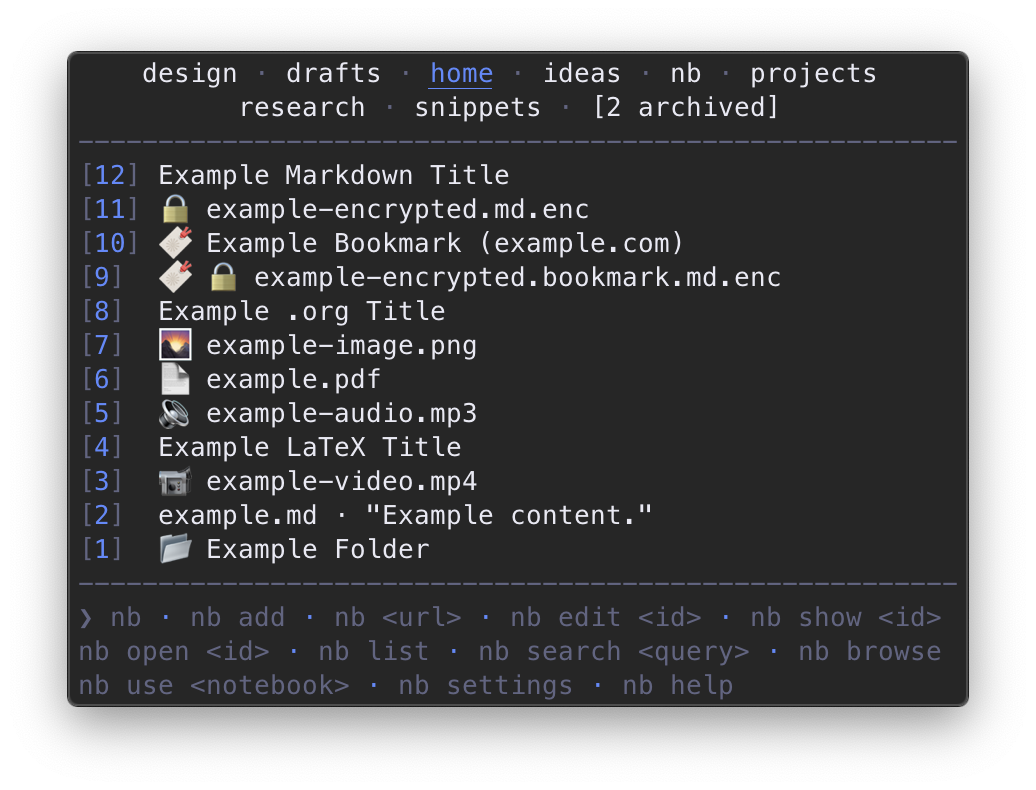 alt="home"
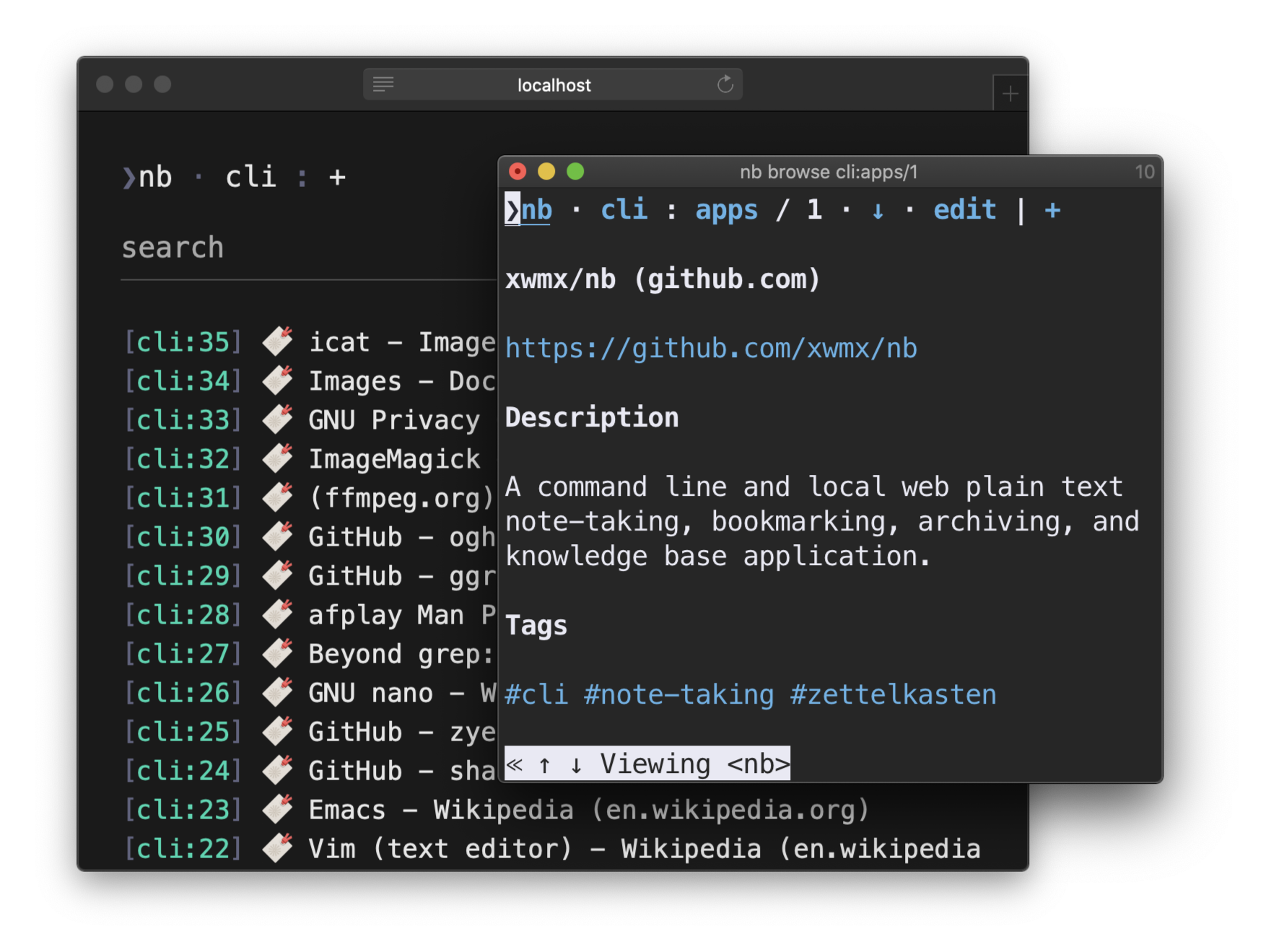 alt="nb browse"
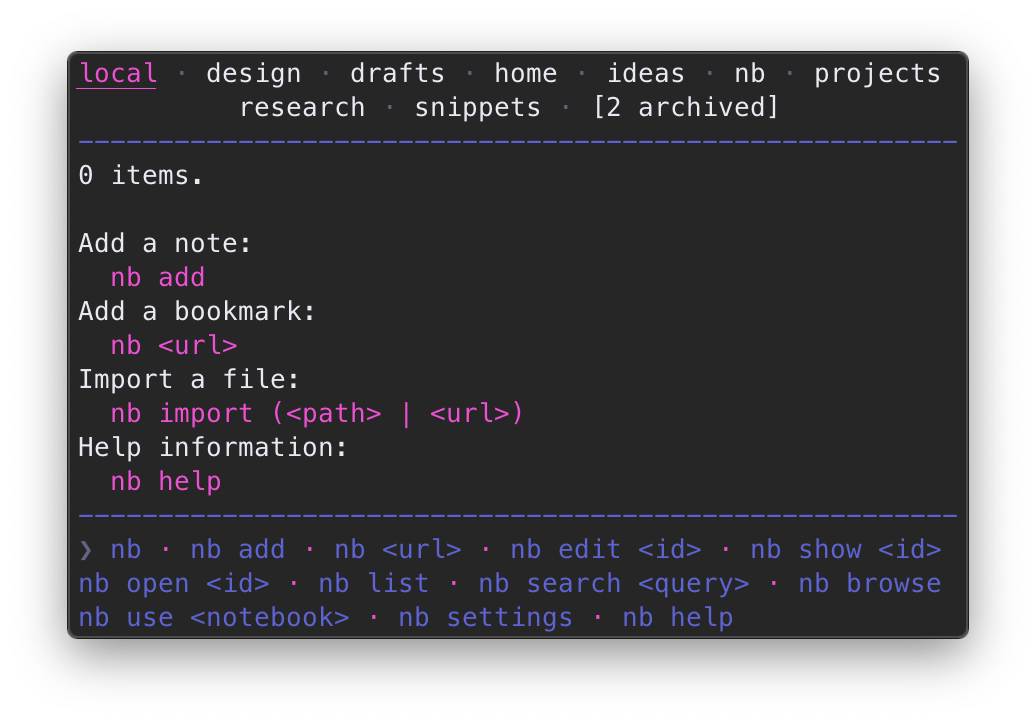 alt="nb list empty"