p4.js
v0.6.13
Portable parallel processing pipelines
2/weekUpdated 3 years agoGPL-3.0Unpacked: 5.0 MB
Published by Kelvin Li
npm install p4.jsP4: Portable Parallel Processing Pipelines
P4 is JavaScript library for accelerating data processing and visualization using the GPU. P4 provides an intuitive and declarative API for specifying common data transformations and visualizations, which automatically compile to WebGL shader programs for parallel computing.
For data processing, P4 is more than 10X faster than codes based on JavaScript Array functions. For visualizing large data, P4 is at least 10X faster than Canvas, and 20X faster than SVG.
$3
Install using npm
``bash`
npm install p4.js
or include the following line in your html:
`html`
Example
`javascript`
p4({container: 'body', viewport:[800, 600]})
.data({
format: 'json',
values: [{BabyWeight: 9, Gender: 'Girl', MotherAge: 28, FatherAge: 32}, ...]
})
.view([{width: 800, height: 600}])
.derive({ AgeDiff: 'abs(FatherAge - MotherAge)' })
.match({ AgeDiff: [0, 10] })
.aggregate({
$group: 'AgeDiff',
$collect: {
Babies: {$count: '*'},
AvgWeight: {$avg: 'BabyWeight'}
}
})
.visualize({
mark: 'bar',
x: 'AgeDiff',
height: 'Babies',
color: 'AvgWeight'
})
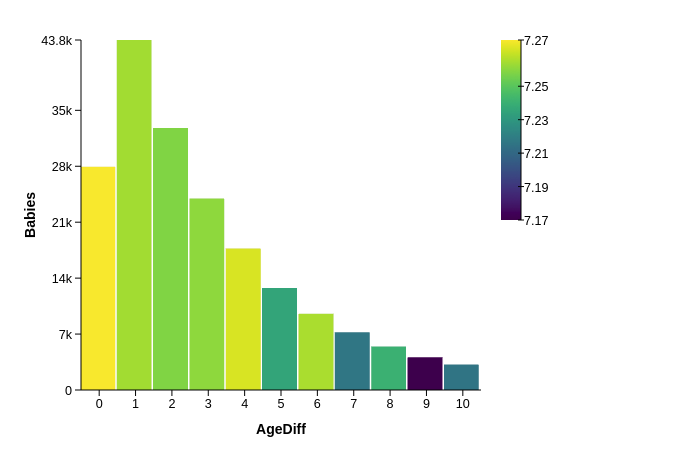
The above codes process a dataset with 100K records and visualize the result as a bar chart shown below.
$3
$3
Derive is for calculating new attributes based on existing data attributes.
`javascript`
derive({
NewAttribute1: 'expression with existing attributes and math functions',
NewAttribute2: 'expression2',
...
})
Supported math functions: abs, ceil, cos, exp, log, log2, max, min, pow, round, sin, sqrt, tan, acos, asin, atan.
At default, 4 new numerical attributes can be derived (for saving GPU memory space). To add more, specify it in the config of the pipeline:
`javascript`
p4.config({deriveMax: 8}).derive({...}) //now it can derive 8 new attributes.
$3
Match can be used to filer the data based on multiple data attributes, including both numeric and categorical.
`javascript`
match({
NumericAttribute1: [start, end],
NumericAttribute2: {$in: [number1, number2, ...]},
CategoricalAttribute1: {$in: [string1, string2, ...]}
...
})
$3
Aggregate is used to group or bin data based on attributes to obtain specified metrics.
`
javascript
aggregate({
  $group: [attr1, attr2], // up to 3 attributes (current limitation),
  $collect: {
    newAttr1Name: {$opt: 'attr3'},
    newAttr2Name: {$opt: 'attr4'},
  }
})
`
Supported \$opt: count, sum, avg, min, max
$3
P4 can effectively visualize the data stored or processed in GPU using different visual marks and plots.
#### Visual Channels
javascript
visualize({id, mark, channels})
`* id (optional)
id of the view for this visualization.
* mark
A visual mark can be: circle, rect, bar, line.
* channels (x, y, width, height, color, opacity)
A channel can be mapped to any original or derived data attributes for visualization. A numeric or string value can be assigned (e.g., {color: 'blue', opacity: 0.5})
##### Example
javascript
p4(config)
  .data({ ... })
  .visualize({
    mark: 'circle',
    x: 'MotherWeight',
    y: 'BabyWeight',
    color: 'teal',
    opacity: 0.5,
    size: 8
  })
`#### View Composition
To generate more than one views, any array of visual encodings can be specified.
json
{
  "$visualize": [
    {
      "mark": "bar",
      "color": "steelblue",
      "x": "MotherEdu",
      "height": "Babies"
    },
    {
      "mark": "line",
      "color": "steelblue",
      "x": "MotherEdu",
      "y": "AvgWeight",
      "size": 5
    }
  ]
}
`
This will generate two bar charts in a column stack (see example here).$3
The view function can be used to compose different view arrangements.
javascript
view({id, width, height, padding, offset})
`#### Example
javascript
p4(config).views([
    {
      "id": "c1",
      "width": 360,
      "height": 360,
      "padding": {"left": 120, "right": 10, "top": 10, "bottom": 50},
      "offset": [380, 0]
    },
    {
      "id": "c2",
      "width": 360,
      "height": 360,
      "padding": {"left": 120, "right": 10, "top": 10, "bottom": 50},
      "offset": [0, 0]
    }
  ],
);
``See this example in Online Editor.
$3
- Only 24-bit, single floating point precision is supported.
- Data size cannot be larger than the max size supported by WebGL texture, which is typically 8096 x 8096.
$3
P4 was first developed to leverage WebGL for GPU-accelerated data processing. The support for interactive visualizations is added based on research work documented in this paper.
Li JK, Ma KL. P4: Portable Parallel Processing Pipelines for Interactive Information Visualization. IEEE transactions on visualization and computer graphics. 2018 Sep 19.