pimatic-phone
v0.9.7
A generic pimatic plugin for mobile devices
0/weekUpdated 3 years agoGPL-2.0Unpacked: 134.7 KB
Published by Bernd Strebel
npm install pimatic-phone

[![downloads][downloads-image]][downloads-url]
[downloads-image]: https://img.shields.io/npm/dm/pimatic-phone.svg?style=flat
[downloads-url]: https://npmjs.org/package/pimatic-phone
pimatic-phone
=============
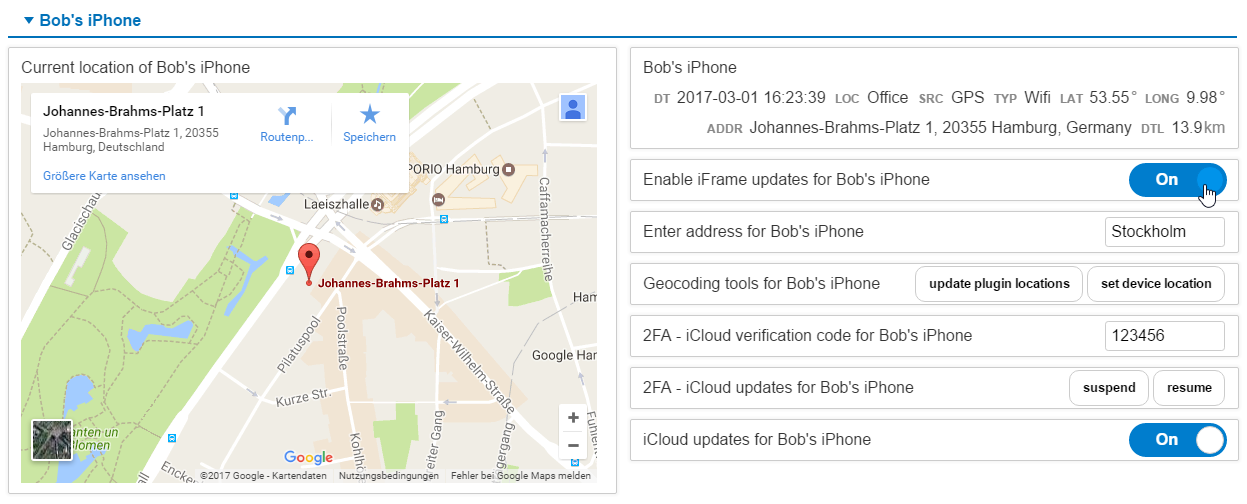
Step-by-step instructions to setup a phone device with Google iFrame
mapping, geocoding and iCloud update control as outlined in the above
screenshot are available in a separate Cookbook

A generic pimatic plugin for mobile devices to provide location based
devices. Continuous GPS tracking and reverse geocoding are expensive in
terms of mobile power consumption and Google/OSM API requests. Many
location based rules will work well with known locations like "Home" or
"Office". The plugin was inspired by the pimatic-locatin-plugin but uses a
different device layout and (as of Rev. 0.6.0) a session based iCloud client
from icloud-promise for iOS devices.
The signature of the _updateLocation_ API call provides compatibility
with the Android App PimaticLocation.
From revision Rev. 0.9.0 reverse Geocoding for the also supported. The new
address attribute could be maintained manually through the plugin location
map configuration or by reverse Geocoding by the Google Maps Geocoding API.
**Make sure, your Google API key is at least activated for
the Google Maps Embed API and the Google Maps Geocoding API.**
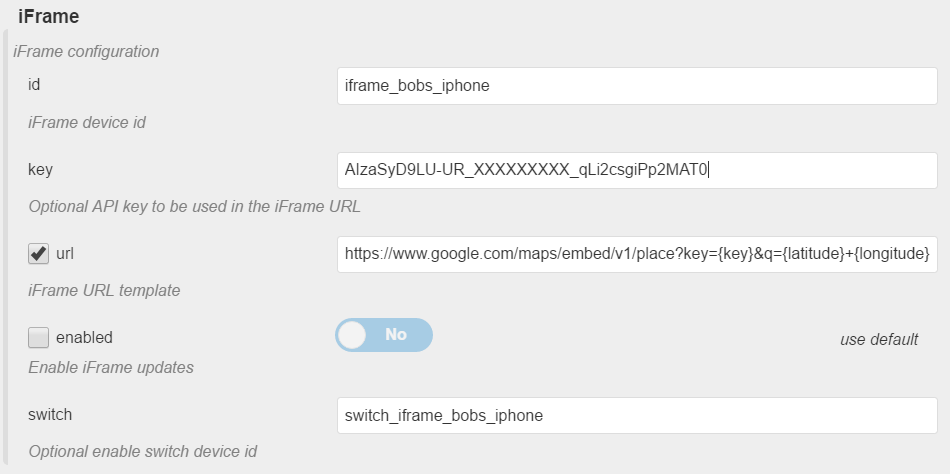
With revision Rev. 0.8.0 an iframeDevice from pimatic-iframe can be utilized
to show the current location on a map. Default settings use the Google Maps Embed API.
You have to register a project at the Google Developer Console and
generate an API key.
iOS devices
- Notification emails: A notification email from Apple is generated when
the iCloud session is established on pimatic startup/device creation.
- Update interval (I): Requesting location information from the iPhone triggers
the device to push the data to the iCloud. A short period increases
power consumption significantly and may drain your battery.
- Update interval (II): Use rules and the pimatic-phone API to suspend location
updates, e.g. if the device is connected to WiFi at home: Use pimatic-ping
or pimatic-cron to trigger the suspend by executing (inspired by a request
at the pimatic forum). This feature could not be used if you have
two factor authentication activated. See 2FA remarks (see below).
As of Rev. 0.8.0 you can define a DummySwitch to enable/disable
iCloud updates through the mobile frontend and since Rev. 0.8.5 you can use
the new actions "suspend \
control updates through the iCloud interface. See Device Actions
for details.

``
curl --user "admin:admin" --silent --request GET \
http://localhost:8080/api/device/
- Session ID and cookies are not permanently stored but recreated at
pimatic startup/iOS device initialisation. Their is no automatic reconnect
of sessions to avoid flooding with notification mails due to configuration
issues or other problems. In case of an error and a lost connection
open the configuration dialog of the device. A new session is established
when you recreate the device by clicking the save button. Their is no need
to restart pimatic.
- Two factor authentication (2FA): If activated, a notification dialog pops up
on your device requiring a confirmation for the session. Also a
verification code is displayed. It seems that neither the confirmation
nor the verification code is really necessary to access the iCloud device
information. You can avoid this messages by generating a verification
code on your iPhone (Settings -> iCloud -> Apple ID -> Security
-> Verification Code) and use this code in the iCloudVerify configuration
option. Currently their is no possibility to refresh 2FA sessions.
Keep your iCloudInterval lesser then the session timeout of 600 seconds.
As of Rev. 0.7.6 additional API calls (enable/disableUpdates, see API
documentation below) may be used to suspend updates for 2FA sessions.
Due to limitations of the iCloud API logout and login calls have to be
performed and Apple notification mails are triggered by the enableUpdates
call. You have to provide a valid verification code or '000000' as in
https://.../enableUpdates?code=000000.
As of Rev. 0.8.5 you can use the new actions "suspend" and "resume"
to control the iCloud updates. The resume action takes an additional
argument "with
rules, a buttons device und a variable input device you can realize
a comfortable frontend to control suspend/resume with verification codes.

Android devices
As of Rev. 0.4.6 an additional API call _updatePhone_ provides a simple to use
interface for Android devices running the Tasker APP. Download and import the
sample project to Tasker and change the server settings in the HTTP Get task.
See the Tasker Setup Guide for details.
Location Map
The location map (maintained in the plugin settings) allows you to define
well known location tags and let you use the most suitable method (native apps,
tasker jobs, GPS/GSM tracking, WLAN connections, etc.) to update the location
of a mobile device.
Since Rev. 0.4.2 overlapping locations are supported. You can, for
example, define a location "Home" with latitude=55.60, longitude=10.80 and
radius=250m and a location "NearHome" with the same gps data but a
radius of 1000m. A distance of 200m will provide the location "Home",
500m give you "NearHome".
Location tags are similar to geofences and client apps like Locative
for iOS or Android can be used to update the device location with the new
GET requests _enter_ and _exit_. See API documentation below for details.
With revision 0.7.5 all API calls return the current device location on
success.
`json`
{
"result":
{
"tag":"Home",
"source":"TAG",
"type":"API",
"time":"2017-02-02 15:47:05",
"utc":1486046825540,
"gps":
{
"latitude":53.12345678,
"longitude":10.87654321
}
},
"success":true
}
Also two additional api calls _fetchLocation_ and _fetchPreviousLocation_
are implemented to provide the location information by simple GET requests.
See the API documentation below for details.
Location based rules
--------------------
No additional predicates or rule actions are provided in the moment but
you can use dynamically generated device variables and attributes, e.g.
`
when $phone.location gets updated and $phone.tag != "Home" then turn lights off
when location of phone is equal to "Office" then log "at work"
when $phone.distanceToHome is lower than 500 then log "almost at home"
...
Device Actions
--------------
Suspend/resume iCloud updates for iOS devices
`
WHEN [button pressed] THEN suspend
WHEN [button pressed] THEN resume
where "verify" is the next valid verification code for 2FA
Simulate device movement
`
WHEN [button pressed] THEN set location of
where "address" is one of your location tags or any valid expression for
a Google Maps Geocoding API lookup
Device Predicates (planned)
---------------------------
In addition to device attributes predicates native predicates should improve
and simplify location based rules, as in
`
WHEN distance to
WHEN route to
WHEN eta to
`
Predicates will be available with the next milestone release 1.0.0
Use xLinks to open maps for device location (deprecated)
--------------------------------------------------------
As of Rev. 0.4.0 you can define URL templates to open Google Maps or
Open Street Map for the current device location:
`coffeescript`
xLinkTemplate:
description: "URL template"
type: "string"
default: "https://www.google.com/maps?q={latitude}+{longitude}"
Limitations: The values are not updated in the frontend. You have to
manually refresh the browser window. Due to this linḿitations, the xLink
feature will be removed. Use the pimatic-iframe based approach available
since Rev. 0.8.0.
Plugin configuration
--------------------
Provides a location table to map geo locations (GPS), mobile cell tower
positions (GSM) and WiFi connections (SSID) to user defined location
tags
`coffeescript`
"plugins": [
{
"locations": [
{
"name": "office",
"tag": "Office",
"ssids": [
"DIGITEC"
],
"gps": {
"latitude": 53.5544809,
"longitude": 9.9786172,
"radius": 250
},
"cids": [
"GSM:42407.5455365",
"GSM:1401.43266861",
"GSM:42407.5455361"
]
},
{
"name": "home",
"tag": "Home",
"ssids": [
"AVM",
"ASUS"
],
"gps": {
"latitude": 53.66,
"longitude": 10.08,
"radius": 250
},
"cids": [
"GSM:42441.5453313",
"GSM:1401.43266781",
"GSM:411.13021"
]
}
],
"plugin": "phone",
"active": true,
"debug": true
}
],
Devices
-------
Device specific configuration
PhoneDevice: Generic mobile device, updates it's location via API
calls (Tasker scripts, Apps)
`json`
{
"serial": "HTC0815",
"xAttributeOptions": [],
"id": "phone_htc-m9",
"name": "ViperOneM9",
"class": "PhoneDevice"
}
PhoneDeviceIOS: Apple mobile devices, uses icloud-promise API to update
the location periodically
`coffeescript`
{
"iCloudUser": "user@domain",
"iCloudPass": "password",
"iCloudDevice": "Users iPhone",
"xAttributeOptions": [],
"id": "phone_user",
"name": "Users iPad",
"class": "PhoneDeviceIOS",
"debug": true,
"accuracy": 500
}
Device configuration option details
`coffeescript
PhoneDevice:
title: "Phone device config"
type: "object"
extensions: ["xAttributeOptions", "xLink"]
properties:
serial:
description: "Serial number of device"
type: "string"
default: ""
debug:
description: "Enable debug output"
type: "boolean"
default: false
accuracy:
description: "Radius (m) for GPS mapping"
type: "number"
default: 250
gpsLimit:
description: "Log new position only if significantly moved"
type: "number"
default: 250
googleMaps:
description: "Optional Google Maps API options"
type: "object"
default: {}
properties:
key:
description: "Optional Google API key to be used in the iFrame URL"
type: "string"
default: ""
geocoding:
description: "Lookup location for address"
type: "boolean"
default: true
reverseGeocoding:
description: "Lookup address for location"
type: "boolean"
default: true
iFrame:
description: "iFrame configuration"
type: "object"
default: {}
properties:
id:
description: "iFrame device id"
type: "string"
default: ""
url:
description: "iFrame URL template"
type: "string"
default: "https://www.google.com/maps/embed/v1/place?key={key}&q={address}"
enabled:
description: "Enable iFrame updates"
type: "boolean"
default: false
switch:
description: "Optional enable switch device id"
type: "string"
default: ""
xLinkTemplate:
description: "URL template"
type: "string"
default: "https://www.google.com/maps?q={latitude}+{longitude}"
PhoneDeviceIOS:
title: "iPhone device configuration"
type: "object"
extensions: ["xAttributeOptions", "xLink"]
properties:
iCloudUser:
description: "iCloud user (Apple ID)"
type: "string"
default: ""
iCloudPass:
description: "iCloud password"
type: "string"
default: ""
iCloud2FA:
description: "iCloud 2FA"
type: "boolean"
default: false
iCloudVerify:
description: "iCloud 2FA verification code"
type: "string"
default: "000000"
iCloudVerifyVariable:
description: "Name of the $variable providing the code"
type: "string"
default: ""
iCloudDevice:
description: "iCloud device name"
type: "string"
default: ""
iCloudInterval:
description: "iCloud poll interval (seconds)"
type: "integer"
default: 300
iCloudSessionTimeout:
description: "iCloud session expiration timeout"
type: "integer"
default: 600
iCloudSuspended:
description: "iCloud updates suspended"
type: "boolean"
default: false
iCloudSwitch:
description: "iCloud suspend switch device id"
type: "string"
default: ""
iCloudTimezone:
description: "iCloud client timezone"
type: "string"
default: "Europe/Berlin"
debug:
description: "Enable debug output"
type: "boolean"
default: false
accuracy:
description: "Radius (m) for GPS mapping"
type: "number"
default: 250
gpsLimit:
description: "Log new position only if significantly moved"
type: "number"
default: 250
googleMaps:
description: "Optional Google Maps API options"
type: "object"
default: {}
properties:
key:
description: "Optional Google API key to be used in the iFrame URL"
type: "string"
default: ""
geocoding:
description: "Lookup location for address"
type: "boolean"
default: true
reverseGeocoding:
description: "Lookup address for location"
type: "boolean"
default: true
iFrame:
description: "iFrame configuration"
type: "object"
default: {}
properties:
id:
description: "iFrame device id"
type: "string"
default: ""
url:
description: "iFrame URL template"
type: "string"
default: "https://www.google.com/maps/embed/v1/place?key={key}&q={address}"
enabled:
description: "Enable iFrame updates"
type: "boolean"
default: false
switch:
description: "Optional enable switch device id"
type: "string"
default: ""
xLinkTemplate:
description: "URL template"
type: "string"
default: "https://www.google.com/maps?q={latitude}+{longitude}"
`
Attributes
----------
The following attributes are available and can be used in rules, for logging
or may be displayed in the frontend. Another set of attributes named
_distanceTo\
`coffeescript`
attributes:
timeSpec:
label: "Update time spec"
description: "Date and time of the last location update."
type: t.string
unit: ""
acronym: 'DT'
displaySparkline: false
hidden: false
discrete: true
timeStamp:
label: "Update time stamp"
description: "Date and time of the last location update."
type: t.number
unit: ""
acronym: 'UTC'
displaySparkline: false
hidden: true
discrete: true
tag:
description: "Current location of the device"
type: t.string
unit: ""
acronym: 'LOC'
displaySparkline: false
hidden: false
discrete: true
location:
description: "Alias for the tag attribute"
type: t.string
unit: ""
acronym: 'LOC'
displaySparkline: false
hidden: true
discrete: true
position:
description: "Alias for the tag attribute"
type: t.string
unit: ""
acronym: 'LOC'
displaySparkline: false
hidden: true
discrete: true
previousTag:
description: "Previous location of the device"
type: t.string
unit: ""
acronym: 'PREV'
displaySparkline: false
hidden: true
discrete: true
previousLocation:
description: "Alias for the previous tag attribute"
type: t.string
unit: ""
acronym: 'PREV'
displaySparkline: false
hidden: true
discrete: true
previousPosition:
description: "Alias for the previous tag attribute"
type: t.string
unit: ""
acronym: 'PREV'
displaySparkline: false
hidden: true
discrete: true
source:
label: "Location source"
description: "Source of location information: LOC, GPS, NET, TAG, SSID, ..."
type: t.string
unit: ""
acronym: 'SRC'
displaySparkline: false
hidden: false
discrete: true
type:
label: "Type"
description: "Type of position data"
type: t.string
unit: ""
acronym: 'TYP'
displaySparkline: false
hidden: false
latitude:
label: "Latitude"
description: "Latitude of device"
type: t.number
unit: "°"
acronym: 'LAT'
displaySparkline: false
hidden: false
longitude:
label: "Longitude"
description: "Longitude of device"
type: t.number
unit: "°"
acronym: 'LONG'
displaySparkline: false
hidden: false
accuracy:
label: "Accuracy"
description: "Accuracy of location data"
type: t.number
unit: "m"
acronym: 'ACC'
displaySparkline: false
hidden: true
cell:
label: "Cell"
description: "Cell ID"
type: t.string
unit: ""
acronym: 'CELL'
displaySparkline: false
hidden: true
ssid:
label: "SSID"
description: "WLAN SSID"
type: t.string
unit: ""
acronym: 'SSID'
displaySparkline: false
hidden: true
gps:
label: "GPS"
description: "GPS"
type: t.string
unit: ""
acronym: 'GPS'
displaySparkline: false
hidden: true
address:
label: "Address"
description: "Address of device"
type: t.string
unit: ""
acronym: 'ADDR'
displaySparkline: false
hidden: false
Many of the attributes are volatile in nature. Adjust database logging
options according to your needs, e.g.:
`coffeescript
"database": {
"deviceAttributeLogging": [
# ...
{
"deviceId": "phone_*",
"attributeName": "*",
"type": "*",
"interval": "0",
"expire": "0"
},
{
"deviceId": "phone_*",
"attributeName": "tag",
"expire": "1y"
},
{
"deviceId": "phone_*",
"attributeName": "gps",
"expire": "1y"
}
],
#...
}
`
With Rev. 0.4.1 a new configuration option gpsLimit allows you to
restrict the logging: Updates are only written to the database when the
location tag changes or a significant movement > gpsLimit was detected
between two updates.
Device actions
--------------
Different actions/API calls can be used to update the device location.
Use HTTP(S) GET requests like
`
http(s)://
where
| call | key(s) | value | comment |
|---------------|----------|--------|---------------------------------|
|updateTag|tag|location tag|set the location tag directly|
|enter|tag|location tag|set the location tag from geofence app|
|exit|tag|location tag|set the location tag from geofence app|
|updateGPS|latitude,longitude,accuracy,source|gps data|used internally for iCloud devices|
|updateCID|cid|%CELLID| Android tasker mobile cell ID|
|updateSSID|ssid|ssid|SSID of connected WLAN
|updateLocation|long,lat,updateAddress|gps data|legacy call for PimaticLocation Android App|
|updatePhone|serial,ssid,ssid,...|Tasker vasrs|see documentation for details|
|fetchLocation|n/a|n/a|return current device location|
|fetchPreviousLocation|n/a|n/a| return the previous location|
|updateDeviceConfig|n/a|n/a|check and update location settings|
|suspend|flag|true/false, on/off|suspend location updates, iOS devices only!|
|disableUpdates|n/a|n/a|logout and disable updates for iOS devices with 2FA|
|enableUpdates|code (verification)|000000|login and enable updates for iOS devices with 2FA|
Example:
`
curl --user "admin:admin" --silent --request GET \
http://localhost:8080/api/device/
Available API call os of Rev. 0.9.5
`coffeescript``
update:
description: "Variable update record"
params:
record:
type: t.string
updatePhone:
description: "Update from Android Tasker APP"
params:
serial:
type: t.string
ssid:
type: t.string
cellid:
type: t.string
locn:
type: t.string
loc:
type: t.string
updateTag:
description: "Update location tag of device"
params:
tag:
type: t.string
updateAddress:
description: "Update address of device"
params:
address:
type: t.string
enter:
description: "Enter geofence"
params:
tag:
type: t.string
exit:
description: "Exit geofence"
params:
tag:
type: t.string
updateGPS:
description: "Update geo location values"
params:
latitude:
type: t.number
longitude:
type: t.number
accuracy:
type: t.number
source:
type: t.string
updateCID:
description: "Update mobile cell id"
params:
cell: t.string
updateSSID:
description: "Update location from WLAN connection"
params:
ssid: t.string
updateLocation:
description: "Legacy: pimatic-location Android app"
params:
long:
type: t.number
lat:
type: t.number
updateAddress:
type: t.number
fetchLocation:
description: "Return current device location"
fetchPreviousLocation:
description: "Return previous device location"
updatePluginConfig:
description: "Update location settings via geocoding lookups"
TODO: detailed description of calls and params, curl examples, tasker
examples
Roadmap
-------
* ~~Generate HTML links to display device location in Google Maps~~
* ~~Generate HTML links to display device location in Open Street Map~~
* ~~Display current location in maps iframe (Google/OSM)~~
* ~~Add distance attribute (distance between geo locations)~~
* Provide device predicates: location, distance, eta, ...
* Use Google Maps for route calculations
Changelog
---------
v0.9.6
- bugfix alias attribute updates [#3]
v0.9.5
- bugfix GPS validation
v0.9.4
- fixed files in package.json
v0.9.3
- fixed gpsLimit bug for Android devices
v0.9.2
- public release
- new device action updatePluginConfig
v0.9.1
- use (reverse) geocoding from Googlke Maps API
make sure, your api key is activated for Embed and Geocoding API
- addtional attribute "address" (from config or reverseGeocoding)
- addtitional action updateAddress for reverse geocoding
- plugin an device configuratin changes (ignore warnings thrown on first
startup with new plugin configuration
v0.8.5
- iOS device config changes
iCloudVerifyVariable to use with VariableInputDevice
iCloud2FA used during startup before a iCloud connection is availabel
- provide first pimatic actions "set location" and "suspend/resume"
v0.8.4
- more diagnostic output if device specific debug is enabled
v0.8.3
- suspend attribute refactoring
v0.8.2
- bugfix device recreation error
v0.8.0
- use pimatic-iframe for device location
- use DummySwitch for iCloud update suspend
v0.7.7
- bugfix device initialization from lastState
v0.7.6
- iCloudSuspended configuration attribute
- disable/enableUpdates API calls for 2FA sessions
v0.7.5
- API calls return JSON response
- support for previousLocation attributes
- additional API calls: enter, exit, fetchLocation, fetchPreviousLocation
v0.7.3
- force UI update on recreation of device
- additional device debugging output if enabled
- minor bugfixes
v0.7.2
- use refreshClient during initalization
v0.7.1
- validate device location (may be undefined) if location service
is disabled
v0.7.0
- enhanced configuration options for iOS devices
- use icloud-promise module
- suspend iCloud location updates via AOI call
v0.6.3
- updated documentation
v0.6.1
- iOS support with session based iCloud client module
v0.5.0
- preliminary hot fix iOS device support
[Support for iOS devices broken due to iCloud API changes!]
v0.4.6
- updatePhone API call for Android Tasker APP
v0.4.5
- initial grunt/mocha setup and travis integration
v0.4.4
- update location only on relevant changes
- significant movements > gpsLimit (v0.4.1)
- tag, source or type changes through API calls (new)
v0.4.3
- tag initialization on startup [#1]
v0.4.2
- support for overlapping locations
v0.4.1
- update location only on significant movements > gpsLimit
v0.4.0
- xLink to location URL
v0.3.1
- Stable release with dynamic distance attributes