postcss-100vh-fix
v2.0.0
PostCSS plugin to fix height/min-height: 100vh on iOS
0/weekUpdated 11 months agoMITUnpacked: 4.9 KB
Published by Andrey Sitnik
npm install postcss-100vh-fixPostCSS 100vh Fix
title="Philosopher’s stone, logo of PostCSS"
src="https://postcss.org/logo-leftp.svg">
[PostCSS] plugin to fix [iOS’s bug] with 100vh.
It works in Chrome (just -webkit-fill-available causes problems in Chrome
in some cases), iOS/iPad/MacOS Safari and [all other browsers].
Pure CSS solution, no JS required.
``css`
body {
/ Footer will be hidden on iOS Safari because of bottom panel /
height: 100vh;
}
`css
body {
height: 100vh;
}
/ Avoid Chrome to see Safari hack /
@supports (-webkit-touch-callout: none) {
body {
/ The hack for Safari /
height: -webkit-fill-available;
}
}
`
 alt="100vh bug illusration Max Schmitt"
title="By Max Schmitt">
It works with min-height and max-height too.
[all other browsers]: https://caniuse.com/#feat=viewport-units
[iOS’s bug]: https://allthingssmitty.com/2020/05/11/css-fix-for-100vh-in-mobile-webkit/
[PostCSS]: https://github.com/postcss/postcss
 alt="Sponsored by Evil Martians" width="236" height="54">
Limits
Pure CSS solution is limited. For many cases you need to use JS-based hack like
[postcss-viewport-height-correction]:
Our hack do not work with partial height like height: 90vh
or .
Also, we do not fix Chrome for Android bug:
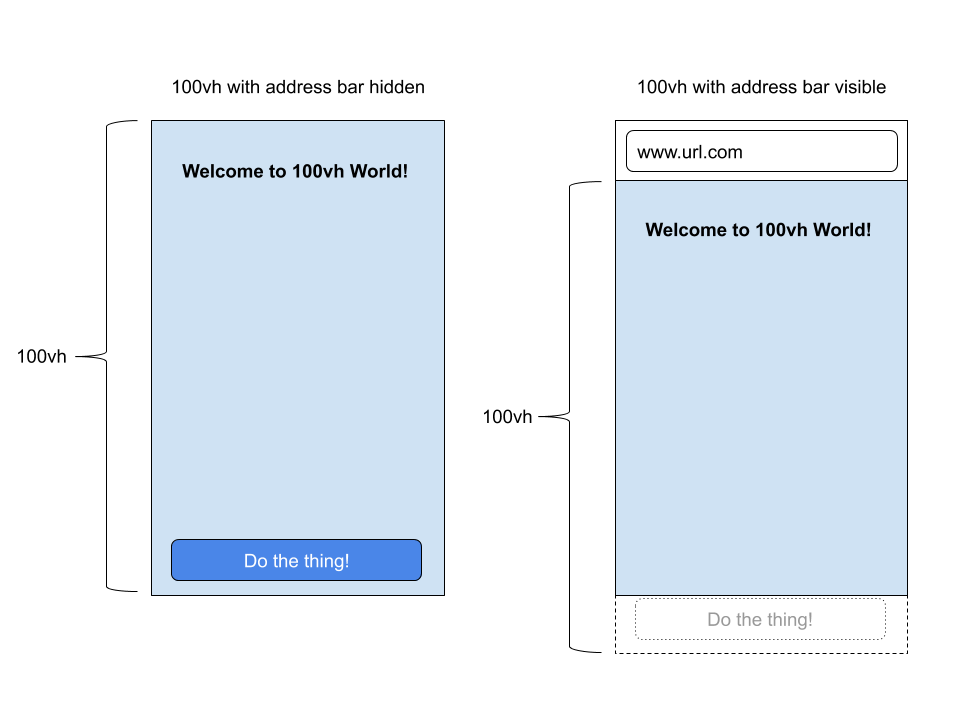 alt="100vh Chrome bug illusration David Chanin"
title="By David Chanin">
[postcss-viewport-height-correction]: https://github.com/Faisal-Manzer/postcss-viewport-height-correction
Usage
Step 1: Install plugin:
`sh`
npm install --save-dev postcss postcss-100vh-fix
Step 2: Check you project for existed PostCSS config: postcss.config.js
in the project root, section in package.json
or in bundle config.
If you do not use PostCSS, add it according to [official docs][PostCSS]
and set this plugin in settings.
Step 3: Add the plugin to plugins list:
`diff`
module.exports = {
plugins: [
+ require('postcss-100vh-fix'),
require('autoprefixer')
]
}
Step 4: Use height: 100vh or min-height: 100vh` in your CSS.