react-ab-test
v2.0.1
A/B testing React components and debug tools. Isomorphic with a simple, universal interface. Well documented and lightweight. Tested in popular browsers and Node.js. Includes helpers for Mixpanel and Segment.com.
828/weekUpdated 3 years agoMIT
Published by pushtell
npm install react-ab-testA/B Testing React Components


Wrap components in
``js`
Version A
Version B
Report to your analytics provider using the emitter. Helpers are available for Mixpanel and Segment.com.
`js`
emitter.addPlayListener(function(experimentName, variantName){
mixpanel.track("Start Experiment", {name: experimentName, variant: variantName});
});
Please ★ on GitHub!
Table of Contents
- Installation
    - Usage
- Standalone Component
- Coordinate Multiple Components
- Weighting Variants
- Debugging
- Server Rendering
- Example
- With Babel
- Alternative Libraries
- Resources for A/B Testing with React
- API Reference
-
-
- emitter
- emitter.emitWin(experimentName)
- [emitter.addActiveVariantListener([experimentName, ] callback)](#emitteraddactivevariantlistenerexperimentname--callback)emitter.addPlayListener([experimentName, ] callback)
- [](#emitteraddplaylistenerexperimentname--callback)emitter.addWinListener([experimentName, ] callback)
- [](#emitteraddwinlistenerexperimentname--callback)emitter.defineVariants(experimentName, variantNames [, variantWeights])
- [](#emitterdefinevariantsexperimentname-variantnames--variantweights)emitter.setActiveVariant(experimentName, variantName)
-
-
-
-
-
-
-
-
-
    - Usage
    -
-
-
- Usage
-
-
- How to contribute
  - Requisites
  - Browser Coverage
  - Running Tests
Installation
react-ab-test is compatible with React 0.14.x and 0.15.x.
`bash`
npm install react-ab-test
Usage
$3
Try it on JSFiddle
`js
var Experiment = require("react-ab-test/lib/Experiment");
var Variant = require("react-ab-test/lib/Variant");
var emitter = require("react-ab-test/lib/emitter");
var App = React.createClass({
onButtonClick: function(e){
this.refs.experiment.win();
},
render: function(){
return
Section A
Section B
}
});
// Called when the experiment is displayed to the user.
emitter.addPlayListener(function(experimentName, variantName){
console.log("Displaying experiment ‘" + experimentName + "’ variant ‘" + variantName + "’");
});
// Called when a 'win' is emitted, in this case by this.refs.experiment.win()
emitter.addWinListener(function(experimentName, variantName){
console.log("Variant ‘" + variantName + "’ of experiment ‘" + experimentName + "’ was clicked");
});
`
$3
Try it on JSFiddle
`js
var Experiment = require("react-ab-test/lib/Experiment");
var Variant = require("react-ab-test/lib/Variant");
var emitter = require("react-ab-test/lib/emitter");
// Define variants in advance.
emitter.defineVariants("My Example", ["A", "B", "C"]);
var Component1 = React.createClass({
render: function(){
return
Section A
Section B
}
});
var Component2 = React.createClass({
render: function(){
return
Subsection A
Subsection B
Subsection C
}
});
var Component3 = React.createClass({
onButtonClick: function(e){
emitter.emitWin("My Example");
},
render: function(){
return ;
}
});
var App = React.createClass({
render: function(){
return
}
});
// Called when the experiment is displayed to the user.
emitter.addPlayListener(function(experimentName, variantName){
console.log("Displaying experiment ‘" + experimentName + "’ variant ‘" + variantName + "’");
});
// Called when a 'win' is emitted, in this case by emitter.emitWin()
emitter.addWinListener(function(experimentName, variantName){
console.log("Variant ‘" + variantName + "’ of experiment ‘" + experimentName + "’ was clicked");
});
`
$3
Try it on JSFiddle
Use emitter.defineVariants() to optionally define the ratios by which variants are chosen.
`js
var Experiment = require("react-ab-test/lib/Experiment");
var Variant = require("react-ab-test/lib/Variant");
var emitter = require("react-ab-test/lib/emitter");
// Define variants and weights in advance.
emitter.defineVariants("My Example", ["A", "B", "C"], [10, 40, 40]);
var App = React.createClass({
render: function(){
return
Section A
Section B
Section C
}
});
`
$3
The debugger attaches a fixed-position panel to the bottom of the
element that displays mounted experiments and enables the user to change active variants in real-time.The debugger is wrapped in a conditional
if(process.env.NODE_ENV === "production") {...} and will not display on production builds using envify.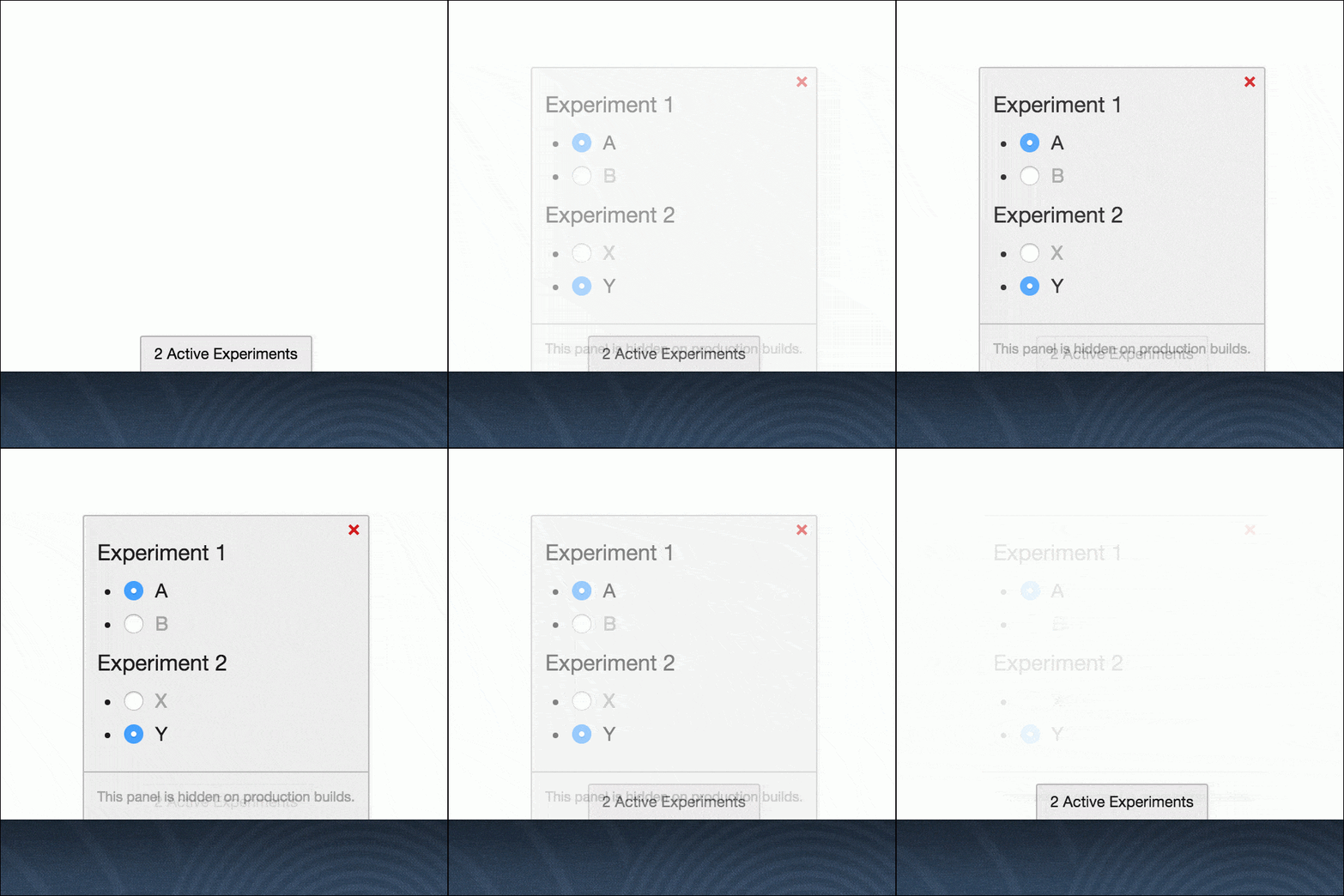
Try it on JSFiddle
`jsvar Experiment = require("react-ab-test/lib/Experiment");
var Variant = require("react-ab-test/lib/Variant");
var experimentDebugger = require("react-ab-test/lib/debugger");
experimentDebugger.enable();
var App = React.createClass({
render: function(){
return
Section A
Section B
;
}
});`
$3
with a userIdentifier property will choose a consistent suitable for server side rendering../examples/isomorphic for a working example.#### Example
Component.jsx:`jsvar React = require("react");
var Experiment = require("react-ab-test/lib/Experiment");
var Variant = require("react-ab-test/lib/Variant");
module.exports = React.createClass({
propTypes: {
userIdentifier: React.PropTypes.string.isRequired
},
render: function(){
return
Section A
Section B
;
}
});`We use a session ID for the
property in this example, although a long-lived user ID would be preferable. See server.js:`js
require("babel/register")({only: /jsx/});var express = require('express');
var session = require('express-session');
var React = require("react");
var ReactDOMServer = require("react-dom/server");
var Component = require("./Component.jsx");
var abEmitter = require("react-ab-test/lib/emitter")
var app = express();
app.set('view engine', 'ejs');
app.use(session({
secret: 'keyboard cat',
resave: false,
saveUninitialized: true
}));
app.get('/', function (req, res) {
var reactElement = React.createElement(Component, {userIdentifier: req.sessionID});
var reactString = ReactDOMServer.renderToString(reactElement);
abEmitter.rewind();
res.render('template', {
sessionID: req.sessionID,
reactOutput: reactString
});
});
app.use(express.static('www'));
app.listen(8080);
`Remember to call
to prevent memory leaks.An EJS template in
template.ejs:`html
Isomorphic Rendering Example
<%- reactOutput %>
`:`js
var React = require('react');
var ReactDOM = require('react-dom');
var Component = require("../Component.jsx");var container = document.getElementById("react-mount");
ReactDOM.render(
`$3
is written in JSX and transpiled into ./lib using Babel. If your project uses Babel you may want to include files from ./src directly.Alternative Libraries
* react-experiments - “A JavaScript library that assists in defining and managing UI experiments in React” by Hubspot. Uses Facebook's PlanOut framework via Hubspot's javascript port.
* react-ab - “Simple declarative and universal A/B testing component for React” by Ola Holmström
* react-native-ab - “A component for rendering A/B tests in React Native” by Loch WansbroughPlease let us know about alternate libraries not included here.
Resources for A/B Testing with React
* Product Experimentation with React and PlanOut on the HubSpot Product Blog
* Roll Your Own A/B Tests With Optimizely and React on the Tilt Engineering Blog
* Simple Sequential A/B Testing
* A/B Testing Rigorously (without losing your job)
Please let us know about React A/B testing resources not included here.
API Reference
$3
Variant.* Properties:
*
name - Name of the experiment.
* Required
* Type: string
* Example:
* - Distinct user identifier. When defined, this value is hashed to choose a variant if defaultVariantName or a stored value is not present. Useful for server side rendering.
* Optional
* Type: string
* Example:
* - Name of the default variant. When defined, this value is used to choose a variant if a stored value is not present. This property may be useful for server side rendering but is otherwise not recommended.
* Optional
* Type: string
* Example: $3
Variant container component.
* Properties:
*
- Name of the variant.
* Required
* Type: string
* Example: $3
Event emitter responsible for coordinating and reporting usage. Extended from facebook/emitter.
####
Emit a win event.
* Return Type: No return value
* Parameters:
*
- Name of an experiment.
* Required
* Type: string
* Example: ####
Listen for the active variant specified by an experiment.
* Parameters:
* - Name of an experiment. If provided, the callback will only be called for the specified experiment.
* Optional
* Type: string
* Example:
* - Function to be called when a variant is chosen.
* Required
* Type: function
* Callback Arguments:
* - Name of the experiment.
* Type: string
* - Name of the variant.
* Type: string####
Listen for an experiment being displayed to the user. Trigged by the React componentWillMount lifecycle method.
* Parameters:
* - Name of an experiment. If provided, the callback will only be called for the specified experiment.
* Optional
* Type: string
* Example:
* - Function to be called when an experiment is displayed to the user.
* Required
* Type: function
* Callback Arguments:
* - Name of the experiment.
* Type: string
* - Name of the variant.
* Type: string####
Listen for a successful outcome from the experiment. Trigged by the emitter.emitWin(experimentName) method.
* Parameters:
* - Name of an experiment. If provided, the callback will only be called for the specified experiment.
* Optional
* Type: string
* Example:
* - Function to be called when a win is emitted.
* Required
* Type: function
* Callback Arguments:
* - Name of the experiment.
* Type: string
* - Name of the variant.
* Type: string####
Define experiment variant names and weighting. Required when an experiment spans multiple components containing different sets of variants.
If
are not specified variants will be chosen at equal rates.The variants will be chosen according to the ratio of the numbers, for example variants
["A", "B", "C"] with weights [20, 40, 40] will be chosen 20%, 40%, and 40% of the time, respectively.* Return Type: No return value
* Parameters:
*
experimentName - Name of the experiment.
* Required
* Type: string
* Example:
* - Array of variant names.
* Required
* Type: Array.
* Example:
* - Array of variant weights.
* Optional
* Type: Array.
* Example: ####
Set the active variant of an experiment.
* Return Type: No return value
* Parameters:
*
 - Name of the experiment.
    * Required
    * Type:
string
* Example:
* - Name of the variant.
* Required
* Type: string
* Example: ####
Returns the variant name currently displayed by the experiment.
* Return Type:
* Parameters:
* - Name of the experiment.
* Required
* Type: string
* Example: ####
Returns a sorted array of variant names associated with the experiment.
* Return Type:
* Parameters:
* - Name of the experiment.
* Required
* Type: string
* Example: $3
Returned by the emitter's add listener methods. More information available in the facebook/emitter documentation.
####
Removes the listener subscription and prevents future callbacks.
* Parameters: No parameters
$3
Debugging tool. Attaches a fixed-position panel to the bottom of the
element that displays mounted experiments and enables the user to change active variants in real-time.The debugger is wrapped in a conditional
if(process.env.NODE_ENV === "production") {...} and will not display on production builds using envify.
####
experimentDebugger.enable()Attaches the debugging panel to the
element.* Return Type: No return value
####
experimentDebugger.disable()Removes the debugging panel from the
element.* Return Type: No return value
$3
Sends events to Mixpanel. Requires
window.mixpanel to be set using Mixpanel's embed snippet.#### Usage
is mounted, the helper sends an Experiment Play event using mixpanel.track(...) with Experiment and Variant properties.When a win is emitted the helper sends an
Experiment Win event using mixpanel.track(...) with Experiment and Variant properties.Try it on JSFiddle
`jsvar Experiment = require("react-ab-test/lib/Experiment");
var Variant = require("react-ab-test/lib/Variant");
var mixpanelHelper = require("react-ab-test/lib/helpers/mixpanel");
// window.mixpanel has been set by Mixpanel's embed snippet.
mixpanelHelper.enable();
var App = React.createClass({
onButtonClick: function(e){
emitter.emitWin("My Example");
// mixpanelHelper sends the 'Experiment Win' event, equivalent to:
// mixpanel.track('Experiment Win', {Experiment: "My Example", Variant: "A"})
},
componentWillMount: function(){
// mixpanelHelper sends the 'Experiment Play' event, equivalent to:
// mixpanel.track('Experiment Play', {Experiment: "My Example", Variant: "A"})
},
render: function(){
return
Section A
Section B
;
}
});`####
Add listeners to
and play events and report results to Mixpanel.* Return Type: No return value
####
mixpanelHelper.disable()Remove
and play listeners and stop reporting results to Mixpanel.* Return Type: No return value
$3
Sends events to Segment. Requires
window.analytics to be set using Segment's embed snippet.#### Usage
is mounted, the helper sends an Experiment Viewed event using segment.track(...) with experimentName and variationName properties.When a win is emitted the helper sends an
Experiment Won event using segment.track(...) with experimentName and variationName properties.Try it on JSFiddle
`jsvar Experiment = require("react-ab-test/lib/Experiment");
var Variant = require("react-ab-test/lib/Variant");
var segmentHelper = require("react-ab-test/lib/helpers/segment");
// window.analytics has been set by Segment's embed snippet.
segmentHelper.enable();
var App = React.createClass({
onButtonClick: function(e){
emitter.emitWin("My Example");
// segmentHelper sends the 'Experiment Won' event, equivalent to:
// segment.track('Experiment Won', {experimentName: "My Example", variationName: "A"})
},
componentWillMount: function(){
// segmentHelper sends the 'Experiment Viewed' event, equivalent to:
// segment.track('Experiment Viewed, {experimentName: "My Example", variationName: "A"})
},
render: function(){
return
Section A
Section B
;
}
});`####
Add listeners to
and play events and report results to Segment.* Return Type: No return value
####
segmentHelper.disable()Remove
and play listeners and stop reporting results to Segment.* Return Type: No return value
How to contribute
$3
Before contribuiting you need:
- doctoc installedThen you can:
- Apply your changes :sunglasses:
- Build your changes with
npm run build
- Test your changes with
- Lint your changes with
- And finally open the PR! :tada:$3
Karma tests are performed on Browserstack in the following browsers:* IE 9, Windows 7
* IE 10, Windows 7
* IE 11, Windows 7
* Opera (latest version), Windows 7
* Firefox (latest version), Windows 7
* Chrome (latest version), Windows 7
* Safari (latest version), OSX Yosemite
* Android Browser (latest version), Google Nexus 7, Android 4.1
* Mobile Safari (latest version), iPhone 6, iOS 8.3
Mocha tests are performed on the latest version of Node.
Please let us know if a different configuration should be included here.
$3
Locally:
bashnpm test
`On Browserstack:
bashBROWSERSTACK_USERNAME=YOUR_USERNAME BROWSERSTACK_ACCESS_KEY=YOUR_ACCESS_KEY npm test
``