react-body-highlighter
v2.0.5TypeScript
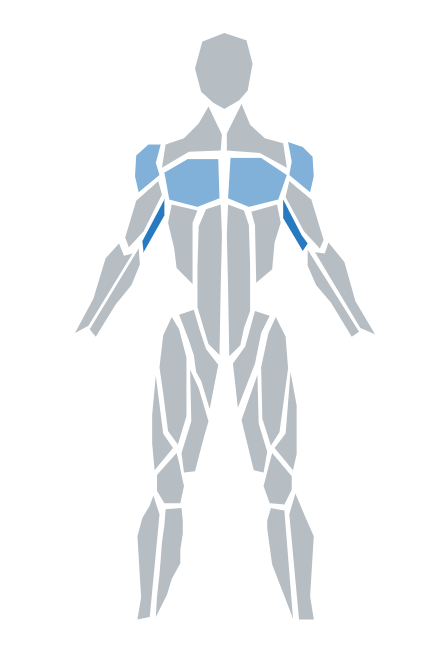
React.js component for highlighting muscles on a body model
0/weekUpdated 3 years agoMITUnpacked: 167.6 KB
Published by GV79
npm install react-body-highlighterreact-body-highlighter
[![Npm Version][npm-version-image]][npm-version-url]
[![License][license-image]][license-url]
[![Downloads][downloads-image]][downloads-url]
This package was created to have a body highlighter component compatible with React.js with minimal dependencies and some extra props for further functionality. The SVG polygons were leveraged from the React Native package react-native-body-highlighter.
Installation
``
sh

$ npm install react-body-highlighter
`
`sh
$ yarn add react-body-highlighter
`
Usage


Example (version 2+):
`ts
import React from 'react';
import Model, { IExerciseData, IMuscleStats } from 'react-body-highlighter';
export default function Component() {
const data: IExerciseData[] = [
{ name: 'Bench Press', muscles: ['chest', 'triceps', 'front-deltoids'] },
{ name: 'Push Ups', muscles: ['chest'] },
];
const handleClick = React.useCallback(({ muscle, data }: IMuscleStats) => {
const { exercises, frequency } = data;
alert(You clicked the ${muscle}! You've worked out this muscle ${frequency} times through the following exercises: ${JSON.stringify(exercises)})
}, [data]);
return (
style={{ width: '20rem', padding: '5rem' }}
onClick={handleClick}
/>
);
}
`
Example (version 1.5): https://codesandbox.io/s/condescending-leaf-qsp4m?file=/src/App.tsx


Props


All props are optional so if they are not passed to the component, they will fallback to default values or be undefined.


| Prop              | Purpose                                                                                     | Type             | Default                  |

| ----------------- | ------------------------------------------------------------------------------------------- | ---------------- | -----------------------  |

| bodyColor         | Default color of unworked body muscle                                                       | String           |
#B6BDC3 |
| data | Data array containing exercise JSON objects: { name: 'Bicep Curl', muscles: ['biceps'] }. While the name and muscles attributes are required, you may optionally provide another attribute frequency to represent the exercise count/intensity. | Object[] | |
| highlightedColors | Array containing colors to display depending on frequency a muscle was worked (array[frequency-1] = color). For an example of how this works, see the CodeSandbox example above in the Usage section. | [] | ['#0984e3', '#74b9ff'] |
| onClick | Callback when muscle is clicked. The function will get passed a JSON object of the following structure: { muscle: 'name', stats: { exercises: [''], frequency: 0 } } | (exercise) => {} | |
| style | CSSProperties style object that gets passed to SVG's parent container (div) | Object | |
| svgStyle | CSSProperties style object that gets passed to SVG element | Object | |
| type | Denotes type of model view (values: anterior or posterior) | String | anterior |
List of muscles/parts supported
`
/ Back /

trapezius

upper-back

lower-back


/ Chest /

chest


/ Arms /

biceps

triceps

forearm

back-deltoids

front-deltoids


/ Abs /

abs

obliques


/ Legs /

adductor

hamstring

quadriceps

abductors

calves

gluteal


/ Head /

head

neck
`
Modifying


The main SVG element has a class name
.rbh which will allow you to manually change any styles necessary.
For example, you can add something like .rhb polygon:hover { fill: #757782 !important; } to your .css` file to change the muscle color on mouse hover.
Otherwise, feel free to fork the repo and make any adjustments to your liking!
[license-image]: http://img.shields.io/npm/l/react-body-highlighter.svg
[license-url]: LICENSE
[downloads-image]: http://img.shields.io/npm/dm/react-body-highlighter.svg
[downloads-url]: http://npm-stat.com/charts.html?package=react-body-highlighter
[npm-version-image]: https://img.shields.io/npm/v/react-body-highlighter.svg
[npm-version-url]: https://www.npmjs.com/package/react-body-highlighter