react-bootstrap-jalali-calendar
v0.2.5
react datepicker created with `react-bootstrap` components without any customs
datepickerreact jalaalicalendar persianpersian react datepickerbootstrap calendarbootsatrp jalaali datepicker
0/weekUpdated 2 years agoMITUnpacked: 109.9 KB
Published by Maher Ashori
npm install react-bootstrap-jalali-calendarreact-bootstrap-jalali-calendar
This package created specifically for react-bootstrap which will help you to easily add Jalali calendar in your project without any changing in the code.
Enjoy coding ...
- Required
- How to make RTL with react-bootstrap
- index.js
- index.html
- Installation
- What return from the datepicker
- Standalone Calendar
- Simple datepicker input
- Multiple inputs
- Using datepicker in array
- Calendar events
- Datepicker Properties
- Calendar Options
---
Version >= 0.2.1
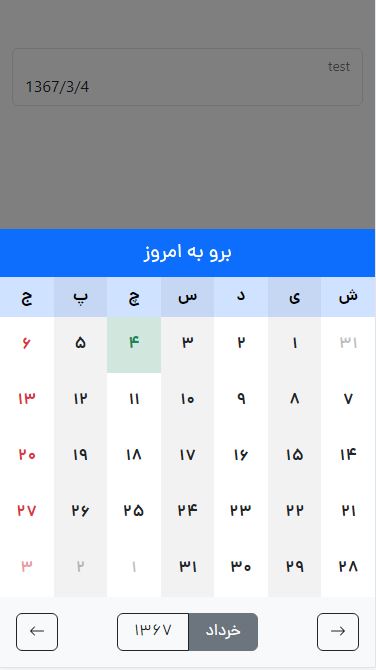
Responsive setting for tablet, mobile and desktop
---
font-family: dana
| Desktop | Tablet & Mobile
| ---------------- | ----------
| window.innerWidth > 768 | window.innerWidth <= 768
| 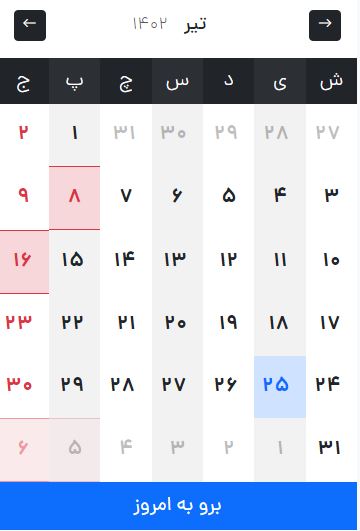 |
| 
Required
This package created with
``text`
npm install react-bootstrap bootstrap
npm install moment-jalaali
Please fill free If you encounter an issue using this product, be sure to notify us from issues part.
_We will do our best to improve and cooperate with you_
index.js
Make your project RTL
`js
import React from 'react';
import ReactDOM from 'react-dom/client';
import App from './App';
import reportWebVitals from './reportWebVitals';
import 'bootstrap/dist/css/bootstrap.rtl.min.css';
import {ThemeProvider} from "react-bootstrap";
const root = ReactDOM.createRoot(document.getElementById('root'));
root.render(
);
reportWebVitals();
`
index.html
Add dir="rtl" to your html`html`
...
Installation 🚀
In the project directory terminal, you can run:
`text`
npm install react-bootstrap-jalali-calendar
Output
When you click on the day, you will get this json.
_Event property default is undefined_
`json`
{
"date": "1400/2/14",
"day": 14,
"event": {
"day": 8,
"description": "۸ تیر عید سعید قربان",
"isHoliday": true
},
"gregorian": "2021-5-4",
"month": 2,
"name": "Tue",
"year": 1400
}
Calendar
`js
import Calendar from 'react-bootstrap-jalali-calendar/dist/calendar';
import react, {useState} from "react";
function App() {
const options = {
hideTodayButton: false,
stopChangingYears: false,
calendarHeaderColor: "primary",
hideToolsBar: false,
calendarToolsColor: "light",
}
const events = [
{
year: 1402,
data: [
{
month: 4,
data: [
{
day: 8,
isHoliday: true,
description: '۸ تیر عید سعید قربان'
},
{
day: 16,
isHoliday: true,
description: '۱۶ تیر عید سعید غدیر خم [ ١٨ ذوالحجه ]'
}
]
},
{
month: 5,
data: [
{
day: 5,
isHoliday: true,
description: '۵ اَمرداد تاسوعای حسینی [ ٩ محرم ]'
},
{
day: 6,
isHoliday: true,
description: '۶ اَمرداد عاشورای حسینی [ ١٠ محرم ]'
}
]
}
]
}
];
const [date, setDate] = useState("1367/3/4");
const selectedDate = (day) => {
console.log(day)
setDate(day.date);
}
return (
<>
{date}
)
}
export default App;
`
Simple input
Easy to use
`js
import React from 'react';
import {useState} from "react";
import Datepicker from 'react-bootstrap-jalali-calendar';
const App = () => {
//optional: with default value
const options = {
template: 'floating',
formControlSize: "",
hideFormControlLabel: false,
hideTodayButton: false,
stopChangingYears: false,
calendarHeaderColor: "primary",
hideToolsBar: false,
calendarToolsColor: "light",
}
//you can remove it
//with default value
const [date, setDate] = useState("1367/3/4");
return (
<>
value={date}
callback={(day) => setDate(day.date)}/>
)
};
export default App;
`
Multiple inputs
Multiple used
`js
import React from 'react';
import {useState} from "react";
import Datepicker from 'react-bootstrap-jalali-calendar';
const App = () => {
const [date, setDate] = useState("");
//with default value
const [date2, setDate2] = useState("1367/3/10");
return (
callback={(day) => setDate(day.date)}/>
callback={(day) => setDate2(day.date)}/>
)
};
export default App;
`
Array inputs
Handle your array inputs
`js
import React from 'react';
import {useState} from "react";
import Datepicker from 'react-bootstrap-jalali-calendar';
const App = () => {
const data = [
{
name: 'test3',
value: ""
},
{
name: 'test4',
value: "1400/2/14"
}
];
const [items, handleItems] = useState(data);
const setItemsValue = (item, date) => {
const cloneItems = [...items];
const findItemByName = cloneItems.find(x => x.name === item.name);
if (findItemByName) {
findItemByName.value = date;
}
handleItems(cloneItems);
}
return (
{
items.map((item, index) => {
return
callback={(day) => setItemsValue(item, day.date)}/>
})
}
)
};
export default App;
`
Calendar events
Set your events on calendar easily
`js
import React from 'react';
import {useState} from "react";
import Datepicker from 'react-bootstrap-jalali-calendar';
const App = () => {
//with default value
const [date, setDate] = useState("1367/3/4");
const events = [
{
year: 1402,
data: [
{
month: 4,
data: [
{
day: 8,
isHoliday: true,
description: '۸ تیر عید سعید قربان'
},
{
day: 16,
isHoliday: true,
description: '۱۶ تیر عید سعید غدیر خم [ ١٨ ذوالحجه ]'
}
]
},
{
month: 5,
data: [
{
day: 5,
isHoliday: true,
description: '۵ اَمرداد تاسوعای حسینی [ ٩ محرم ]'
},
{
day: 6,
isHoliday: true,
description: '۶ اَمرداد عاشورای حسینی [ ١٠ محرم ]'
}
]
}
]
}
];
return (
<>
value={date}
callback={(day) => setDate(day.date)}/>
)
};
export default App;
`
Datepicker Properties 📄
| Name | Default | Required | Description
| ------------- | ---------- | -------- | -----------
| callback | null | Yes | calendar method to pass the valuevalue
| | null | Yes | input valuename
| | null | Yes | input nameid
| | {name} | No | input id - default is {name} if emptylabel
| | {name} | No | input id - default is {name} if emptyplaceholder
| | {name} | No | input id - default is {name} if emptydisabled
| | false | No | disable inputrequired
| | false | No | required inputevents
| | [array] | No | calendar events
Calendar Options 📄
###BootstrapMainColors
`json`
[
"danger",
"primary",
"dark",
"info",
"light",
"secondary",
"success",
"warning"
]
| Name | Default | Options | Description
| --------------------- | ---------- | ----------------------- | -----------
| template | floating | floating formControl | Bootstrap input typeformControlSize
| | "" | lg sm "" | Bootstrap input size if hideFormControlLabel{template: "formControl"}
| | false | | Hide input label if hideTodayButton{template: "formControl"}
| | false | | Hide today button from the calendar stopChangingMonths
| | false | | Disable changing month, it will effect years stopChangingYears
| | false | | Disable changing years hideToolsBar
| | false | | Hide calendar toolbar include: change years, change month
| | primary | BootstrapMainColors | Select from bootstrap main colorscalendarToolsColor
| | light` | BootstrapMainColors | Select from bootstrap main colors