react-do-tree-select
v1.3.9
A tree select [React] component.
0/weekUpdated 3 years agoMITUnpacked: 89.4 KB
Published by hjyue1@163.com
npm install react-do-tree-selectreact-do-tree-select
A tree select [React] component.

!NPM license

Features
- Support a large amount of data (1000,000 pieces of data were tested for stability)
- Support half-selection (even if the child nodes are all selected, the check of parent level will not be affected)
Demo
- online
Install
``
bash
npm install react-do-tree-select --saveor
yarn install react-do-tree-select
`
react-do-tree-select depends on ReactExamples
Here's simple example to get you started.
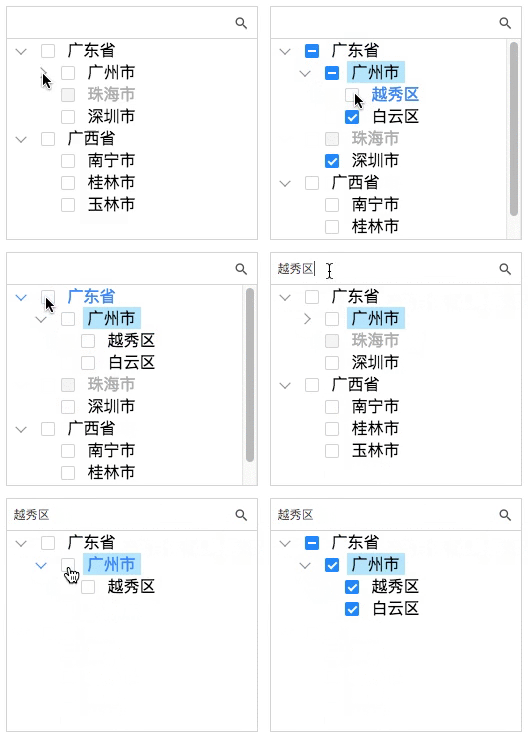
js
import React from 'react';
import TreeSelect from 'react-do-tree-select';
import Data from './Data';class MyComponent extends React.Component {
constructor(props) {
super(props);
this.state = {
treeData: [],
selectVal: '',
showlevel: 0,
}
this.onSelect = this.onSelect.bind(this);
this.onExpand = this.onExpand.bind(this);
this.onChecked = this.onChecked.bind(this);
this.customTitleRender = this.customTitleRender.bind(this);
}
componentDidMount() {
const treeData = Data;
this.setState({treeData});
}
customTitleRender(item) {
return item.title
}
onSelect(val, e) {
console.log(val);
}
onExpand(val, e) {
console.log(val);
}
onChecked(val, e) {
console.log(val);
}
render() {
return (
const { treeData, showlevel } = this.state;
const checkbox = {
enable: true,
parentChain: true, // child Affects parent nodes;
childrenChain: true, // parent Affects child nodes;
halfChain: true, // The selection of child nodes affects the semi-selection of parent nodes.
initCheckedList: [] // Initialize check multiple lists
}
return (
style = {{width: 320,height: 600}}
selectVal = {this.state.selectVal}
onSelect = {this.onSelect}
onExpand = {this.onExpand}
onChecked = {this.onChecked}
checkbox = {checkbox}
showlevel = {showlevel}
customTitleRender = {this.customTitleRender}/>
);
);
}
}
`
./Data.js
js
export default [
    {
        title: '广东省',
        value: '1',
        children: [
            {
                title: '广州市',
                value: '1-1',
                children: [
                    {
                        title: '越秀区',
                        value: '1-1-1',
                    },{
                        title: '白云区',
                        value: '1-1-2',
                    }
                ]
            },{
                title: '珠海市',
                value: '1-2',
                disabled: true,
            },{
                title: '深圳市',
                value: '1-3',
            }
        ]
    },{
        title: '广西省',
        value: '2',
        children: [
            {
                title: '南宁市',
                value: '2-1',
            },{
                title: '桂林市',
                value: '2-2',
            },{
                title: '玉林市',
                value: '2-3',
            }
        ]
    }
]
``API
| property | description | type | default | required |
| -------- | ----------- | ---- | ------- | -------- |
| treeData | source data config | array | - | true |
| showlevel | Hierarchy of expansion | number | 0 |
| checkbox | Check box config config | object | - |
| wrapperClassName | Extended class name | string | - |
| selectVal | Selected items | string | - |
| style | Custom style | object | {width: 320, height: 800} |
| onSelect | Click the event callback function | function( item, event ) | - |
| onExpand | Icon Click the event callback function | function( item, event ) | - |
| onChecked | Check the callback function for the event | function( items, event ) | - |
| customIconRender | The custom icon is extended after the entry | function(item) : DOM | - |
| customTitleRender | Displays the title of the entry | function(item) : DOM | - |
$3
| property | description | type | default | required |
| -------- | ----------- | ---- | ------- | -------- |
| title | Item title | string | - |
| value | The unique identity of the item | string | - |
| disabled | Whether the item is disabled | bool | false |
| children | Item children | array | - |
$3
| property | description | type | default | required |
| -------- | ----------- | ---- | ------- | -------- |
| enable | Switch the check box | bool | false |
| parentChain | child Affects parent nodes | bool | true |
| childrenChain | parent Affects child nodes | bool | true |
| halfChain | The selection of child nodes affects the semi-selection of parent nodes | bool | true |
| initCheckedList | Initialize check multiple lists | array | - |
License
react-do-tree-select is available under the MIT License.
[React]: https://github.com/facebook/react