react-kanban-kit
v0.0.2-beta.5TypeScript
A flexible and customizable Kanban board component for React applications, built with TypeScript and modern drag-and-drop functionality powered by Atlassian's pragmatic-drag-and-drop.
0/weekUpdated 1 months agoMITUnpacked: 1.0 MB
Published by hazem braiek
npm install react-kanban-kitReact Kanban Kit
A flexible and customizable Kanban board component for React applications, built with TypeScript and modern drag-and-drop functionality powered by Atlassian's pragmatic-drag-and-drop.
Demo
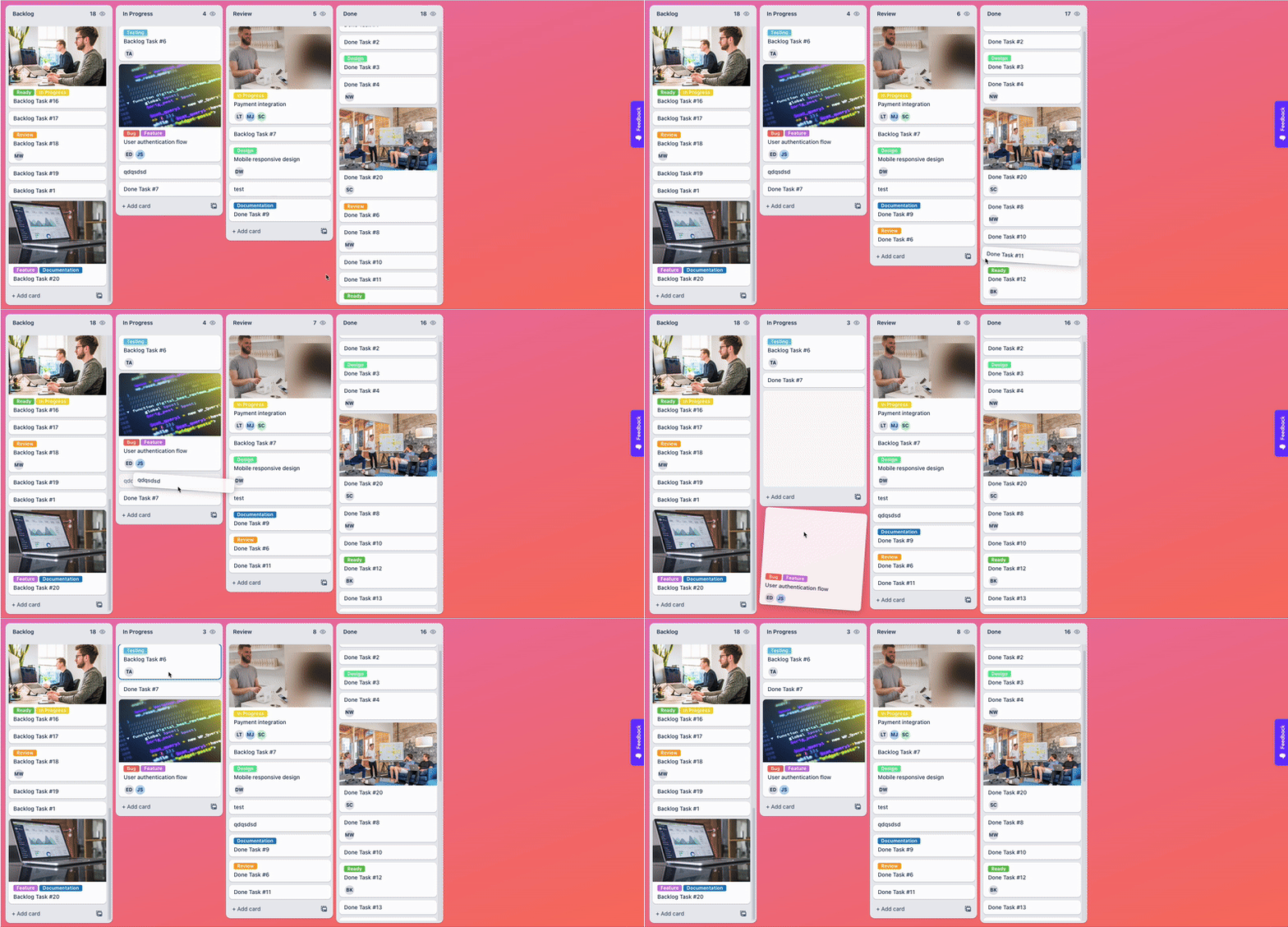
Check out the live demo: https://react-kanban-kit.netlify.app/
Features
- 🎯 Drag and Drop: Cards and columns with smooth animations
- 📱 Responsive Design: Works on desktop, tablet, and mobile
- 🎨 Highly Customizable: Custom renderers for cards, headers, footers, and more
- 🔄 Virtual Scrolling: Optimized performance for large datasets
- 📦 TypeScript Support: Full type safety and IntelliSense
- 🎮 View-Only Mode: Disable interactions when needed
- 🎯 Skeleton Loading: Built-in loading states with animations
- 🎨 Custom Styling: Function-based styling with access to data context
- 🔥 Modern Architecture: Built with React hooks and clean separation of concerns
Installation
``bash`
npm install react-kanban-kitor
yarn add react-kanban-kitor
pnpm add react-kanban-kit
Basic Usage
`tsx
import { Kanban } from "react-kanban-kit";
const MyKanbanBoard = () => {
const dataSource = {
root: {
id: "root",
title: "Root",
children: ["col-1", "col-2", "col-3"],
totalChildrenCount: 3,
parentId: null,
},
"col-1": {
id: "col-1",
title: "To Do",
children: ["task-1", "task-2"],
totalChildrenCount: 2,
parentId: "root",
},
"col-2": {
id: "col-2",
title: "In Progress",
children: ["task-3"],
totalChildrenCount: 1,
parentId: "root",
},
"col-3": {
id: "col-3",
title: "Done",
children: ["task-4"],
totalChildrenCount: 1,
parentId: "root",
},
"task-1": {
id: "task-1",
title: "Design Homepage",
parentId: "col-1",
children: [],
totalChildrenCount: 0,
type: "card",
content: {
description: "Create wireframes and mockups for the homepage",
priority: "high",
},
},
"task-2": {
id: "task-2",
title: "Setup Database",
parentId: "col-1",
children: [],
totalChildrenCount: 0,
type: "card",
},
// ... more tasks
};
const configMap = {
card: {
render: ({ data, column, index, isDraggable }) => (
{data.title}
{data.content?.description &&
{data.content.description}
}{data.content?.priority && (
priority ${data.content.priority}
}>
                {data.content.priority}
)}
),
isDraggable: true,
},
};
return (
configMap={configMap}
onCardMove={(move) => {
console.log("Card moved:", move);
// Handle card movement
}}
onColumnMove={(move) => {
console.log("Column moved:", move);
// Handle column reordering
}}
/>
);
};
`
Advanced Usage
$3
` {data.content?.description}tsx
const configMap = {
card: {
render: ({ data, column, index, isDraggable }) => (
{data.title}
{data.content?.assignee}
{data.content?.dueDate}
),
isDraggable: true,
},
divider: {
render: ({ data }) => (
{data.title}
),
isDraggable: false,
},
footer: {
render: ({ data, column }) => (
),
isDraggable: false,
},
};
`
$3
`tsx`
configMap={configMap}
renderColumnHeader={(column) => (
{column.title}
{column.totalChildrenCount}
)}
renderColumnFooter={(column) => (
)}
// Column adder
allowColumnAdder={true}
renderColumnAdder={() => (
)}
// List footer (shown at bottom of each column)
allowListFooter={(column) => column.id !== "done"}
renderListFooter={(column) => (
)}
/>
$3
`tsx`
renderCardDragPreview={(card, info) => (
{card.title}
Moving to...
)}
renderCardDragIndicator={(card, info) => (
)}
// DND state change callbacks
onCardDndStateChange={(info) => {
console.log("Card DND state:", info.state.type);
if (info.state.type === "is-dragging") {
// Card is being dragged
}
}}
onColumnDndStateChange={(info) => {
console.log("Column DND state:", info.state.type);
if (info.state.type === "is-card-over") {
// Card is being dragged over this column
}
}}
/>
$3
`tsx2px solid ${column.content?.color || "#ddd"}
rootClassName="my-kanban-board"
rootStyle={{ backgroundColor: "#f5f5f5", padding: "20px" }}
// Column styling (functions get access to column data)
columnWrapperStyle={(column) => ({
backgroundColor: column.id === "urgent" ? "#ffe6e6" : "#ffffff",
border: ,column-wrapper ${column.content?.theme || "default"}
})}
columnWrapperClassName={(column) =>
  }
  columnHeaderStyle={(column) => ({
    backgroundColor: column.content?.headerColor || "#f8f9fa",
    color: column.content?.textColor || "#333",
  })}
  columnStyle={(column) => ({
    minHeight: column.totalChildrenCount > 10 ? "800px" : "400px",
  })}
  columnClassName={(column) =>
    column.totalChildrenCount === 0 ? "empty-column" : "has-items"
  }
  // Card styling
  cardWrapperStyle={(card, column) => ({
    marginBottom: "8px",
    opacity: card.content?.archived ? 0.5 : 1,
  })}
  cardWrapperClassName="custom-card-wrapper"
  cardsGap={12} // Gap between cards in pixels
  // Column list content styling
  columnListContentStyle={(column) => ({
    padding: column.totalChildrenCount === 0 ? "40px 16px" : "8px",
  })}
  columnListContentClassName={(column) =>
  }
/>
$3
`tsxLoading more items for column: ${columnId}
configMap={configMap}
// Custom skeleton loading
renderSkeletonCard={({ index, column }) => (
)}
// Virtual scrolling (default: true)
virtualization={true}
// Load more functionality
loadMore={(columnId) => {
console.log();
// Fetch and add more items
}}
// Scroll event handling
onScroll={(event, column) => {
const { scrollTop, scrollHeight, clientHeight } = event.target;
const isNearBottom = scrollTop + clientHeight >= scrollHeight - 100;
if (isNearBottom) {
// Load more items when near bottom
loadMore?.(column.id);
}
}}
/>
`
$3
`tsx`
configMap={configMap}
viewOnly={true} // Disables all drag and drop interactions
/>
Props Reference
$3
| Prop | Type | Description |
| ------------ | ----------- | ---------------------------------------------------- |
| dataSource | BoardData | Required. The data structure for the board |configMap
| | ConfigMap | Required. Configuration for different card types |viewOnly
| | boolean | Disable all drag and drop interactions |
$3
| Prop | Type | Description |
| -------------------- | ---------------------------------- | ---------------------------- |
| loadMore | (columnId: string) => void | Load more items for a column |renderSkeletonCard
| | ({ index, column }) => ReactNode | Custom skeleton loader |
$3
| Prop | Type | Description |
| ------------------------ | ---------------------------- | -------------------------------- |
| onCardMove | (move: CardMove) => void | Fired when a card is moved |onColumnMove
| | (move: ColumnMove) => void | Fired when a column is reordered |onCardDndStateChange
| | (info: DndState) => void | Card drag state changes |onColumnDndStateChange
| | (info: DndState) => void | Column drag state changes |
$3
| Prop | Type | Description |
| ------------------------- | --------------------------- | ------------------------ |
| renderCardDragPreview | (card, info) => ReactNode | Custom card drag preview |renderCardDragIndicator
| | (card, info) => ReactNode | Custom drop indicator |
$3
| Prop | Type | Description |
| --------------------- | ---------------------------------- | ----------------------------- |
| renderColumnHeader | (column: BoardItem) => ReactNode | Custom column header |renderColumnFooter
| | (column: BoardItem) => ReactNode | Custom column footer |renderColumnWrapper
| | (column, props) => ReactNode | Wrap entire column |allowColumnAdder
| | boolean | Show add column button |renderColumnAdder
| | () => ReactNode | Custom add column button |renderListFooter
| | (column: BoardItem) => ReactNode | Footer at bottom of card list |allowListFooter
| | (column: BoardItem) => boolean | Show list footer per column |
$3
| Prop | Type | Description |
| ------------------------ | -------------------------------------- | -------------------------- |
| columnWrapperStyle | (column: BoardItem) => CSSProperties | Column wrapper styles |columnHeaderStyle
| | (column: BoardItem) => CSSProperties | Column header styles |columnStyle
| | (column: BoardItem) => CSSProperties | Column inner styles |columnListContentStyle
| | (column: BoardItem) => CSSProperties | Column content area styles |cardWrapperStyle
| | (card, column) => CSSProperties | Card wrapper styles |
$3
| Prop | Type | Description |
| ---------------------------- | ------------------------------- | -------------------- |
| rootClassName | string | Root container class |columnWrapperClassName
| | (column: BoardItem) => string | Column wrapper class |columnHeaderClassName
| | (column: BoardItem) => string | Column header class |columnClassName
| | (column: BoardItem) => string | Column inner class |columnListContentClassName
| | (column: BoardItem) => string | Column content class |cardWrapperClassName
| | string | Card wrapper class |
$3
| Prop | Type | Description |
| ---------------- | --------- | ---------------------------------------- |
| virtualization | boolean | Enable virtual scrolling (default: true) |cardsGap
| | number | Gap between cards in pixels |
$3
| Prop | Type | Description |
| --------------- | --------------------- | --------------------- |
| onColumnClick | (e, column) => void | Column click handler |onCardClick
| | (e, card) => void | Card click handler |onScroll
| | (e, column) => void | Column scroll handler |
Data Structure
$3
`typescript
interface BoardData {
root: BoardItem;
[key: string]: BoardItem;
}
interface BoardItem {
id: string;
title: string;
parentId: string | null;
children: string[];
content?: any; // Your custom data
type?: keyof ConfigMap; // Card type
totalChildrenCount: number;
isDraggable?: boolean;
}
`
$3
`typescript
type ConfigMap = {
[type: string]: {
render: (props: CardRenderProps) => React.ReactNode;
isDraggable?: boolean;
};
};
type CardRenderProps = {
data: BoardItem;
column: BoardItem;
index: number;
isDraggable: boolean;
};
`
Event Types
$3
`typescript`
interface CardMove {
cardId: string;
fromColumnId: string;
toColumnId: string;
taskAbove: string | null;
taskBelow: string | null;
position: number;
}
$3
`typescript`
interface ColumnMove {
columnId: string;
fromIndex: number;
toIndex: number;
}
CSS Classes
The component provides CSS classes you can style:
`css
/ Root container /
.rkk-board {
}
/ Column wrapper /
.rkk-column-outer {
}
/ Column inner container /
.rkk-column {
}
/ Column wrapper /
.rkk-column-wrapper {
}
/ Column header /
.rkk-column-header {
}
/ Column content area /
.rkk-column-content {
}
/ Column content list /
.rkk-column-content-list {
}
/ Card wrapper /
.rkk-generic-item-wrapper {
}
/ Card outer container /
.rkk-card-outer {
}
/ Card inner container /
.rkk-card-inner {
}
/ Drop shadow indicator /
.rkk-card-shadow {
}
/ Skeleton loading /
.rkk-skeleton {
}
`
TypeScript Support
This package is built with TypeScript and provides full type definitions. Import types as needed:
`typescript``
import {
BoardData,
BoardItem,
ConfigMap,
CardRenderProps,
BoardProps,
} from "react-kanban-kit";
Contributing
Contributions are welcome! Please feel free to submit a Pull Request.
License
MIT © Hazem braiek