react-minimal-datetime-range
v2.1.0TypeScript
A react component for date time range picker.
0/weekUpdated 2 years agoMITUnpacked: 731.2 KB
Published by Edward Xiao
npm install react-minimal-datetime-rangereact-minimal-datetime-range

 !Cdnjs !npm bundle size (minified + gzip)   
A react component for date time range picker. Online demo examples.
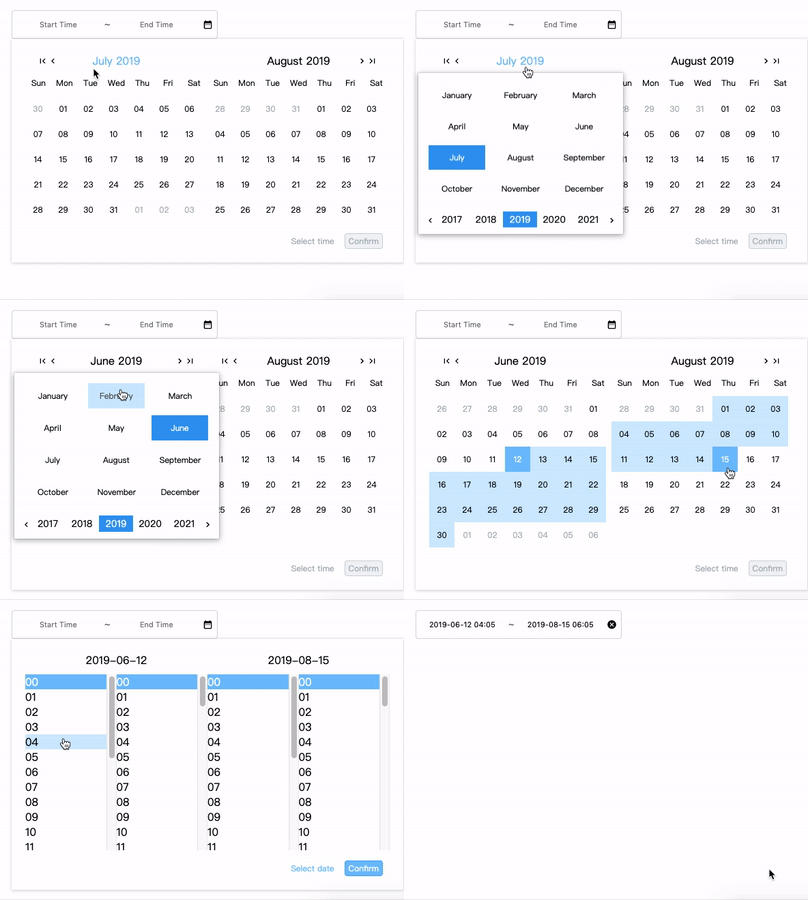
Online Demo
Online demo example
Codesandbox Examples
* Live playground (Make sure window width is greater than 900 for better experience)
* Example of custom locales (when providing ``
window.REACT_MINIMAL_DATETIME_RANGE['customLocale']`)Docs Link
Custom Locale Guide(can be multiple locales)$3
`js
"peerDependencies": {
"react": ">= 16.8.6",
"react-dom": ">= 16.8.6"
}
`Installation
sh
npm install react-minimal-datetime-range --save
`
#### By CDN (starting from v2.0.0)
html
...
`Donation
Thanks for donating me a donut! ⁄(⁄ ⁄•⁄ω⁄•⁄ ⁄)⁄Browser support
Tested on IE9+ and Chrome and Safari(10.0.3)Docs
js
import { CalendarPicker, RangePicker } from 'react-minimal-datetime-range';
import 'react-minimal-datetime-range/lib/react-minimal-datetime-range.min.css';
en-us} // ['en-us', 'zh-cn','ko-kr']; default is en-us
show={showCalendarPicker} //default is false
allowPageClickToClose={true} // default is true
onClose={() => setShowCalendarPicker(false)}
defaultDate={year + '-' + month + '-' + date} // OPTIONAL. format: "YYYY-MM-DD"
onYearPicked={res => console.log(res)}
onMonthPicked={res => console.log(res)}
onDatePicked={res => console.log(res)}
onResetDate={res => console.log(res)}
onResetDefaultDate={res => console.log(res)}
style={{ width: '300px', margin: '10px auto 0' }}
// markedDates={[${todayY}-${todayM}-${todayD - 1}, ${todayY}-${todayM}-${todayD}]} // OPTIONAL. ['YYYY-MM-DD']
// supportDateRange={[2022-02-16, 2022-12-10]} // "YYYY-MM-DD"
// defaultTimes={['10:12']} // OPTIONAL
// enableTimeSelection={true} // OPTIONAL
// handleChooseHourPick={res => console.log(res)} // OPTIONAL
// handleChooseMinutePick={res => console.log(res)} // OPTIONAL
/>
show={false} // default is false
disabled={false} // default is false
allowPageClickToClose={true} // default is true
onConfirm={res => console.log(res)}
onClose={() => console.log('onClose')}
onClear={() => console.log('onClear')}
style={{ width: '300px', margin: '0 auto' }}
placeholder={['Start Time', 'End Time']}
// markedDates={[
${todayY}-${todayM}-${todayD - 1}, ${todayY}-${todayM}-${todayD}]} // OPTIONAL. ['YYYY-MM-DD']
showOnlyTime={false} // default is false, only select time
// duration={2} // day count. default is 0. End date will be automatically added 2 days when the start date is picked.
// onChooseDate={res => {}} // on date clicked
////////////////////
// IMPORTANT DESC //
////////////////////
defaultDates={[year+'-'+month+'-'+date,year+'-'+month+'-'+date]}
// ['YYYY-MM-DD', 'YYYY-MM-DD']
// This is the value you choosed every time.
defaultTimes={[hour+':'+minute,hour+':'+minute]}
// ['hh:mm', 'hh:mm']
// This is the value you choosed every time.
initialDates={[year+'-'+month+'-'+date,year+'-'+month+'-'+date]}
// ['YYYY-MM-DD', 'YYYY-MM-DD']
// This is the initial dates.
// If provied, input will be reset to this value when the clear icon hits,
// otherwise input will be display placeholder
initialTimes={[hour+':'+minute,hour+':'+minute]}
// ['hh:mm', 'hh:mm']
// This is the initial times.
// If provied, input will be reset to this value when the clear icon hits,
// otherwise input will be display placeholder
/>
`
$3
By providing window.REACT_MINIMAL_DATETIME_RANGE['customLocale']`, you can overwrite the current locale if you like or add a new locale.codesandbox example(located in index.html)
`html
``Contributors ✨
Thanks goes to these wonderful people (emoji key):
 Edward Xiao 💻 📖 🚇 ⚠️ 👀 |  ryush00 💻 |
This project follows the all-contributors specification. Contributions of any kind welcome!