react-mockframe
v1.0.4TypeScript
React device mockup components for landing pages and product showcases. Display your app in iPhone, Android, iPad, and MacBook frames.
0/weekUpdated 1 weeks agoMITUnpacked: 328.1 KB
Published by Mohammed Banani
npm install react-mockframeMockFrame
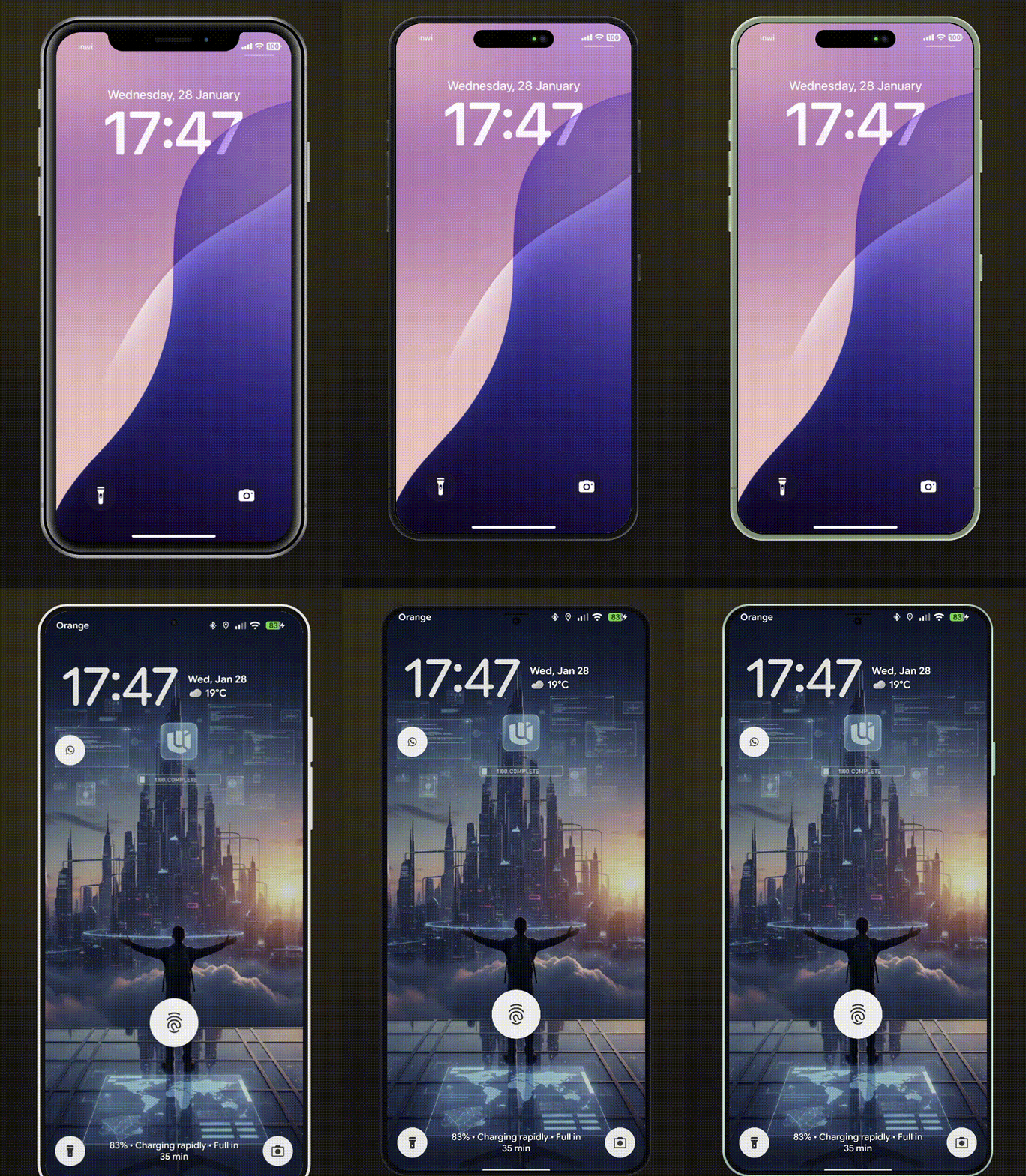
Device mockups for React. Showcase your apps in realistic phone, tablet, and laptop frames. Perfect for SaaS landing pages, product demos, and marketing websites.


Features
- 10 Modern Devices - iPhone 8/8 Plus, iPhone X, iPhone 17, Pixel 10, Galaxy S25, iPad Mini, iPad Pro, MacBook Pro 2020, MacBook Pro
- Multiple Color Variants - Authentic device colors for each model
- Landscape Mode - Rotate phones and tablets
- Notch/Dynamic Island Toggle - Show or hide notches
- Smooth Animations - Optional animated transitions
- Custom Device Frames - Create your own frames with CustomMockFrame
- Modular CSS - Import only the device families you need
- TypeScript First - Full type safety with discriminated unions
- Lightweight - ~11KB ESM, tree-shakeable
Supported Devices
| Device | Colors | Landscape | Notch/Island |
|--------|--------|-----------|--------------|
| iPhone X | - | Yes | Notch |
| iPhone 8 | black, silver, gold | Yes | - |
| iPhone 8 Plus | black, silver, gold | Yes | - |
| iPhone 17 | black, white, mist-blue, sage, lavender, cosmic-orange, deep-blue | Yes | Dynamic Island |
| Pixel 10 | obsidian, porcelain, mint, rose | Yes | - |
| Galaxy S25 | phantom-black, icy-blue, navy, silver, mint | Yes | - |
| iPad Mini | black, silver | Yes | - |
| iPad Pro | space-gray, silver | Yes | - |
| MacBook Pro 2020 | - | - | - |
| MacBook Pro | space-gray, silver | - | Notch |
Installation
``bash`
npm install react-mockframeor
pnpm add react-mockframeor
yarn add react-mockframe
Quick Start
`tsx
import { MockFrame } from 'react-mockframe'
import 'react-mockframe/styles/mockframe.css'
export default function App() {
return (
)
}
`
Usage Examples
$3
`tsx`

$3
`tsx`
$3
`tsx`
$3
`tsx
// Hide notch on iPhone X
// Hide Dynamic Island on iPhone 17
// Hide notch on MacBook Pro
`
$3
`tsx`
color="mint"
width={360}
height={800}
zoom={0.8}
>
$3
`tsx`
color="icy-blue"
zoom={zoomLevel}
animated
>
$3
`tsx
Your product headline
Describe your product value proposition here.

`
$3
`tsx`

Props
$3
| Prop | Type | Description |
|------|------|-------------|
| device | DeviceName | Required. The device model to render |color
| | string | Device color variant (required for devices with colors) |landscape
| | boolean | Rotate to landscape orientation (phones/tablets only) |hideNotch
| | boolean | Hide the notch or dynamic island |width
| | number | Override screen content width in pixels |height
| | number | Override screen content height in pixels |zoom
| | number | Scale the entire device frame (e.g., 0.75 for 75%) |animated
| | boolean | Enable smooth transitions for zoom changes |children
| | ReactNode | Content to render inside the device screen |
The color prop is type-safe - TypeScript only allows valid colors for each device:
`tsx
// Valid - iPhone 17 supports 'lavender'
// TypeScript error - iPhone X has no color variants
// TypeScript error - 'pink' is not a valid iPhone 17 color
`
Custom Device Frames
Create your own device frames with CustomMockFrame:
`tsx
import { CustomMockFrame } from 'react-mockframe'
height={812}
bezelWidth={12}
borderRadius={44}
screenBorderRadius={40}
bezelColor="#1a1a1a"
zoom={0.8}
animated
>
`
$3
| Prop | Type | Default | Description |
|------|------|---------|-------------|
| width | number | Required | Screen content width in pixels |height
| | number | Required | Screen content height in pixels |bezelWidth
| | number \| object | 12 | Bezel thickness (uniform or per-side) |borderRadius
| | number | 44 | Outer frame corner radius |screenBorderRadius
| | number | auto | Screen corner radius |bezelColor
| | string | #1a1a1a | Bezel background color |zoom
| | number | - | Scale factor for the frame |animated
| | boolean | - | Enable smooth transitions |landscape
| | boolean | - | Display in landscape orientation |frameClassName
| | string | - | CSS class for the outer frame |screenClassName
| | string | - | CSS class for the screen area |
Per-side bezel example:
`tsx`
height={812}
bezelWidth={{ top: 60, right: 12, bottom: 60, left: 12 }}
>
Modular CSS Bundles
Import only the device families you need to reduce bundle size:
`tsx
// Full bundle - all devices (~46KB)
import 'react-mockframe/styles/mockframe.css'
// iPhones only (~27KB)
import 'react-mockframe/styles/mockframe-iphones.css'
// Android only (~7KB)
import 'react-mockframe/styles/mockframe-android.css'
// Tablets only (~7KB)
import 'react-mockframe/styles/mockframe-tablets.css'
// Laptops only (~6KB)
import 'react-mockframe/styles/mockframe-laptops.css'
`
TypeScript
The library exports helpful types:
`tsx
import type {
DeviceName, // Union of all device names
MockFrameProps, // Full props with type safety
DeviceConfig, // Get config for a specific device
DeviceColor, // Get available colors for a device
DeviceHasLandscape, // Check if device supports landscape
CustomMockFrameProps,
} from 'react-mockframe'
// Get available colors for a specific device
type iPhone17Colors = DeviceColor<'iPhone 17'>
// => 'black' | 'white' | 'mist-blue' | 'sage' | 'lavender' | 'cosmic-orange' | 'deep-blue'
// Check if a device supports landscape
type CanRotate = DeviceHasLandscape<'iPad Pro'>
// => true
`
Access device data programmatically:
`tsx
import { DeviceNames, DeviceOptions } from 'react-mockframe'
// Array of all device names
console.log(DeviceNames)
// ['iPhone X', 'iPhone 8', 'iPhone 8 Plus', 'iPhone 17', ...]
// Access device configuration
const config = DeviceOptions['iPhone 17']
console.log(config.colors) // ['black', 'white', 'mist-blue', ...]
console.log(config.width) // 393
console.log(config.height) // 852
``
Demo Website
The interactive demo website includes:
- Device Preview - Switch between all devices and colors in real-time
- Orientation Toggle - Portrait and landscape modes
- Notch Toggle - Show/hide notch and dynamic island
- Auto-Fit Zoom - Automatically scale device to fit the viewport
- Screenshot Upload - Drag & drop images into the device frame
- Image Controls - Zoom, pan, and reposition uploaded images
- Background Options - Solid colors and gradient presets
- Export to PNG/WebP - Download mockups with transparent backgrounds
- Live Code Preview - Copy-paste ready code snippets
- Dark/Light Theme - Full theme support
Browser Support
- Chrome 95+
- Firefox 95+
- Safari 15+
- Edge 95+
License
MIT License - see LICENSE for details.
Author
Mohammed Banani — @mbdev3
Contributing
Contributions are welcome! Please open an issue or submit a pull request.
License
MIT License — see LICENSE for details.