react-multistep
v6.1.0TypeScript
Responsive ReactJS multistep form component
1.1K/weekUpdated 4 months agoMITUnpacked: 82.0 KB
Published by @djidja8
npm install react-multistepResponsive React multistep form component
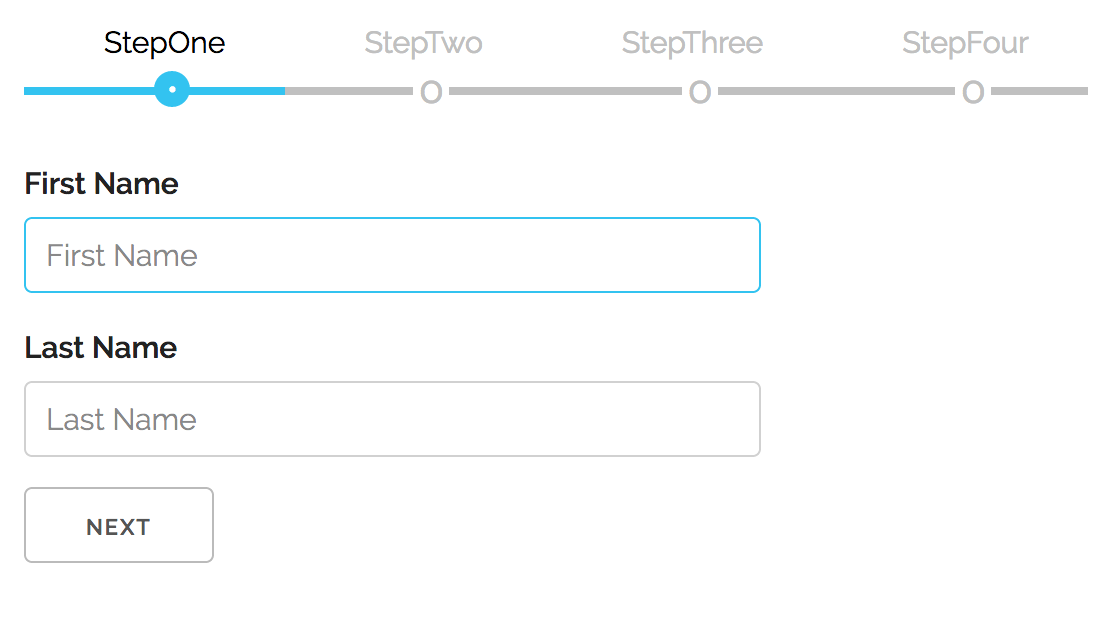
Take it for a SPIN! :dizzy:
#### List of contributors :raised_hands:
$3
``
Version 5.x.x is in a maintenance mode, the new development is ongoing on v6.x.x. Version (v5.x.x) bug fixes will still be available on NPM, if you would like to open a PR for a fix or make a fork, git checkout branch v5.x.x. The new version, v6.0.0 has a multiple improvements (see below) and is not backwards compatible.
What's New in v6.0.0
Version 6.0.0 is a complete rewrite with modern React patterns and
architecture. This is a breaking change from v5.x.x.
$3
v6 is now headless - the MultiStep component manages state and logic, but
you control the UI. This gives you complete flexibility over how steps,
navigation, and progress indicators look and behave.
Before (v5): Built-in navigation UI with limited customization
`jsx`
{/ steps /}
Now (v6): Bring your own UI, powered by the useMultiStep hook
`jsx`
$3
The useMultiStep hook is the core of v6. Any component inside can access wizard state and navigation:
`tsx
import { useMultiStep } from "react-multistep";
function CustomNavigation() {
const {
activeStep, // Current step index (0-based)
stepCount, // Total number of steps
steps, // Array of step metadata
next, // Go to next step
previous, // Go to previous step
goToStep, // Jump to specific step
currentStepValid, // Is current step valid?
} = useMultiStep();
return (
);
}
`
Key capabilities:
- Access wizard state from any nested component
- Build custom navigation (tabs, progress bars, breadcrumbs)
- Implement complex flows (skip steps, conditional navigation)
- Full TypeScript support
$3
v6 uses React Context internally, eliminating prop drilling:
- Automatic state injection: Every child receives signalParent callback
- Decoupled architecture: Navigation UI doesn't need to be at the top level
- Flexible composition: Mix and match custom chrome components
$3
Steps control their own validity via the signalParent callback:
`tsx
function AddressStep({ signalParent }) {
const [zip, setZip] = useState("");
useEffect(() => {
// Signal validity whenever state changes
signalParent({ isValid: zip.length === 5 });
}, [zip, signalParent]);
return setZip(e.target.value)} />;
}
`
Automatic enforcement:
- Next button disabled when isValid: false
- Can't jump forward to invalid steps
- Optional callback
$3
v6 includes an optional modern CSS stylesheet with:
- Mobile-first responsive design (container queries)
- Automatic dark mode (color-scheme: light dark)clamp()
- Fluid typography with
- Touch-optimized tap targets (44px)
- CSS custom properties for easy theming
`jsx`
import "react-multistep/styles"; // Optional!
$3
- Core: 10.3kb (logic only)
- CSS: 4.4kb (optional)
- Total: ~15kb vs ~45kb in v5
$3
Removed:
- showNavigation propprevButton
- / nextButton propsprevStyle
- Built-in navigation UI
- Style props (, nextStyle, etc.)
Added:
- useMultiStep hooksignalParent
- callback for validation
- Context-based architecture
- Optional modern CSS import
- TypeScript-first design
See the example app for a complete working implementation.
🚀 What's New in v6.1.0
$3
v6.1.0 introduces an optional server-side module for building HTMX-powered
multi-step wizards with zero client-side JavaScript (except HTMX itself).
Perfect for server-rendered applications, progressive enhancement, and when you
want the server to control all state and validation.
Key Features:
- ✅ HATEOAS-driven - Server controls which navigation actions are available
- ✅ Light Functional Programming - Pure functions, Result types, ports
pattern
- ✅ Zero client-side logic - All state and validation managed server-side
- ✅ HTMX integration - Progressive enhancement with automatic updates
- ✅ Type-safe - Full TypeScript support with branded types
- ✅ Framework-agnostic - Works with any Node.js HTTP framework
- ✅ Session-based - Built-in session store abstraction
$3
The server module is included in the main package:
`bash`
npm install react-multistep
$3
`typescript
import {
createWizardHandler,
inMemorySessionStore,
systemClock,
makeStepId,
validationOk,
validationErr,
ok,
} from "react-multistep/server";
import type { WizardConfig, StepDefinition } from "react-multistep/server";
// Define steps with validation and rendering
const steps: StepDefinition[] = [
{
id: makeStepId("personal-info"),
title: "Personal Information",
validate: (data) => {
const d = data as { name?: string; email?: string };
const errors: Record
if (!d.name || d.name.length < 2) {
errors.name = "Name must be at least 2 characters";
}
if (!d.email || !d.email.includes("@")) {
errors.email = "Invalid email address";
}
return Object.keys(errors).length > 0
? validationErr(errors)
: validationOk();
},
render: (ctx) => {
const data = ctx.data as { name?: string; email?: string } | null;
const errors = ctx.errors || {};
return ok(
);
},
},
];// Create wizard configuration
const config: WizardConfig = { steps };
// Create handler with dependency injection
const handler = createWizardHandler(
config,
inMemorySessionStore(),
systemClock(),
{
containerId: 'wizard-shell',
template: ({ containerId, indicators, stepContent, navigation }) =>
,
  }
);// Use with any HTTP framework
app.all("/wizard/*", async (req, res) => {
  const response = await handler(req);
  res.status(response.status).send(await response.text());
});
`Pass a fourth
argument to fully customize the generated HTML:-
containerId – override the wrapper element ID (default wizard-content)
- template(ctx) – replace the default layout while reusing rendered pieces
- renderNavigation / renderStepIndicators – swap in bespoke markupErrors are serialized as JSON with sensible HTTP status codes (
422 for
validation failures, 404 for missing sessions/steps, 409 for navigation
conflicts, etc.), so clients can react appropriately.$3
The server module follows Light FP principles with clear separation of
concerns:
`
Pure Core                     Adapters                   HTTP
─────────────────────        ─────────────────────      ────────────────
wizard.ts (pure logic)   →   session.ts (storage)   →   http.ts (routes)
renderer.ts (pure HTML)  →   ports.ts (interfaces)  →   middleware.ts
types.ts (ADTs)
Pure Functions:
- All domain logic is pure (no I/O, no side effects)
- Validation, rendering, and state transitions are deterministic
- Easy to test and reason about
Result Types:
- All fallible operations return
- No exceptions in the core - errors are values
- Exhaustive error handling with discriminated unionsPorts Pattern:
- Dependencies injected as interfaces (
, Clock, UuidGen)
- Easy to swap implementations (in-memory, Redis, database)
- Zero coupling between layers$3
The wizard handler provides these routes automatically:
-
GET /wizard/:sessionId - Initialize wizard, render first step
- POST /wizard/:sessionId/update - Update current step data (triggers
validation)
- POST /wizard/:sessionId/next - Navigate to next step
- POST /wizard/:sessionId/previous - Navigate to previous step
- POST /wizard/:sessionId/goto/:index - Jump to specific step
- POST /wizard/:sessionId/submit - Submit final step$3
The server module generates HTMX-enhanced HTML with automatic state management:
`html
hx-post="/wizard/session-123/next"
hx-target="#wizard-content"
hx-swap="outerHTML"
class="wizard-button-next"
>
Next
name="email"
hx-post="/wizard/session-123/update"
hx-trigger="change"
hx-target="#wizard-content"
hx-swap="outerHTML"
/>
`When a field changes, HTMX posts to the server, which validates, updates session
state, and returns the entire updated wizard UI. Navigation buttons automatically
enable/disable based on validation state.
$3
Built-in session storage with customizable backends:
typescript
import { inMemorySessionStore } from "react-multistep/server";// In-memory (development)
const store = inMemorySessionStore();
// Or implement your own for production:
import type { SessionStore } from "react-multistep/server";
const redisStore: SessionStore = {
get: async (id) => {
/ ... /
},
set: async (id, session) => {
/ ... /
},
delete: async (id) => {
/ ... /
},
};
`$3
A full working example with Node.js HTTP server is available:
bash
npm run example:server
Open http://localhost:8000/
`See
for:- Complete step definitions with validation
- HTMX integration patterns
- Custom HTML rendering
- Session management
- Error handling
- 📘 Extended guide: Server example README
$3
The server module supports intelligent step skipping for optional or
conditional sections. Users can jump multiple steps ahead if intermediate steps
are skippable based on their data or business rules.
#### Basic Skip Configuration
Add a
canSkip function to any step definition:`typescript
{
id: makeStepId("company-details"),
title: "Company Details", // Skip this step for personal accounts
canSkip: (session) => {
const basicInfo = session.stepData[0] as { accountType?: string };
return basicInfo?.accountType === "personal";
},
validate: (data) => { / validation logic / },
render: (ctx) => { / render logic / }
}
`#### Skip Patterns
Always Optional:
typescript
canSkip: () => true  // Step 3 (marketing preferences) always skippable
`Conditional Logic:
typescript
canSkip: (session) => {
  const userType = session.stepData[0] as { type: string };
  return userType?.type === "existing_customer";  // Skip onboarding for existing users
}
`Complex Business Rules:
typescript
canSkip: (session) => {
  const userRole = session.metadata.userRole;
  const hasCompletedBefore = session.metadata.returning;
  return userRole === "admin" || hasCompletedBefore;
}
`#### Multi-Step Navigation
The enhanced navigation logic allows users to jump multiple steps when
intermediate steps are skippable:
- Step 1 → Step 4: If Steps 2 & 3 are both skippable
- Step 2 → Step 5: If Steps 3 & 4 can be skipped based on Step 2's data
- Intelligent blocking: Navigation blocked if any required intermediate step
is invalid
#### Navigation Rules
typescript
// Enhanced canGoToStep logic:
if (targetStep > currentStep + 1) {
  // Multi-step jump attempt
  if (!currentStepValid) return false;  // Current step must be valid  // Check all intermediate steps
  for (let i = currentStep + 1; i < targetStep; i++) {
    const step = config.steps[i];
    const canSkip = step?.canSkip?.(session) ?? false;    // Block if step can't be skipped AND isn't already valid
    if (!canSkip && !session.stepValidity[i]) {
      return false;
    }
  }
  return true;  // ✅ Jump allowed
}
`#### Demo Example
Try the enhanced skip logic with a complete example:
bash
Run the skip logic demo
node examples/server-side/skip-example.js
Open http://localhost:8001/
`Demo flow:
1. Choose "Personal" account → Company details (Step 2) becomes skippable
2. Choose "Business" account → Company details required
3. Marketing preferences (Step 3) always optional
4. Jump directly from Step 1 to Step 4 when steps are skippable
#### HTMX Integration
Step indicators automatically reflect skip states in the UI:
html
3. Required Step
`The server controls all navigation logic - HTMX simply enables the interactions
that the server determines are valid based on current state and skip rules.
$3
Use Server-Side when:
- You want zero client-side JavaScript (progressive enhancement)
- Server controls all state and business logic
- You need server-side validation and security
- Building forms that work without JavaScript
- Using server-side rendering frameworks (Next.js, Remix, etc.)
Use Client-Side when:
- You want rich interactive UIs
- Need offline capabilities
- Want instant validation feedback
- Building single-page applications
- Client-side state management (Redux, Zustand, etc.)
Both modules can coexist in the same application for different use cases.
#
$3
To use this module in your app run:
sh
npm install react-multistep
`next, import it inside of your app:
jsx
import MultiStep from "react-multistep";
`and then, in your application, you add your custom components/forms this way:
jsx
`Because v6 is headless, you provide the surrounding chrome yourself. A minimal
layout might be:
tsx
import { MultiStep, useMultiStep } from "react-multistep";
import type { StepComponentProps } from "react-multistep";function WizardChrome({ children }: { children: React.ReactNode }) {
const { steps, activeStep, goToStep, next, previous, currentStepValid } =
useMultiStep();
return (
{steps.map((step) => (
aria-selected={step.index === activeStep}
onClick={() => goToStep(step.index)}
>
{step.title ?? Step ${step.index + 1}}
))}
{children}
{activeStep < steps.length - 1 && (
)}
);
}function StepOne({ signalParent }: StepComponentProps) {
const [value, setValue] = useState("");
useEffect(() => {
signalParent({ isValid: value.trim().length > 0 });
}, [value, signalParent]);
return (
setValue(event.target.value)} />
);
}
`$3
| Prop | Type | Default | Description |
| ------------------- | ------------------------------ | ------------ | ------------------------------------------------------------------------- |
|
| React.ReactNode | – | Steps to render. Each child is cloned and receives a signalParent prop. |
| activeStep | number | uncontrolled | Controls the active step index. Leave undefined for internal state. |
| initialStep | number | 0 | Starting step when using internal state. |
| onStepChange | (step: number) => void | undefined | Fires whenever the active step changes (manual or programmatic). |
| onValidationError | (activeStep: number) => void | undefined | Called when the user tries to advance while the current step is invalid. |Each child receives a
signalParent callback used to report validation state:`ts
props.signalParent({ isValid: boolean, goto?: number });
`If
is false, the Next button is disabled and step jumping forward is
blocked. The optional goto field lets you hint which step the wizard should
focus when navigation fails. When the user tries to advance past an invalid
step, MultiStep will attempt to redirect to goto (clamped to the available
steps) if that target is already valid—handy for summary/review screens that
need to bounce the user back to the first incomplete section.> TypeScript tip: extend the provided
StepComponentProps type to get full
> autocomplete for signalParent and the optional title prop:
>
> `ts
> import type { StepComponentProps } from "react-multistep";
>
> type AccountStepProps = StepComponentProps<{ plan: Plan }>
> `$3
Any descendant of
 can tap into a hook family to inspect navigation
state or drive custom controls:`tsx
import { useMultiStepState, useStepNavigation } from "react-multistep";function WizardChrome({ children }: React.PropsWithChildren) {
const { steps, activeStep, currentStepValid, stepCount } = useMultiStepState();
const { previous, next, goToStep } = useStepNavigation();
return (
{Step ${activeStep + 1} of ${stepCount}}
{steps.map((step) => (
))}
{children}
);
}
`####
Returns the full context object for cases where you need everything at once.
The shape matches the bullet list below.
####
& useStepNavigation()Prefer these slice hooks for most real-world UIs—they only trigger re-renders
when the specific slice changes, which keeps custom chrome components snappy.
####
Convenience helper that just gives you
(useful for read-only indicators
or analytics).All hooks share the same data model:
-
activeStep: current index (0-based)
- stepCount: total number of registered steps
- steps: array describing each step { index, isActive, isValid, title }
- : programmatically navigate to any step (respects validation
rules)
- next() / previous(): shortcuts for relative navigation
- setStepValidity(index, isValid): manually toggle a step’s validity (exposed
via useMultiStep() and useStepNavigation() for async workflows)
- isStepValid(index): read cached validity for any step
- currentStepValid: convenience boolean for the active step$3
When the child form component needs to control the Next button, call
signalParent inside your component whenever validity changes:`tsx
useEffect(() => {
props.signalParent({ isValid: formIsValid });
}, [formIsValid, props.signalParent]);
`The example app demonstrates a reusable chrome component that consumes the hook
and renders the navigation UI for each step.
$3
Version 6.0.0 includes an optional modern CSS stylesheet with mobile-first,
responsive design:
jsx
// Import the optional stylesheet
import "react-multistep/styles";
`Features:
- Mobile-first responsive design with container queries
- Automatic dark mode support via
- Fluid typography using for adaptive sizing
- Touch-optimized tap targets (44px minimum)
- CSS custom properties for easy theming
- Modern CSS features: @layer, light-dark(), logical properties
- Backward compatible: Works without the CSS, enhanced with itCustomization:
All styles use CSS custom properties with sensible defaults:
`css
:root {
--multistep-primary: #1eaedb;
--multistep-inactive: silver;
--multistep-bg: #f1f1f141;
--multistep-spacing-md: clamp(2rem, 3vw, 4rem);
--multistep-button-size: clamp(2.5rem, 5vw, 4rem);
/ ...and more /
}
`Override any variable in your own CSS to customize colors, spacing, or
typography. The component adapts automatically to small screens (mobile) and
large screens (desktop) without media queries using container queries.
Instructions for local development
#### If you would like to explore further, contribute a PR or just try the included code example:
Start by cloning the repo locally:
sh
git clone https://github.com/srdjan/react-multistep.git
`then:
sh
cd react-multistep            // (1) navigate to the project folder
npm install                   // (2) install dependencies
npm run build                 // (3) build the component
`On a successful build, try the example app:
sh
cd ./examples/client-side     // (1) navigate to the example folder
npm install                   // (2) install dependencies
npm run dev                   // (3) build the library + run esbuild dev server (http://localhost:8000)optional
npm run build                 // production bundle to ./dist
``Now, you can open the example in your favorite browser...