react-native-accordion-list-view
v2.0.3TypeScript
Animated accordion collapsable List for react native.
231/weekUpdated 2 years agoMITUnpacked: 55.3 KB
Published by Louay Sleman
npm install react-native-accordion-list-viewreact-native-accordion-list-view
A high performance, beautiful and fully customizable Accordion list for React Native.
Implemented using react-native-vector-icons.




Getting started
``
js
npm install react-native-accordion-list-view --save
`
or
js
yarn add react-native-accordion-list-view
`
Now we need to install react-native-vector-icons.js
npm install react-native-vector-icons --save
`
or
js
yarn add react-native-vector-icons
`Platforms Supported
- [x] iOS
- [x] Android
Important Note
This plugin work with Layout Animation and In order to get this to work on Android you need to set the following flags via UIManager:
javascript
if (Platform.OS === 'android') {
    if (UIManager.setLayoutAnimationEnabledExperimental) {
        UIManager.setLayoutAnimationEnabledExperimental(true);
    }
}
`$3
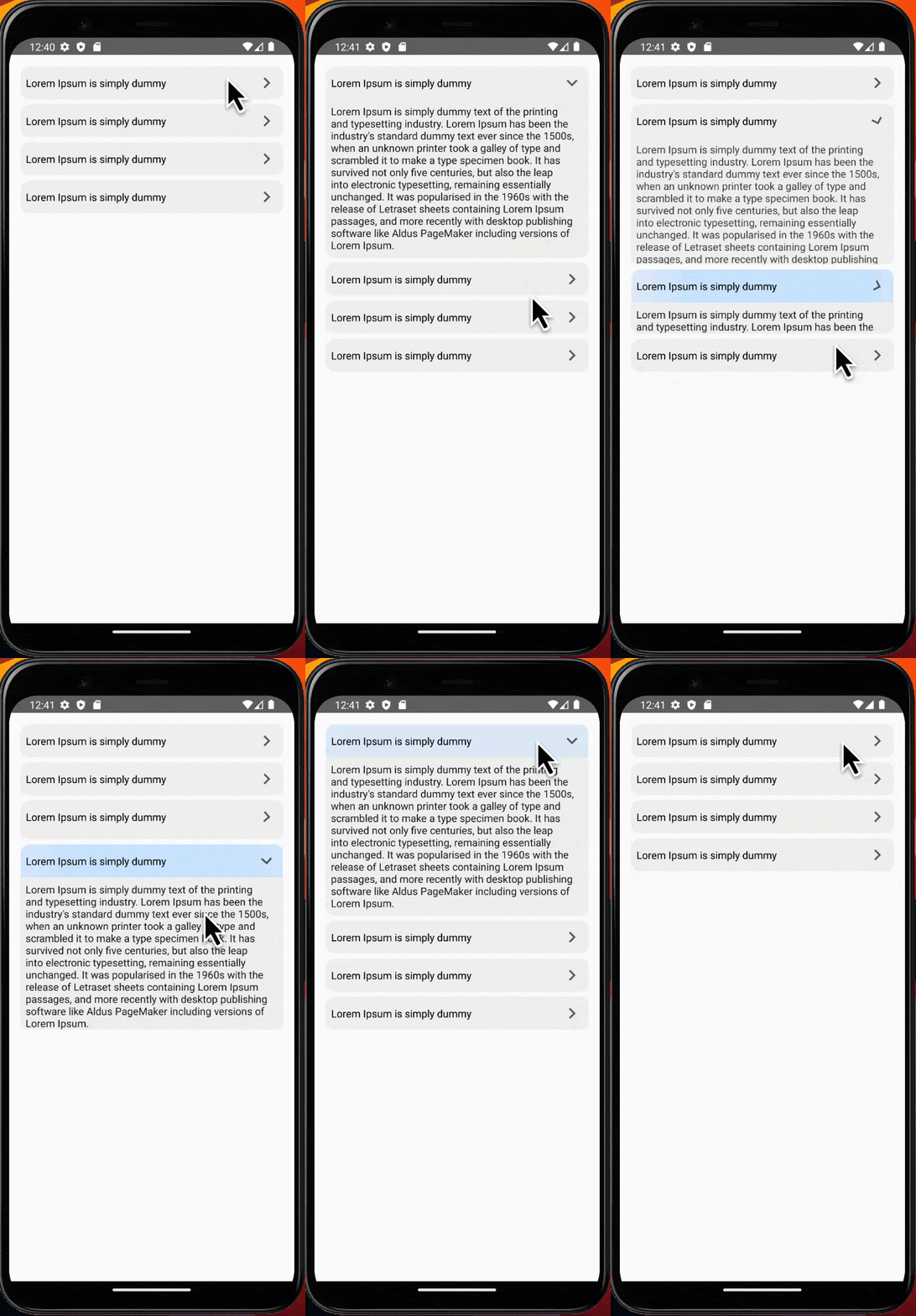
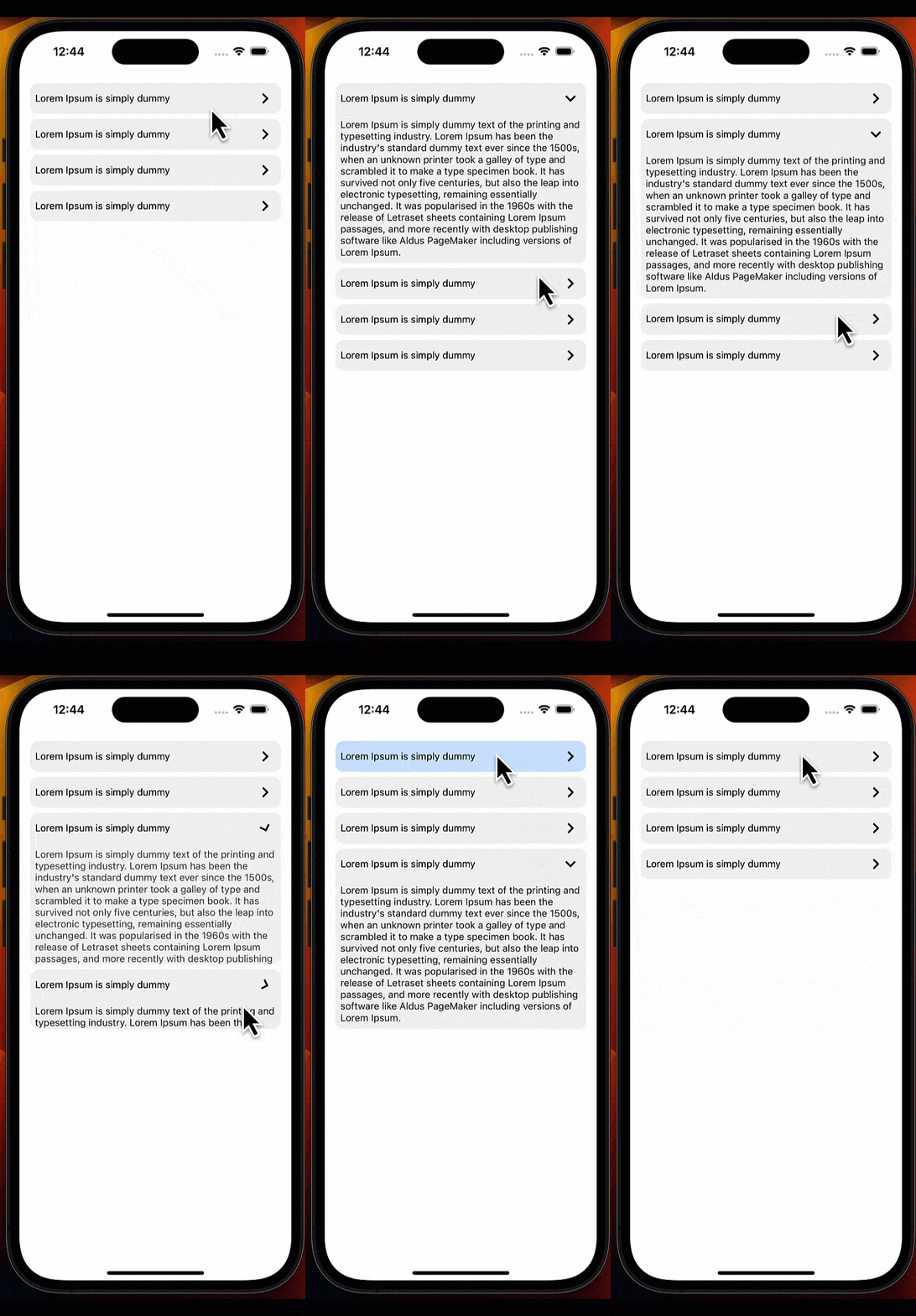
Versioning
This project follows semantic versioning. We do not hesitate to release breaking changes but they will be in a major version.$3
- 2.0.3 - New Features
We've enhanced the Accordion list by adding support for the index parameter in the customTitle, customBody, and customIcon functions. This enables greater customization possibilities, allowing you to dynamically adjust the rendering of elements based on the index of each accordion item. Explore these new parameters to tailor your accordion items more precisely to your application's requirements.
- 2.0.2 - New Features defaultOpenIndices: You can now specify an array of indices in the
prop for the accordion list. These indices indicate which sections should be expanded by default, allowing you to control the initial state of the accordion. pressableProps: We've added a new prop called
pressableProps to both the accordion list and accordion item components. This allows you to customize the styles and ripple effects for the pressable component, giving you more control over the user interaction experience.
- 2.0.1 - Allow single/multiple expanding, allow AccordionItem to be opened by default using isOpen property, add onPress for AccordionItem.
- 2.0.0 - Change library code to typescript and Replacing TouchableOpacity with Pressable.
- 1.0.4 - Support RTL and update README.
- 1.0.3 - Accordion list FlatList props bug fixes.
- 1.0.2 - Accordion Item Bug fixes.
- 1.0.1 - Update README.
- 1.0.0 - First release.$3
| Props | Params | isRequire | Default | Description |
|--------------------|-------------------------------------------------------------------|-----------|---------------------|--------------------------------------------------------------------------------------------------------------------------------------------------|
| data | Array | Yes | | For simplicity, data is a plain array. If you want to use something else, like an immutable list |
| customTitle | (item, index) => JSX.Element | Yes | | Function that returns a React element to display as Accordion title |
| customBody | (item, index) => JSX.Element | Yes | | Function that returns a React element to display as Accordion body |
| customIcon | (index) => JSX.Element | No | keyboard-arrow-left | Function that returns a React element to display as Accordion icon |
| containerItemStyle | ViewStyle | No | {} | Styling for Accordion item container view |
| style | ViewStyle | No | {} | Styling for container view |
| animationDuration | Number | No | 300 | Accordion animation duration |
| isRTL | Boolean | No | false | Support RTL |
| expandMultiple | Boolean | No | false | Allow more than one section to be expanded |
| defaultOpenIndices | number[] | No | [] | An array of indices indicating which sections should be expanded by default. If
expandMultiple is set to false, it can only contain a single index. |
| pressableProps | AccordionPressableProps | No | {} | Additional props for configuring the Pressable component. |
$3
This is a wrapper around
Flatlist, all their props works well and the inherited props too (from ScrollView and VirtualizedList).$3
#### Without Custom Styles
`javascript
import React, { useEffect } from 'react';
import {View, SafeAreaView, StyleSheet, Text, Platform, UIManager} from 'react-native';
import {AccordionList} from 'react-native-accordion-list-view';const App = () => {
const data = [
{
id: 0,
title: 'Lorem Ipsum is simply dummy',
body: "Lorem Ipsum is simply dummy text of the printing and typesetting industry. Lorem Ipsum has been the industry's standard dummy text ever since the 1500s, when an unknown printer took a galley of type and scrambled it to make a type specimen book. It has survived not only five centuries, but also the leap into electronic typesetting, remaining essentially unchanged. It was popularised in the 1960s with the release of Letraset sheets containing Lorem Ipsum passages, and more recently with desktop publishing software like Aldus PageMaker including versions of Lorem Ipsum.",
},
{
id: 1,
title: 'Lorem Ipsum is simply dummy',
body: "Lorem Ipsum is simply dummy text of the printing and typesetting industry. Lorem Ipsum has been the industry's standard dummy text ever since the 1500s, when an unknown printer took a galley of type and scrambled it to make a type specimen book. It has survived not only five centuries, but also the leap into electronic typesetting, remaining essentially unchanged. It was popularised in the 1960s with the release of Letraset sheets containing Lorem Ipsum passages, and more recently with desktop publishing software like Aldus PageMaker including versions of Lorem Ipsum.",
},
];
useEffect(() => {
if (Platform.OS === 'android') {
if (UIManager.setLayoutAnimationEnabledExperimental) {
UIManager.setLayoutAnimationEnabledExperimental(true);
}
}
}, []);
return (
customTitle={item => {item.title} }
customBody={item => {item.body} }
animationDuration={400}
expandMultiple={true}
/>
);
};
export default App;
const styles = StyleSheet.create({
container: {
paddingVertical: '2%',
paddingHorizontal: '3%',
height: '100%',
backgroundColor: '#e7e7e7',
},
});
`#### With Custom Styles
javascript
import React, { useEffect } from 'react';
import {View, SafeAreaView, StyleSheet, Text, Platform, UIManager} from 'react-native';
import {AccordionList} from 'react-native-accordion-list-view';const App = () => {
const data = [
{
id: 0,
title: 'Lorem Ipsum is simply dummy',
body: "Lorem Ipsum is simply dummy text of the printing and typesetting industry. Lorem Ipsum has been the industry's standard dummy text ever since the 1500s, when an unknown printer took a galley of type and scrambled it to make a type specimen book. It has survived not only five centuries, but also the leap into electronic typesetting, remaining essentially unchanged. It was popularised in the 1960s with the release of Letraset sheets containing Lorem Ipsum passages, and more recently with desktop publishing software like Aldus PageMaker including versions of Lorem Ipsum.",
},
{
id: 1,
title: 'Lorem Ipsum is simply dummy',
body: "Lorem Ipsum is simply dummy text of the printing and typesetting industry. Lorem Ipsum has been the industry's standard dummy text ever since the 1500s, when an unknown printer took a galley of type and scrambled it to make a type specimen book. It has survived not only five centuries, but also the leap into electronic typesetting, remaining essentially unchanged. It was popularised in the 1960s with the release of Letraset sheets containing Lorem Ipsum passages, and more recently with desktop publishing software like Aldus PageMaker including versions of Lorem Ipsum.",
},
{
id: 2,
title: 'Lorem Ipsum is simply dummy',
body: "Lorem Ipsum is simply dummy text of the printing and typesetting industry. Lorem Ipsum has been the industry's standard dummy text ever since the 1500s, when an unknown printer took a galley of type and scrambled it to make a type specimen book. It has survived not only five centuries, but also the leap into electronic typesetting, remaining essentially unchanged. It was popularised in the 1960s with the release of Letraset sheets containing Lorem Ipsum passages, and more recently with desktop publishing software like Aldus PageMaker including versions of Lorem Ipsum.",
},
{
id: 3,
title: 'Lorem Ipsum is simply dummy',
body: "Lorem Ipsum is simply dummy text of the printing and typesetting industry. Lorem Ipsum has been the industry's standard dummy text ever since the 1500s, when an unknown printer took a galley of type and scrambled it to make a type specimen book. It has survived not only five centuries, but also the leap into electronic typesetting, remaining essentially unchanged. It was popularised in the 1960s with the release of Letraset sheets containing Lorem Ipsum passages, and more recently with desktop publishing software like Aldus PageMaker including versions of Lorem Ipsum.",
},
];
useEffect(() => {
if (Platform.OS === 'android') {
if (UIManager.setLayoutAnimationEnabledExperimental) {
UIManager.setLayoutAnimationEnabledExperimental(true);
}
}
}, []);
return (
customTitle={(item, index) => {item.title} }
customBody={(item, index) => {item.body} }
animationDuration={400}
defaultOpenIndices={[0, 2]}
expandMultiple={true}
containerItemStyle={{padding: 0}}
pressableProps={{
style: ({pressed}) => [
{
padding: '2%',
backgroundColor:
pressed && Platform.OS == 'ios'
? 'rgb(210, 230, 255)'
: 'transparent',
},
],
android_ripple: {
color: 'rgb(210, 230, 255)',
},
}}
/>
);
};
export default App;
const styles = StyleSheet.create({
container: {
paddingVertical: '2%',
paddingHorizontal: '3%',
height: '100%',
backgroundColor: '#e7e7e7',
},
});
`$3
This component allows you to use component in any place if you have your own wrapper or if you have a problem with using FlatList in your screen.| Props | Params | isRequire | Default | Description |
|-------------------|------------------|-----------|---------------------|-----------------------------------------------------------------------------------------------------------------------------------|
| customTitle | () => JSX.Element | Yes | | Function that returns a React element to display as Accordion title |
| customBody | () => JSX.Element | Yes | | Function that returns a React element to display as Accordion body |
| customIcon | () => JSX.Element | No | keyboard-arrow-left | Function that returns a React element to display as Accordion icon |
| containerStyle | ViewStyle | No | {} | Styling for Accordion item container view |
| animationDuration | Number | No | 300 | Accordion animation duration |
| isRTL | Boolean | No | false | Support RTL |
| isOpen | Boolean | No | false | An optional param to make accordion item already open |
| onPress | (isOpen: boolean) => void | No | - | An optional callback function called when a click happen to the accordion item and return the current state (if it's open or not) |
| pressableProps | AccordionPressableProps | No | {} | Additional props for configuring the Pressable component. |
$3
`javascript
import React, {useEffect} from 'react';
import {View, SafeAreaView, StyleSheet, Text, ScrollView, Platform, UIManager} from 'react-native';
import {AccordionItem} from 'react-native-accordion-list-view';const App = () => {
const data = [
{
id: 0,
title: 'Lorem Ipsum is simply dummy',
body: "Lorem Ipsum is simply dummy text of the printing and typesetting industry. Lorem Ipsum has been the industry's standard dummy text ever since the 1500s, when an unknown printer took a galley of type and scrambled it to make a type specimen book. It has survived not only five centuries, but also the leap into electronic typesetting, remaining essentially unchanged. It was popularised in the 1960s with the release of Letraset sheets containing Lorem Ipsum passages, and more recently with desktop publishing software like Aldus PageMaker including versions of Lorem Ipsum.",
},
{
id: 1,
title: 'Lorem Ipsum is simply dummy',
body: "Lorem Ipsum is simply dummy text of the printing and typesetting industry. Lorem Ipsum has been the industry's standard dummy text ever since the 1500s, when an unknown printer took a galley of type and scrambled it to make a type specimen book. It has survived not only five centuries, but also the leap into electronic typesetting, remaining essentially unchanged. It was popularised in the 1960s with the release of Letraset sheets containing Lorem Ipsum passages, and more recently with desktop publishing software like Aldus PageMaker including versions of Lorem Ipsum.",
},
];
useEffect(() => {
if (Platform.OS === 'android') {
if (UIManager.setLayoutAnimationEnabledExperimental) {
UIManager.setLayoutAnimationEnabledExperimental(true);
}
}
}, []);
return (
{data.map(item => (
customTitle={() => {item.title} }
customBody={() => {item.body} }
animationDuration={400}
isOpen={false}
onPress={(isOpen) => console.log(isOpen)}
/>
))}
);
};
export default App;
const styles = StyleSheet.create({
container: {
paddingVertical: '2%',
paddingHorizontal: '3%',
height: '100%',
backgroundColor: '#e7e7e7',
},
});
`
$3
Error: You have multiple items opened by default, but expandMultiple is disabled, If you encounter the following error message in your console:
javascript
console.error('Error: You have multiple items opened by default, but expandMultiple is disabled.');
``This error occurs when you have set expandMultiple to false and provided an array with multiple indices in the defaultOpenIndices prop. Remember that when expandMultiple is set to false, you can only specify a single index in the defaultOpenIndices array.
To resolve this issue, make sure that defaultOpenIndices contains only one index when expandMultiple is false.
$3
MIT