react-native-currency-input
v1.1.1TypeScript
A simple currency input component for both iOS and Android
react-nativereact-native-currencyreact-native-currency-inputreact-native-number-formatreact-native-number-inputreact-native-componentiosandroid
0/weekUpdated 2 years agoMITUnpacked: 115.7 KB
Published by Caio Medeiros
npm install react-native-currency-inputReact Native Currency Input







A simple currency input component for both iOS and Android.
The goal of
react-native-currency-input is to offer a simple and effective way to handle number inputs with custom format, usually a currency input, but it can be used for any number input case.
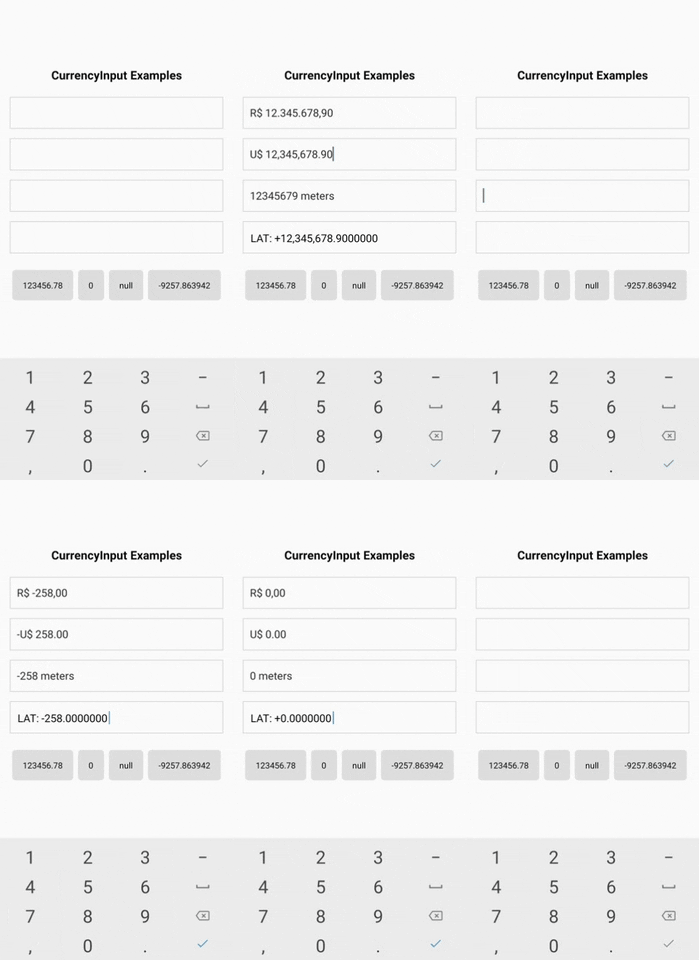
- Features
- Installation
- Basic Usage
- Advanced Usage
- Using custom TextInput
- Props
- Example
- FakeCurrencyInput
- FakeCurrencyInput Usage
- FakeCurrencyInput Props
-
formatNumber
-
formatNumber Options
Features
- A simple and practical component for number inputs
- It's just a
- Handle any number format with these powerful props:
precision, delimiter, separator, prefix and suffix.
- It handles negative values and you can choose the position of the sign with the
signPosition.
- Set minimun and maximum values with
minValue and maxValue.
- Use React Native ES6 and React Hooks
BONUS
-
-
formatNumber(): A function that formats number
Installation
``
sh

npm install react-native-currency-input
`
or
`sh
yarn add react-native-currency-input
`
Basic Usage
`javascript
import CurrencyInput from 'react-native-currency-input';
function MyComponent() {
const [value, setValue] = React.useState(2310.458); // can also be null
return
}
`
Advanced Usage
`javascript
import CurrencyInput from 'react-native-currency-input';
function MyComponent() {
const [value, setValue] = React.useState(2310.458);
return (
onChangeValue={setValue}
prefix="R$"
delimiter="."
separator=","
precision={2}
minValue={0}
showPositiveSign
onChangeText={(formattedValue) => {
console.log(formattedValue); // R$ +2.310,46
}}
/>
);
}
`
Using custom TextInput
`javascript
import CurrencyInput from 'react-native-currency-input';
import { Input } from 'native-base';
function MyComponent() {
const [value, setValue] = React.useState(2310.458);
return (
onChangeValue={setValue}
renderTextInput={textInputProps => }
renderText
prefix="R$"
delimiter="."
separator=","
precision={2}
/>
);
}
`
Props


| Prop                   | Type     | Default       | Description                                                                                                                                |

| ---------------------- | -------- | ------------- | ------------------------------------------------------------------------------------------------------------------------------------------ |

| ...TextInputProps | | | Inherit all props of TextInput. |
| value | number | | The value for controlled input. REQUIRED |
| onChangeValue | function | | Callback that is called when the input's value changes. REQUIRED |
| prefix | string | | Character to be prefixed on the value. |
| suffix\* | string | | Character to be suffixed on the value. |
| delimiter | string | , | Character for thousands delimiter. |
| separator | string | . | Decimal separator character. |
| precision | number | 2 | Decimal precision. |
| maxValue | number | | Max value allowed. Might cause unexpected behavior if you pass a value higher than the one defined here. |
| minValue | number | | Min value allowed. Might cause unexpected behavior if you pass a value lower than the one defined here. |
| signPosition | string | "afterPrefix" | Where the negative/positive sign (+/-) should be placed. |
| showPositiveSign | boolean | false | Set this to true to show the + character on positive values. |
| onChangeText | function | | Callback that is called when the input's text changes. IMPORTANT: This does not control the input value, you must use onChangeValue. |
| renderTextInput | function | | Use a custom TextInput component. |
_\* IMPORTANT:_ Be aware that using the suffix implies setting the selection property of the TextInput internally. You can override the selection, but that will cause behavior problems on the component
_Tip:_ If you don't want negative values, just use minValue={0}.
Example
See EXAMPLE
`sh
git clone https://github.com/caioquirinomedeiros/react-native-currency-input.git
cd react-native-currency-input/example
yarn
yarn android / yarn ios
`
FakeCurrencyInput
This component hides the TextInput and use a Text on its place, so you'll lost the cursor, but will get rid of the flickering issue. To replace the cursor it's used a pipe character (|) that will be always at the end of the text. It also have a wrapper View with position "relative" on which the TextInput is stretched over.
- Pros
- No flickering issue as a controlled input component
- The cursor is locked at the end, avoiding the user to mess up with the mask
- Cons
- Lost of selection functionality. The user will still be able to copy/paste, but with a bad experience
- The cursor is locked at the end...
$3
`javascript
import { FakeCurrencyInput } from 'react-native-currency-input';
function MyComponent() {
const [value, setValue] = React.useState(0); // can also be null
return (
onChangeValue={setValue}
prefix="$"
delimiter=","
separator="."
precision={2}
onChangeText={(formattedValue) => {
// ...
}}
/>
);
}
`
$3


It includes the same props of the CurrencyInput with the additional of the following:


| Prop                      | Type       | Default | Description                                       |

| ------------------------- | ---------- | ------- | ------------------------------------------------- |

| ...CurrencuInputProps | | | Inherit all props of CurrencyInput. |
| containerStyle | style prop | | Style for the container View that wraps the Text. |
| caretColor | string | #6495ed | Color of the caret. Same as caretStyle.color. |
| caretStyle | style prop | | Style for the caret text component. |
formatNumber(value, options)
`javascript
import { formatNumber } from 'react-native-currency-input';
const value = -2375923.3;
const formattedValue = formatNumber(value, {
separator: ',',
prefix: 'R$ ',
precision: 2,
delimiter: '.',
signPosition: 'beforePrefix',
});
console.log(formattedValue); // -R$ 2.375.923,30
`
$3


| Name                   | Type    | Default       | Description                                                      |

| ---------------------- | ------- | ------------- | ---------------------------------------------------------------- |

|
prefix | string | | Character to be prefixed on the value. |
| suffix | string | | Character to be suffixed on the value. |
| delimiter | string | , | Character for thousands delimiter. |
| separator | string | . | Decimal separator character. |
| precision | number | 2 | Decimal precision. |
| ignoreNegative | boolean | false | Set this to true to disable negative values. |
| signPosition | string | "afterPrefix" | Where the negative/positive sign (+/-) should be placed. |
| showPositiveSign | boolean | false | Set this to true to show the +` character on positive values. |
Contributing
See the contributing guide to learn how to contribute to the repository and the development workflow.
License
react-native-currency-input is released under the MIT license. See LICENSE for details.
Any question or support will welcome.