react-native-multiple-picker
v0.0.21
A fancy cross-platform multiple picker module for react-native.
0/weekUpdated 3 years agoMIT
Published by Mojtaba Izadmehr
npm install react-native-multiple-pickerreact-native-multiple-picker
===================
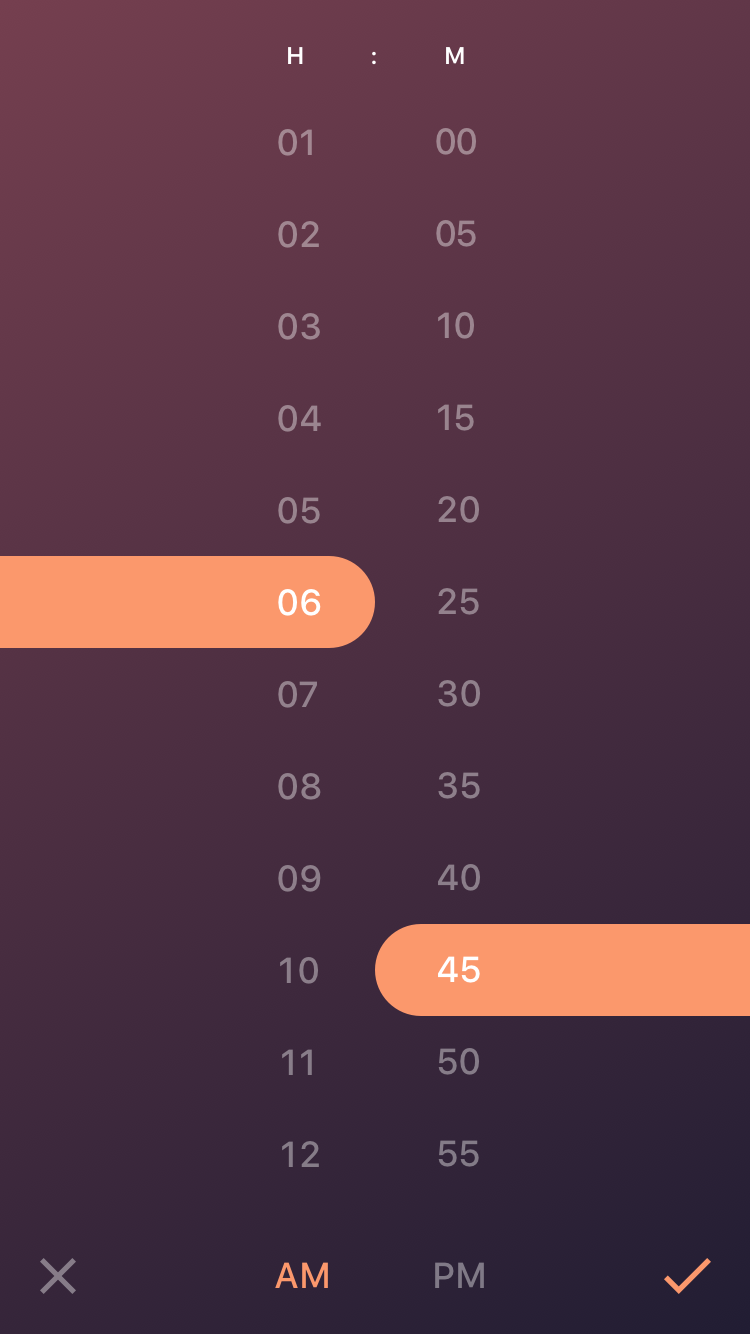
A fancy cross-platform multiple picker module for react-native, inspired by concept design Time Picker in dribble. I will probably re-design the UI to have more customization for time/date picker. Currently, as I decided to build a more general multiple pickers, I changed the UI a little bit toward a general picker.

----------
Installation
-------------
react-native-multiple-picker uses react-native-linear-gradient module to handle the gradient effect. Installing react-native-multiple-picker should automatically install the dependencies, however, linear gradient has to be linked. In order to install this module suiccessfuly follow the this procedure:
#### Installing react-native-linear-gradient
npm install react-native-linear-gradient --save
Then try to link linear-gradient module by the command:
rnpm link
> Note:
> if the above code was not defined try to install rnpm first:
>
> npm install -g rnpm
after linking the project, re-build the project by the following code (based on your platform):
react-native run-android
react-native run-ios
if there was any issue with this process, you may refer to the main page of the react-native-linear-gradient:
https://github.com/react-native-community/react-native-linear-gradient
#### Installing react-native-multiple-picker
npm install --save react-native-multiple-picker
----------
Issues
-------------------
> Note:
> if by any chance after installation, the the picker worked but, the gardient background did not show, follow manual installation procedure of react-native-linear-gradient (sometimes rnpm link does not work properly):
https://github.com/react-native-community/react-native-linear-gradient
----------
Props
-------------------
Main Props
$3
data is the main props which shows the category of all the data to be shown in the picker. It should be formatted as an array of categories, in which each category is an array of items. For instance, if you want to show three categories of days, months and years (for a date picker) you can use the following style:
``
let Days =  [
              {key: 0, label: 'Sunday'},
              {key: 1, label: 'Monday'},
              {key: 2, label: 'Tuesday'},
              {key: 3, label: 'Wednesday'},
              {key: 4, label: 'Thursday'},
              {key: 5, label: 'Friday'},
              {key: 6, label: 'Saturday'},
            ]
let Months = [
              {key: 0, label: '1'},
              {key: 1, label: '2'},
              {key: 2, label: '3'},
              {key: 3, label: '4'},
              {key: 4, label: '5'},
              {key: 5, label: '6'},
              {key: 6, label: '7'},
              {key: 7,label: '8'},
              {key: 8,label: '9'},
              {key: 9,label: '10'},
              {key: 10,label: '11'},
              {key: 11,label: '12'},
           ]
const data = [Days, Months];
`
Note: The key property should acts as index of each array and initValue and the value returned by the picker are selected based on the key; hence, it is suggested to start key values always from 0.
A better way (ES6) to form numeric arrays from a starting point to an ending one (for example years between 1970 is:
`
        let firstYear = 1970;
        let years = new Array(40).fill({label: null}).map((item, id) => {
            return {label: id + firstYear, key: id}
        });
`$3
label is the label of each data category and should simply be entered as an array of strings, such as:
`
let label = ['Day', 'Month', 'Year'];onChange
this prop is the function which handles the returned value from the picker. The api of this function is:
`
onChange={(option) => {
                        console.log(option);
                        this.setState({selectedValue: option})
                    }}
Additional Props
$3
In this version the styling of the color gradient, including different gradient colors, and their locations can be modified. gradientStyle should be entered as and object such as:
`
const gradStyle = {
start: {x: 0, y: 0},
end: {x: 1, y: 1.0},
locations: [0, 1],
colors: ['#743e4e', '#221d33']
};
`
Just note that if you want to use more than two colors (for example 3) in your color gradient, the locations and colors arrays should have 3 elements, for example:
`
const gradStyle = {
            start: {x: 0, y: 0},
            end: {x: 1, y: 1.0},
            locations: [0, 0.5, 1],
            colors: ['#743e4e', '#fff', '#221d33']
        };
$3
This parameters determines the relative hight of the picker section, and should be a number between 0 to 1. This parameter is usefull when the number of your data points are limited and a full screen picker looks ugly. For example:
` height={0.7} `
$3
initValue can be used when you want your picker to be prefilled with some specefic data. The formatting of initValue should be an array with the length equal to the number of data categories. Each element of this array points to index of the data which should be selected. For example:
`initValue = [0,1,2]`
----------
Usage
-------------------
A the top of the file, in which you want to use this module, import the package:
import Picker from 'react-native-multiple-picker';
In order to use this module, you need to define the data categories and labels in separatae arrays.
`
let Days =  [
              {key: 0, label: 'Sunday'},
              {key: 1, label: 'Monday'},
              {key: 2, label: 'Tuesday'},
              {key: 3, label: 'Wednesday'},
              {key: 4, label: 'Thursday'},
              {key: 5, label: 'Friday'},
              {key: 6, label: 'Saturday'},
            ]
let Months = [
              {key: 0, label: '1'},
              {key: 1, label: '2'},
              {key: 2, label: '3'},
              {key: 3, label: '4'},
              {key: 4, label: '5'},
              {key: 5, label: '6'},
              {key: 6, label: '7'},
              {key: 6, label: '8'},
              {key: 6, label: '9'},
              {key: 6, label: '10'},
              {key: 6, label: '11'},
              {key: 6, label: '12'},
           ]
const data = [Days, Months];
const label = ['Day','Month'];
onChange={(option) => {console.log(option)}}
label={label}
>
`
----------
Example Code
----------
`
import React, {Component} from 'react';
import {Text, View, StyleSheet} from 'react-native';
import Picker from 'react-native-multiple-picker';
class App extends Component {
    constructor() {
        super();
this.state = {
selectedValue: null
}
}
render() {
let firstYear = 1970;
let years = new Array(40).fill({label: null}).map((item, id) => {
return {label: id + firstYear, key: id}});
let days = new Array(30).fill({label: null}).map((item, id) => {
return {label: id + 1, key: id}});
let months = new Array(12).fill({label: null}).map((item, id) => {
return {label: id + 1, key: id}});
const data = [days, months,years];
const label = ['Day','Month','Year'];
const {selectedValue} = this.state;
return (
onChange={(option) => {
console.log(option);
this.setState({selectedValue: option})
}}
label={label}
>
);
}
}
export default App;
``