react-native-popover-menu
v2.0.2
React Native: Native Popover Menu
0/weekUpdated 3 years agoApache LicenseUnpacked: 86.1 KB
Published by Pranav Raj Singh Chauhan
npm install react-native-popover-menu



ReactNative: Native Popover Menu (Android/iOS)
If this project has helped you out, please support us with a star 🌟
This library is a React Native bridge around native popover libraries. It allows show/guide beautiful popover menus:
| Android: zawadz88/MaterialPopupMenu |
| ----------------- |
|  |
|
| iOS: liufengting/FTPopOverMenu |
| ----------------- |
| 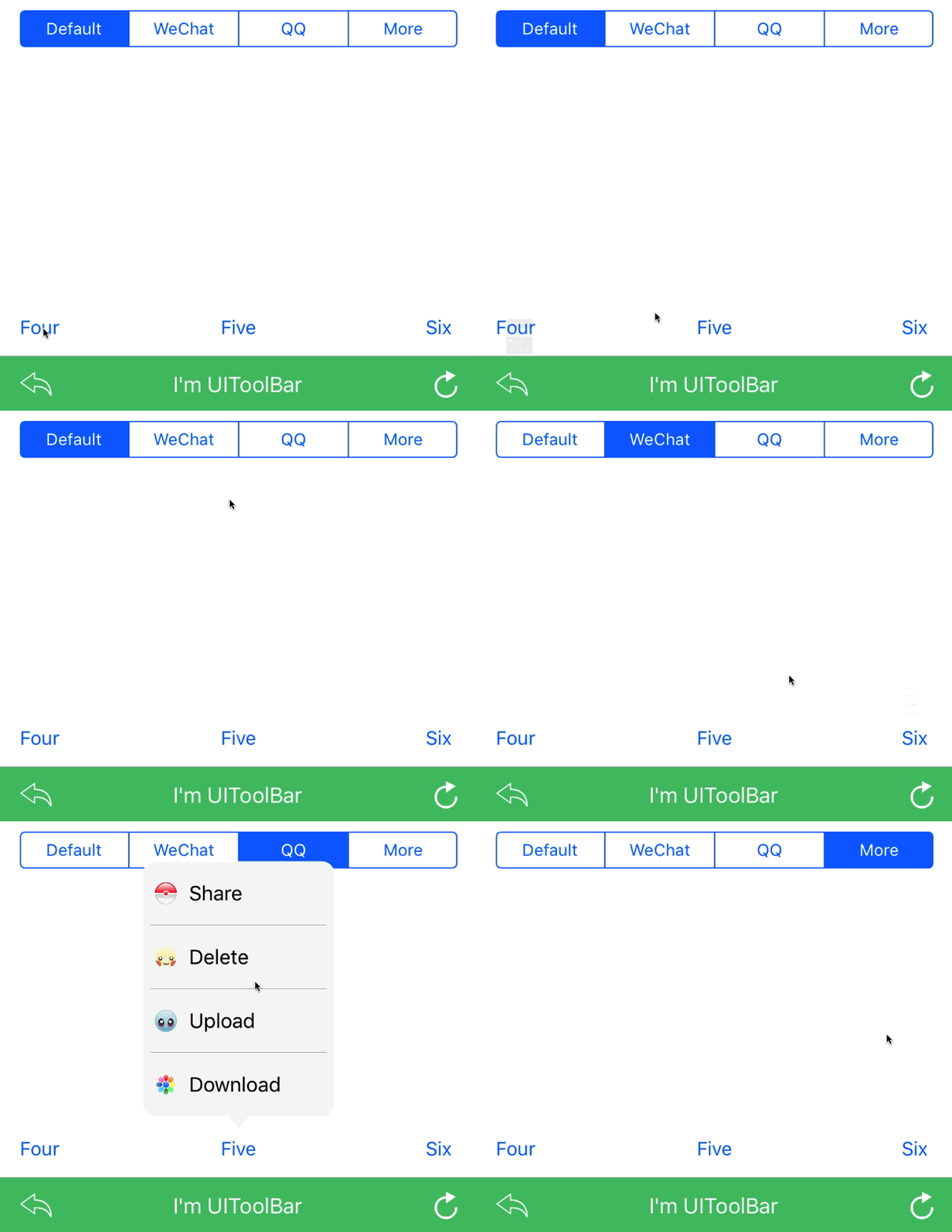 |
|
📖 Getting started
$ npm install react-native-popover-menu --save
RN61 >= RNBAS V2 >
- Add react-native-image-helper your app package.json
$ npm install react-native-image-helper --save
- Add react-native-vector-icons to your app package.json and configure it as per their installation steps
$ npm install react-native-vector-icons --save
- iOS
> iOS Prerequisite: Please make sure CocoaPods is installed on your system
- Add the following to your Podfile -> ios/Podfile and run pod update:
``
use_native_modules!
pod 'RNPopoverMenu', :path => '../node_modules/react-native-popover-menu/ios'
post_install do |installer|
installer.pods_project.targets.each do |target|
target.build_configurations.each do |config|
config.build_settings['IPHONEOS_DEPLOYMENT_TARGET'] = '9.0'
end
end
end
`
- Android
Please add below snippet into your app build.gradle
`
allprojects {
    repositories {
        maven { url 'https://jitpack.io' }
    }
}
RN61 >= RNPM V1 >
> RN60 above please use react-native-popover-menu V1 and above
- iOS
> iOS Prerequisite: Please make sure CocoaPods is installed on your system
- Add the following to your Podfile -> ios/Podfile and run pod update:
`
use_native_modules!
pod 'RNPopoverMenu', :path => '../node_modules/react-native-popover-menu/ios'
post_install do |installer|
installer.pods_project.targets.each do |target|
target.build_configurations.each do |config|
config.build_settings['IPHONEOS_DEPLOYMENT_TARGET'] = '9.0'
end
end
end
`
- Android
Please add below snippet into your app build.gradle
`
allprojects {
    repositories {
        maven { url 'https://jitpack.io' }
    }
}
RN61 < RNPO V1 <
> RN60 below please use react-native-popover-menu V.0.*
$ react-native link react-native-popover-menu
$ react-native link react-native-vector-icons
- Android
Please add below snippet into your app build.gradle
`
buildscript {
repositories {
jcenter()
maven { url "https://maven.google.com" }
}
...
}
allprojects {
repositories {
mavenLocal()
jcenter()
maven { url "https://maven.google.com" }
...
}
}
dependencies {
implementation 'com.android.support:appcompat-v7:28.0.0'
}
`
> Note: This library is supported Android SDK 28 > above
- iOS
- After react-native link react-native-popover-menu, please verify node_modules/react-native-popover-menu/ios/ contains Pods folder. If does not exist please execute pod install command on node_modules/react-native-popover-menu/ios/, if any error => try pod repo update then pod install
💻 Usage
`javascript
import RNPopover from 'react-native-popover-menu';
import Icon from 'react-native-vector-icons'
`
- React Way
`javascript
let copy =
let paste =
let share =
`
- API Way
`javascript
let copy =
let paste =
let share =
let menus = [
{
label: "Editing",
menus: [
{ label: "Copy", icon: copy },
{ label: "Paste", icon: paste }
]
},
{
label: "Other",
menus: [
{ label: "Share", icon: share }
]
},
{
label: "",
menus: [
{ label: "Share me please" }
]
}
]
RNPopover.Show(this.ref, {
title: "",
menus: menus,
onDone: selection => { }
});
`
> Note:
> - We have added family prop for Icon class, please make sure that you pass the props
💡 Props
- Props: Generic
| Prop | Type | Default | Note |
| ----------------- | ---------- | ------- | ---------------------------------------------------------------------------------------------------------- |
| title | string | | Title of popover sectionmenus
| | array | | Array of Menus | |onDone(sectionSelection, menuSelection)
| | func | | It is called when menu is selected | |
- Props: Android
| Prop | Type | Default | Note |
| ----------------- | ---------- | ------- | ---------------------------------------------------------------------------------------------------------- |
| theme | string | light | Light & Dark theme support only on Android Platform
- Props: iOS
| Prop | Type | Default | Note |
| ----------------- | ---------- | ------- | ---------------------------------------------------------------------------------------------------------- |
| tintColor | string | '#FFFFFF' | Color of tintmenuWidth
| | number | | Specify menu width of the Popover |rowHeight
| | number | | Height of the menu row |rowHeight
| | number | | Height of the menu row |textMargin
| | number | | Specify text margin from icon |iconMargin
| | number | | Specify icon margin from border |selectedRowBackgroundColor
| | string | | Specify selected row background color |roundedArrow
| | bool | | Specify whether rounded arrow required or not |textColor
| | string | | Specify text color |borderColor
| | string | | Specify border color |borderWidth
| | number | | Specify border width |separatorColor
| | string | | Specify the menu separator color |shadowColor
| | string | | Specify the shadow color |shadowOpacity
| | float | | Specify shadow opacity between 0 and 1. 0 disables the shadow. |shadowRadius
| | number | | Specify shadow radius |shadowOffsetX
| | number | | Specify the horizontal shadow offset |shadowOffsetY
| | number | | Specify the vertical shadow offset |
Icons
- RN Vector Icons: It supports react-native-vector-icons library. Please find below snippet for the usage:
`javascript
let facebook =
`
> Note:
> - We have added family prop for Icon` class, please make sure that you pass the props
- Custom Icons
> Note:
> Since we are using native libraries, we have not found a solution in order to render RN Images in production, therefore please copy all your image assets in platform specific folders:
- Android: Please copy your image assets in app resource drawable folder
- iOS: Please copy your image assets in app resources folder
> Please refer example application for the image usage.
✨ Credits
- Android: zawadz88/MaterialPopupMenu
- iOS: liufengting/FTPopOverMenu
🤔 How to contribute
Have an idea? Found a bug? Please raise to ISSUES.
Contributions are welcome and are greatly appreciated! Every little bit helps, and credit will always be given.
💫 Where is this library used?
If you are using this library in one of your projects, add it in this list below. ✨
📜 License
This library is provided under the Apache License.
RNPopoverMenu @ prscX
💖 Support my projects
I open-source almost everything I can, and I try to reply everyone needing help using these projects. Obviously, this takes time. You can integrate and use these projects in your applications for free! You can even change the source code and redistribute (even resell it).
However, if you get some profit from this or just want to encourage me to continue creating stuff, there are few ways you can do it:
* Starring and sharing the projects you like 🚀
* If you're feeling especially charitable, please follow prscX on GitHub.

Thanks! ❤️
prscX.github.io