react-native-rtl-toggle
v1.0.7
React native toggle for android and ios, RTL support
react-native-rtl-togglereact-native-componentreact-componentreact-nativeiosandroidcoverflowrtlswitchtoggle
0/weekUpdated 3 years agoMITUnpacked: 12.0 KB
Published by Abbas moosavi
npm install react-native-rtl-togglereact-native-rtl-toggle


Simple switch toggle component for react-native. This component supports horizontal switch toggle with animation with several options like start/end background colors, start/end circle colors, and duration for animation.
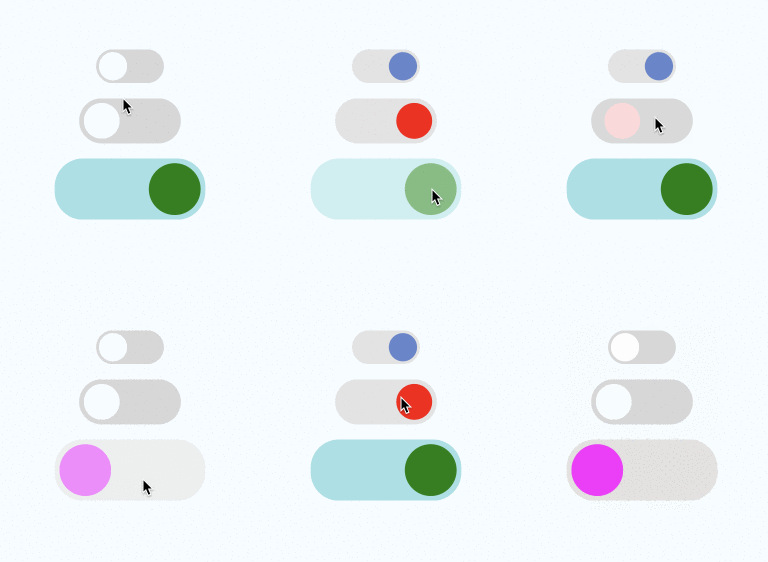
Changelogs
- [1.0.7]
+ Fix git repository.
- [1.0.6]
+ Support rtl use I18nManager.
- [1.0.5]
+ Support changing state not only from contructor.
- [1.0.4]
+ Initial state support.
- [1.0.3]
+ Support types.
- [1.0.1]
+ Fixed prop-types.
- [1.0.0]
+ First time publish.
Npm repo
https://www.npmjs.com/package/react-native-rtl-toggle
Git repo
https://github.com/abbasmoosavi/react-native-rtl-toggle
Props
| | necessary | types | default
|----|-----|-----|---------|
|switchOn| ✓ | boolean | false |
|onPress| ✓ | func | () => {} |
|containerStyle| | styles | { width: 72, height: 36, borderRadius: 18 ... } |
|circleStyle| | styles | { width: 30, height: 30, borderRadius: 15 ... } |
|backgroundColorOn| | string | 'rgb(227,227,227)' |
|backgroundColorOff| | string | 'rgb(215,215,215)' |
|circleColorOn| | string | 'white' |
|circleColorOff| | string | 'rgb(102,134,205)' |
|duration| | number | 300
Getting started
$ npm install react-native-rtl-toggle --save``javascript
import React, { Component } from 'react';
import {
Platform,
StyleSheet,
Text,
View
} from 'react-native';
import SwitchToggle from 'react-native-rtl-toggle';
export default class App extends Component<{}> {
constructor(props) {
super(props);
this.state = {
switchOn1: false,
switchOn2: false,
};
}
render() {
return (
onPress={this.onPress1}
/>
marginTop: 16,
width: 108,
height: 48,
borderRadius: 25,
backgroundColor: '#ccc',
padding: 5,
}}
circleStyle={{
width: 38,
height: 38,
borderRadius: 19,
backgroundColor: 'white', // rgb(102,134,205)
}}
switchOn={this.state.switchOn2}
onPress={this.onPress2}
circleColorOff='white'
circleColorOn='red'
duration={500}
/>
marginTop: 16,
width: 160,
height: 65,
borderRadius: 30,
padding: 5,
}}
backgroundColorOn='#a0e1e5'
backgroundColorOff='#e5e1e0'
circleStyle={{
width: 55,
height: 55,
borderRadius: 27.5,
backgroundColor: 'blue', // rgb(102,134,205)
}}
switchOn={this.state.switchOn3}
onPress={this.onPress3}
circleColorOff='#ff11ff'
circleColorOn='green'
duration={500}
/>
);
}
onPress1 = () => {
this.setState({ switchOn1: !this.state.switchOn1 });
}
onPress2 = () => {
this.setState({ switchOn2: !this.state.switchOn2 });
}
onPress3 = () => {
this.setState({ switchOn3: !this.state.switchOn3 });
}
}
const styles = StyleSheet.create({
container: {
flex: 1,
justifyContent: 'center',
alignItems: 'center',
backgroundColor: '#F5FCFF',
},
});
``