react-native-security-suite
v0.9.22
Comprehensive security suite for React Native apps - Root/Jailbreak detection, SSL pinning, encryption, secure storage, screenshot protection, and network monitoring
react-nativesecurityencryptionssl-pinningroot-detectionjailbreak-detectionsecure-storagescreenshot-protectionnetwork-monitoringandroid
321/weekUpdated 2 days agoMITUnpacked: 181.4 KB
Published by Mohammad Navabi
npm install react-native-security-suiteReact Native Security Suite 🔒


Comprehensive security solutions for React Native applications - Protect your mobile apps with advanced security features including root/jailbreak detection, SSL certificate pinning, encryption, secure storage, screenshot protection, and network monitoring.
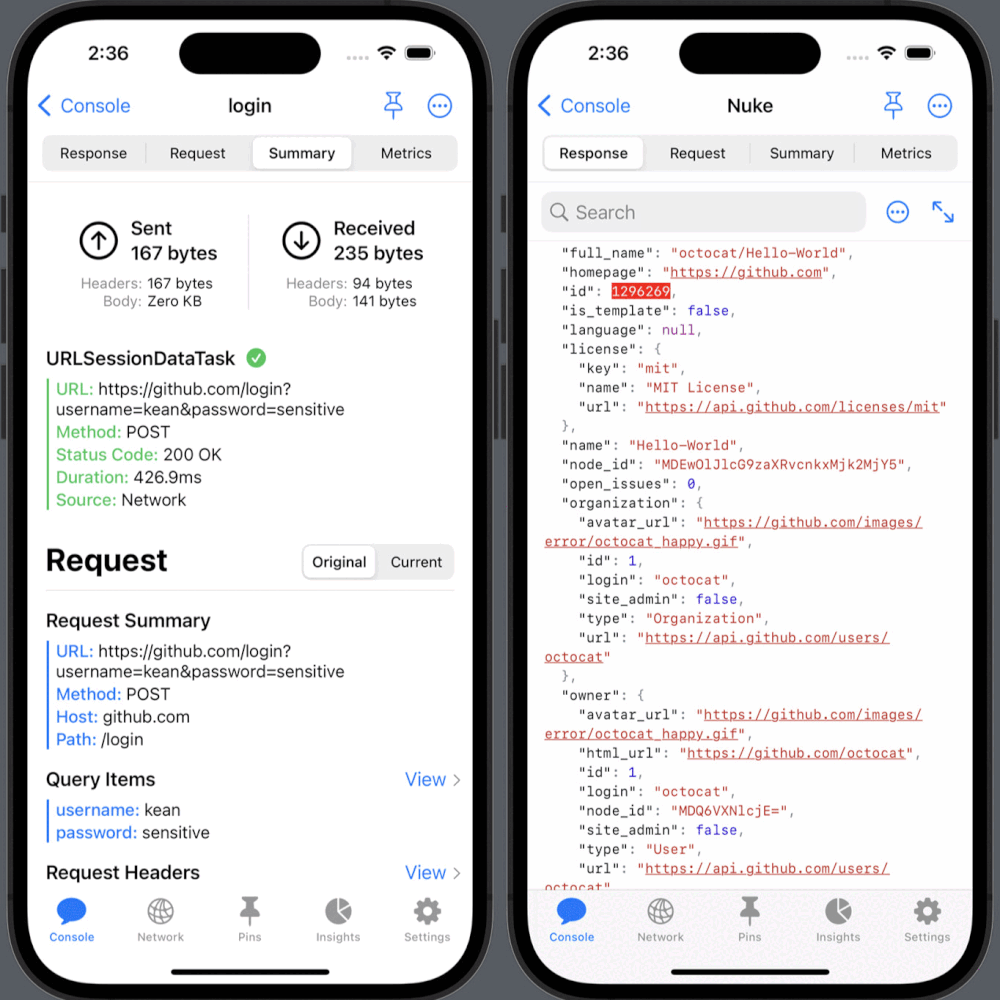
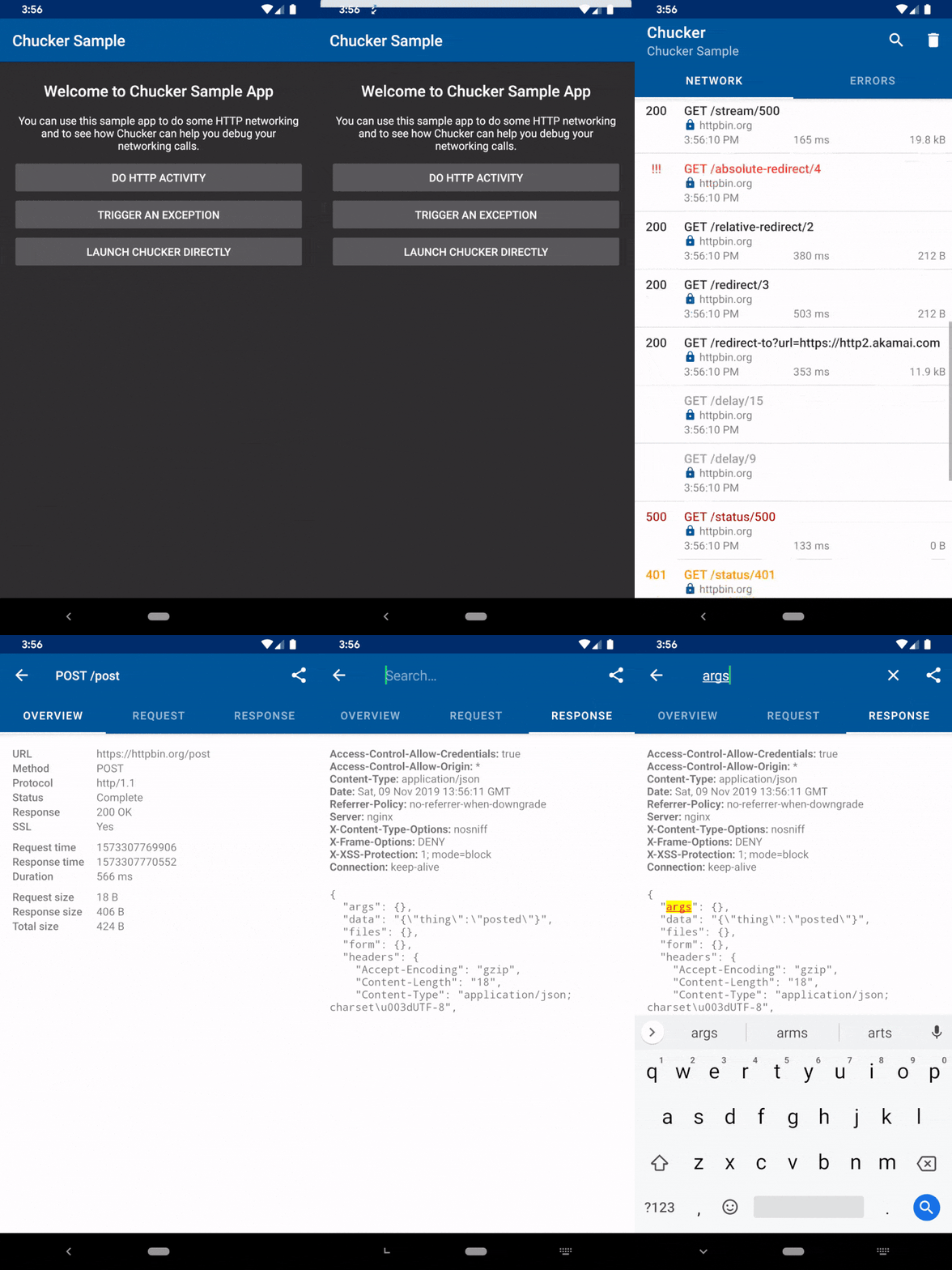
🚀 Features
$3
- Root Detection: Detect rooted Android devices
- Jailbreak Detection: Detect jailbroken iOS devices
- Screenshot Protection: Prevent screenshots and screen recordings
- SSL Certificate Pinning: Secure network communications
- Public Key Pinning: Advanced certificate validation
$3
- Text Encryption/Decryption: Secure data encryption with multiple algorithms
- Secure Storage: Encrypted local storage with AsyncStorage integration
- Diffie-Hellman Key Exchange: Secure key generation and sharing
- Hard & Soft Encryption: Multiple encryption levels for different security needs
$3
- Network Logger: Built-in request/response logging
- Android Chucker Integration: Advanced network debugging
- iOS Pulse Integration: Network monitoring for iOS
- SSL Pinning with Custom Certificates: Enhanced security for API calls
📱 Supported Platforms
- ✅ Android (API 21+)
- ✅ iOS (iOS 11.0+)
- ✅ React Native (0.60+)
🛠 Installation
> Note: You must add @react-native-async-storage/async-storage in your app's package.json as well. React Native only autolinks native modules that are listed in your project's dependencies, so AsyncStorage must be a direct dependency of your app.
$3
``bash`
yarn add react-native-security-suite @react-native-async-storage/async-storage
$3
`bash`
npm install react-native-security-suite @react-native-async-storage/async-storage
$3
`bash`
cd ios && pod install
📖 Usage Examples
$3
Detect compromised devices to protect your app from security risks:
`javascript
import { deviceHasSecurityRisk } from 'react-native-security-suite';
const checkDeviceSecurity = async () => {
const isRiskyDevice = await deviceHasSecurityRisk();
if (isRiskyDevice) {
console.log('⚠️ Device is rooted/jailbroken - Security risk detected');
// Handle security risk - show warning or restrict features
} else {
console.log('✅ Device security check passed');
}
};
`
$3
Protect sensitive content from screenshots and screen recordings:
`javascript
import { SecureView } from 'react-native-security-suite';
const SensitiveScreen = () => {
return (
🔒 This content is protected from screenshots
secureTextEntry={true}
/>
);
};
`
$3
Secure your data with multiple encryption methods:
`javascript
import { encrypt, decrypt } from 'react-native-security-suite';
const handleEncryption = async () => {
// Soft encryption (faster, less secure)
const softEncrypted = await encrypt('Sensitive data', false);
console.log('Soft encrypted:', softEncrypted);
const softDecrypted = await decrypt(softEncrypted, false);
console.log('Soft decrypted:', softDecrypted);
// Hard encryption (slower, more secure)
const hardEncrypted = await encrypt('Highly sensitive data', true);
console.log('Hard encrypted:', hardEncrypted);
const hardDecrypted = await decrypt(hardEncrypted, true);
console.log('Hard decrypted:', hardDecrypted);
};
`
$3
Store sensitive data securely with automatic encryption:
`javascript
import { SecureStorage } from 'react-native-security-suite';
const handleSecureStorage = async () => {
try {
// Store encrypted data
await SecureStorage.setItem(
'userToken',
'eyJhbGciOiJIUzI1NiIsInR5cCI6IkpXVCJ9...'
);
await SecureStorage.setItem(
'userCredentials',
JSON.stringify({
username: 'user@example.com',
password: 'encrypted_password',
})
);
// Retrieve and decrypt data
const token = await SecureStorage.getItem('userToken');
const credentials = await SecureStorage.getItem('userCredentials');
console.log('Retrieved token:', token);
console.log('Retrieved credentials:', JSON.parse(credentials));
// Remove sensitive data
await SecureStorage.removeItem('userToken');
} catch (error) {
console.error('Secure storage error:', error);
}
};
`
$3
Implement secure key exchange for encrypted communications:
`javascript
import {
getPublicKey,
getSharedKey,
encryptBySharedKey,
decryptBySharedKey,
} from 'react-native-security-suite';
const handleKeyExchange = async () => {
try {
// Generate client public key
const clientPublicKey = await getPublicKey();
console.log('Client public key:', clientPublicKey);
// Send to server and receive server's public key
const serverPublicKey = 'SERVER_PUBLIC_KEY_FROM_API';
// Generate shared secret key
const sharedKey = await getSharedKey(serverPublicKey);
console.log('Shared key generated:', sharedKey);
// Encrypt data with shared key
const encryptedMessage = await encryptBySharedKey('Secret message');
console.log('Encrypted message:', encryptedMessage);
// Decrypt data with shared key
const decryptedMessage = await decryptBySharedKey(encryptedMessage);
console.log('Decrypted message:', decryptedMessage);
} catch (error) {
console.error('Key exchange error:', error);
}
};
`
$3
Secure your API communications with certificate pinning:
`javascript
import { fetch } from 'react-native-security-suite';
const secureApiCall = async () => {
try {
const response = await fetch('https://api.yourapp.com/secure-endpoint', {
method: 'POST',
headers: {
'Content-Type': 'application/json',
'Authorization': 'Bearer your-token',
},
body: JSON.stringify({
userId: 123,
action: 'sensitive_operation',
}),
certificates: [
'sha256/AAAAAAAAAAAAAAAAAAAAAAAAAAAAAAAAAAAAAAAAAAA=',
'sha256/BBBBBBBBBBBBBBBBBBBBBBBBBBBBBBBBBBBBBBBBBBB=',
],
validDomains: ['api.yourapp.com', 'secure.yourapp.com'],
timeout: 10000,
});
const data = await response.json();
console.log('Secure API response:', data);
} catch (error) {
console.error('SSL pinning failed:', error);
// Handle certificate validation failure
}
};
`
$3
Monitor network requests in development:
`javascript
import { fetch } from 'react-native-security-suite';
const monitoredRequest = async () => {
try {
const response = await fetch(
'https://api.example.com/data',
{
method: 'GET',
headers: {
Accept: 'application/json',
},
},
__DEV__
); // Enable logging in development
return await response.json();
} catch (error) {
console.error('Network request failed:', error);
}
};
`
🔧 API Reference
$3
- deviceHasSecurityRisk() - Detect rooted/jailbroken devices
$3
- encrypt(text, hardEncryption?, secretKey?) - Encrypt textdecrypt(encryptedText, hardEncryption?, secretKey?)
- - Decrypt textSecureStorage
- - Encrypted storage methods
$3
- getPublicKey() - Generate public keygetSharedKey(serverPublicKey)
- - Generate shared keyencryptBySharedKey(text)
- - Encrypt with shared keydecryptBySharedKey(encryptedText)
- - Decrypt with shared key
$3
- fetch(url, options, loggerEnabled?) - Secure fetch with SSL pinning
$3
- SecureView - Screenshot-protected view component
🛡️ Security Best Practices
1. Always validate certificates - Use SSL pinning for production APIs
2. Detect compromised devices - Check for root/jailbreak before sensitive operations
3. Use appropriate encryption levels - Hard encryption for highly sensitive data
4. Protect sensitive UI - Wrap sensitive content in SecureView
5. Monitor network traffic - Use built-in logging for debugging
6. Secure key management - Implement proper key exchange protocols
🐛 Troubleshooting
$3
iOS Build Errors:
`bash`
cd ios && pod install && cd ..
npx react-native run-ios
Android Build Errors:
`bash`
cd android && ./gradlew clean && cd ..
npx react-native run-android
Metro Cache Issues:
`bash`
npx react-native start --reset-cache
🤝 Contributing
We welcome contributions! Please see our Contributing Guide for details.
$3
`bash``
git clone https://github.com/mohamadnavabi/react-native-security-suite.git
cd react-native-security-suite
yarn install
cd example && yarn install && cd ..
yarn example android # or ios
📄 License
This project is licensed under the MIT License - see the LICENSE file for details.
🙏 Acknowledgments
- Chucker for Android network monitoring
- Pulse for iOS network monitoring
- React Native community for continuous support
📞 Support
- 📧 Email: 7navabi@gmail.com
- 🐛 Issues: GitHub Issues
- 📖 Documentation: GitHub Wiki
---
Made with ❤️ for the React Native community