react-native-select-dropdown
v4.0.1TypeScript
react-native-select-dropdown is a highly customized dropdown | select | picker | menu for react native that works for andriod and iOS platforms.
0/weekUpdated 1 years agoMITUnpacked: 35.5 KB
Published by Adel Reda
npm install react-native-select-dropdownreact-native-select-dropdown
react-native-select-dropdown is a highly customized dropdown | select | picker | menu for react native that works for android and iOS platforms.
Installation
#### # Using npm
``bash`
npm install react-native-select-dropdown
#### # Using yarn
`bash`
yarn add react-native-select-dropdown
Demo
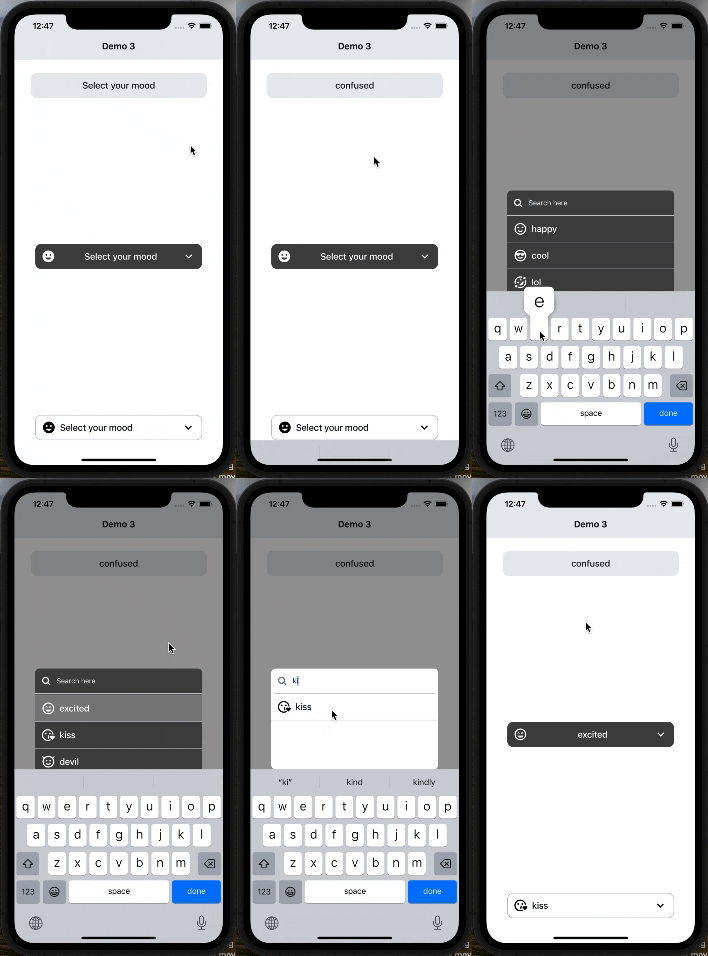
#### Code provided in Examples folder.
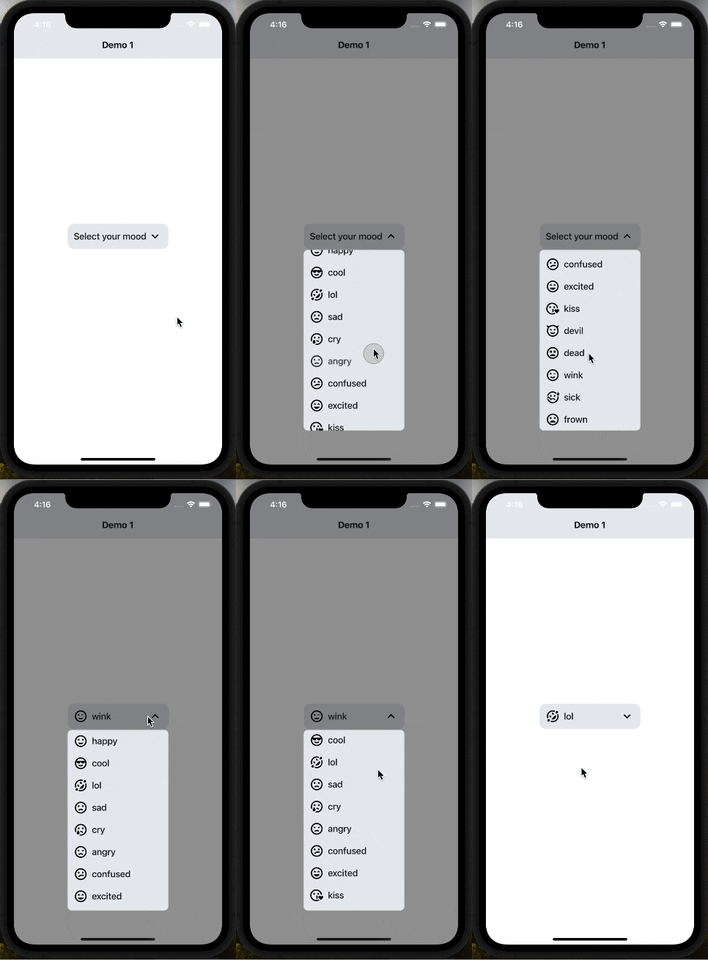
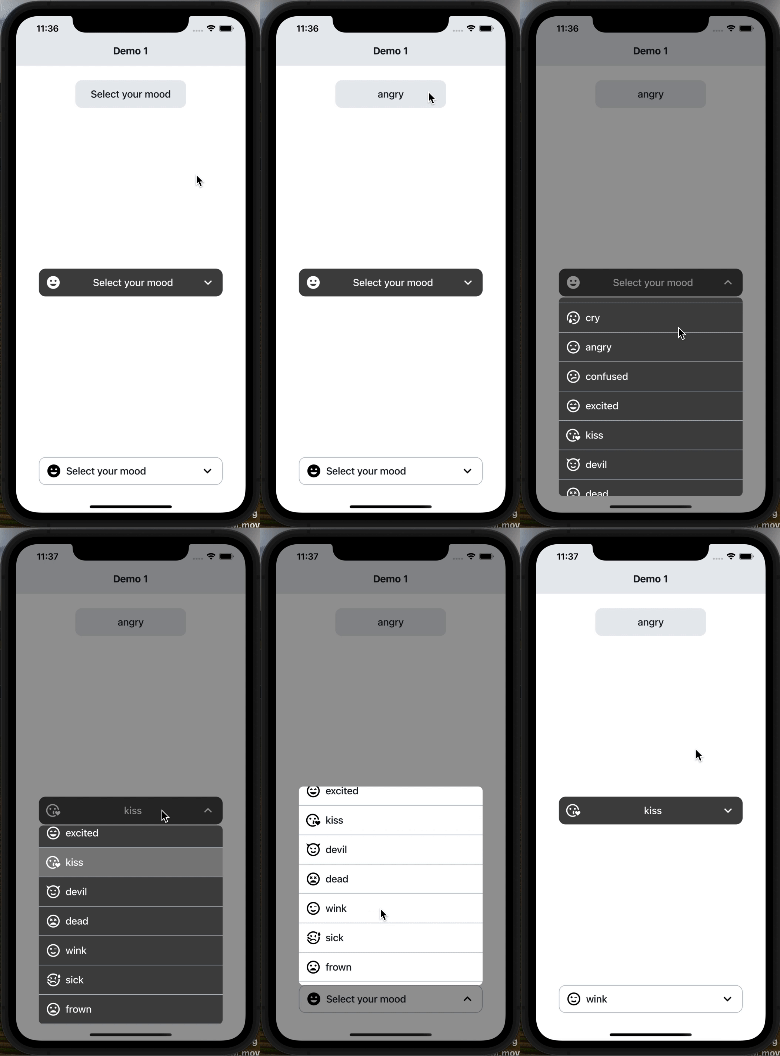
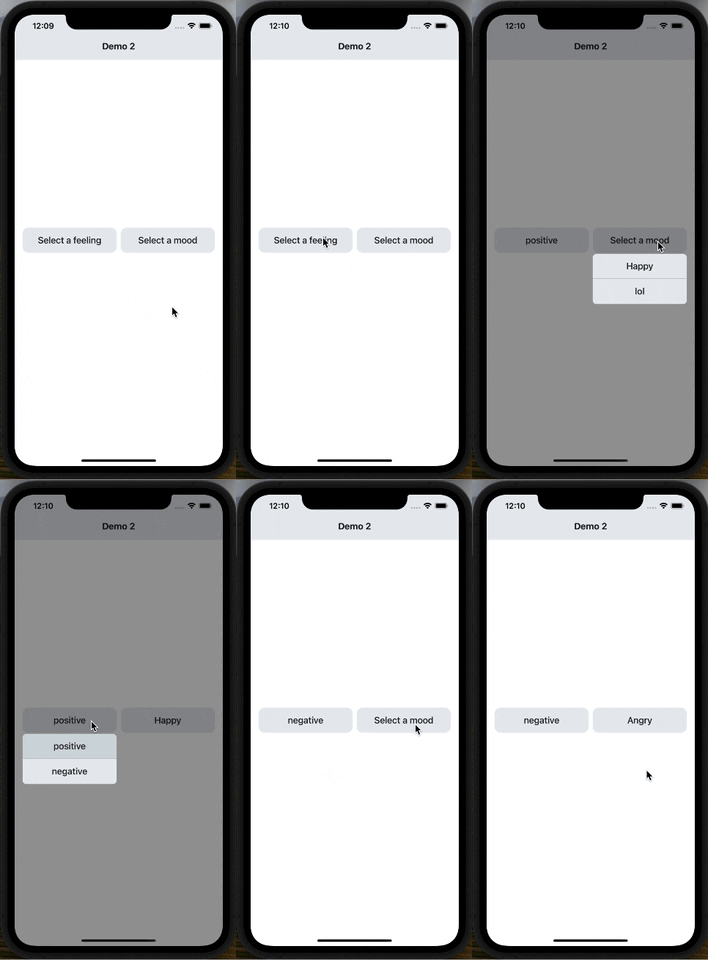
#### Search Functionality (Code provided in Examples folder).
🚀 Major Changes
$3
- (defaultButtonText, buttonTextAfterSelection, buttonStyle, buttonTextStyle, renderCustomizedButtonChild, renderDropdownIcon, dropdownIconPosition) have been removed and (renderButton) has been added to customize dropdown button
- (rowTextForSelection, rowStyle, rowTextStyle, selectedRowStyle, selectedRowTextStyle, renderCustomizedRowChild) have been removed and (renderItem) has been added to customize each dropdown item
- testID added to scroll the dropdown menu in e2e tests.
- Most of issues have been fixed.
- Updated readme.md file
- More examples in examples folder.
Usage
`
import SelectDropdown from 'react-native-select-dropdown'
import Icon from 'react-native-vector-icons/MaterialCommunityIcons';
...
const emojisWithIcons = [
{title: 'happy', icon: 'emoticon-happy-outline'},
{title: 'cool', icon: 'emoticon-cool-outline'},
{title: 'lol', icon: 'emoticon-lol-outline'},
{title: 'sad', icon: 'emoticon-sad-outline'},
{title: 'cry', icon: 'emoticon-cry-outline'},
{title: 'angry', icon: 'emoticon-angry-outline'},
{title: 'confused', icon: 'emoticon-confused-outline'},
{title: 'excited', icon: 'emoticon-excited-outline'},
{title: 'kiss', icon: 'emoticon-kiss-outline'},
{title: 'devil', icon: 'emoticon-devil-outline'},
{title: 'dead', icon: 'emoticon-dead-outline'},
{title: 'wink', icon: 'emoticon-wink-outline'},
{title: 'sick', icon: 'emoticon-sick-outline'},
{title: 'frown', icon: 'emoticon-frown-outline'},
];
...
onSelect={(selectedItem, index) => {
console.log(selectedItem, index);
}}
renderButton={(selectedItem, isOpened) => {
return (
{selectedItem && (
)}
{(selectedItem && selectedItem.title) || 'Select your mood'}
);
}}
renderItem={(item, index, isSelected) => {
return (
);
}}
showsVerticalScrollIndicator={false}
dropdownStyle={styles.dropdownMenuStyle}
/>
...
const styles = StyleSheet.create({
dropdownButtonStyle: {
width: 200,
height: 50,
backgroundColor: '#E9ECEF',
borderRadius: 12,
flexDirection: 'row',
justifyContent: 'center',
alignItems: 'center',
paddingHorizontal: 12,
},
dropdownButtonTxtStyle: {
flex: 1,
fontSize: 18,
fontWeight: '500',
color: '#151E26',
},
dropdownButtonArrowStyle: {
fontSize: 28,
},
dropdownButtonIconStyle: {
fontSize: 28,
marginRight: 8,
},
dropdownMenuStyle: {
backgroundColor: '#E9ECEF',
borderRadius: 8,
},
dropdownItemStyle: {
width: '100%',
flexDirection: 'row',
paddingHorizontal: 12,
justifyContent: 'center',
alignItems: 'center',
paddingVertical: 8,
},
dropdownItemTxtStyle: {
flex: 1,
fontSize: 18,
fontWeight: '500',
color: '#151E26',
},
dropdownItemIconStyle: {
fontSize: 28,
marginRight: 8,
},
});
$3
- data
- onSelect
- disabled
- testID
- onFocus
- onBlur
- showsVerticalScrollIndicator
- search
$3
- reset
- openDropdown
- closeDropdown
- selectIndex
---
$3
array of data that will be represented in dropdown 'can be array of objects
| Type | Required |
| ----- | -------- |
| array | Yes |
---
$3
function recieves selected item and its index in data array
| Type | Required |
| -------- | -------- |
| function | Yes |
---
$3
function returns React component for the dropdown button
| Type | Required |
| -------- | -------- |
| function | Yes |
---
$3
function returns React component for each dropdown item
| Type | Required |
| -------- | -------- |
| function | Yes |
---
$3
default selected item in dropdown ( check examples in Demo1)
| Type | Required |
| ---- | -------- |
| any | No |
---
$3
default selected item index
| Type | Required |
| ------- | -------- |
| integer | No |
---
$3
disable dropdown
| Type | Required |
| ------- | -------- |
| boolean | No |
---
$3
array of disabled items index
| Type | Required |
| ----- | -------- |
| array | No |
---
$3
disable auto scroll to selected value
| Type | Required |
| ------- | -------- |
| boolean | No |
---
$3
dropdown menu testID
| Type | Required |
| ------ | -------- |
| string | No |
---
$3
function fires when dropdown is opened
| Type | Required |
| -------- | -------- |
| function | No |
---
$3
function fires when dropdown is closed
| Type | Required |
| -------- | -------- |
| function | No |
---
$3
function fires when dropdown scrolls to the end (for paginations)
| Type | Required |
| -------- | -------- |
| function | No |
---
$3
required to set true when statusbar is translucent (android only)
| Type | Required |
| ------- | -------- |
| boolean | No |
---
$3
style object for dropdown view
| Type | Required |
| ------ | -------- |
| object | No |
---
$3
backdrop color when dropdown is opened
| Type | Required |
| ------ | -------- |
| string | No |
---
$3
When true, shows a vertical scroll indicator.
| Type | Required |
| ------- | -------- |
| boolean | No |
---
$3
enable search functionality
| Type | Required |
| ------- | -------- |
| boolean | No |
---
$3
style object for search input
| Type | Required |
| ------ | -------- |
| object | No |
---
$3
text color for search input
| Type | Required |
| ------ | -------- |
| string | No |
---
$3
style object for search input text
| Type | Required |
| ------ | -------- |
| object | No |
---
$3
placeholder text for search input
| Type | Required |
| ------ | -------- |
| string | No |
---
$3
text color for search input placeholder
| Type | Required |
| ------ | -------- |
| string | No |
---
$3
function returns React component for search input icon
| Type | Required |
| -------- | -------- |
| function | No |
---
$3
function returns React component for search input icon
| Type | Required |
| -------- | -------- |
| function | No |
---
$3
function callback when the search input text changes, this will automatically disable the dropdown's internal search to be implemented manually outside the component
| Type | Required |
| -------- | -------- |
| function | No |
---
| Method | Description |
| -------------------- | -------------------------------- |
| reset() | Remove selection & reset it |openDropdown()
| | Open the dropdown. |closeDropdown()
| | Close the dropdown. |selectIndex(index)` | Select a specific item by index. |
|
---