react-native-select-dropdown-android
v2.0.4TypeScript
react-native-select-dropdown is a highly customized dropdown | select | picker | menu for react native that works for andriod and iOS platforms.
0/weekUpdated 3 years agoMITUnpacked: 34.6 KB
Published by Adel Reda
npm install react-native-select-dropdown-androidreact-native-select-dropdown
react-native-select-dropdown is a highly customized dropdown | select | picker | menu for react native that works for andriod and iOS platforms.
Installation
#### # Using npm
``bash`
npm install react-native-select-dropdown
#### # Using yarn
`bash`
yarn add react-native-select-dropdown
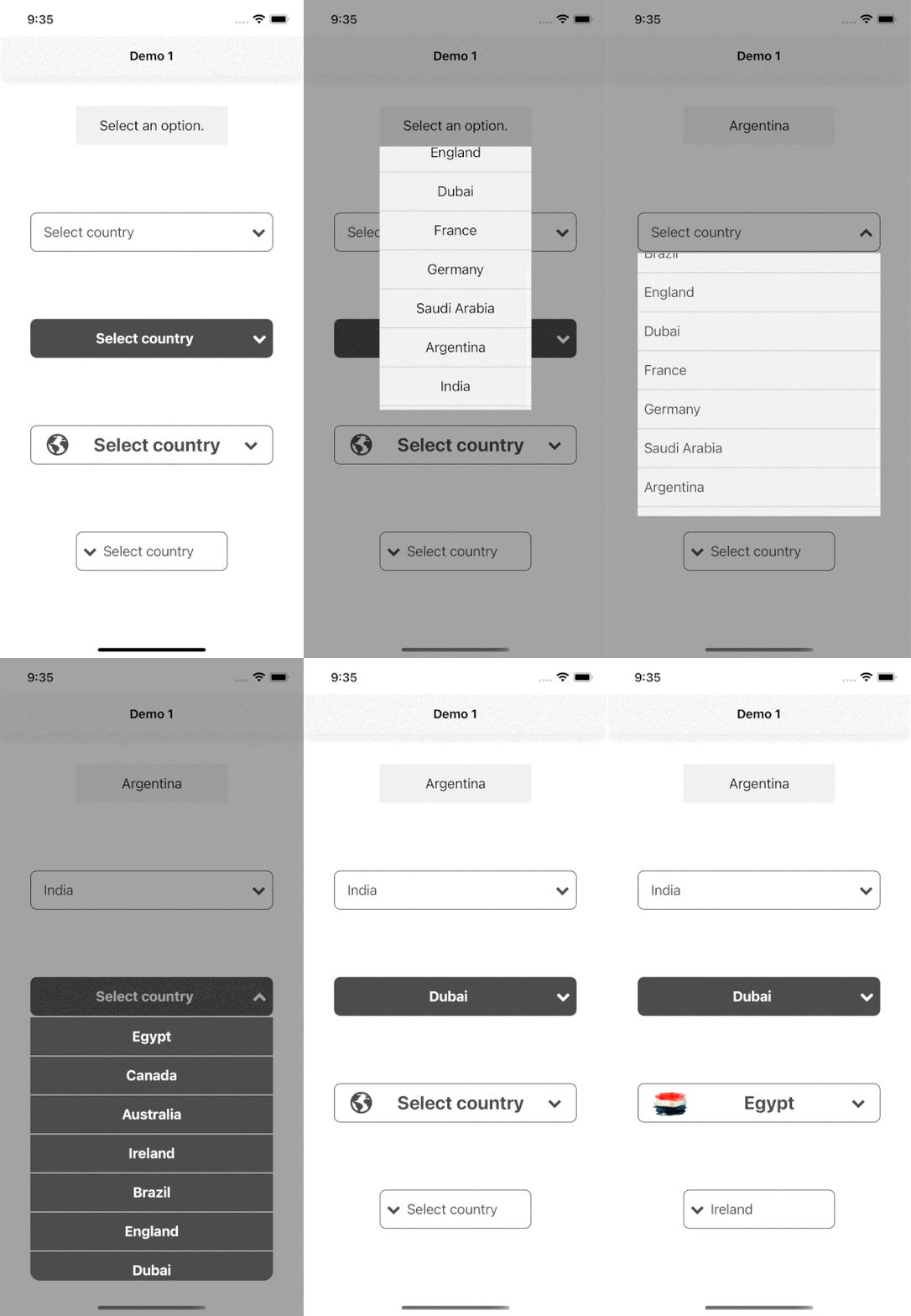
Demo
#### Code provided in Examples folder.

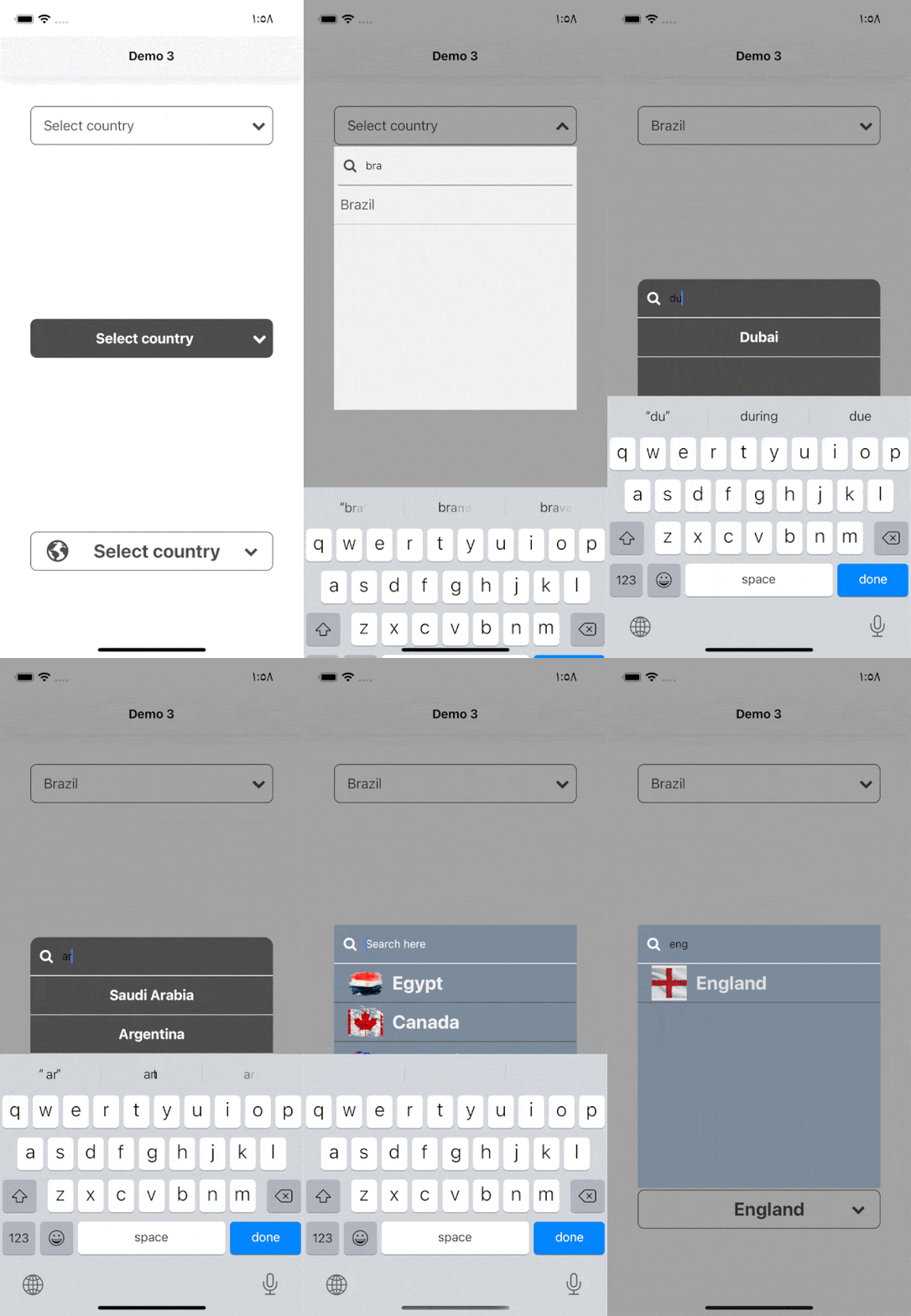
#### Search Functionality (Code provided in Examples folder).
Usage
`
import SelectDropdown from 'react-native-select-dropdown'
...
const countries = ["Egypt", "Canada", "Australia", "Ireland"]
...
onSelect={(selectedItem, index) => {
console.log(selectedItem, index)
}}
buttonTextAfterSelection={(selectedItem, index) => {
// text represented after item is selected
// if data array is an array of objects then return selectedItem.property to render after item is selected
return selectedItem
}}
rowTextForSelection={(item, index) => {
// text represented for each item in dropdown
// if data array is an array of objects then return item.property to represent item in dropdown
return item
}}
/>
$3
- data
- onSelect
- disabled
- onFocus
- onBlur
- rowStyle
- search
$3
- reset
- openDropdown
- closeDropdown
---
$3
array of data that will be represented in dropdown 'can be array of objects
| Type | Required |
| ----- | -------- |
| array | Yes |
---
$3
function recieves selected item and its index in data array
| Type | Required |
| -------- | -------- |
| function | Yes |
---
$3
default button text when no item is selected
| Type | Required |
| ------ | -------- |
| String | No |
---
$3
function recieves selected item and its index, this function should return a string that will be represented in button after item is selected
| Type | Required |
| -------- | -------------------------------------------------------------------- |
| function | Yes "unless you customized button using renderCustomizedButtonChild" |
---
$3
function recieves item and index for each row in dropdown, this function shoud return a string that will be represented in each row in dropdown
| Type | Required |
| -------- | ----------------------------------------------------------------- |
| function | Yes "unless you customized button using renderCustomizedRowChild" |
---
$3
default selected item in dropdown ( check examples in Demo1)
| Type | Required |
| ---- | -------- |
| any | No |
---
$3
default selected item index
| Type | Required |
| ------- | -------- |
| integer | No |
---
$3
disable dropdown
| Type | Required |
| ------- | -------- |
| boolean | No |
---
$3
disable auto scroll to selected value
| Type | Required |
| ------- | -------- |
| boolean | No |
---
$3
function fires when dropdown is opened
| Type | Required |
| -------- | -------- |
| function | No |
---
$3
function fires when dropdown is closed
| Type | Required |
| -------- | -------- |
| function | No |
---
$3
style object for button
| Type | Required |
| ------ | -------- |
| object | Yes |
---
$3
style object for button text
| Type | Required |
| ------ | -------- |
| object | No |
---
$3
function recieves selected item and its index, this function should return a React component as a child for dropdown button buttonStyle should be used for parent button view style.
#### # check examples folder to make things clear
| Type | Required |
| -------- | -------- |
| function | No |
---
$3
function that should return a React component for dropdown icon
| Type | Required |
| -------- | -------- |
| function | No |
---
$3
dropdown icon position "left" || "right"
| Type | Required |
| ------ | -------- |
| string | No |
---
$3
required to set true when statusbar is translucent (android only)
| Type | Required |
| ------- | -------- |
| boolean | No |
---
$3
style object for dropdown view
| Type | Required |
| ------ | -------- |
| object | No |
---
$3
backdrop color when dropdown is opened
| Type | Required |
| ------ | -------- |
| string | No |
---
$3
background color behind list items when dropdown is opened
| Type | Required |
| ------ | -------- |
| string | No |
---
$3
style object for row
| Type | Required |
| ------ | -------- |
| object | Yes |
---
$3
style object for row text
| Type | Required |
| ------ | -------- |
| object | No |
---
$3
style object for selected row
| Type | Required |
| ------ | -------- |
| object | Yes |
---
$3
style object for selected row text
| Type | Required |
| ------ | -------- |
| object | No |
---
$3
function recieves item and its index, this function should return React component as a child for customized row rowStyle should be used for parent row view style.
#### # check examples folder to make things clear
| Type | Required |
| -------- | -------- |
| function | No |
---
$3
enable search functionality
| Type | Required |
| ------- | -------- |
| boolean | No |
---
$3
style object for search input
| Type | Required |
| ------ | -------- |
| object | Yes |
---
$3
text color for search input
| Type | Required |
| ------ | -------- |
| string | No |
---
$3
placeholder text for search input
| Type | Required |
| ------ | -------- |
| string | No |
---
$3
text color for search input placeholder
| Type | Required |
| ------ | -------- |
| string | No |
---
$3
function returns React component for search input icon
| Type | Required |
| -------- | -------- |
| function | No |
---
$3
function returns React component for search input icon
| Type | Required |
| -------- | -------- |
| function | No |
---
| Method | Description |
| ----------------- | ----------------------------------------------------------------------------------------------------------------------------------------------------------- |
| reset() | Remove selection & reset it to display defaultButtonText check https://github.com/AdelRedaa97/react-native-select-dropdown/pull/1#issuecomment-818307624. |openDropdown()
| | Open the dropdown. |closeDropdown()` | Close the dropdown. |
|
---