react-native-webview-bridge
v0.40.1
React Native WebView Javascript Bridge
0/weekUpdated 3 years agoMITUnpacked: 693.2 KB
Published by Ali Najafizadeh
npm install react-native-webview-bridgePlease take a look at this issue first
React Native WebView Javascript Bridge


I have been testing and reading a lot of way to safely create a bridge between react-native and webview. I'm happy to announced that the wait is over and from React-Native 0.20 and above, the bridge is fully functional.
Installation
In order to use this extension, you have to do the following steps:
in your react-native project, run npm install react-native-webview-bridge --save
$3
1. go to xcode's Project Navigator tab
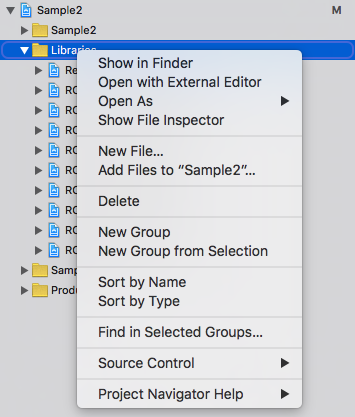
2. right click on
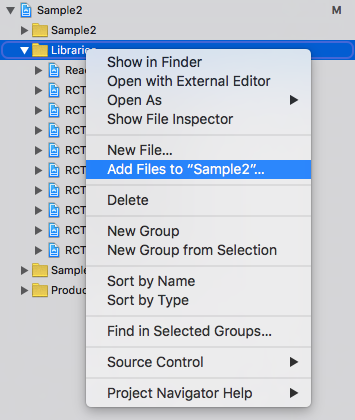
Libraries3. select
Add Files to ... option
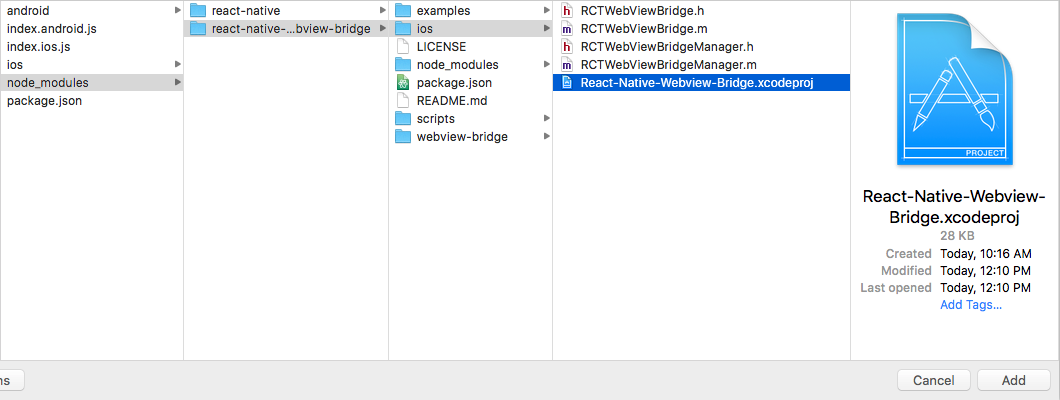
4. navigate to
node_modules/react-native-webview-bridge/ios and add React-Native-Webview-Bridge.xcodeproj folder
5. on project
Project Navigator tab, click on your project's name and select Target's name and from there click on Build Phases
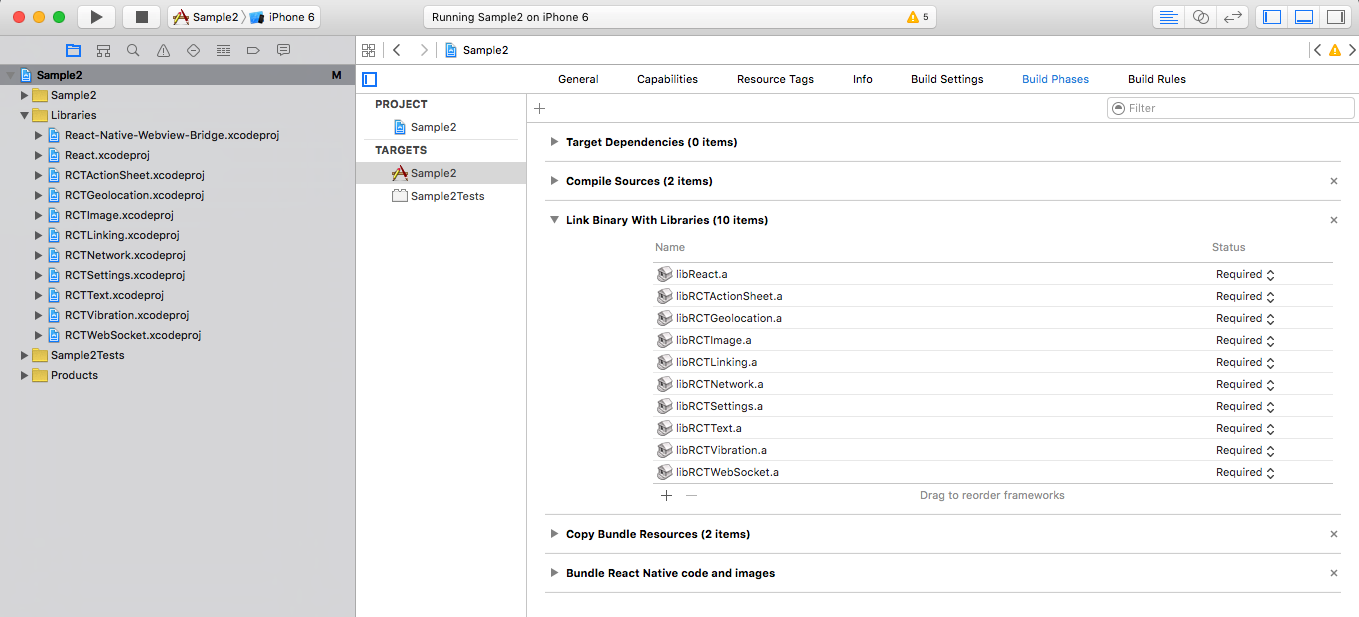
6. expand
Link Binary With Libraries and click + sign to add a new one.7. select
libReact-Native-Webviwe-Bridge.a and click Add button.
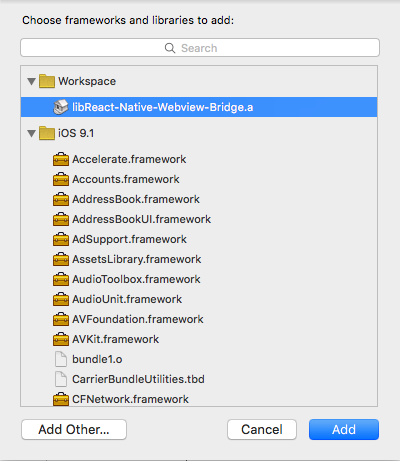
8. clean compile to make sure your project can compile and build.
$3
1. add the following import to MainApplication.java (MainActivity.java if RN < 0.29) of your application
``java`
import com.github.alinz.reactnativewebviewbridge.WebViewBridgePackage;
2. add the following code to add the package to MainApplication.java (MainActivity.java if RN < 0.29)
`java`
protected List
return Arrays.
new MainReactPackage(),
new WebViewBridgePackage() //<- this
);
}
3. add the following codes to your android/setting.gradle
> you might have multiple 3rd party libraries, make sure that you don't create multiple include.
`
include ':app', ':react-native-webview-bridge'
project(':react-native-webview-bridge').projectDir = new File(rootProject.projectDir, '../node_modules/react-native-webview-bridge/android')
4. edit android/app/build.gradle and add the following line inside dependencies
`
compile project(':react-native-webview-bridge')
5. run react-native run-android to see if everything is compilable.
Usage
just import the module with one of your choices way:
CommonJS style
`js`
var WebViewBridge = require('react-native-webview-bridge');
ES6/ES2015 style
`js`
import WebViewBridge from 'react-native-webview-bridge';
WebViewBridge is an extension of WebView. It injects special script into any pages once it loads. Also it extends the functionality of WebView by adding 1 new method and 1 new props.
#### sendToBridge(message)
the message must be in string. because this is the only way to send data back and forth between native and webview.
#### onBridgeMessage
this is a prop that needs to be a function. it will be called once a message is received from webview. The type of received message is also in string.
#### allowFileAccessFromFileURLs (Android only)
this is a prop that allows locally loaded pages via file:// to access other file:// resources. Pass-thru to corresponding setting) in WebView. Default is false for Android 4.1 and above.
#### allowUniversalAccessFromFileURLs (Android only)
this is a prop that allows locally loaded pages via file:// to access resources in any origin. Pass-thru to corresponding setting) in WebView. Default is false for Android 4.1 and above.
Bridge Script
bridge script is a special script which injects into all the webview. It automatically register a global variable called WebViewBridge. It has 2 optional methods to implement and one method to send message to native side.
#### send(message)
this method sends a message to native side. the message must be in string type or onError method will be called.
#### onMessage
this method needs to be implemented. it will be called once a message arrives from native side. The type of message is in string.
#### onError (iOS only)
this is an error reporting method. It will be called if there is an error happens during sending a message. It receives a error message in string type.
Notes
> a special bridge script will be injected once the page is going to different URL. So you don't have to manage when it needs to be injected.
> You can still pass your own javascript to be injected into webview. However, Bridge script will be injected first and then your custom script.
Simple Example
This example can be found in examples
folder.`js
const injectScript = (function () {
if (WebViewBridge) {
WebViewBridge.onMessage = function (message) {
if (message === "hello from react-native") {
WebViewBridge.send("got the message inside webview");
}
};
WebViewBridge.send("hello from webview");
}
}());;
var Sample2 = createReactClass({
onBridgeMessage(message){
const { webviewbridge } = this.refs;
switch (message) {
case "hello from webview":
webviewbridge.sendToBridge("hello from react-native");
break;
case "got the message inside webview":
console.log("we have got a message from webview! yeah");
break;
}
},
render() {
return (
onBridgeMessage={this.onBridgeMessage.bind(this)}
injectedJavaScript={injectScript}
source={{uri: "https://google.com"}}/>
);
}
});
``