react-orgchart
v1.0.5
A simple org chart for React.
0/weekUpdated 3 years agoMIT
Published by Nate Turner
npm install react-orgchartSimple Org Chart for React
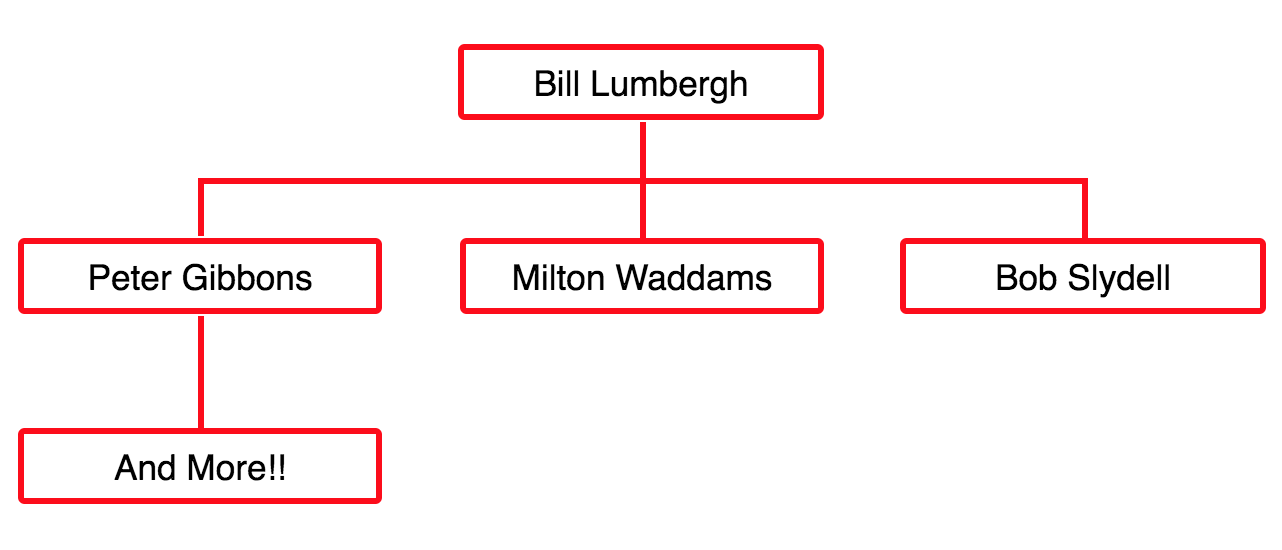
See the example project for demonstration of creating org chart data structure and using the OrgChart component.
This project focuses on the simplicity of its api.
$3
``
jsx harmon
import OrgChart from 'react-orgchart';
import 'react-orgchart/index.css';
`$3
The children` property of each node are rendered as children nodes.`jsx harmony
const initechOrg = {
name: "Bill Lumbergh",
actor: "Gary Cole",
children: [
{
name: "Peter Gibbons",
actor: "Ron Livingston",
children: [
{
name: "And More!!",
actor: "This is just to show how to build a complex tree with multiple levels of children. Enjoy!"
}
]
},
{
name: "Milton Waddams",
actor: "Stephen Root"
},
{
name: "Bob Slydell",
actor: "John C. McGi..."
},
]
};
`
$3
You can easily add functionality as you see fit to this node component.
Pass down necessary data through the tree structure outlined above.
jsx harmony
const MyNodeComponent = ({node}) => {
  return (
     alert("Hi my real name is: " + node.actor)}>{ node.name }
  );
};
`$3
jsx harmony
`$3
See Example project stylesheet for ideas.$3
Simple wrap your org chart in a div with an id and define styles like this:
css
.initechNode {
border: solid 3px red;
border-radius: 3px;
padding: 5px;
width: 150px;
display: inline-block;
}#initechOrgChart .orgNodeChildGroup .nodeGroupLineVerticalMiddle {
border-right: solid 3px red
}
#initechOrgChart .nodeLineBorderTop {
border-top: solid 3px red;
}
``