react-picky-date-time
v2.0.9TypeScript
A react component for date time picker.
149/weekUpdated 1 years agoMITUnpacked: 1.8 MB
Published by Edward Xiao
npm install react-picky-date-timereact-picky-date-time

 !Cdnjs !npm bundle size (minified + gzip)   
A react component for date time picker.
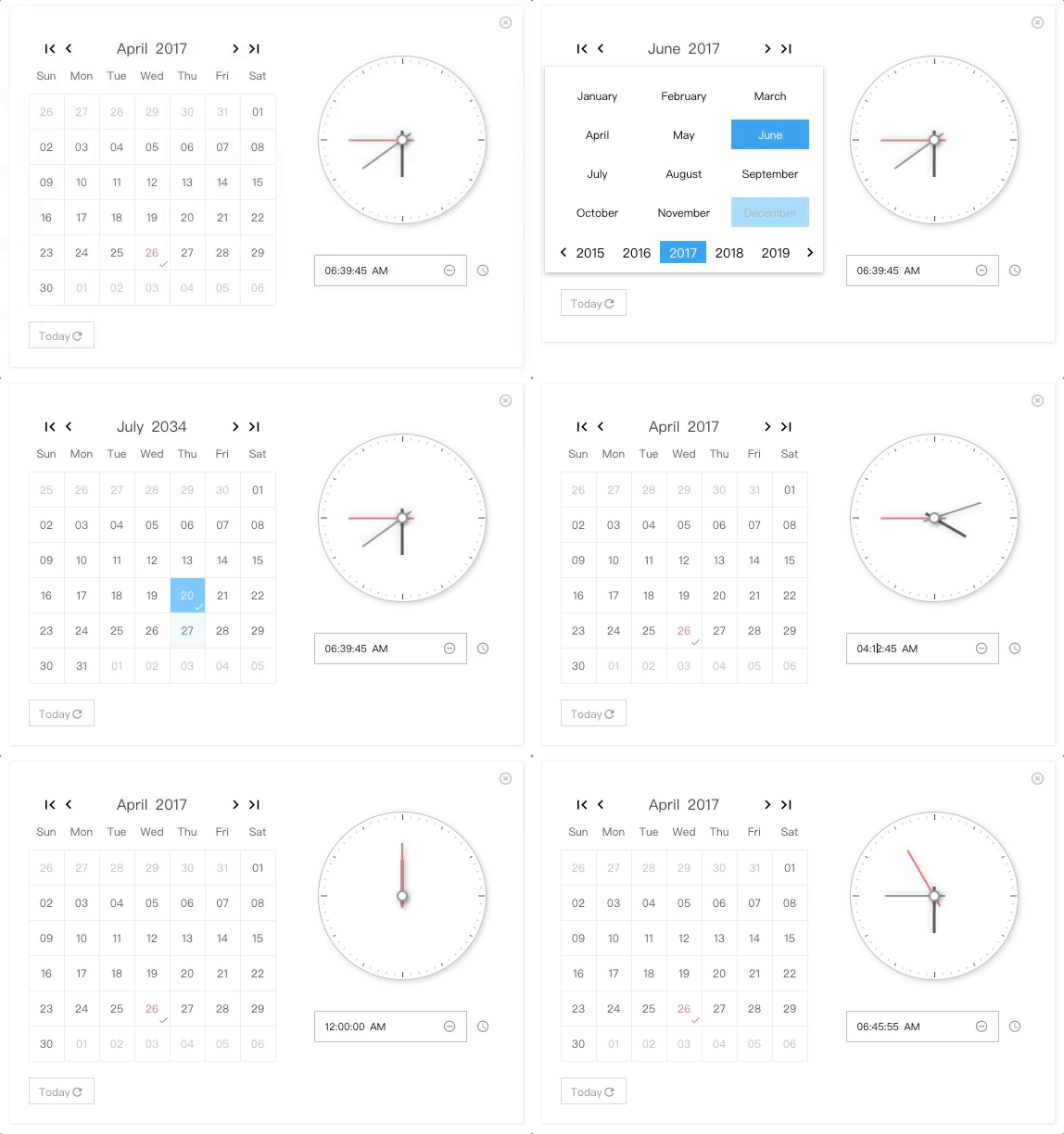
NO Jquery, NO Moment.js
$3
Demo & Examples
Please check the online demo example
Attention: you can find demo source here :)
Codesandbox Examples
* Online demo example playground
* Custom locales(when providing ``
window.REACT_PICKY_DATE_TIME['customLocale']`)$3
`js
"peerDependencies": {
"react": ">= 16.8.6",
"react-dom": ">= 16.8.6"
}
`Docs Link
Custom Locale Guide(can be multiple locales)Usage
js
import ReactPickyDateTime from 'react-picky-date-time';...
const Index = memo(() => {
const [showPickyDateTime, setShowPickyDateTime] = useState(true);
const [date, setDate] = useState('30');
const [month, setMonth] = useState('01');
const [year, setYear] = useState('2000');
const [hour, setHour] = useState('03');
const [minute, setMinute] = useState('10');
const [second, setSecond] = useState('40');
const [meridiem, setMeridiem] = useState('PM');
...
// See events section
...
return (
mode={0} //0: calendar only, 1: calendar and clock, 2: clock only; default is 0
locale="en-us" // 'en-us' or 'zh-cn'; default is en-us
show={showPickyDateTime} //default is false
onClose={() => setShowPickyDateTime(false)}
defaultTime={
${hour}:${minute}:${second} ${meridiem}} // OPTIONAL. format: "HH:MM:SS AM"
defaultDate={${month}/${date}/${year}} // OPTIONAL. format: "MM/DD/YYYY"
onYearPicked={res => onYearPicked(res)}
onMonthPicked={res => onMonthPicked(res)}
onDatePicked={res => onDatePicked(res)}
onResetDate={res => onResetDate(res)}
onResetDefaultDate={res => onResetDefaultDate(res)}
onSecondChange={res => onSecondChange(res)}
onMinuteChange={res => onMinuteChange(res)}
onHourChange={res => onHourChange(res)}
onMeridiemChange={res => onMeridiemChange(res)}
onResetTime={res => onResetTime(res)}
onResetDefaultTime={res => onResetDefaultTime(res)}
onClearTime={res => onClearTime(res)}
// markedDates={['10/19/2021']} // OPTIONAL. format: "MM/DD/YYYY"
// supportDateRange={['12/03/2021', '12/05/2021']} // OPTIONAL. min date and max date. format: "MM/DD/YYYY"
/>
);
});
`##### Class components version example goes here ->
Installation
sh
npm install react-picky-date-time --save
`#### By CDN (starting from v1.9.1)
html
...
`Donate
Thanks for donating me a donut! ⁄(⁄ ⁄•⁄ω⁄•⁄ ⁄)⁄Browser support
Tested on IE9+ and Chrome and Safari(10.0.3)This library relies
new AbortController`, so if you are developing for IE10+ you should include the polyfill like below
`js
import 'promise-polyfill/src/polyfill';
import 'unfetch/polyfill';
import 'abortcontroller-polyfill';
`For IE9, you also need
performance` `requestAnimationFrame` polyfill for clock tickingEvents
Also consoled out on the demo page examples
`js
const onYearPicked = res => {
const { year } = res;
setYear(year);
}; const onMonthPicked = res => {
const { month, year } = res;
setMonth(month);
setYear(year);
};
const onDatePicked = res => {
const { date, month, year } = res;
setDate(date);
setMonth(month);
setYear(year);
};
const onResetDate = res => {
const { date, month, year } = res;
setDate(date);
setMonth(month);
setYear(year);
};
const onResetDefaultDate = res => {
const { date, month, year } = res;
setDate(date);
setMonth(month);
setYear(year);
};
const onSecondChange = res => {
const { value } = res;
setSecond(value);
};
const onMinuteChange = res => {
const { value } = res;
setMinute(value);
};
const onHourChange = res => {
const { value } = res;
setHour(value);
};
const onMeridiemChange = res => {
setMeridiem(res);
};
const onResetTime = res => {
const { clockHandSecond, clockHandMinute, clockHandHour } = res;
setSecond(clockHandSecond.value);
setMinute(clockHandMinute.value);
setHour(clockHandHour.value);
};
const onResetDefaultTime = res => {
const { clockHandSecond, clockHandMinute, clockHandHour } = res;
setSecond(clockHandSecond.value);
setMinute(clockHandMinute.value);
setHour(clockHandHour.value);
};
const onClearTime = res => {
const { clockHandSecond, clockHandMinute, clockHandHour } = res;
setSecond(clockHandSecond.value);
setMinute(clockHandMinute.value);
setHour(clockHandHour.value);
};
// just toggle your outter component state to true or false to show or hide
openPickyDateTime() {
setShowPickyDateTime(true)
}
onClose() {
setShowPickyDateTime(false)
}
`$3
By providing window.REACT_PICKY_DATE_TIME['customLocale']`, you can overwrite the current locale if you like or add a new locale.
codesandbox example(located in index.html)
`html
``Contributors ✨
Thanks goes to these wonderful people (emoji key):
 Edward Xiao 💻 📖 🚇 ⚠️ 👀 |
This project follows the all-contributors specification. Contributions of any kind welcome!