react-pivottable-grouping
v0.12.0
A React-based pivot table with grouping
0/weekUpdated 3 years agoMITUnpacked: 261.1 KB
Published by Jakub Jagielka
npm install react-pivottable-groupingreact-pivottable-grouping
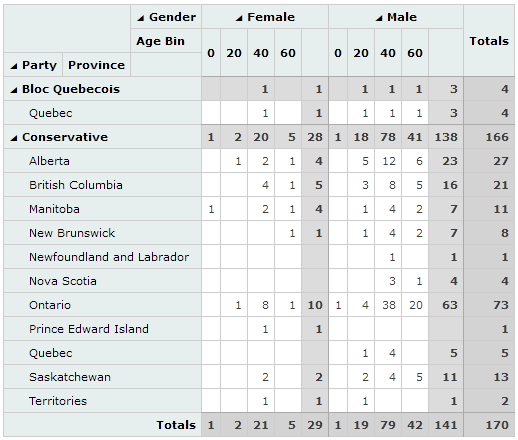
This is a fork of react-pivottable with added capacity of grouping and displaying subtotals.
It adds an option grouping: true to the possible options. The rest of the API remains unchaged.
Preview
See the working demo here.
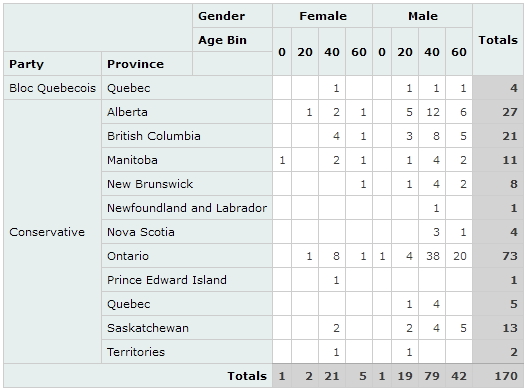
Left image is the default react-pivottable rendering, while right images shows react-pivottable-grouping with the default _grouping:true_ enabled.
---
Original react-pivottable README.md
react-pivottable
react-pivottable is a React-based pivot table library with drag'n'drop
functionality. It is a React port of the jQuery-based
PivotTable.js by the same author.
react-pivottable is part of Plotly's React Component Suite for building data visualization Web apps and products.
What does it do & where is the demo?
react-pivottable's function is to enable data exploration and analysis by
summarizing a data set into table or Plotly.js
chart with a true 2-d drag'n'drop UI, very similar to the one found in older
versions of Microsoft Excel.
A live demo can be found here.
How can I use it in my project?
$3
Installation is via NPM and has a peer dependency on React:
``
npm install --save react-pivottable react react-dom
Basic usage is as follows. Note that PivotTableUI is a "dumb component" that
maintains essentially no state of its own.
`js
import React from 'react';
import ReactDOM from 'react-dom';
import PivotTableUI from 'react-pivottable/PivotTableUI';
import 'react-pivottable/pivottable.css';
import 'react-pivottable/grouping.css';
// see documentation for supported input formats
const data = [
['attribute', 'attribute2'],
['value1', 'value2'],
];
class App extends React.Component {
constructor(props) {
super(props);
this.state = props;
}
render() {
return (
onChange={s => this.setState(s)}
{...this.state}
/>
);
}
}
ReactDOM.render(
`
$3
The Plotly react-plotly.js component can be passed in via dependencyplotly.js
injection. It has a peer dependency on .
Important: If you build your project using webpack, you'll have to follow
these instructions
in order to successfully bundle plotly.js. See below for how to avoid havingplotly.js
to bundle .
`
npm install --save react-pivottable react-plotly.js plotly.js react react-dom
To add the Plotly renderers to your app, you can use the following pattern:
`js
import React from 'react';
import PivotTableUI from 'react-pivottable/PivotTableUI';
import 'react-pivottable/pivottable.css';
import 'react-pivottable/grouping.css';
import TableRenderers from 'react-pivottable/TableRenderers';
import Plot from 'react-plotly.js';
import createPlotlyRenderers from 'react-pivottable/PlotlyRenderers';
// create Plotly renderers via dependency injection
const PlotlyRenderers = createPlotlyRenderers(Plot);
// see documentation for supported input formats
const data = [
['attribute', 'attribute2'],
['value1', 'value2'],
];
class App extends React.Component {
constructor(props) {
super(props);
this.state = props;
}
render() {
return (
onChange={s => this.setState(s)}
renderers={Object.assign({}, TableRenderers, PlotlyRenderers)}
{...this.state}
/>
);
}
}
ReactDOM.render(
`
#### With external plotly.js
If you would rather not install and bundle plotly.js but rather get it into
your app via something like