react-router-native-stack
v0.0.16
A stack navigation component for react-router-native
123/weekUpdated 3 years agoMITUnpacked: 37.6 KB
Published by Travis Nuttall
npm install react-router-native-stackreact-router-native-stack


A Stack component for React Router v4 on React Native.
Disclaimer
This library is in an alpha state. I am still experimenting with the
transitions and animations, and the API will likely evolve and change. I'd
love for you to try it out and give feedback so that we can get to a production
ready state!
Motivation
React Router v4 supports react native, but doesn't include any animated transitions
out of the box. I created this component to support card stack style screen transitions.
Here's a basic demo:
!SimpleStack Example Screen Capture
You can run the above demo on Expo with this link: https://exp.host/@traviskn/simplestack
Installation
Install react-router-native and this package:
npm install react-router-native react-router-native-stack --save
Usage
Here's a simple working example of using the stack.
``javascript
import React, { Component } from 'react';
import { Button, StyleSheet, Text, View } from 'react-native';
import { NativeRouter, Route } from 'react-router-native';
import Stack from 'react-router-native-stack';
function Home({ history }) {
return (
function Page({ history, match }) {
return (
export default class App extends Component {
render() {
return (
);
}
}
const styles = StyleSheet.create({
screen: {
flex: 1,
flexDirection: 'column',
alignItems: 'center',
justifyContent: 'space-around',
},
});
`
This is what the above code looks like running on iOS:
The stack component uses a Switch
internally to match the current route. It listens for 'PUSH' and 'POP' actions
on history to determine whether to transition forward or backwards. It manages a
PanResponder to allow swiping back through the route stack. It keeps track of the
history index when it mounts so that it knows to stop allowing the swipe back transition
when you reach the beginning index.
Animation Options
In the examples so far you have seen the default iOS transition animation,
'slide-horizontal'. In addition to that the stack also supports 'slide-vertical','fade-vertical', and 'cube'.
if you add an animationType="slide-vertical" prop to the stack in the previous
example, this is the result:
!Slide Vertical Usage Example Screen Capture
'fade-vertical' is the default for Android, and looks like this:
!Fade Vertical Usage Example Screen Capture
And finally, here's a demo of animationType="cube":
There is also an animation type of 'none' if you need to disable animations.
$3
Sometimes it is desirable to animate a route replace, i.e to animate back to a specific route (without using history.go(-n)).
Use replaceTransitionType as a prop, with either POP or PUSH to animate the REPLACE event.
`javascripthistory.replace(routePath)
will now transition using the POP animation type.`
Gesture Handling Options
By default the stack component allows swiping back for the slide-horizontal and cube animation types. If you want togestureEnabled
disable this, you can pass in a prop set to false.
`javascript`
// This stack will not respond to the swipe back gesture
{/ Your routes here /}
Customizing Animation Type Per-Route
If you need, you can configure the animation type on a per-route basis by adding
an animationType prop to a specific route. As an example, consider that we took
our previous example and had a separate route for each page:
`javascript
import React, { Component } from 'react';
import { Button, StyleSheet, Text, View } from 'react-native';
import { NativeRouter, Route } from 'react-router-native';
import Stack from 'react-router-native-stack';
function Home({ history }) {
return (
function Page({ history, match }) {
return (
export default class App extends Component {
render() {
return (
);
}
}
const styles = StyleSheet.create({
screen: {
flex: 1,
flexDirection: 'column',
alignItems: 'center',
justifyContent: 'space-around',
},
});
`
With this updated code we have configured the taco page to use a slide-vertical
animation, but all the other pages will use the default animation.
The taco page will control the animation type when it pushes onto the stack, and
when it pops off of the stack. Here's how it looks:
!Per-Route Animation Type Example
Specifying a Header and/or Footer component per route
Scenario 1: Sometimes you'll want a fixed header/footer that doesn't animate between routes.
Scenario 2: At other times you'll want to transition between routes that have different headers/footers.
Scenario 3: And finally, you may want to transition to a route that has no fixed header or footer.
All this is possible by specifying a headerComponent and/or footerComponent prop on your routes:
`js`
export default class App extends Component {
render() {
return (
);
}
}
Go to examples/App to see the full setup for the above.
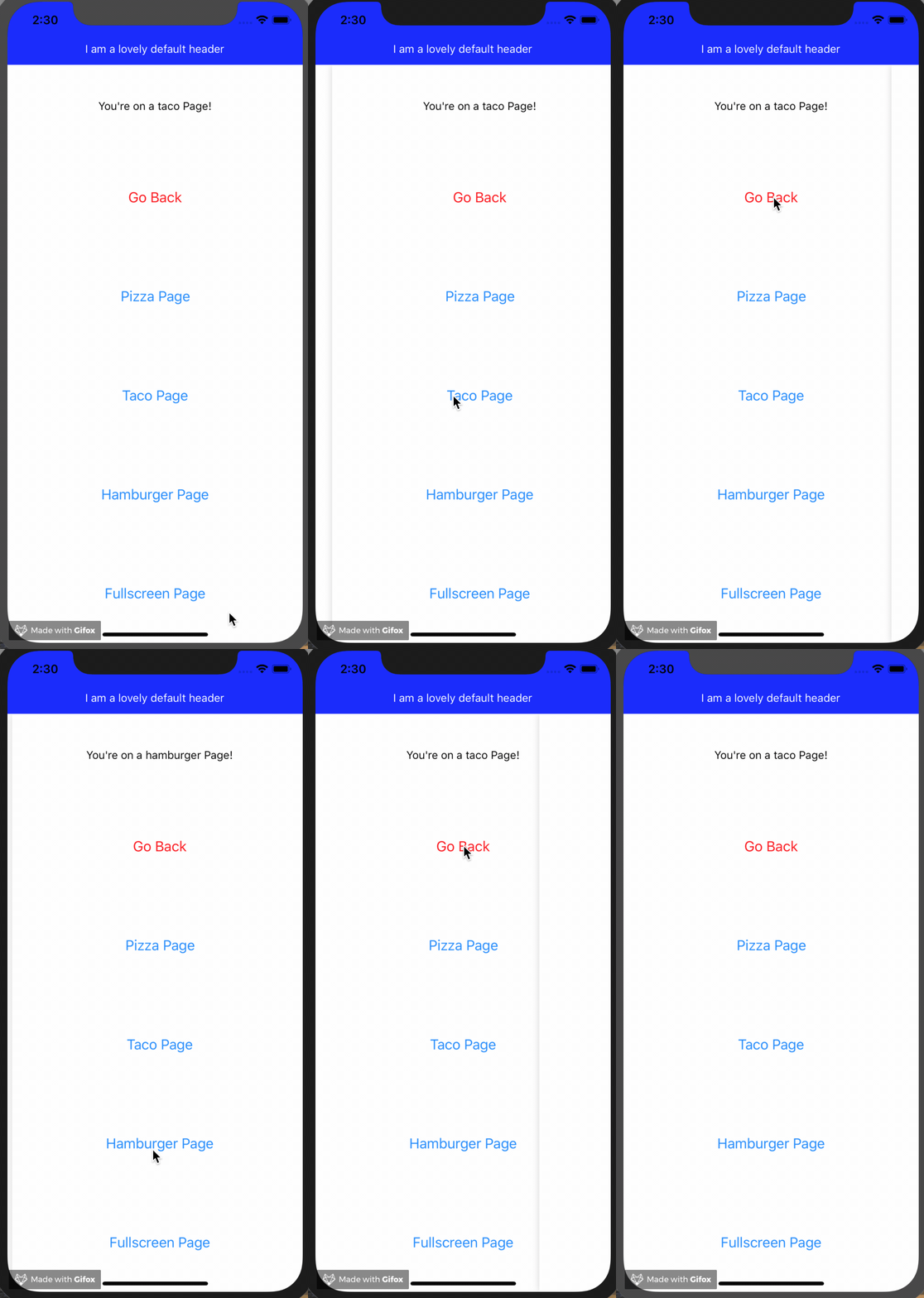
Scenario 1: If your Header and/or Footer matches that of the route you're transitioning to, then that component
will be considered "fixed" and will not be included in the transition animation.
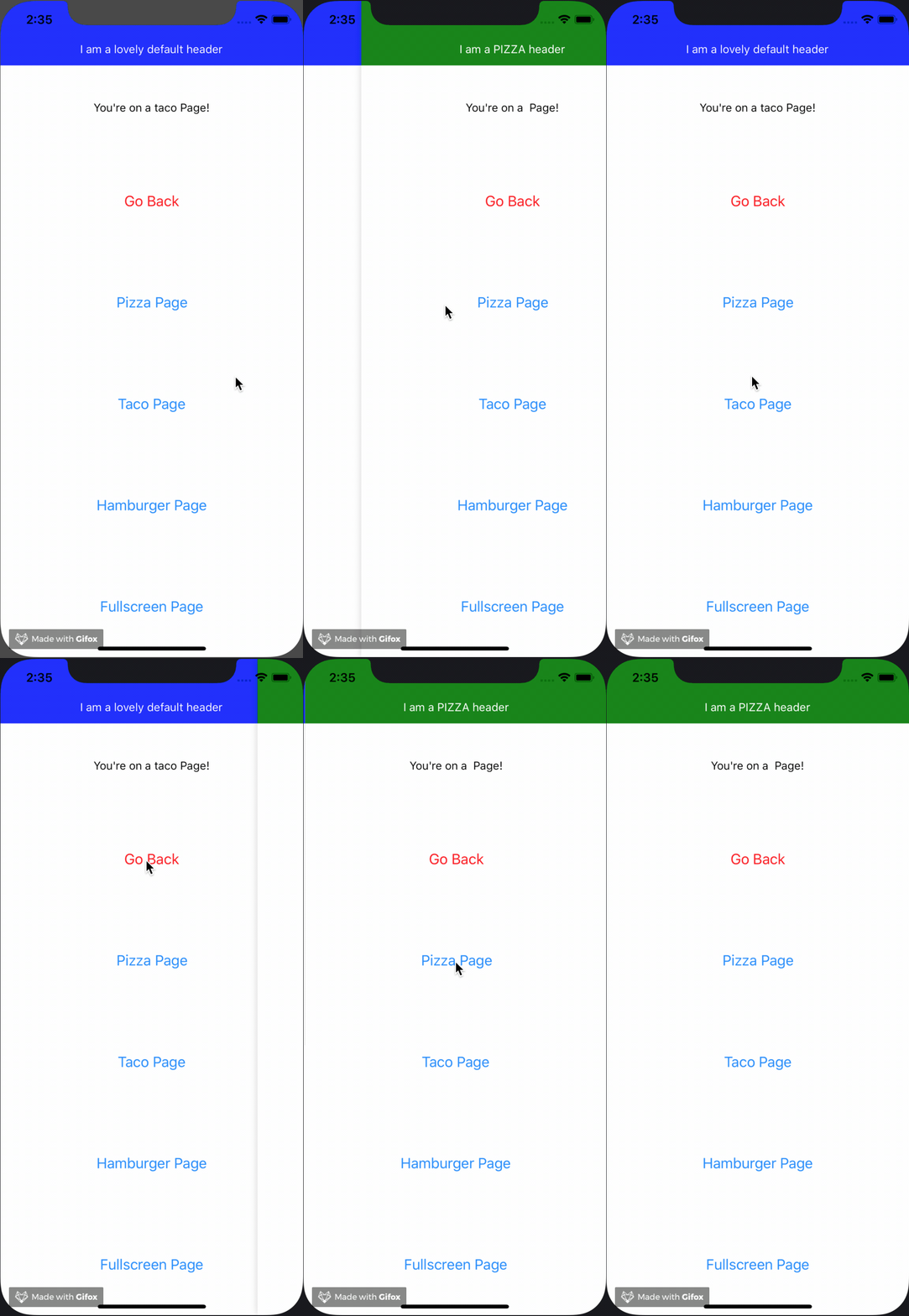
Scenario 2: If the route you're transitioning to contains a different Header/Footer than the previous route,
then the Header/Footer for both routes will be contained within the transition area, and will be
included in the transition animation.
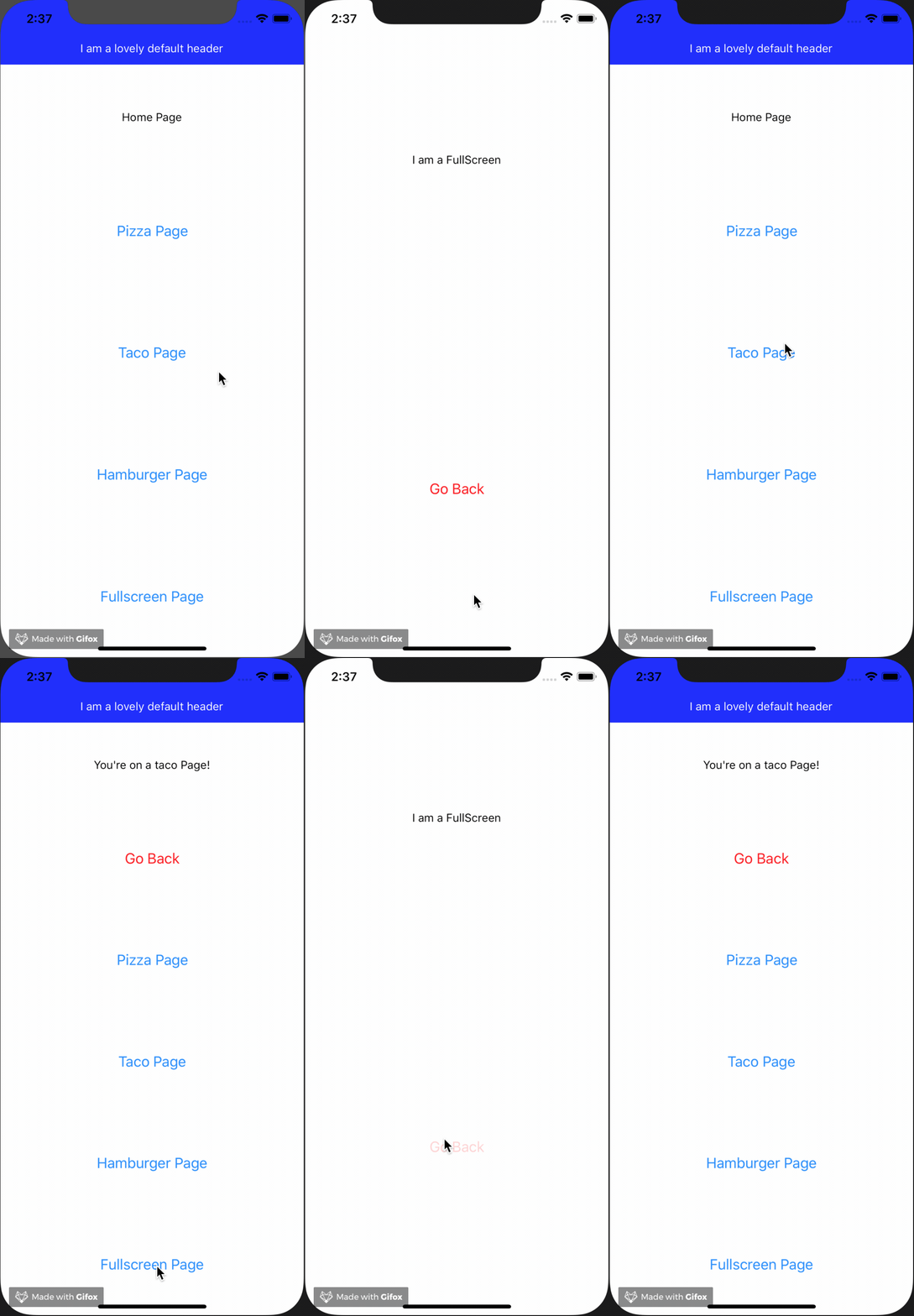
Scenario 3: If you're transitioning to/from a route that contains no Header/Footer, then that's treated the
same as Scenario 2, and any Headers/Footers will be contained within the transition area. The route that
contains no Header/Footer will obviously have none rendered, and therefore the main component will
occupy the full area available.
IMPORTANT NOTE: The above approach makes no assumption as to the look/feel of the Header/Footer
component, including internal animation. As the React Native world moves towards iOS and Android
apps being built simultaneously, using custom header/footer/navigation components that make sense
within the design system of the given app, it follows that we should give the developer full power
over how to animate the mounting/unmounting of the Header and Footer components themselves (as well
as the elements within them). We do pass the Stack component's internal animated value into the Header
and/or Footer component you provide as an animatedValue prop that you can use to build your own
animations that run in sync with the Stack's animations.
Using the headerComponent and footerComponent props is a simple way to either include or exclude
components from the route transition animation.
Nested routes
Where one of the Routes in the Stack have nested Routes the default behaviour is to
animate between pages as if you were changing to completely different route.
Sometimes this behaviour is not what you want (for example when creating a page
to show items, where items can be deep linked to, but only form part of the page).
In this case you can add a key to the Route, and "self"-transitions are then
ignored.
`javascript
{ / animates moving to /items, but not when changing itemId / }
const Items = ({match}) =>
`
isAnimating handler
Sometimes you'll want your app to respond a certain way while a route transition animation
is occurring. For example you may want to prevent custom 's and
`javascript`
isAnimating={(value) => {
reduxStore.dispatch(myActionHere(value));
}}
>
One way of handling the above scenario would be to use a redux dispatcher as my isAnimating
handler and subsequently have all my
Known Limitations
Currently the stack has no built-in animations for headers or footers, but that
feature is a work in progress! We do pass down the Stack component's internal
animated value as a prop to the header and/or footer components you add as props
to your routes, so you can potentialy build your own custom animation. We hope to
get more options working soon.
Many stack navigators keep all screens in the stack mounted when you push new
screens onto the stack. This library is different, in that it unmounts the previous
route's screen when a new one is pushed on. If you have state that needs to be
maintained even after a screen unmounts, you will need to store that state in a
parent component that contains the stack or possibly use another state management
solution such as AsyncStorage, Redux, or MobX.
A common use case for a cube transition is to swipe forward to the next route,
but currently it only supports swiping back to the previous route. An API to
enable swiping forward to a new route is something I hope to work on soon.
The cube animation doesn't work quite as well on Android as it does on iOS. I
hope to be able to adjust the animation configuration a bit to make it look more
consistent.
I have made several assumptions about the history route stack while using this library.
I assume in particular that history never mutates, and that you always navigate
forward by pushing and backward by popping routes. It could be that in cases where
you need to deep link or redirect to a specific location in the app that you haven't
built up the expected route stack, and this component won't allow swiping back
when you need it to.
As I research more use cases I hope to be able to create a more flexible API to
support them.
Acknowledgements
I drew a lot of inspiration from other libraries and code samples.
Obviously this library wouldn't exist without the fantastic React Router!
React Navigation has become one of the leading
navigation solutions for react native, I have used it in many personal and work
projects and I referenced it as a guide for implementing many of the transition
animations in this library.
For the cube animation I used this example
by @underscopeio as a reference.
Many thanks to the authors and maintainers of these open source libraries!
More
You may be asking, "What about tab and drawer navigation?". As it turns out,
there are already many great open source components to enable drawer and tab
navigation, and you can already use React Router to drive the state of those
components. I hope to add more examples to this repository soon demonstrating
this. For now know that the Stack is just one of several components that you can
combine with React Router to enable just about any navigation pattern you need!
Check out the examples/` folder in this repository for more usage examples.